Outline ·
[ Standard ] ·
Linear+
Asus ASUS ROG Phone II Discussion Thread, Worlds First 120Hz AMOLED Display!
|
Nub!
|
 Oct 23 2019, 10:47 AM Oct 23 2019, 10:47 AM
|

|
QUOTE(Nub! @ Oct 22 2019, 09:00 PM) Did not try Google map. Will try tomorrow. Anyway I thought Google bought over Waze, so I assume signal should be the same. I personally like Waze a lot. Edit - not sure it helps, but I turned off adaptive battery management. GPS seems to be a a lot better now. Thanks tho Take back what I said. Still bad. QUOTE(azhar75 @ Oct 22 2019, 09:12 PM) The servers are different though... I can vouch that Google Map will never fail in any smartphones... I only use Waze on highway to spot speed trap and avoid accidents on a long journey... In town, GMap is my choice... I've tried just now with my wife's phone op6. Op6 perform way better on Waze. Mine was basically 95percent lost signal. Then I tried maps. Is the same.. I open it side by side. When maps picked up signal, Waze picked up as well. When they gone, they done together. Picking up signal usually lasted for few seconds only. Anyone have the same problem with me please do share. My jobs require me to travel to unfamiliar places all the time so GPS is pretty important to me. |
|
|
|
|
|
Nub!
|
Oct 23 2019, 02:19 PM
|
|
|
Thanks for the replying. I've downloaded GPS status and toolbox. I've change the location source to fused instead of GPS. Seems to be locking my location pretty quick. Will update after I hit the road again
|
|
|
|
|
|
Nub!
|
Oct 23 2019, 09:32 PM
|
|
|
QUOTE(BBXiong @ Oct 23 2019, 03:11 PM) Mine has such issue, but I'm not too bothered by it. I believe it might be affected a certain AMOLED batch only, and from the looks of it, this should be something fixable from firmware update, so i'll just wait until Asus officially announce something regarding this. for camera, someone from XDA already ported gcam for RoG Phone, I am already using it already. (btw bought the phone last weekend, battery life so good) Wide angle from having too much noise become very clean when using gcam Night Sight mode, will post a sample later on phone. If you're talking about 30W, it should be QC 4.0. Since QC 4.0 is also compatible with USB-PD, u can also charge it using other PD charger, or even the original charger from switch if u have one. I am still using my older chargers that I bought for my samsung S8+ last time, should be QC 2.0 or 3.0, they worked fairly well still. If you're getting a QC charger, 2.0 and 3.0 has little difference, both has 18W max output, 3.0 just have more power stepping, while QC 4.0 is the major upgrade that you should consider since our phone supports it, but it's kinda rare in the market at this point of time. Hi there, I need some help regarding installing gcam. First of all, I have no knowledge on rooting phones. So I'm stuck at this step. Mine sharing how do I find this root directory? Attached thumbnail(s)
|
|
|
|
|
|
Nub!
|
Oct 24 2019, 11:42 AM
|
|
|
QUOTE(BBXiong @ Oct 24 2019, 10:52 AM) I didnt root my phone actually, although I am tempted since rooted phone can work with Nintendo Switch joycon with no delay. Waiting for someone to produce a case that i can snap the joycon on it since i dont have 3D printer. as for the gcam, what I did was looked into xda developer forum (one of the primary CFW/tools that is favored by most of the open source community) to find if anyone ported gcam over. It's currently named uni_cam, but it's actually gcam, u can easily download the apk and install it. They also provided some extra xml file for camera calibration i believe, but I didnt bother looking at it just yet. I think i downloaded this version, not sure got newer version or notThanks for replying sir. The thing is I don't know where to mess with xml files. I'll have a look later see if I can find a way. |
|
|
|
|
|
Nub!
|
Oct 24 2019, 02:07 PM
|
|
|
QUOTE(BBXiong @ Oct 24 2019, 01:55 PM) I didnt do anything as well, just install the apk and use it as is, changed the settings under HDR+ to get an image that I think i'm happy with and that's all. Too lazy to post image nowadays, maybe see if I got time to do a not :| Thanks for replying I've deleted the previous gcam app from another website. Without the XML config I can open the app but everything is black. So I've tried the uni cam. All the pics I took is in black and white |
|
|
|
|
|
Nub!
|
Oct 24 2019, 07:17 PM
|
|
|
QUOTE(BBXiong @ Oct 24 2019, 07:10 PM) Yeah I have that problem too at first. Here's my setting, also try turn on monochrome mode, then exit setting and take a picture, then turn off monochrome mode again and see if it works 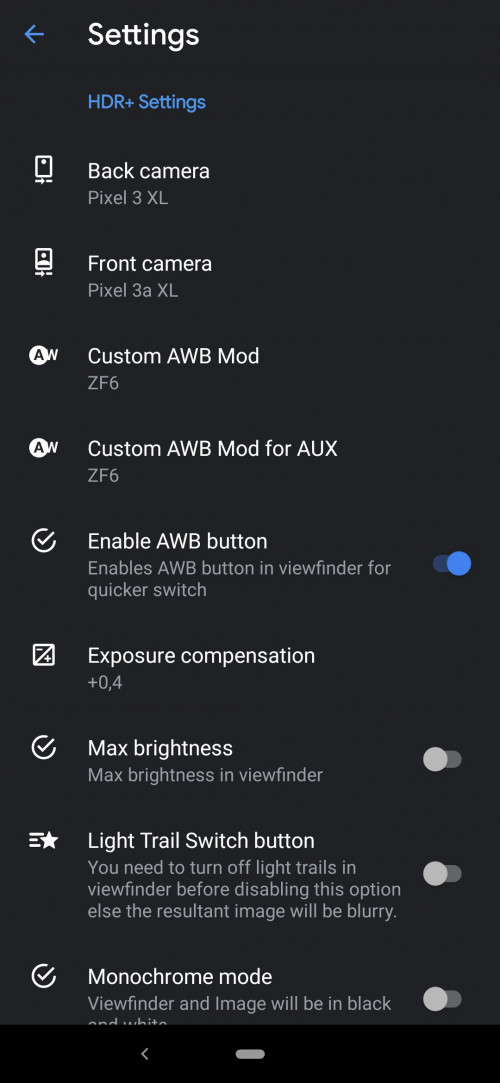 That's why they gave u 2 options, another one is ZenUI skin. Which is an AOSP experience. It can be easily swapped through setting and they asked which skin u wanted to use too during initial setup Hi there, it worked. Night mode is way better than stock. Just that before shoot the camera seems way too dark to see anything compare to stock. But picture turned out brighter Edit - I need to share this Gcam linkI followed the guide thru this website without rooting the phone. Somehow it works. I use the stock file manager from rog 2. Select internal storage, unhide system folder (not sure if is necessary), Then create a new folder named Gcam and so on( follow the guide) Somehow it worked. Haven't compare the pics, you guys can try it if interested. This post has been edited by Nub!: Oct 24 2019, 09:42 PM |
|
|
|
|
|
Nub!
|
Oct 29 2019, 12:08 AM
|
|
|
QUOTE(squall0833 @ Oct 26 2019, 02:58 PM) ok guys, There's two issue about this phone, for those who own rog phone 2, please let us know how's it on ur device 1: Red tint on dark grey color when brightness below 30% 2: Dust accumulate or moisture in wide range camera (maybe because of the "vent") let us know if u have the two problem above 1. Is there, but It doesn't bother me at all. 2. Nop |
|
|
|
|
|
Nub!
|
Nov 7 2019, 02:43 PM
|
|
|
QUOTE(garbanicus @ Nov 6 2019, 05:18 PM) Looks like everywhere also no stock. Have to preorder now and wait few weeks. 7mobile? |
|
|
|
|
|
Nub!
|
Dec 28 2019, 09:09 PM
|
|
|
QUOTE(ROGUP12 @ Dec 28 2019, 07:37 PM) You can try this: https://shopee.com.my/ASUS-ROG-Phone-2-Case...7854.5310098561Before my purchase, 4 guys have bought it with good reviews, featuring precise cutouts, air trigger compatibility and stury design. The only drawback is it does not fit cooler. Otherwise, it will be perfect, up to your needs. Here are some pics with my phone and from the shop.[attachmentid=10384410][attachmentid=10384411][attachmentid=10384412][attachmentid=10384413][attachmentid=10384414] Thanks for the recommendation. Taobao ones work fine. I saw this too, it I'm not wrong this is just the bumper which might only protect the sides. Not the front and back. |
|
|
|
|
|
Nub!
|
Jan 6 2020, 08:44 PM
|
|
|
Yesterday attempted to charge my phone using the 30w cable that came with the phone.
Then my phone got loud warning charging temperature too high. Ask me quickly unplug and send it to asus center.
I unplug and touch the USB c that plugged in. Indeed very very hot.
Tried a few times same thing happened. Was getting worried I can't charge my phone anymore. So I tried it with normal slow charger. It doesn't work at first but after a few times it worked. Then I put back to my fast charger and it worked too.
Just letting you guys know. This is pretty scary, I'm worry this issue will get worst.
|
|
|
|
|
|
Nub!
|
Jan 7 2020, 08:19 PM
|
|
|
QUOTE(attw @ Jan 7 2020, 05:35 PM) Have you brought it back to the service centre then? That would seem to be the logical option. Nop, I don't have time and I can't be phoneless due to my work. |
|
|
|
|



 Quote
Quote
 0.0524sec
 0.69
0.69
 7 queries
 GZIP Disabled