Outline ·
[ Standard ] ·
Linear+
iOS 13 for iPhone Official Discussion Thread
|
vez
|
 Jul 7 2019, 06:38 PM Jul 7 2019, 06:38 PM
|

|
QUOTE(rebus @ Jul 7 2019, 12:18 PM) When going on beta forget about battery life. It was never amazing to begin on iPhones. Only stand by time idle drain so makes it look good but start using and can see the juice draining on any current iOS. Just the plus models have a longer duration. But the Max does not match the Plus models. These going on Beta don’t expect anything that’s why it’s beta to look for and iron out bugs by user feedback. Using 6S with PB. Bugs are there but world best if have secondary device to try Beta iOS  too bad my ipad Air is too old to get it |
|
|
|
|
|
vez
|
Sep 20 2019, 01:05 AM
|
|
|
iOS 13 is officially out  |
|
|
|
|
|
vez
|
Sep 21 2019, 03:47 PM
|
|
|
QUOTE(yongtjunkit @ Sep 20 2019, 06:46 PM) The slow charging part is probably because of the optimize battery charging is on 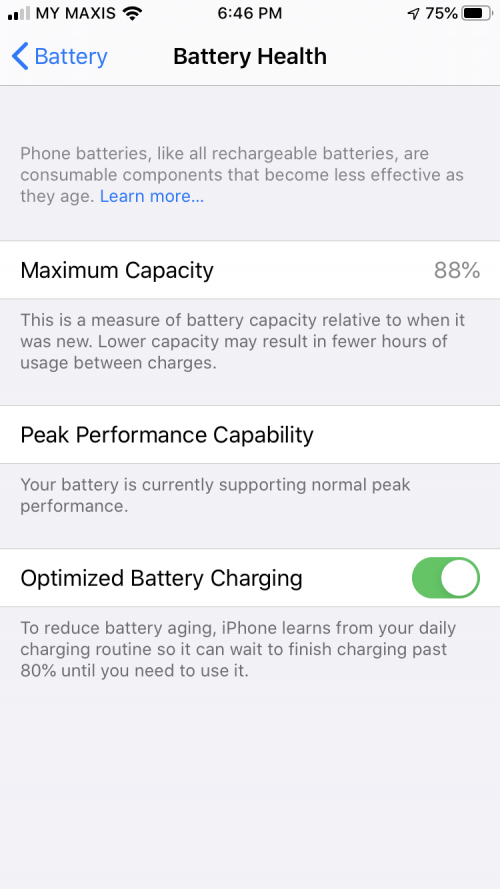 i read somewhere not slow charging, some kind of after 80%, will stop charging some gives example like you sleep at 10PM, wake up at 7AM, if you charge your phone before sleep, once reach 80%, iPhone will stop charging, it learns your charging so will about to know you wake at 7AM, so will continue charge to 100% before you wake maybe some algorithm build into it some have different experience base on person charging time. |
|
|
|
|
|
vez
|
Sep 21 2019, 03:50 PM
|
|
|
QUOTE(zuhaili87 @ Sep 21 2019, 02:48 PM) Loving it so far on my X, but 1 thing that annoys me is the “long press”. Now have to wait for a significant amount of time before the window pop up. For example want to copy message in whatsapp, need to long press. Also, my phone now quite confuse 3D touch / haptic touch.   i use to be double tap on particular message to show the selection, now i try long press, seems really slow haha.... maybe they need bypass the default long press build into iOS 13 maybe whatsapp should enhance this for iOS 13 in future, since iOS 13 made some tweak already, whatsapp shall follow This post has been edited by vez: Sep 21 2019, 03:50 PM |
|
|
|
|
|
vez
|
Sep 25 2019, 10:27 AM
|
|
|
the app download no more limit is good will prompt and let you know if you want to use cellular o download |
|
|
|
|
|
vez
|
Oct 1 2019, 04:46 PM
|
|
|
QUOTE(surre4l @ Sep 30 2019, 01:21 PM) For people experiencing Personal Hotspot issues, this might help you if you're using eSim on XS Max. After updating to ios13, i noticed my hotspot stopped working. e.g: my laptop is able to connect to my hotspot, but it either says no internet, (or even when it says internet connection, there really isnt), or it just outright refuse to connect. I'm running 2 lines in my xs max (both maxis), and one of the numbers is on esim. So this morning, i tried this: Settings -> Cellular -> Cellular Data, turn off "Allow Cellular Data Switching". And the hotspot is working again. Hope this works for whoever is having issues with hotspot (and using esim). I've also realized my physical sim card has no "4G" sign next to the signal status, but my esim has "4G. I think might need to go back maxis to fix either the physical sim/e-sim. your both line active? i thought only one data can be active if esim + physical sim is active, only one cellular data will be active, it is impossible both line showing 4G  |
|
|
|
|
|
vez
|
Oct 6 2019, 10:35 PM
|
|
|
QUOTE(mickeysew814 @ Oct 6 2019, 09:39 PM) Based on ios13, the pop up slider for volume, I predict 2020/2021 we should expect iPhone without physical buttons for volumes. no physical button difficult for case if need touch |
|
|
|
|
|
vez
|
Oct 8 2019, 08:42 PM
|
|
|
QUOTE(xzilem @ Oct 8 2019, 11:30 AM) Anyone use Two-factor authentication (2FA) here? I've enabled 2FA and i can return back to previous Two-step verification before 18 Oct 2019. So what i want to know, if i don't have the device & phone number with me (ex: lost), how can i get into my Apple Id / icloud account or use find my iphone or get the forgotten password? I need an advice before the recovery process link expired on 18 Oct 2019. keep your recovery code  all 2FA have recovery code certain activation of 2FA remind user to keep the recovery code, but for Apple, you can login to Apple ID web to retrieve it and keep it safely This post has been edited by vez: Oct 8 2019, 08:43 PM |
|
|
|
|
|
vez
|
Oct 9 2019, 02:24 PM
|
|
|
QUOTE(cucubud @ Oct 9 2019, 09:43 AM) It doesn't work on my iPhone 7. I plug in to charge at 10pm. Midnight I check, already reached 100%. Monitor for a few days. Still the same. Midnight already 100%. need few weeks https://9to5mac.com/2019/10/01/ios-13-iphon...ttery-charging/ it need to learn how you charge first |
|
|
|
|
|
vez
|
Oct 14 2019, 02:15 PM
|
|
|
QUOTE(decavalera @ Oct 14 2019, 01:47 PM) With current iOS, it is really annoying to use the slide from right to left for back button function is already there for years, since when iOS have back button like Android |
|
|
|
|
|
vez
|
Oct 15 2019, 07:37 AM
|
|
|
QUOTE(peter liew @ Oct 14 2019, 11:15 PM) Hi Just to check in that Iphone 11 Pro FB app.. the FB album cant show? Anyone facing semilar issues ? nope, trying with UniFi fiber at home, maxis and celcom line separately can load album |
|
|
|
|
|
vez
|
Oct 30 2019, 10:38 AM
|
|
|
QUOTE(Sib @ Oct 30 2019, 09:58 AM) updated to 13.2 last night. after few hours this morning, i noticed signal reception & data connection seems much better. whatsapp connects quicker, but at the same time introduce new bug, no notification badges appear. 💆🏼♂️ performance wise much snappier, app loads much faster. did you update whatsapp yesterday? latest whatsapp update, for muted chat (individual/group) no more badge notification, it is whatsapp bug reported by user long ago, muted chat should not have badge |
|
|
|
|
|
vez
|
Nov 9 2019, 02:19 PM
|
|
|
QUOTE(krishtiano86 @ Nov 8 2019, 09:51 AM) 13.2.2 fixes RAM management issues. Tested on my Xs Max. same here, seems fixed on my 11 pro |
|
|
|
|
|
vez
|
Apr 3 2020, 12:21 AM
|
|
|
on ios 13.4, anyone have wifi assist problem, mine unable to turn off, when i off go back again it is on This post has been edited by vez: Apr 3 2020, 12:21 AM |
|
|
|
|
|
vez
|
Sep 7 2020, 02:37 PM
|
|
|
after updated to 13.7 few days ago I noticed my app store update page always show empty app icon anyone experience similar problem? I tried soft reset, the icon will display properly after that, but with new app available for update, it will display empty icon for that particular app that require update again...  This post has been edited by vez: Sep 7 2020, 02:40 PM
 |
|
|
|
|
|
vez
|
Sep 7 2020, 07:19 PM
|
|
|
QUOTE(mamamia @ Sep 7 2020, 05:03 PM) iOS bug... too bad, probably wont be fix until 14 release... |
|
|
|
|
|
vez
|
Sep 8 2020, 10:13 AM
|
|
|
QUOTE(Kiding @ Sep 7 2020, 11:29 PM) My iPhone X running on 13.6.1 also having the same problem, so it is not only 13.7 has it. QUOTE(G-17 @ Sep 8 2020, 12:31 AM) Does it happen on wifi connected to TM Unifi? If that’s the case, I think it might be an issue related to TM’s IP range and whatever CDN Apple is using, or something like that. For me, it happens only while connected to home wifi. Both iOS 12 and 13 devices, as well as accessing App Store or iTunes related pages on a web browser. If I switch to cellular data or use a VPN, the issue isn’t there anymore. If someone can confirm for me that it’s indeed a Unifi issue, the maybe some of us can inform TM via their Twitter. seems confirmed is UniFi issue, been at home for the past 4 days, now using maxis celullar no problem |
|
|
|
|
|
vez
|
Sep 8 2020, 08:05 PM
|
|
|
QUOTE(ju69an @ Sep 8 2020, 06:09 PM) I'm using TIME and I have this problem as well. So I'm pretty sure it's an iOS bug and nothing to do with our ISPs. but I have tried with Maxis and Celcom mobile data, dont have this issue only at home connected to Time have you try with your mobile data only?? UniFi have bad history in App Store, last two years always have slow update on app issue This post has been edited by vez: Sep 8 2020, 08:06 PM |
|
|
|
|
|
vez
|
Sep 8 2020, 10:38 PM
|
|
|
QUOTE(ju69an @ Sep 8 2020, 06:09 PM) I'm using TIME and I have this problem as well. So I'm pretty sure it's an iOS bug and nothing to do with our ISPs. confirm is ISP issue, i try using wifi vs maxis mobile data as shown below once I switch off wifi and change to mobile data it show properly immediately 

|
|
|
|
|



 Quote
Quote
 0.0355sec
 0.69
0.69
 7 queries
 GZIP Disabled