

Here's the V4!. Congrats
ILLEGEAR Custom Performance Laptops v.4, AMD RYZEN 4800H with FREE AC Valhalla
ILLEGEAR Custom Performance Laptops v.4, AMD RYZEN 4800H with FREE AC Valhalla
|
|
 Apr 24 2019, 06:04 AM Apr 24 2019, 06:04 AM
Return to original view | Post
#1
|
 
Senior Member
2,661 posts Joined: Apr 2007  
|
Here's the V4!. Congrats
|
|
|
|
|
|
Apr 30 2019, 01:20 PM
Return to original view | Post
#2
|
|
Senior Member
2,661 posts Joined: Apr 2007
|
QUOTE(AZIM@ILLEGEAR @ Apr 30 2019, 12:58 PM) For laptops with 9th Gen and GTX GPUs, I would recommend the Prodigy instead On Onyx, is it Mini DP 1.4 version and HDMI 2.0? Or is it Mini DP 1.3 https://www.illegear.com/laptops/prodigy-rogue/ https://www.illegear.com/laptops/prodigy-rogue/Kindly find the models as listed below: 2 external displays (1x HDMI and 1x mini DisplayPort) LAGUNA: https://www.illegear.com/laptops/laguna/ Z7: https://www.illegear.com/laptops/z7/ 3 external displays (1x HDMI and 2x mini DisplayPort) PRODIGY: https://www.illegear.com/laptops/prodigy-rogue/ ROGUE: https://www.illegear.com/laptops/prodigy-rogue/ ONYX: https://www.illegear.com/laptops/onyx/ SELENITE: https://www.illegear.com/laptops/selenite/ D-Series: https://store.illegear.com/43-desktop-replacement  |
|
|
Jun 11 2019, 04:55 PM
Return to original view | Post
#3
|
|
Senior Member
2,661 posts Joined: Apr 2007
|
QUOTE(Xnet @ Jun 11 2019, 12:08 AM) noted You can go cheaper by buying a MacBook. It is all about options.I dont see myself paying over 9k for windoze lappy |
|
|
Aug 13 2019, 10:38 AM
Return to original view | Post
#4
|
|
Senior Member
2,661 posts Joined: Apr 2007
|
Intel 10th gen is almost hereeeeee
|
|
|
Sep 9 2019, 08:08 PM
Return to original view | Post
#5
|
|
Senior Member
2,661 posts Joined: Apr 2007
|
QUOTE(puremoe @ Sep 9 2019, 04:43 PM) Hi, Looks pretty normal there. Can't expect much cooling for notebook chassis especially coupled with a known hot CPU.Recently purchased a Raven SE-R (i7-9750H, RTX2060) While playing Control with Ray Tracing on, high details - my CPU temp hit 97 max and GPU temp hit 86 max. Is this normal? Not sure what to expect tbh this is like my first gaming laptop. Slightly worried since I thought the cooling for this is decent what with the triple heatpipe etc. GPU Temp - https://pictr.com/images/2019/09/09/56AtAu.png CPU Temp - https://pictr.com/images/2019/09/09/56A2tg.png If you are willing to sacrifice on rtx, disable it, undervolt CPU and cap max boost then use msi afterburner to undervolt GPU. It should be able to hit max around 68-73degrees which is what I would say comfortable. Going down on quality settings and play at 60fps non rtx may drop temp even further to around 67-69 max when you limit GPU clock and undervolt just enough for it to sustain 60fps |
|
|
Jan 16 2020, 02:13 PM
Return to original view | Post
#6
|
|
Senior Member
2,661 posts Joined: Apr 2007
|
QUOTE(Jared21 @ Jan 14 2020, 10:35 PM) To anyone with the Selenite or Onyx suffering from unusually high package power draw, follow these steps. Full credit to eddi3x3x3 on the notebookreview forum: Any way to add exe to gamestream without using GeForce Experience? I don't like using Shield Link. I use Gamestream to play CEMU on TV wirelessly via Nvidia Shield1. DO NOT use geforce experience 2. Reinstall the nvidia drivers using the NVcleaninstaller (https://www.techpowerup.com/forums/...an-installer-for-nvidia-drivers-alpha.249085/) When you run the NVcleaninstaller, make sure you select the following: 1. Display Driver (need this obviously) 2. PhysX 3. HD Audio via HDMI 4. Microsoft Visual C 2017 Runtime 5. Optimus (Need that battery life right?) 6. USB-C driver (need this for display port over usb C) 7. Shield Wireless Controller (only if you plan to stream gameplay to another device, otherwise leave it unchecked) 8. Virtual Audio Leave everything else unchecked until nvidia fixes this issue. My CPU wattage went down from an idle 12 W average to 1-2 W average. I'm now getting less than 1w idle on both battery and while plugged in and this fix sticks through restarts. Who needs nvidia's dumb telemetry and GFE anyways. C states also drop down to C8 with mine being around 50 to 60% in C8 |
|
|
|
|
|
Jan 17 2020, 09:42 AM
Return to original view | Post
#7
|
|
Senior Member
2,661 posts Joined: Apr 2007
|
QUOTE(jstndng @ Jan 16 2020, 04:27 PM) eh what model is this? Ionic |
|
|
Feb 7 2020, 10:00 AM
Return to original view | Post
#8
|
|
Senior Member
2,661 posts Joined: Apr 2007
|
QUOTE(Jared21 @ Feb 6 2020, 06:58 PM) Full credit to eddi3x3x3 on the notebookreview forum: I saw users on notebookchdck said it lasted until a reboot only1. DO NOT use geforce experience 2. Reinstall the nvidia drivers using the NVcleaninstaller (https://www.techpowerup.com/forums/...an-installer-for-nvidia-drivers-alpha.249085/) When you run the NVcleaninstaller, make sure you select the following: 1. Display Driver (need this obviously) 2. PhysX 3. HD Audio via HDMI 4. Microsoft Visual C 2017 Runtime 5. Optimus (Need that battery life right?) 6. USB-C driver (need this for display port over usb C) 7. Shield Wireless Controller (only if you plan to stream gameplay to another device, otherwise leave it unchecked) 8. Virtual Audio Leave everything else unchecked until nvidia fixes this issue. My CPU wattage went down from an idle 12 W average to 1-2 W average. I'm now getting less than 1w idle on both battery and while plugged in and this fix sticks through restarts. Who needs nvidia's dumb telemetry and GFE anyways. C states also drop down to C8 with mine being around 50 to 60% in C8 For now it has been determined to be an Nvidia driver issue. So far no official fix has been released form them so peeps on the notebookreview forum have determined this to be the best method to reduce power consumption on battery and on standby |
|
|
Feb 25 2020, 06:56 PM
Return to original view | Post
#9
|
|
Senior Member
2,661 posts Joined: Apr 2007
|
QUOTE(kyLL @ Feb 24 2020, 01:14 PM) yea they quoted me 150 for servicing.. TT_TT Did they mention how long it will take? Is it a same day service?This post has been edited by pluginbaby: Feb 25 2020, 06:56 PM |
|
|
Mar 22 2020, 08:10 PM
Return to original view | Post
#10
|
|
Senior Member
2,661 posts Joined: Apr 2007
|
QUOTE(whatsayyou @ Mar 22 2020, 02:32 PM) Hi, I have an ILLEGEAR RE-15, with 860M. It has 1 HDMI port. Can this laptop be connected to and output to a 1440p monitor, such as the Acer Nitro VG271UP? Will there be any issues or restrictions (such as 1440p but at 60hz only)? That monitor only does 120hz on HDMI. It is 144hz on display port. It should be working fine but you'll be getting max 120hz only |
|
|
Mar 27 2020, 12:29 PM
Return to original view | Post
#11
|
|
Senior Member
2,661 posts Joined: Apr 2007
|
QUOTE(ojassed @ Mar 26 2020, 05:40 PM) Those of you with Raven SE-R, how far could you undervolt the cpu with TS? I'm still getting cpu spikes of 95c in some games at -100v. Is that normal? Yes that's normal. Look at online reviews when they test new laptops with epic/high game settings and you'll see same temp figures as well. But it can be reduced to 70ish with some sacrifices without severely impacting gameplay.Is the game bottlenecked at GPU or CPU? If both fine to deliver acceptable framerates you might wanna consider underclocking CPU and GPU. For an example I play fortnite, at competitive setting all graphics were set to low hence I don't need GPU to always be boosting to max. 1300-1400mhz is sufficient to play at 120fps ish on Illegear Onyx 2060. Higher temps on GPU will be shared eventually to CPU. Monitor your games and you may be able to reduce the heat. Undervolt does help but when you're maxed out the only choice is to underclock or play around with speedshift to balance out CPU boosting behaviour This post has been edited by pluginbaby: Mar 27 2020, 12:32 PM |
|
|
May 20 2020, 02:26 PM
Return to original view | Post
#12
|
|
Senior Member
2,661 posts Joined: Apr 2007
|
What? WASD is already RM100
BTW how many of u guys had Illegear's given NVME SSD dying or disconnecting from time to time? It is not the samsung one but the one with Illegear branding on it. This post has been edited by pluginbaby: May 20 2020, 02:27 PM |
|
|
May 24 2020, 03:57 PM
Return to original view | Post
#13
|
|
Senior Member
2,661 posts Joined: Apr 2007
|
Keep it on Game Mode if you are ok with loud noises. Im on Onyx 8750h 2060 and play games on Equilibrium mode. On stock it is indeed hot and loud but after tuning in throttlestop I managed to figure out sweetspot for the games I play and anticipate the max clock needed roughly.
90degrees+ temp and loud fan noise seems normal for out of the box condition without further undervolt and some tuning when under load. |
|
|
|
|
|
May 27 2020, 12:58 AM
Return to original view | Post
#14
|
|
Senior Member
2,661 posts Joined: Apr 2007
|
QUOTE(jason111785 @ May 26 2020, 05:34 PM) anyone tried to undervolt the 10th Gen proc? I read in forums that 10th Gen is not undervoltable because of the plundervolt itssue. Was there any update to your bios? Out of the box when you bought it, were you able to undervolt higher? I've tried using Throttle stop and with -120 on core and cache also it will BSOD randomly on me. If this was caused by bios update then we are all screwed until new bios comes out. Undervolting is the reason most are enjoying acceptable temps, else it would be around 90-95degrees which makes the laptop sounding like a jet engine and uncomfortable for gaming. This post has been edited by pluginbaby: May 27 2020, 12:58 AM |
|
|
Jul 11 2020, 07:11 PM
Return to original view | Post
#15
|
|
Senior Member
2,661 posts Joined: Apr 2007
|
QUOTE(STEVE@ILLEGEAR @ Jul 11 2020, 11:59 AM) Hi mindspring, It is possible to drop by to send in your laptop for the dust cleaning and thermal repasted, however, it requires some time as our technical team have to perform stress testing procedures before releasing the PC. You may consult with our tech support team via whatsapp, 018-261 8599 for further arrangement. Is it same day or different day pickup? And how much for the charge |
|
|
Jul 30 2020, 08:49 PM
Return to original view | Post
#16
|
|
Senior Member
2,661 posts Joined: Apr 2007
|
Hi Illegear,
Pls quote me battery replacement for Onyx 8750h rtx2060 including shipping cost.. Bought it around April last year. I'm not able to send this in physically unless it is just a few hrs work and can be done on Saturdays as I'm using the laptop work purpose. I was swapping the ssd just now and noticed that the battery was swollen heavily. Lucky I inspected else it would be a tragedy! I'm shocked to see how quickly the battery gone bad. Even on normal unplugged usage for work and meeting it wouldn't last more than 2hrs lol in power save mode Update: I don't know my serial number since the sticker below is now fully white as the serial printings wiped off or degraded over time. This post has been edited by pluginbaby: Jul 30 2020, 09:04 PM |
|
|
Jul 31 2020, 08:20 PM
Return to original view | Post
#17
|
|
Senior Member
2,661 posts Joined: Apr 2007
|
I just realized that when playing games without battery and directly AC only, i get power and voltage limit throttling. Not sure theres something weird with the bios but it makes it uneasy seeing it as seems like even the supplied AC adapter isnt enough to supply to laptop so it actually needs battery to be in which leads to fast battery swelling
Update: GPU seems to be locked at only 30w when using 180w AC adapter only without battery in. It feels as if Im running a 1050/1650 now hahahahahaha This post has been edited by pluginbaby: Jul 31 2020, 08:56 PM |
|
|
Aug 1 2020, 07:47 PM
Return to original view | Post
#18
|
|
Senior Member
2,661 posts Joined: Apr 2007
|
QUOTE(Sam0601 @ Aug 1 2020, 02:52 PM) Hi Price J. What's your CPU? I think only intel 9th gen and below supports undervolting via throttlestop. 10th gen bios locked the undervolting due to Plundervolt mitigation. Not sure if Ryzen master allows undervolting for AMD mobile CPUs Is there any way to let us undervolt the CPU? cause it's seem like Illegear bios doesn't support it. Cause I realize the CPU is getting crazy hot , around 97-99 degree celcius. So I'm thinking try to undervolt it. QUOTE(Prince J @ Aug 1 2020, 04:32 PM) Hi pluginbaby, for the battery quotation and availability, you may enquire our tech support line at: +60 18-261 8599 (WhatsApp) or support@illegear.com (email). Noted @PrinceJ. ThanksssKindly note that our ONYX batteries are bulk imported from tongfang directly that goes through proper import procedure including MSDS documentation and clearance which incur heavy costs. You can also source cheaper battery from Aliexpress (as suggested by other forumers) and install into the machine on your own, ILLEGEAR will still honor your warranty as long as the 3rd party battery doesn't damage the laptop itself. Hi awol, yes the website is by AMD Malaysia. Desktop CPU (including ARES V)/GPU gamecode redemption: https://www.amdrewards.com/ Laptop 4800H gamecode redemption: https://promo.amd-malaysia.com/amdgamebundle Hi Sam, kindly turn off the CPU Power Boost in your command center as below if you wish to achieve better temperature. The Power Boost feature unlocks the CPU and push it to 88W TDP. 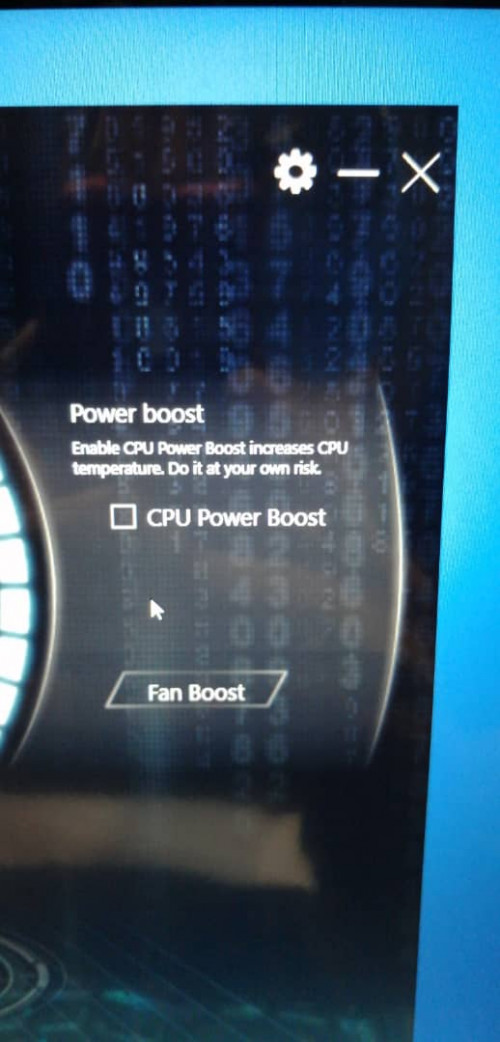 This post has been edited by pluginbaby: Aug 1 2020, 07:47 PM |
|
|
Aug 6 2020, 07:05 AM
Return to original view | Post
#19
|
|
Senior Member
2,661 posts Joined: Apr 2007
|
Anyone know hows the RAM warranty? Does it follow consumable or hardware warranty?
I tried to search on FAQ and Illegear warranty page but I'm still not clear on this |
|
|
Aug 15 2020, 12:17 PM
Return to original view | Post
#20
|
|
Senior Member
2,661 posts Joined: Apr 2007
|
QUOTE(zhishuen00 @ Aug 15 2020, 04:58 AM) Mind sharing the model of the external keyboard that you're using? Am currently looking at a few wireless ones but damn are they pricey. Thanks btw. I think illegear sells them for RM30-50 a cap piece (need to confirm with them the price). Expensive they say because they need to buy full keyboard part then take only the parts requested aka the WASD commonly.Damn that sounds bad. Did your colleague get replacements for the caps (if its even possible)? Thanks btw. |
|
Topic ClosedOptions
|
| Change to: |  0.0256sec 0.0256sec
 0.71 0.71
 7 queries 7 queries
 GZIP Disabled GZIP Disabled
Time is now: 8th December 2025 - 02:22 PM |
 Quote
Quote