

QUOTE(SkyBlue® @ May 23 2019, 07:55 PM)
new raven se look sexy! But pls improve the screen to 144mhz and gc to minimum 1660ti or rtx 2060.

imo, it will be more sexier if it comes with freebies for pre order buyer 😁ILLEGEAR Custom Performance Laptops v.4, AMD RYZEN 4800H with FREE AC Valhalla
|
|
 May 24 2019, 10:45 AM May 24 2019, 10:45 AM
Return to original view | Post
#1
|
 
Junior Member
67 posts Joined: May 2012 
|
QUOTE(SkyBlue® @ May 23 2019, 07:55 PM) new raven se look sexy! But pls improve the screen to 144mhz and gc to minimum 1660ti or rtx 2060. imo, it will be more sexier if it comes with freebies for pre order buyer 😁 |
|
|
|
|
|
May 29 2019, 05:27 PM
Return to original view | Post
#2
|
|
Junior Member
67 posts Joined: May 2012
|
any review on raven se? 😁
|
|
|
Jun 5 2019, 06:55 AM
Return to original view | Post
#3
|
|
Junior Member
67 posts Joined: May 2012
|
QUOTE(aomerodi @ Jun 5 2019, 01:48 AM) Just got my Raven SE. Note : I changed out from Onyx Lite which I originally ordered early May. I will make a video of it soon, just a walk-around and not much of a review myself. what's ur personal impression on the laptop ya? especially on its battery life and thermal performance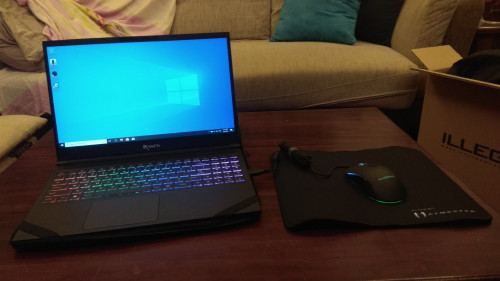 |
|
|
Jun 29 2019, 02:09 AM
Return to original view | Post
#4
|
|
Junior Member
67 posts Joined: May 2012
|
just got my raven se, gtx1650 with i5 n 8gb ram config. my questions are:
1. while playing gta v,im only managed to get max 30 fps max, even at lowest setting. is there anything that i should do to increase the frame rate? 2. as the battery is irremovable, how to prolong battery life? for other brand like lenovo,we can set the laptop not to fully charged ,so u can minimize be battery wear n tear despite of its being charged |
|
|
Jun 29 2019, 02:05 PM
Return to original view | Post
#5
|
|
Junior Member
67 posts Joined: May 2012
|
QUOTE(STEVE@ILLEGEAR @ Jun 29 2019, 12:04 PM) Hi mfahdr May i know if you plugged in the charger while playing games? In addition, upon charging full, the laptop will use the direct power from the adapter, hence it has the built in cut off mechanism, to minimize the battery wear and tear. Hope this clarifies. response for item no 1:yes,i plugged in the laptop,and it's fully charged. is there any setting in the laptoptthat i should play around? response item no 2: so there's no need ro worry about its battery even though its plugged in and fully charged, right? This post has been edited by mfahdr: Jun 29 2019, 02:06 PM |
|
|
Jun 29 2019, 02:09 PM
Return to original view | Post
#6
|
|
Junior Member
67 posts Joined: May 2012
|
QUOTE(ZM Fong @ Jun 29 2019, 12:29 PM) 1. Is it plugged in? 1. yes2. Keep it at 30-70% if possible, if plugged in most of the time then keeping at 100% is OK (not ideal but this is the best way) 2. apparently, there's no built in software to enable me to charge the battery laptop as suggested by you,unlike lenovo. Unless if i unplugged the laptop once it reach (i.e 70%), and use its own battery to power up the laptop |
|
|
|
|
|
Jun 30 2019, 10:09 AM
Return to original view | Post
#7
|
|
Junior Member
67 posts Joined: May 2012
|
QUOTE(mfahdr @ Jun 29 2019, 02:09 PM) 1. yes sorry guys.. it seems that i enabled vsync. prob rectified once i turn it off. my bad😅😅.. anyhow, thnx ya.. trully appreciate it 😁2. apparently, there's no built in software to enable me to charge the battery laptop as suggested by you,unlike lenovo. Unless if i unplugged the laptop once it reach (i.e 70%), and use its own battery to power up the laptop |
|
|
Sep 16 2019, 09:28 AM
Return to original view | Post
#8
|
|
Junior Member
67 posts Joined: May 2012
|
my windows entered bsod several time today while installing application. it happened a lot recently. does anyone facing this issue? it it because of windows update or hardware issue? I'm using raven se btw
|
|
|
Sep 16 2019, 03:06 PM
Return to original view | Post
#9
|
|
Junior Member
67 posts Joined: May 2012
|
QUOTE(Prince J @ Sep 16 2019, 12:03 PM) Hi mfahdr, when it happened in the beginning, the message appeared is memory management. not sure whether the other bsod prompted the same error after that. just to add on, i had to reset my laptop yesterday as windows failed to boot normally. today,the bsod happened again while i was trying to installed some applications, twice. but never had a chance to read the error message as the laptop booted too fast.What's the BSOD error code showing? |
|
|
Sep 18 2019, 09:11 PM
Return to original view | Post
#10
|
|
Junior Member
67 posts Joined: May 2012
|
QUOTE(AZIM@ILLEGEAR @ Sep 16 2019, 07:05 PM) Hi mfahdr, sorry to learn about this! I would recommend for you to contact our Support Team directly by using the number below: just a quick update.. after playing games for a about 10 minutes,,it happened again.. it seems like it stuck at this screen now..before it automatically turn off.. what a bummer.. +6018-2618599 (WhatsApp) Our Support Team shall assist you accordingly  orait.. will be reaching them soon..thanx 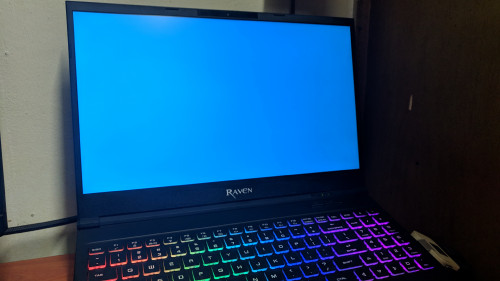 This post has been edited by mfahdr: Sep 19 2019, 08:37 AM |
|
Topic ClosedOptions
|
| Change to: |  0.0599sec 0.0599sec
 0.36 0.36
 7 queries 7 queries
 GZIP Disabled GZIP Disabled
Time is now: 15th December 2025 - 04:41 AM |
 Quote
Quote