

QUOTE(chenchet @ Dec 19 2019, 07:38 AM)
How to get this web UI? Just update the firmware?

Use IE or Chrome type 192.168.8.1 Login Username and password
then go to Setting -> Dial-up-> Network Settings
Huawei B618 Router V2, We are back!
|
|
 Dec 19 2019, 05:14 PM Dec 19 2019, 05:14 PM
Return to original view | IPv6 | Post
#41
|
 
Junior Member
450 posts Joined: Mar 2007  
|
QUOTE(chenchet @ Dec 19 2019, 07:38 AM) How to get this web UI? Just update the firmware? Use IE or Chrome type 192.168.8.1 Login Username and password then go to Setting -> Dial-up-> Network Settings |
|
|
|
|
|
Dec 19 2019, 05:20 PM
Return to original view | IPv6 | Post
#42
|
|
Junior Member
450 posts Joined: Mar 2007
|
QUOTE(GameSky @ Dec 18 2019, 09:56 PM) digi network afaik route via singapore Using Malus VPN into China, streamyx and Maxis function perfect, Digi problem.  SpeedCN VPN working perfect with all.  QUOTE(Xaser_3 @ Dec 19 2019, 08:49 AM) It depends Bro. Some VPN's are faster than others. It all depends whether you are a premium subscriber or not. Free users get snail speeds most of the time. Malus and SpeedCN this 2 VPN into China i subcsribe VIP already.Been contact to Malus and try to checking what the problem. Should be their VPN port in problem, waiting them add one more Malaysia port. QUOTE(fruitie @ Dec 19 2019, 10:46 AM) I don't shut it off even I'm not at home (e.g. working or hanging outside), however if I will be away for more than a day then I will shut it off. Ha, u also a heavy user too. I'm always off when i going sleep, and on back at morning, my router working around 15 hours per day. This post has been edited by ming0000: Dec 19 2019, 05:23 PM |
|
|
Dec 19 2019, 11:45 PM
Return to original view | IPv6 | Post
#43
|
|
Junior Member
450 posts Joined: Mar 2007
|
QUOTE(saitong09 @ Dec 19 2019, 07:51 PM) Will life shorten if frequent On/Off as compare to 24/7? This question need other help answer. Normally I ON it at morning and Shut Down at midnight. QUOTE(dark_axl21 @ Dec 19 2019, 08:00 PM) I think the issue is with heat dissipation like all other equipments? Actually B618 not so heat, this item are great. This post has been edited by ming0000: Dec 19 2019, 11:46 PM |
|
|
Dec 20 2019, 04:16 PM
Return to original view | IPv6 | Post
#44
|
|
Junior Member
450 posts Joined: Mar 2007
|
QUOTE(fruitie @ Dec 19 2019, 11:54 PM) Why wanna shut it down? Midnight No people use it, so OFF it loh, save elec money. |
|
|
Dec 20 2019, 04:17 PM
Return to original view | IPv6 | Post
#45
|
|
Junior Member
450 posts Joined: Mar 2007
|
QUOTE(dadurtyz @ Dec 20 2019, 01:56 PM) Im using unifi air with B618 router, WOW, Unifi air Download 100mbps, so great.Mostly my upload speed get around 50mb, Just recently it go down. Does TM capping the speed? Early this month i try my hometown, 1mbps around, midnight up to 5mbps. |
|
|
Dec 20 2019, 04:23 PM
Return to original view | IPv6 | Post
#46
|
|
Junior Member
450 posts Joined: Mar 2007
|
QUOTE(fruitie @ Dec 20 2019, 04:19 PM) It will not consume so much of electricity la.. Cause my living house goverment low cost unit, HOT abit, and i did not using Aircond, so need to take care all elec unit.  Moreover, not sure by doing this will reduce the lifespan or not. Moreover, not sure by doing this will reduce the lifespan or not. |
|
|
|
|
|
Dec 22 2019, 10:16 PM
Return to original view | IPv6 | Post
#47
|
|
Junior Member
450 posts Joined: Mar 2007
|
QUOTE(saitong09 @ Dec 20 2019, 10:08 PM) Base on the B618 power consumption, switch off at night save you few cents only a day QUOTE(Xaser_3 @ Dec 22 2019, 10:02 AM) Not much savings on your electricity bill by turning your modem off every night. Just like printers when on standby, consumes very little power. Wahahah, that true also. Seen when i not around home or went to sleep, i will off PC and router those electric unit. Been habit start from young till now. |
|
|
Dec 23 2019, 06:27 PM
Return to original view | IPv6 | Post
#48
|
|
Junior Member
450 posts Joined: Mar 2007
|
When start up B618 it will connect Digi i150 with Band 3+7 with 4G+ LTE.
But WebUI top right sometime show Band 3 or 7 only. Normally will jump to Band 7 with 4G+. If WebUI show Band 7 with 4G+, speed around 40mbps. If WebUI show Band 3 with 4G+, speed around 80mbps. My place Band 7 slow, Band 3 fast. So i need to apply Band 3 only and then apply again Band 3+7 for 4G+, WebUI will show Band 3 with 4G+. Is that any way to make it always choose Band 3 for 1st choice with 4G+? or just need i manually click it? 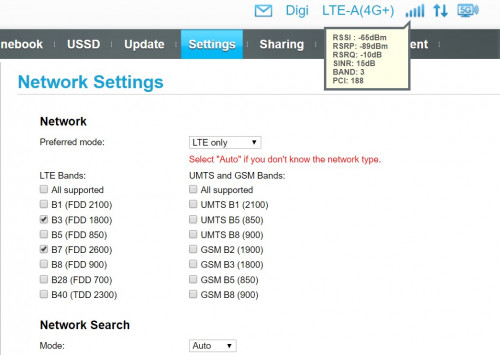 |
|
|
Dec 23 2019, 10:08 PM
Return to original view | IPv6 | Post
#49
|
|
Junior Member
450 posts Joined: Mar 2007
|
QUOTE(GameSky @ Dec 23 2019, 07:00 PM) noticed sometime no network for suddenly, but still can access the modem login just said unable to connect to network and red led. had to reboot ..not sure it's my b618 or local tower here problem. Yesterday night 22/12 my home also facing disconnect a few time, each time DC around 15 second around. I didnot reboot router, just waiting. |
|
|
Dec 25 2019, 11:45 PM
Return to original view | IPv6 | Post
#50
|
|
Junior Member
450 posts Joined: Mar 2007
|
QUOTE(Xaser_3 @ Dec 24 2019, 10:39 AM) I too have been experiencing these random network drop out/disconnect ions the past 1 week. Not sure if it's due to tower congestion or isolated issues with the local tower. It was back to normal upon a reboot which is rarely and seldom with my Infinite experience over the years. I told my mum, if WIFI no active, just OFF B618 router for 30sec and ON it back. |
|
|
Jan 4 2020, 11:21 PM
Return to original view | IPv6 | Post
#51
|
|
Junior Member
450 posts Joined: Mar 2007
|
QUOTE(fadzioriq @ Dec 26 2019, 08:21 PM) May I know why your interface is different with mine? I'm using B618s-65d type Different?which part?I'm just login at 192.168.8.1 |
|
|
May 31 2020, 12:06 AM
Return to original view | IPv6 | Post
#52
|
|
Junior Member
450 posts Joined: Mar 2007
|
My Sharp 4K smart TV cant get WIFI from B618, search and manual key in also problem.
Anyone face problem like this too? |
|
|
Jun 12 2020, 02:39 PM
Return to original view | IPv6 | Post
#53
|
|
Junior Member
450 posts Joined: Mar 2007
|
QUOTE(Hwoarang45 @ Jun 9 2020, 04:18 PM) mine same, has to unplug lan cable first, apparently wifi and lan cannot work together, DHCP issues, just unplug ur lan cable reboot tv and try wifi again. But i did not plug in LAN cable to my TV |
| Change to: |  0.0202sec 0.0202sec
 0.46 0.46
 7 queries 7 queries
 GZIP Disabled GZIP Disabled
Time is now: 2nd December 2025 - 02:10 PM |
 Quote
Quote