Huawei Mate 20/20 Pro/20 X & Huawei GT V2, long overdue V2 *;p
Huawei Mate 20/20 Pro/20 X & Huawei GT V2, long overdue V2 *;p
|
|
 Apr 7 2022, 05:07 PM Apr 7 2022, 05:07 PM
Return to original view | Post
#1
|
 
Senior Member
4,034 posts Joined: Dec 2019 
|
Mate 20
|
|
|
|
|
|
Jun 4 2022, 02:09 PM
Return to original view | IPv6 | Post
#2
|
|
Senior Member
4,034 posts Joined: Dec 2019
|
QUOTE(RiriRuruRara @ Jun 4 2022, 04:14 AM) Hi anyone of your possible can help me out in a emergency problem? i don't think it's possible without restoring from backup.My dad recorded and accidentally deleted a very important voice memo, is it possible to retrieve it somewhere in a 30 day bin or something??? Please Help!!  try to look at Files app' "Recently Deleted"; i purposely created a dummy voice recording and delete, but it's not inside there nor elsewhere. also, Mate 20 variants should have Huawei's Cloud Backup available even at basic Free tier; if it's enabled, look into restoring from it. 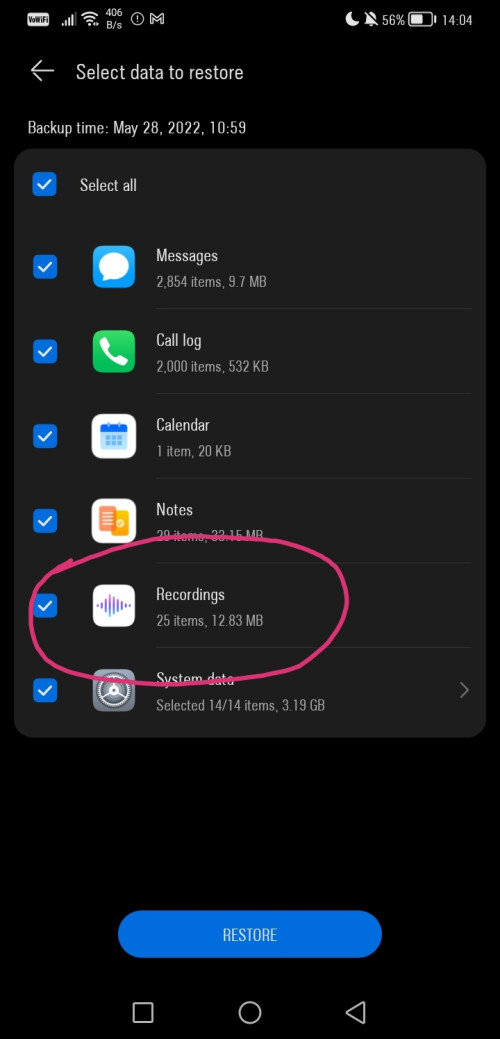 |
|
|
Jun 5 2022, 10:24 AM
Return to original view | IPv6 | Post
#3
|
|
Senior Member
4,034 posts Joined: Dec 2019
|
QUOTE(RiriRuruRara @ Jun 5 2022, 03:12 AM) Thanks will look into it when I get hold of his phone. So it should be in there?Is this function on when start phone up?? Bcs he is boomer I don't think he activate anything.. At least, need to create/signin with Huawei ID acccount. Can't recall if default is enabled or not, but it should be so at default schedule if just go through "next". "next", "next" back then without care after signed in.This post has been edited by Oltromen Ripot: Jun 5 2022, 10:26 AM RiriRuruRara liked this post
|
|
|
Jun 5 2022, 10:25 AM
Return to original view | IPv6 | Post
#4
|
|
Senior Member
4,034 posts Joined: Dec 2019
|
QUOTE(RiriRuruRara @ Jun 5 2022, 03:12 AM) Thanks will look into it when I get hold of his phone. So it should be in there?Is this function on when start phone up?? Bcs he is boomer I don't think he activate anything.. and be quick. i am using basic free tier as-is, and seems like it only keep previous+most recent backup sets.This post has been edited by Oltromen Ripot: Jun 5 2022, 10:25 AM RiriRuruRara liked this post
|
|
|
Jun 5 2022, 10:04 PM
Return to original view | IPv6 | Post
#5
|
|
Senior Member
4,034 posts Joined: Dec 2019
|
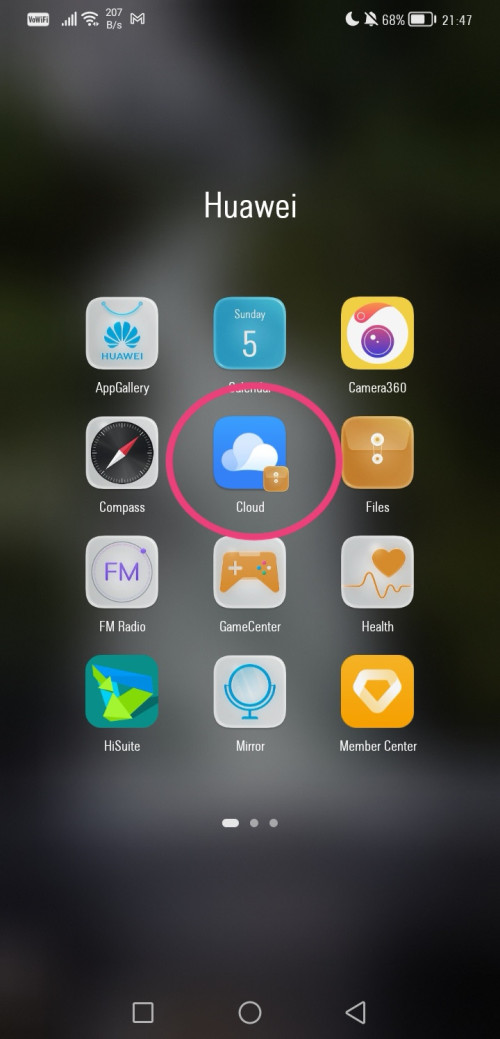
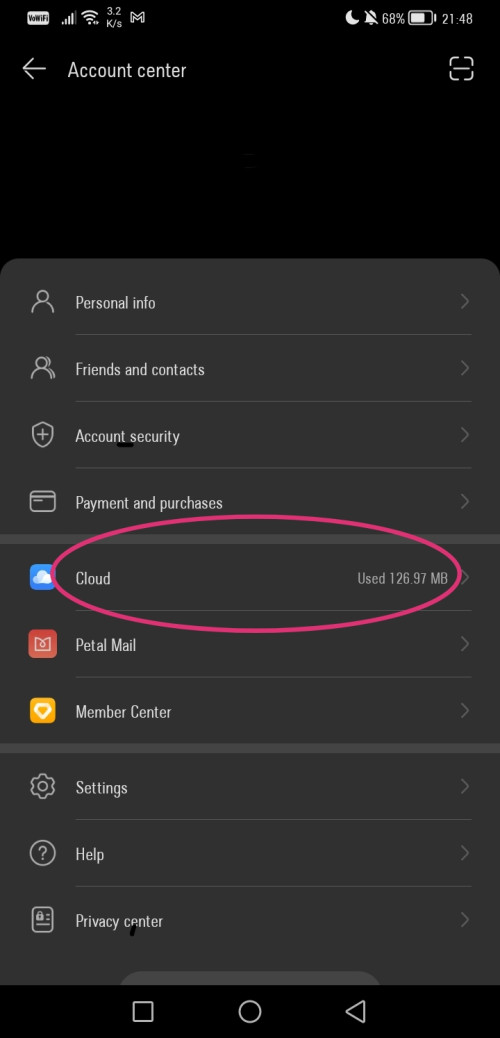
QUOTE(RiriRuruRara @ Jun 5 2022, 09:17 PM) Bro sorry to bother you again, but how to get to this page? Bcs when I went to his Huawei data recovery page it looks nothing like in the picture? Note: I'm using the most-recent up-to-date versions, so it might differ from what you actually have in terms of appearance, naming, etc, but availability-wise, backup and RESTORE is already here since a long time ago,Either straight through Huawei Cloud app, or long-winded through Settings. » Click to show Spoiler - click again to hide... « » Click to show Spoiler - click again to hide... « Either way, you should arrive to this page: 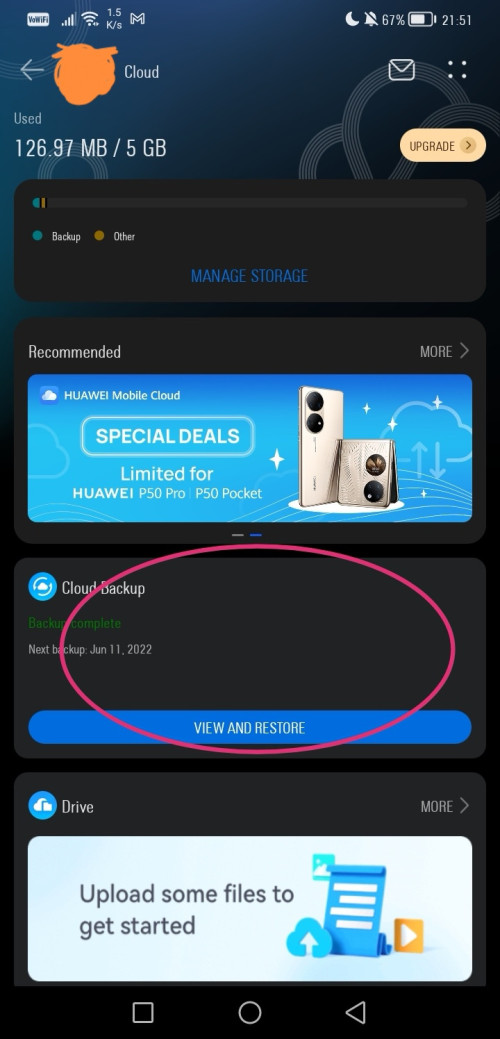 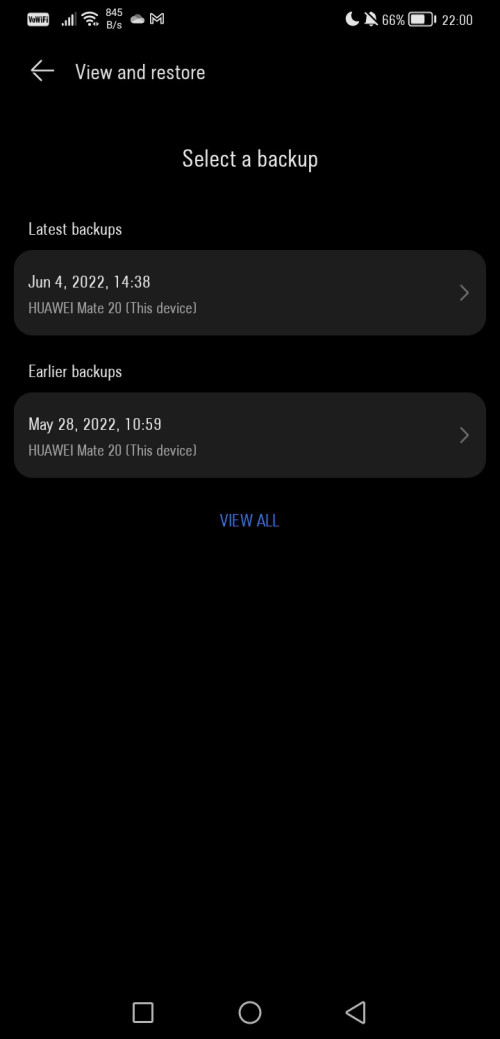 |
| Change to: |  0.0916sec 0.0916sec
 0.43 0.43
 7 queries 7 queries
 GZIP Disabled GZIP Disabled
Time is now: 10th December 2025 - 03:54 AM |
 Quote
Quote