Welcome Guest ( Log In | Register )

Outline · [ Standard ] · Linear+

 RTX 2060 temps very high on full load, 45c on idle, 85c full load

views
     
Steve Lum
post Mar 19 2019, 11:29 PM

Ayyyyy
*****
Senior Member
709 posts

Joined: Apr 2012
From: Damansara


QUOTE(flagstar @ Mar 19 2019, 11:08 PM)
Yeah, exactly point on my fan model. Unfortunately i can only install 1 more extra fan which is below the front intake fan but I don't think it'll improve the air flow anyway since below there are where the extra cable resides.
I know that card is overkill but people from reddir (I asked) recommend to get it anyway for future proofing instead of getting 1660ti. Does this mean I have to forge another budget for better case?
*
The only way to at least improve it is by upgrading those fans. Noctua A12 or S12A and Corsair AF120 are the few good ones out there that you can look into. Though, I reckon the best solution is to get a better case. There's a list of case's temperature and airflow comparison online that you can take a look at before you make a purchasing decision, such as this https://www.gamersnexus.net/guides/3120-bes...c-cases-of-2017 . You can see how much of a difference in temp a case can make smile.gif

This post has been edited by Steve Lum: Mar 19 2019, 11:35 PM
Steve Lum
post Mar 20 2019, 03:04 AM

Ayyyyy
*****
Senior Member
709 posts

Joined: Apr 2012
From: Damansara


QUOTE(flagstar @ Mar 20 2019, 12:11 AM)
Upgrading those fans would really hurt my budget right now for 4 of them. Case is no different here and that means I'd to save up more that what I had in mind initially. I've seen that ATX has better airflow mostly so is it better to just upgrade current case to ATX?

Oh, i need to add more fan too for ATX :sad:
Not when I asked about the product before. They said galax is a good card for both performance and cooling. If it run undee 80c, I would not worry at all but here I am, when the case itself was the problem

My 1060 run at 80c before upgraded but I didn't pay much attention to it because its fan wasn't as loud as this galax card
*
Yeap! It's defo better to upgrade your current case to ATX cases. Full-sized towers are usually better for future proof as well, for upgradability in the future. I'm still using CM Cosmos 2 case from 7 yrs ago, and i've upgraded the hardware three times now without any hurdles, looks sparkling brand new too wink.gif. And you don't have to buy extra fans yet, considering those cases do come with 2-3 fans, which totals up to 7 fans with ur current case wink.gif Then perhaps you could upgrade those fans after
Steve Lum
post Apr 3 2019, 04:01 PM

Ayyyyy
*****
Senior Member
709 posts

Joined: Apr 2012
From: Damansara


QUOTE(flagstar @ Apr 3 2019, 02:41 PM)
In the end, I opted for new case now. I bought Thermaltake Versa H27 TG ATX Case (same brand but eh, I like its build for the price), reuse all the case fans from previous case with 3 front intake, 1 rear exhaust and 1 top exhaust.

Tested case under idle
CPU: 40c (3.2GHz)
GPU: 42c (400MHz)
GPU Fan speed: 50%

Tested on load (MHW Very high preset)
CPU: 65c (3.7GHz)
GPU: 80c (1825MHz)
GPU Fan Speed: 80%

Test on load (Supersition Benchmark Extreme Preset)
CPU: 46c
GPU: 79c (1825MHz)
GPU Fan Speed: 79%

It seems by opting for new ATX case, I was able to shave off 3c on load but at least this time, it can run on boost clock without it downclock itself on thermal limit. I hope this would be enough until I bought better case fans later on down the road

P/s: thanks everyone for helping and provide suggestion for my problem. Really appreciate it.
*
That's a pretty good case smile.gif When you do upgrade those fans, those frontal intake fans should be your primary target. And if your current front intake fans are powered directly by your motherboard, it would be better to adjust the min speed higher (I have mine set at 80% mid temp speed,as long as it doesn't get too noisy) through bios for the meantime till you've upgraded those fans. Congrats on your new case btw tongue.gif
Steve Lum
post Apr 4 2019, 02:08 AM

Ayyyyy
*****
Senior Member
709 posts

Joined: Apr 2012
From: Damansara


QUOTE(flagstar @ Apr 3 2019, 11:23 PM)
The seller I go when I bought those case do recommend me to get the TT pure fan pack for like rm239 and he said it's a good fan to opt for but I still hold on from buying it yet. Need more advice for better case fans. Also can't find noctua fans at lowyat, probably need to survey more shops later.

All those front intake fan and top exhaust fan were wired to a 3-pin splitter to molex so can't really control much but low and high switch which I assume is 5v/12v switch
*
I've bought my noctua fans from lelong website. Noctuas are well known for their performance and 6 years warranty. And I use them for my watercooling radiators since they're really quiet at full speed and has high static pressure. But like what 1024kbps mentioned, Noctua Industrial PPC would be a beast for airflow. Found one here . Only found out they existed after I bought my current Noctua fans sad.gif And for that TT fans, they're more priced towards aesthetic than performance for it's RGB lighting. Which you could rather go for Corsair LL fans and place them at the top
Steve Lum
post Apr 4 2019, 02:56 AM

Ayyyyy
*****
Senior Member
709 posts

Joined: Apr 2012
From: Damansara


An example of my setup just for reference. It's not great but it will do laugh.gif It's a pretty old case so it has no side glass but the size of it is really good for upgrades and airflow.
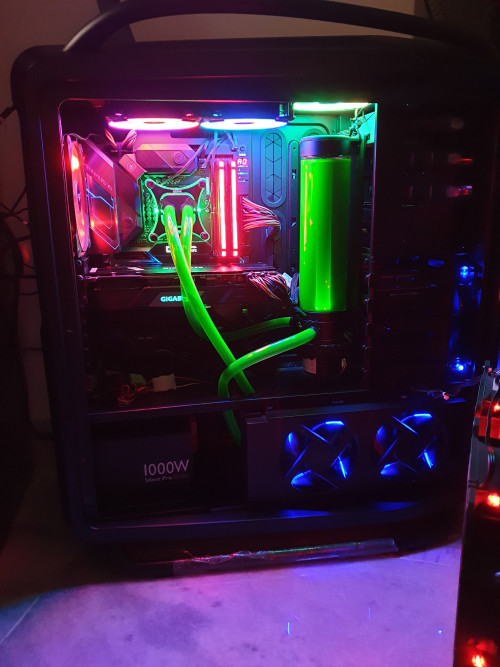
Front: CM Megaflow 200mm& Sickleflow (Air-In)
Side Upper: Corsair SP120 x 2 for GPU airflow (Air-In)
Side Lower: CM sickleflow x2 (bottom) (Air-In) from outside of case into Noctua NF-F12 x2 into radiator (air-push) and out through radiator by CM Xtraflo x2 (air-pull& Air-Out)
Top: Corsair LL120 x3 (Air-Out)
Rear: Corsair AF140 (Air-Out)
» Click to show Spoiler - click again to hide... «


» Click to show Spoiler - click again to hide... «

Don't judge sad.gif I have weird fans obsession and having empty fan slots looks weird haha

A recommended fans setup for your case could be
Front: 3x Noctua Industrial PPC 120
Top: 3x Corsair LL120
Rear: 1x Noctua Industrial PPC (for performance) or 1x Corsair AF120 (performance with fixed LED light and on budget) or 1x Corsair LL120 (to complete ur RGB sweat.gif )

I'm not a pro however, so looking for certain comparison or reviews online would be great. Hope I helped


This post has been edited by Steve Lum: Apr 4 2019, 03:04 AM
Steve Lum
post Apr 5 2019, 02:37 AM

Ayyyyy
*****
Senior Member
709 posts

Joined: Apr 2012
From: Damansara


QUOTE(flagstar @ Apr 4 2019, 01:59 PM)
Huh, that's new for me, I didn't knew there was industrial ppc until you guys brought it up, definitely will look for it to assist with my air cooling setup build. Another thing that I learnt from the link you gave me, putting sleeve bearing fan (which is all of my current case fans) other than vertical position would have higher failure rate.

For PWM, I do need to get at least a controller right? My new case do not have built-in PWM support
My new case can support up to 7 120mm fans or 4 120mm x 2 140mm fans as the front panel can only support 120mm fan. I find this as no issue, as long there's 3 slot. I'm planning to replace those front panel fans as your suggestion with 2 or 3 industrial ppc fans while moving the current one to top intake. It would wear out the current fan but it's cheap to replace anyway. Later in the road, swapping those top intake fan to better fan or aio. Only concern with this setup is the type of airflow in the case.

Does the corsair LL 120 really good? I'm having doubt looking at the fan spec, about 40 CFM each which is like my sickleflow fan(?) Lets just say I'm ignoring all the fancy rgb and prefer performance.
*
Noctua NF-F12 does come with a pwm Y-splitter like this that you can connect 2 fans to a single fan header. Though, it's industrial counterpart probably doesn't come with it. But like what kbps said, there will be limitation on how much power those headers can give out, having a 12W and 1A power limit (each NF-F12 Industrial V. takes up 3.6W and 0.3A). However, there's certain motherboards such as Asus that has H_Amp headers which supports up to 3Amps.
And for those LL120, it should be suffice considering heat rises, and those fans are enough to boost and push those heat out from your case. They're really quiet too, which is a total plus to me. I used to have CM xtraflo fans at the top which has 83CFM, it does it's job really well but it's noise turns me off with what sounds like a heli next to me due to its high RPM. Bear in mind that top fans will produce the most noise considering it doesn't have much obstruction above it rather than just the filter itself. Unlike frontal fans which have slight obstruction in front (cover) and behind (into ur case) which would have its noise kept to its minimum.

This post has been edited by Steve Lum: Apr 5 2019, 02:38 AM


Change to:
| Lo-Fi Version
0.0211sec    0.61    6 queries    GZIP Disabled
Time is now: 10th December 2025 - 03:56 AM