Outline ·
[ Standard ] ·
Linear+
Lenovo Legion Gaming Laptop (Y530, Y730) Thread V1, also include upcoming Legion(Y540, Y740)
|
prasys
|
 Mar 15 2019, 01:53 PM Mar 15 2019, 01:53 PM
|
Heros Never Die


|
QUOTE(hong3831 @ Mar 15 2019, 10:32 AM) Just cancel my legion Y730 order due to ridiculous shipment lead time. Ordered on 18Feb, date of expect shipment keep changing and now the status is asking wait until May.... Probably a lot of backorders |
|
|
|
|
|
prasys
|
Mar 15 2019, 02:19 PM
|
Heros Never Die
|
QUOTE(hong3831 @ Mar 15 2019, 02:14 PM) They just inform due to serious shortage of part. Din even contact me about the situation, just self update the lead time until I check the order. Sigh, got to look for other model as my current laptop already have buyer. Thinkpad - but wait that might not be good for you...Illgear is the other one |
|
|
|
|
|
prasys
|
Mar 15 2019, 03:59 PM
|
Heros Never Die
|
QUOTE(hong3831 @ Mar 15 2019, 03:42 PM) Yeah men...thats kind of suck I made full payment during 18Feb and still get nothing till now when they advertise ship out in 2 weeks. You wouldn't be charged , that one is pre-auth My card was only charged when they shipped it out - FYI |
|
|
|
|
|
prasys
|
Mar 15 2019, 04:11 PM
|
Heros Never Die
|
QUOTE(hong3831 @ Mar 15 2019, 04:02 PM) It's actually deducted my credit on my card. But I think is still under pending transaction. Not often use card, so I'm not sure how's that difference. Instead of keep quite, I actually feel better if they try to offer me other model... It's pre-auth . Basically they would hold it for 7 Days . After that they would release - and charge it later |
|
|
|
|
|
prasys
|
Mar 26 2019, 10:21 PM
|
Heros Never Die
|
QUOTE(rockccf @ Mar 26 2019, 06:00 PM) Is it worth to spend extra few k for Y740 instead of Y540? RGB is not my thing, and I hardly play games now, and for sure I won't OC my machine. The reason I am considering this machine is because I need to do some heavy development and I run a lot of programs at the same time. Or is there any alternative? I'm also looking into Thinkpad T-series and P-series, but unfortunately they don't have a powerful GPU. What's the GPU that you are looking at ? |
|
|
|
|
|
prasys
|
Mar 27 2019, 10:37 PM
|
Heros Never Die
|
QUOTE(rockccf @ Mar 27 2019, 03:09 PM) No specific model. But since now it's era of RTX, rtx is a good choice. For nvidia GTX 10 series, minimum 1060/70 i think? I don't see the issue. I am okay with my 1050 Ti , sure it's not the best at least it can handle things when I throw at it |
|
|
|
|
|
prasys
|
Apr 18 2019, 09:13 AM
|
Heros Never Die
|
QUOTE(xcves @ Apr 18 2019, 12:57 AM) yeap! finally something that can game without looking like a care-free teenager with RGB coming from every direction. anyway imo, lenovo laptops are heading the right direction in terms of looks/style/sleekness these days. so thats good i guess. the X1C looks good too. yeah they are less powerful. Current legion laptops use same GC as the X1E, GTX 1050ti. but the newer ones are coming with even more powerful GC. well they are marketed as gaming laptops after all so thats a given. Pricing wise almost similar actually, as in the Legion and ThinkPad lines respectively are considered quite pricey for their specs vs other brands.. but they are both different categories of laptops as well, so they got their own pricing and cant really compare between the two.. Well X1E uses 1050Ti MAX-Q and it's clock speds are lowered , basically it's a nerfed 1050Ti. However the Y530 uses 1050Ti without Max-Q ,and it can push the thermals higher |
|
|
|
|
|
prasys
|
Apr 24 2019, 09:05 AM
|
Heros Never Die
|
QUOTE(khan @ Apr 24 2019, 08:54 AM) Just ordered myself a Y530 from Lazada  wohooo... cant wait!!  I wonder why didn't get it direct from Lenovo..Lazada might be old stocks....you know |
|
|
|
|
|
prasys
|
Apr 24 2019, 10:02 AM
|
Heros Never Die
|
QUOTE(khan @ Apr 24 2019, 09:38 AM) But then it's a gaming laptop - so shouldn't be an issue.... |
|
|
|
|
|
prasys
|
Apr 24 2019, 01:28 PM
|
Heros Never Die
|
QUOTE(khan @ Apr 24 2019, 11:06 AM) don't think can be change, the seller have another Y530 with that 300 nits but it is much more exp...although it does comes with i7, 144 Hz panel and SSD. oh well, this laptop will basically be my desktop replacement, won't be going outdoor so the 250 nits should be just fine.. (i can only comfort myself with that excuses) lol... 144Hz ftw especially if you are serious about gaming QUOTE(xcves @ Apr 24 2019, 12:06 PM) if indoor use 250 nits should be okay i guess. hopefully you will be fine with the color accuracy when you get it.. otherwise you're gonna be complaining about it, unless you plan to plug it into a monitor then it doesnt matter I am using X1 Extreme with the crappy display - yeah you can play games very well.... |
|
|
|
|
|
prasys
|
May 23 2019, 05:18 PM
|
Heros Never Die
|
QUOTE(aba9785 @ May 23 2019, 01:00 PM) Hi guys, I'm a bit confused. Based on Page 30 of y530 manual source: https://download.lenovo.com/consumer/mobile..._hmm_201805.pdf 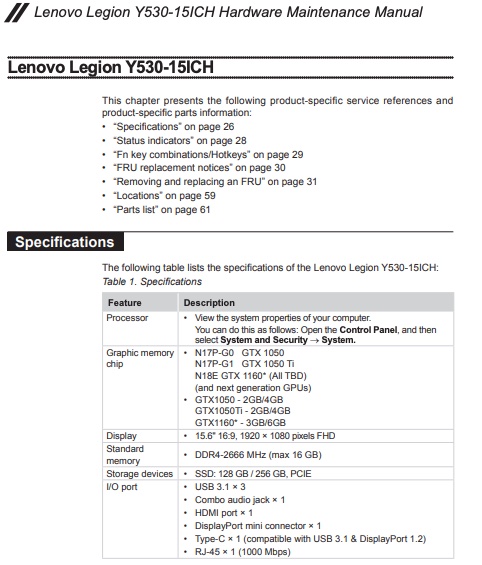 this is for I/O port. • HDMI port × 1 • DisplayPort mini connector × 1 • Type-C × 1 (compatible with USB 3.1 & DisplayPort 1.2) My questions: 1. Can I connect 3 external monitor to Y530? eg: 1 to HDMI port, 1 to mini DP, 1 to Type C 2. Anyone successfully connect external monitor via Type C ? either native Type C cable or via HDMI to Type C adapter or DP to Type C adapter I'm looking for a notebook that can connect to 2 or more external monitors. Please share your experiences. Thank you.  1. I cannot say , but with my Thinkpad X1 Extreme , I can daisy chain and connect 2 monitors (one via HDMI) and the other one is via USB-C. I think I can even daisy chain it to another display in Type-C. Most notebook allows you to drive 2 displays or more but if it's 4K - you may need a powerful GPU |
|
|
|
|
|
prasys
|
May 23 2019, 05:52 PM
|
Heros Never Die
|
QUOTE(aba9785 @ May 23 2019, 05:37 PM) you will need a monitor that can support daisy chain  but yes, I'm into that. Still not sure if i can connect external monitor to USB Type C out on Y530. Not really well documented in product page, but it's mentioned in service manual. Wonder if anyone try it before? It works on my 1050Ti MAX-Q - else just get a TB3 dock to connect it Now does it really work on Y530 that's a different question. I doubt someone want to use it as a workstation. Different market segment |
|
|
|
|
|
prasys
|
May 24 2019, 05:17 PM
|
Heros Never Die
|
QUOTE(aba9785 @ May 24 2019, 08:02 AM) Got it.  If not mistaken, Y530 has Type-C output but it did not list it as ThunderBolt 3 capable. that's why i'm not sure if anyone here manage to try it  Actually i'm planning to get it as workstation (Primary), gaming (secondary) My main requirement for now is it need to be able to power my 3 monitor setup (at home) and still be a reliable workhorse (when i'm outside) Currently I'm powering my 3 monitor via single DP (Dell U2414h - Dell U2414h - 1440p monitor) on an old notebook. Just get a TB3 graphics card and power all 3 like a champ.....just get a professional/workstation laptop like Thinkpad series |
|
|
|
|
|
prasys
|
May 25 2019, 05:00 PM
|
Heros Never Die
|
QUOTE(aba9785 @ May 25 2019, 07:35 AM) TB3 graphic card...this is something new... will do more research on it. Thank you for sharing  Can read my review of RTX2070 TB3..overkill but it would work |
|
|
|
|



 Quote
Quote


 0.0364sec
 1.78
1.78
 7 queries
 GZIP Disabled