

Which to choice?
NVIDIA GeForce RTX 2070 Super Max-Q 8GB GDDR6
Vs
32GB RAM + 2TB HDD.
RTX2060 and 2070 different alot ?
Lenovo Legion Gaming Laptop (Y530, Y730) Thread V1, also include upcoming Legion(Y540, Y740)
Lenovo Legion Gaming Laptop (Y530, Y730) Thread V1, also include upcoming Legion(Y540, Y740)
|
|
 Jun 4 2020, 01:28 PM Jun 4 2020, 01:28 PM
Return to original view | Post
#1
|
 
Junior Member
85 posts Joined: May 2007 
|
Which to choice?
NVIDIA GeForce RTX 2070 Super Max-Q 8GB GDDR6 Vs 32GB RAM + 2TB HDD. RTX2060 and 2070 different alot ? |
|
|
|
|
|
Jun 4 2020, 04:04 PM
Return to original view | Post
#2
|
|
Junior Member
85 posts Joined: May 2007
|
QUOTE(Ethan Hunt @ Jun 4 2020, 02:18 PM) For me depend on what you do with the laptop and what you gaming bro. Different is about 20-30fps +- depending on the game as well. I will take RTX 2070 for future proofing and down the road if got extra budget can upgrade the ram and storage.  QUOTE(ZM Fong @ Jun 4 2020, 02:21 PM) Value wise, 2060. In most cases you don't need 32GB RAM Game and Coding. Now some code development starts to require 16GB RAM to debug. FYI 2060 in 7i is 110W while 2070/2070S/2080S Max-Q is 105W (with dynamic boost, if off 90W) For which model? Also have the same though, just not sure what big difference between 2060 and 2070. Read some review, the difference not much about 3-4% improvement. 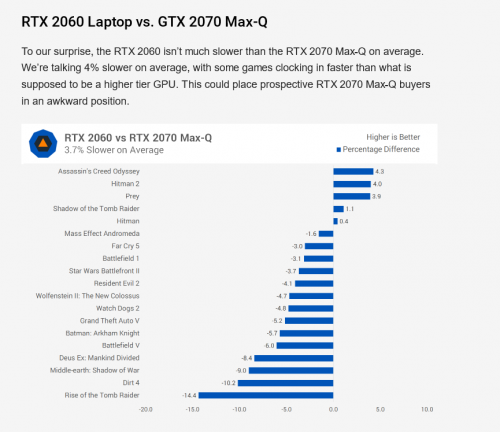 |
|
|
Jun 4 2020, 05:22 PM
Return to original view | Post
#3
|
|
Junior Member
85 posts Joined: May 2007
|
QUOTE(Ethan Hunt @ Jun 4 2020, 04:25 PM) That is for the normal GTX 2070 MaxQ. Not the Super version. Just check back the spec details, you are right. You talking about Super right? Agreed. Super is another level already eventho its MaxQ. 7i spec with NVIDIA GeForce RTX 2070 Super Max-Q 8GB GDDR6. 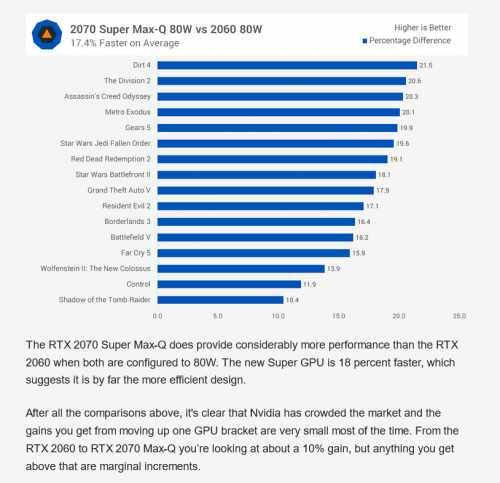 |
|
|
Jul 10 2020, 04:41 PM
Return to original view | Post
#4
|
|
Junior Member
85 posts Joined: May 2007
|
hi, any one come across legion 5i ssd slot can be remove and replace with a m.2 ?
|
|
|
Jul 10 2020, 06:03 PM
Return to original view | Post
#5
|
|
Junior Member
85 posts Joined: May 2007
|
QUOTE(BeastX @ Jul 10 2020, 04:56 PM) You have 2 m2 slots on the L 5i.... however the one on the right (from the bottom w battery close to u)... only fits single sided NVMe drives... The layout not same with i saw from other website. 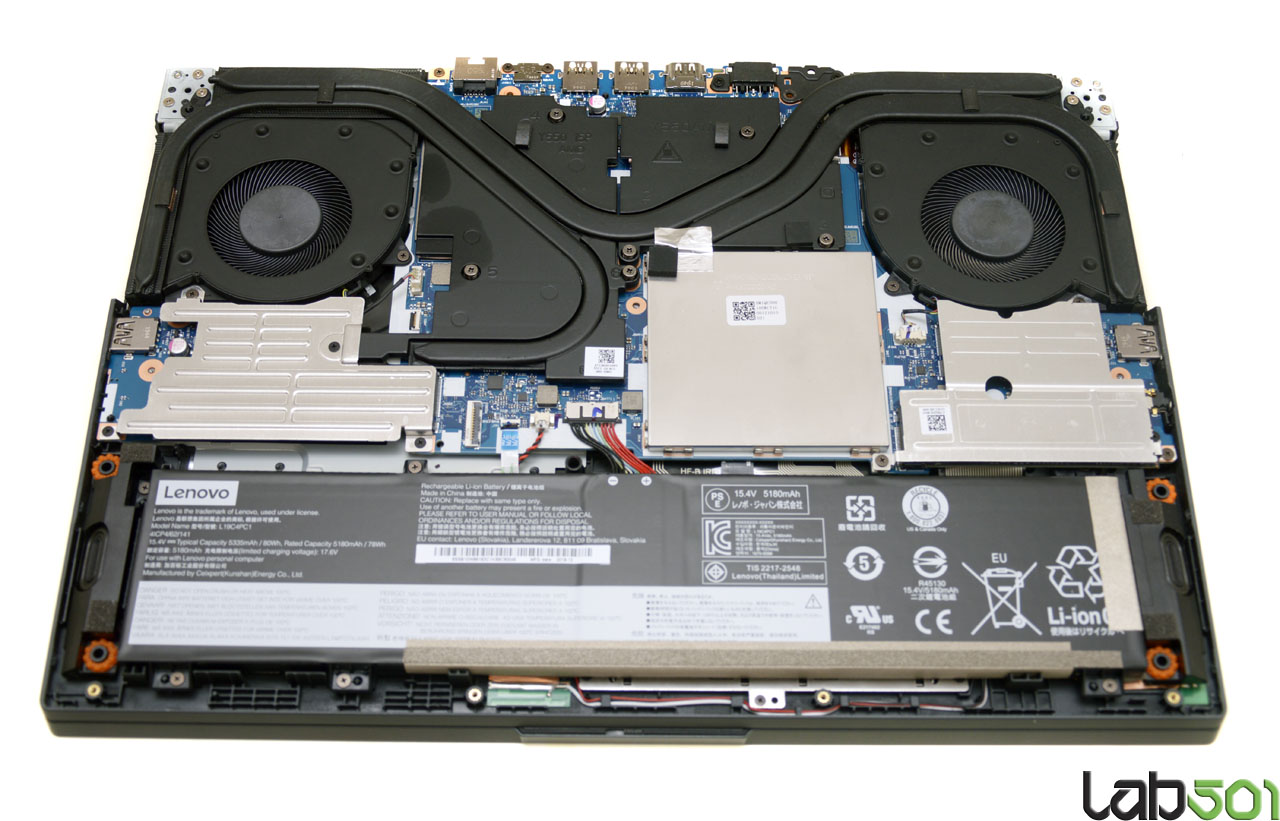 Link 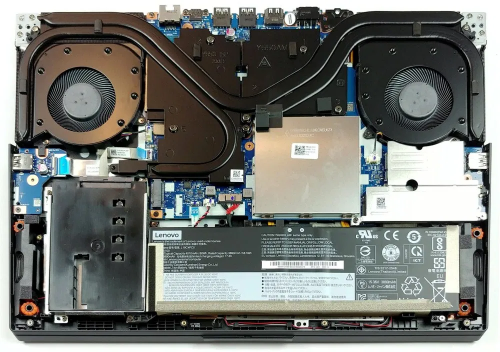 |
|
|
Jul 11 2020, 11:36 AM
Return to original view | Post
#6
|
|
Junior Member
85 posts Joined: May 2007
|
Any thermal testing result to share on legion 5 and legion 7 ?
|
|
|
|
|
|
Jul 13 2020, 01:11 PM
Return to original view | Post
#7
|
|
Junior Member
85 posts Joined: May 2007
|
QUOTE(dexjac @ Jul 13 2020, 11:43 AM) The monitor is superb. It has picture by picture feature where I can feed 2 different sources to it without border in between. Its very heavy though so make sure your table can hold its weight. The monitor is this model = Lenovo G27c-10 27" Curved Gaming Monitor ?It also comes with harman kardon conference speaker. Don't expect miracle out of the small speaker but it looks nice and conceal nicely at the monitor stand. It has microphone but a bit too far from my sitting position to catch my voice properly. My old pc (I7 920 😜) can run on 2560 x 1200 only hence black bars on both sides 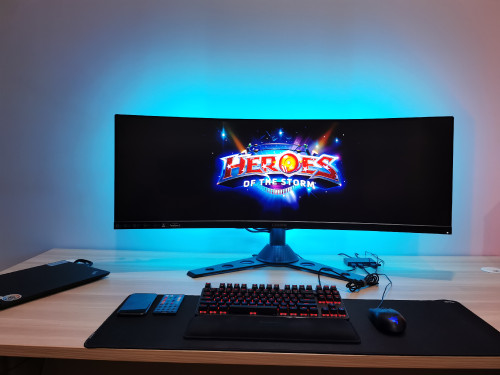 |
|
|
Jul 13 2020, 03:00 PM
Return to original view | Post
#8
|
|
Junior Member
85 posts Joined: May 2007
|
Fuh... 43.4 Inch monitor.
|
|
|
Jul 18 2020, 03:55 PM
Return to original view | Post
#9
|
|
Junior Member
85 posts Joined: May 2007
|
Seem like LENXCIMB no more 20% discount.
 |
|
|
Jul 30 2020, 05:43 PM
Return to original view | Post
#10
|
|
Junior Member
85 posts Joined: May 2007
|
QUOTE(Cold|Drawn @ Jul 30 2020, 05:17 PM) was thinking to just select 1st SSD, then the 2nd leave it blank for future upgrade. currently, if want to have 80w battery need to select both with M.2 PCIE. If pic one will be default back with one dummy case and 60w battery . ZM Fong liked this post
|
| Change to: |  0.0407sec 0.0407sec
 1.00 1.00
 7 queries 7 queries
 GZIP Disabled GZIP Disabled
Time is now: 8th December 2025 - 07:07 AM |
 Quote
Quote