Welcome Guest ( Log In | Register )

Outline · [ Standard ] · Linear+

 Lenovo Legion Gaming Laptop (Y530, Y730) Thread V1, also include upcoming Legion(Y540, Y740)

views
     
aba9785
post May 22 2019, 08:11 AM

el aba9785
*****
Senior Member
743 posts

Joined: Jun 2005
From: Penang


QUOTE(mfahdr @ May 12 2019, 06:07 PM)
any idea when y540 will reach our shore and its proce? it seems like they are taking forever to release it to our market. want to finish the existing stock for y530 perhaps?
*
maybe you go opt in for the 'notify me' here
https://www.lenovo.com/my/en/laptops/legion...5/p/88GMY501214


actually i'm divided between the current non customisable Y530, or spend more on Y740 or wait for Y540
based on the priced shared earlier, seems like lenovo already reduce price for y740 and making it cheaper.

https://www.lenovo.com/my/en/laptops/legion...Legion-y-Series
aba9785
post May 23 2019, 01:00 PM

el aba9785
*****
Senior Member
743 posts

Joined: Jun 2005
From: Penang


Hi guys,
I'm a bit confused.
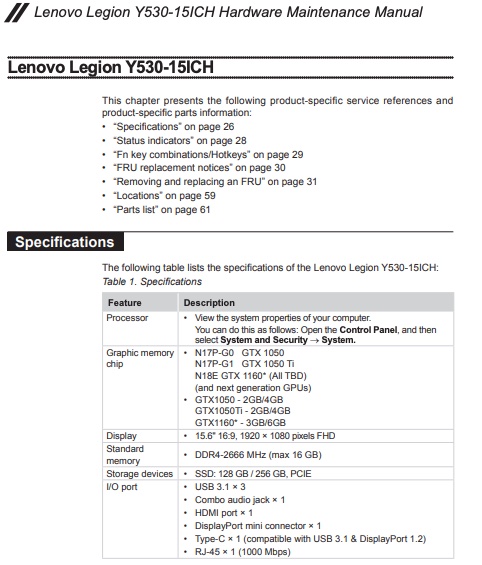
Based on Page 30 of y530 manual
source: https://download.lenovo.com/consumer/mobile..._hmm_201805.pdf

user posted image

this is for I/O port.
• HDMI port × 1
• DisplayPort mini connector × 1
• Type-C × 1 (compatible with USB 3.1 & DisplayPort 1.2)


My questions:
1. Can I connect 3 external monitor to Y530?
eg: 1 to HDMI port, 1 to mini DP, 1 to Type C


2. Anyone successfully connect external monitor via Type C ?
either native Type C cable or via HDMI to Type C adapter or DP to Type C adapter

I'm looking for a notebook that can connect to 2 or more external monitors.

Please share your experiences.
Thank you. icon_question.gif
aba9785
post May 23 2019, 05:37 PM

el aba9785
*****
Senior Member
743 posts

Joined: Jun 2005
From: Penang


QUOTE(prasys @ May 23 2019, 05:18 PM)
1. I cannot say , but with my Thinkpad X1 Extreme , I can daisy chain and connect 2 monitors (one via HDMI) and the other one is via USB-C.  I think I can even daisy chain it to another display in Type-C.

Most notebook allows you to drive 2 displays or more but if it's 4K - you may need a powerful GPU
*
you will need a monitor that can support daisy chain laugh.gif
but yes, I'm into that.

Still not sure if i can connect external monitor to USB Type C out on Y530.
Not really well documented in product page, but it's mentioned in service manual.
Wonder if anyone try it before?
aba9785
post May 24 2019, 08:02 AM

el aba9785
*****
Senior Member
743 posts

Joined: Jun 2005
From: Penang


QUOTE(prasys @ May 23 2019, 05:52 PM)
It works on my 1050Ti MAX-Q - else just get a TB3 dock to connect it

Now does it really work on Y530 that's a different question. I doubt someone want to use it as a workstation.

Different market segment
*
Got it. notworthy.gif
If not mistaken, Y530 has Type-C output but it did not list it as ThunderBolt 3 capable.
that's why i'm not sure if anyone here manage to try it brows.gif


Actually i'm planning to get it as workstation (Primary), gaming (secondary)
My main requirement for now is it need to be able to power my 3 monitor setup (at home)
and still be a reliable workhorse (when i'm outside)


Currently I'm powering my 3 monitor via single DP (Dell U2414h - Dell U2414h - 1440p monitor) on an old notebook.
aba9785
post May 25 2019, 07:35 AM

el aba9785
*****
Senior Member
743 posts

Joined: Jun 2005
From: Penang


QUOTE(prasys @ May 24 2019, 05:17 PM)
Just get a TB3 graphics card and power all 3 like a champ.....just get a professional/workstation laptop like Thinkpad series
*
TB3 graphic card...this is something new...
will do more research on it.

Thank you for sharing thumbup.gif


Change to:
| Lo-Fi Version
0.0417sec    0.55    7 queries    GZIP Disabled
Time is now: 8th December 2025 - 05:11 PM