Outline ·
[ Standard ] ·
Linear+
Lenovo Legion Gaming Laptop (Y530, Y730) Thread V1, also include upcoming Legion(Y540, Y740)
|
Dinofluffy
|
 Jul 17 2019, 06:24 PM Jul 17 2019, 06:24 PM
|
Getting Started


|
QUOTE(anson18 @ Jul 17 2019, 04:58 PM) 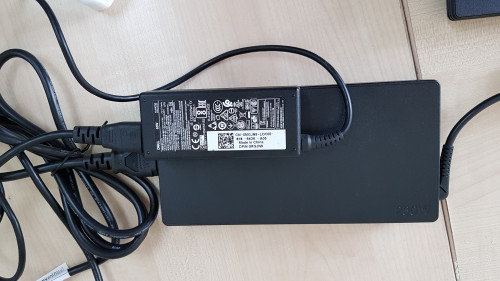 Above is my existing laptop charger compared to the Y540!! Understood that is huge different on the watt. But really too hard for me to take out for meeting or work!! lol Seek for any alternative solution? I'm curious why nowadays still provided those bulky power charger!!!  Well before you buy it you should watch some Y540 videos in youtube. They will show the bulky charger everytime when they take out the laptop from the box. If at that time you realize is huge or big for you and it is not convenient to take out for meeting or work, you should go for other laptop. But since you bought it, so what can you do is search for alternative solution as you mentioned it. If there's no alternative solution, then just accept the fact. Can't change anything already unless you sell it and look for new one which has smaller charger and suitable for you to take out for meeting or work. Cheers Btw enjoy your new machine!  |
|
|
|
|
|
Dinofluffy
|
Oct 12 2019, 12:03 AM
|
Getting Started
|
QUOTE(Oblah @ Oct 11 2019, 09:27 PM) Well after a few days of troubleshooting and multiple hours of testing I have managed to fix ALL of my sound issues, including audio crackling and the very annoying audio desync. It mostly boils down to power management issues. Fixes include: 1. Nvidia Settings --> Manage 3D settings --> Power management mode --> Adaptive 2. Setting up a high performance power plan in Control Panel 3. Preventing Realtek drivers from switching to low power mode https://forums.lenovo.com/t5/Gaming-Laptops/Legion-Y530-sound-issues-fix/td-p/43777334. Reducing WiFi transmit power https://forums.lenovo.com/t5/Gaming-Laptops/Lenovo-Y540-crackling-sound/m-p/4511068/highlight/true#M30260I'm just glad I can retain the default Realtek drivers as the Dolby audio tuning improves speaker quality by a lot. What do you mean by audio crackling and audio desync? Mind explain to me? I wanna check if my Y540 has the problem or not. Thank you |
|
|
|
|
|
Dinofluffy
|
Oct 12 2019, 12:33 AM
|
Getting Started
|
QUOTE(Oblah @ Oct 12 2019, 12:13 AM) Audio crackling is when you play videos/music with your speakers and you can sometimes hear as if there is static or a crackling sound. Sometimes you can even hear the audio interrupt briefly with a 'pop' sound. At louder volumes it becomes quite obvious. Audio desync is when you play a video long enough, the audio starts to precede the video. Try playing a 20 minute YouTube video (preferably with someone constantly talking) non-stop and near the end of the video see if the audio matches their mouths talking. Alright. I will try and see. For the first one most of the time i use earphone and listen song so not really influence my daily usage. But 2nd one i will check that out. Thank you for the explanation! |
|
|
|
|
|
Dinofluffy
|
Nov 10 2019, 06:39 AM
|
Getting Started
|
Hey everyone, just now i had a problem with the connection. The wifi suddenly appeared a yellow error and said no internet access on my Y540. Requested to check my modem and restart my modem. But my phone still able to load instagram or facebook with the wifi connection. Anyone know what is the problem? I tried to troubleshoot and did reset the network. After the reset, i reinsert the password and now it can connect back. Weird case
|
|
|
|
|



 Quote
Quote
 0.0419sec
 0.86
0.86
 7 queries
 GZIP Disabled