

QUOTE(templar1996 @ Jul 16 2020, 12:02 PM)
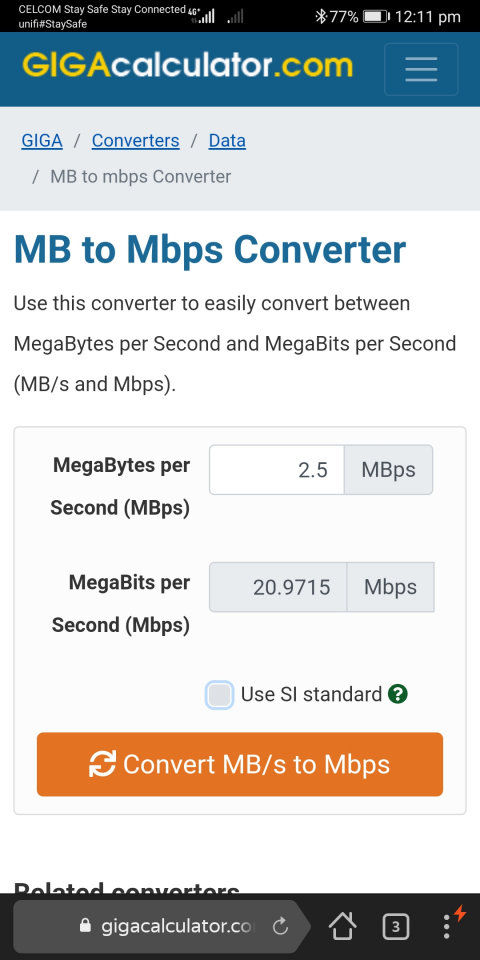
Yeah not sure about that. Been using for 6month now, whenever im downloading apps or something from gdrive, max speed i can get is 2.5MB/s. That's full signal coverage 4G+

Official TM Unifi Mobile Fans Club & Enquiries V8, #khabar baik
|
|
 Jul 16 2020, 12:12 PM Jul 16 2020, 12:12 PM
|
 
All Stars
17,220 posts Joined: Dec 2015  
|
QUOTE(templar1996 @ Jul 16 2020, 12:02 PM) Yeah not sure about that. Been using for 6month now, whenever im downloading apps or something from gdrive, max speed i can get is 2.5MB/s. That's full signal coverage 4G+ templar1996 liked this post
|
|
|
|
|
|
Jul 16 2020, 01:42 PM
|

Newbie
24 posts Joined: Nov 2018
|
QUOTE(azhar75 @ Jul 16 2020, 12:12 PM) |
|
|
Jul 17 2020, 02:40 PM
Show posts by this member only | IPv6 | Post
#3603
|

Senior Member
1,437 posts Joined: Mar 2009 From: ME TO YOU 
|
Anyone on android 10? Can you access mobile@unifi(prepaid) app even before subscribing data?
|
|
|
Jul 17 2020, 02:41 PM
|

Senior Member
1,961 posts Joined: Jun 2010
|
Anyone try the sim with router?
I plug it into my TPlink router, couldn't detect signal. is that router configuration required? Thanks. |
|
|
Jul 17 2020, 03:05 PM
|
|
All Stars
17,220 posts Joined: Dec 2015
|
QUOTE(UnknownH @ Jul 17 2020, 02:40 PM) Anyone on android 10? Can you access mobile@unifi(prepaid) app even before subscribing data? No issue on me-owww's Who-R-We Mate 10 Pro's A10...If you can't proceed, try uninstall and re-install... |
|
|
Jul 17 2020, 04:37 PM
|

Senior Member
2,780 posts Joined: May 2008
|
QUOTE(UnknownH @ Jul 17 2020, 02:40 PM) Anyone on android 10? Can you access mobile@unifi(prepaid) app even before subscribing data? u need working data before opening the app |
|
|
|
|
|
Jul 17 2020, 07:02 PM
|
|
Junior Member
99 posts Joined: Sep 2017
|
How to know the 4G/LTE coverage of certain area?
I know my phone is old and can only connect to band 38 and band 40 but sometimes it can use 4G/LTE data. I want to know that it is my phone's fault or the coverage. |
|
|
Jul 17 2020, 07:19 PM
|
|
All Stars
17,220 posts Joined: Dec 2015
|
QUOTE(duhduh1234 @ Jul 17 2020, 07:02 PM) How to know the 4G/LTE coverage of certain area? Band 5 is the main spectrum ... Band 38/40 are just "bonus"... I know my phone is old and can only connect to band 38 and band 40 but sometimes it can use 4G/LTE data. I want to know that it is my phone's fault or the coverage. Band 5 coverage is at (ensure to toggle-off the "3G" checkbox): https://unifi.com.my/unifi-en/personal/home...d-coverage.page Band 38/40 coverage is based on "luck"...LOL... If the smartphone shows LTE+ or 4G+ on the signal status, it is connecting to Band 38/40... |
|
|
Jul 17 2020, 07:26 PM
Show posts by this member only | IPv6 | Post
#3609
|

Senior Member
1,132 posts Joined: Jun 2011 From: Perak.
|
QUOTE(alandhw @ Jul 17 2020, 03:41 PM) Anyone try the sim with router? Which model of TPlink router do you use? Please check if the model supports 4G LTE band 5, 38, or 40?I plug it into my TPlink router, couldn't detect signal. is that router configuration required? Thanks. If the router supports the bands, it’ll work just plug n play. BTW, Unifi Mobile postpaid is not recommended to be use in router cause it has limited hotspot quotas. |
|
|
Jul 17 2020, 07:42 PM
|
|
Junior Member
99 posts Joined: Sep 2017
|
QUOTE(azhar75 @ Jul 17 2020, 07:19 PM) Band 5 is the main spectrum ... Band 38/40 are just "bonus"... My phone cannot band 5. Band 5 coverage is at (ensure to toggle-off the "3G" checkbox): https://unifi.com.my/unifi-en/personal/home...d-coverage.page Band 38/40 coverage is based on "luck"...LOL... If the smartphone shows LTE+ or 4G+ on the signal status, it is connecting to Band 38/40... Thanks for the clarification. Now i know it's my phone fault. |
|
|
Jul 17 2020, 08:50 PM
Show posts by this member only | IPv6 | Post
#3611
|
|
All Stars
17,220 posts Joined: Dec 2015
|
QUOTE(duhduh1234 @ Jul 17 2020, 07:42 PM) My phone cannot band 5. If the smartphone doesn't have Band 5, it will still connect to the cell tower(s) but on H+/3G spectrum (under Axiata license)...Thanks for the clarification. Now i know it's my phone fault. |
|
|
Jul 17 2020, 09:17 PM
Show posts by this member only | IPv6 | Post
#3612
|
|
Senior Member
1,437 posts Joined: Mar 2009 From: ME TO YOU
|
QUOTE(azhar75 @ Jul 17 2020, 03:05 PM) No issue on me-owww's Who-R-We Mate 10 Pro's A10... I'm on custom ROM. Guess issue with the ROM.If you can't proceed, try uninstall and re-install... QUOTE(JLA @ Jul 17 2020, 04:37 PM) u need working data before opening the app That sounds inconvenient. Telco app manages our line(subscription, how many GB/min/sms left). Surely they(should) whitelist the app for the data regardless. |
|
|
Jul 21 2020, 11:12 AM
|
|
Senior Member
1,961 posts Joined: Jun 2010
|
QUOTE(ckimsem @ Jul 17 2020, 07:26 PM) Which model of TPlink router do you use? Please check if the model supports 4G LTE band 5, 38, or 40? Tplink mr6400. how to check the router supported band?If the router supports the bands, it’ll work just plug n play. BTW, Unifi Mobile postpaid is not recommended to be use in router cause it has limited hotspot quotas. I tried with unifi mobile prepaid. |
|
|
|
|
|
Jul 21 2020, 11:27 AM
|

Senior Member
1,739 posts Joined: Dec 2006
|
QUOTE(azhar75 @ Jul 17 2020, 07:19 PM) Band 5 is the main spectrum ... Band 38/40 are just "bonus"... only band 40 is 4g+Band 5 coverage is at (ensure to toggle-off the "3G" checkbox): https://unifi.com.my/unifi-en/personal/home...d-coverage.page Band 38/40 coverage is based on "luck"...LOL... If the smartphone shows LTE+ or 4G+ on the signal status, it is connecting to Band 38/40... band 38 or 5 is 4G only |
|
|
Jul 21 2020, 11:44 AM
|
|
All Stars
17,220 posts Joined: Dec 2015
|
QUOTE(yujin86 @ Jul 21 2020, 11:27 AM) only band 40 is 4g+ Then some1 from UF needs to poke their Webmaster to update this page...band 38 or 5 is 4G only 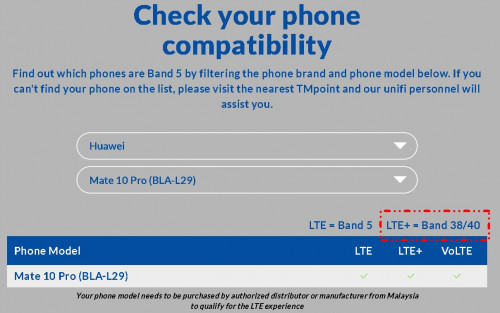 |
|
|
Jul 21 2020, 12:36 PM
|
|
Senior Member
1,739 posts Joined: Dec 2006
|
QUOTE(azhar75 @ Jul 21 2020, 11:44 AM) Then some1 from UF needs to poke their Webmaster to update this page... yes pls  so far i only seem 4G band 38 with 20 mhz and 4G+ Band40 20mhz+ Band40 10mhz and lastly for coverage purpose 4G Band 5 5mhz i do notice sometime connected to celcom 4G Band 7 20 mhz or 4G Band 3 15mhz/20mhz |
|
|
Jul 21 2020, 04:43 PM
Show posts by this member only | IPv6 | Post
#3617
|
|
Senior Member
1,132 posts Joined: Jun 2011 From: Perak.
|
QUOTE(alandhw @ Jul 21 2020, 12:12 PM) Tplink mr6400. how to check the router supported band? TP Link mr6400 is a 4G only capable router, and it depends on which version you're using. Only APAC V3 version has support for 4G LTE band 5, there's a high chance that your model doesn't support 4G LTE band 5, and neither your location has 4G LTE band 38 nor 40. So, you might need to look for other routers.I tried with unifi mobile prepaid. Network Type (V2) 4G: FDD-LTE B1/B3/B7/B8/B20 (2100/1800/2600/900/800MHz) TDD-LTE B38/B39/B40/B41 (2600/1900/2300/2500MHz) 3G: DC-HSPA+/HSPA+/HSPA/UMTS B1/B8 (2100/900MHz) 2G: EDGE/GPRS/GSM Quad Band (850/900/1800/1900MHz) Network Type (V3) 4G: FDD-LTE B1/B3/B7/B8/B20 (2100/1800/2600/900/800MHz) TDD-LTE B38/B39/B40/B41 (2600/1900/2300/2500MHz) 3G: DC-HSPA+/HSPA+/HSPA/UMTS B1/B8 (2100/900MHz) Network Type (APAC V3) 4G: FDD-LTE B1/B3/B5/B7/B8/B20/B28 (2100/1800/850/2600/900/800/700MHz) TDD-LTE B38/B39/B40/B41 (2600/1900/2300/2500MHz) 3G: DC-HSPA+/HSPA+/HSPA/UMTS B1/B5/B8 (2100/850/900MHz) You may check it yourself at https://www.tp-link.com/my/home-networking/...#specifications This post has been edited by ckimsem: Jul 21 2020, 04:46 PM |
|
|
Jul 21 2020, 04:58 PM
|
|
Senior Member
1,961 posts Joined: Jun 2010
|
QUOTE(ckimsem @ Jul 21 2020, 04:43 PM) TP Link mr6400 is a 4G only capable router, and it depends on which version you're using. Only APAC V3 version has support for 4G LTE band 5, there's a high chance that your model doesn't support 4G LTE band 5, and neither your location has 4G LTE band 38 nor 40. So, you might need to look for other routers. Band 5 is 850MHz and specialize for mobile phone use?Network Type (V2) 4G: FDD-LTE B1/B3/B7/B8/B20 (2100/1800/2600/900/800MHz) TDD-LTE B38/B39/B40/B41 (2600/1900/2300/2500MHz) 3G: DC-HSPA+/HSPA+/HSPA/UMTS B1/B8 (2100/900MHz) 2G: EDGE/GPRS/GSM Quad Band (850/900/1800/1900MHz) Network Type (V3) 4G: FDD-LTE B1/B3/B7/B8/B20 (2100/1800/2600/900/800MHz) TDD-LTE B38/B39/B40/B41 (2600/1900/2300/2500MHz) 3G: DC-HSPA+/HSPA+/HSPA/UMTS B1/B8 (2100/900MHz) Network Type (APAC V3) 4G: FDD-LTE B1/B3/B5/B7/B8/B20/B28 (2100/1800/850/2600/900/800/700MHz) TDD-LTE B38/B39/B40/B41 (2600/1900/2300/2500MHz) 3G: DC-HSPA+/HSPA+/HSPA/UMTS B1/B5/B8 (2100/850/900MHz) You may check it yourself at https://www.tp-link.com/my/home-networking/...#specifications |
|
|
Jul 21 2020, 09:34 PM
Show posts by this member only | IPv6 | Post
#3619
|
|
Senior Member
1,132 posts Joined: Jun 2011 From: Perak.
|
QUOTE(alandhw @ Jul 21 2020, 05:58 PM) Band 5 is 850MHz and specialize for mobile phone use? I don’t know how to explain. You may google yourself. |
|
|
Jul 22 2020, 12:38 AM
|

Senior Member
1,448 posts Joined: Apr 2007
|
wtf, this morning reload, only 900mb. where's the 1 gb LTE.
|
| Change to: |  0.0209sec 0.0209sec
 0.74 0.74
 6 queries 6 queries
 GZIP Disabled GZIP Disabled
Time is now: 10th December 2025 - 01:55 AM |
 Quote
Quote