Welcome Guest ( Log In | Register )

5 Pages « < 2 3 4 5 >Bottom

Outline · [ Standard ] · Linear+

 ILLEGEAR Selenite Discussion Thread V1, world’s first 17.3” bezel-less laptop

views
     
Prince J
post Jun 6 2020, 01:26 PM

Regular
******
Senior Member
1,272 posts

Joined: May 2010
From: Team ILLEGEAR


QUOTE(Ralph Yap @ Jun 6 2020, 07:34 AM)
Hi guys, facing some problems right here. Was playing GTA online yesterday, then powered off after 2 hours of usage. Soon after that, just remember have to email smth, then i powered my selenite on again. However, my laptop screen started flashing like crazy non-stop. it only resolved when i reduced my screen brightness to minimum. The flashing worsen with increasing brightness. When it is not plugged in, it will flash even with minimum screen brightness. What's the problem guys? Pls help, thanksss cry.gif  cry.gif
P.S. had only been using my laptop for a little more than 1 year
*
Hi Ralph, can you pm me your serial number? Will create a service ticket for you.
Prince J
post Jun 9 2020, 01:43 AM

Regular
******
Senior Member
1,272 posts

Joined: May 2010
From: Team ILLEGEAR


QUOTE(amir.asyraf @ Jun 8 2020, 09:25 PM)
My Selenite (i7-9750H RTX 2060) has been completely freezing up lately. Usually happens when watching videos. Doesn't matter on Youtube or local files (VLC, MPC, PotPlayer etc). It's really random and has been happening noticeably often now. Sometimes I'm able to watch a movie from start to end, sometimes it would freeze 15 minutes in.

By freeze I mean completely and fully unresponsive and unrecoverable, locked up. Completely unresponsive to any keys or mouse actions. Even if I leave it for an hour it would still be frozen. The only thing I could is force shutdown by holding the power button for 5 seconds. It's really frustrating. I've already had several data loss because of this.

Anyone have any idea? I've never had it locked up while playing games. Right now I'm thinking it's either the RAM or SSD, or maybe even the secondary SSHD.
*
Hi there, can you send in your laptop for us to take a look? Will assist.

QUOTE(jason111785 @ Jun 9 2020, 01:09 AM)
@Illegear Team, may I know on the Selenite Pro

1) HDMI 2.0 port is a 2.0b or just 2.0
2) Thunderbolt port capable of doing display port 1.4?

I am asking as I am getting a 165hz monitor and it only support 165hz  over DP 1.4 on 1440p.
*
HDMI 2.0 with HDCP 2.2

Yes can support Displayport 1.4.
Prince J
post Jun 16 2020, 02:23 PM

Regular
******
Senior Member
1,272 posts

Joined: May 2010
From: Team ILLEGEAR


QUOTE(static_365 @ Jun 16 2020, 10:24 AM)
Hi everyone,

Good Morning, after 3 week of waiting finally Selenite G RTX 2070 Super with I7 10th Gen arrived yesterday!

First thing I did is try to play the game I like which is Command and Conquer Tiberium War, a 2007 game on Steam and the FPS i get is only 31 MAX. The laptop is plugged in. Sometimes will drop to 20 and 10 and the game will become lagging.

I do not expect this kind of issue on 2070 Super, can anyone teach me what should I do and why is this happening? I have tweak all the setting to performance and in Nvidia Control panel I choose to use RTX 2070 GPU instead of Intel® UHD Graphic. I have disable Whisper mode.

Before I tweak it, game is running on Intel® UHD and the game is so lagging.
[attachmentid=10517170]

Anyone with Selenite G have similiar issue?
*
Hi static_365

Can i know your Nvidia driver version?

May i also double confirm your BIOS and EC versions in the BIOS? You may press F2 upon boot up and screenshot to me.

This post has been edited by Prince J: Jun 16 2020, 02:34 PM
Prince J
post Jun 16 2020, 07:07 PM

Regular
******
Senior Member
1,272 posts

Joined: May 2010
From: Team ILLEGEAR


QUOTE(tiggywombat @ Jun 16 2020, 05:35 PM)
Your motherboard chipset is faulty. It's a common problem on all 8th gen Selenite, sooner or later will have this problem.

Need to send for replacement motherboard with 9th gen i7 CPU, otherwise it will only fail again.
*
Hi tiggywombat,

The chipset issue only affects a certain batch of 8th gen Selenite, and after we sent back to Tongfang for rework the problem is solved permanently. (So far there are only 2pcs of SELENITE 8th gen we swap motherboard with existing buffer motherboard and problems re-occurs again)

We did, however, offer motherboard upgrade to 9th gen SELENITE to reduce the RMA turnaround time for some urgent customers.

Hope clarify.

Prince J
post Jun 16 2020, 07:08 PM

Regular
******
Senior Member
1,272 posts

Joined: May 2010
From: Team ILLEGEAR


QUOTE(alexnvidia @ Jun 16 2020, 12:43 PM)
They have some major performance issue with selenite G now. you are not the first to experience fps tanked and game stuttering. refer to the previous page. there's another victim with the exact same issue as you.

also, their rtx 2070 super performs well below what it should be for 115W max P. if you paid extra for RTX 2070 super, you will be in for a nasty surprise. long story short, expect same performance as a regular rtx 2070 or lower.

people should hold off buying this laptop until they figure out what's going on. and not sure if this issue is also present on selenite pro series.
*
We are aware of this and am working with Tongfang FAE for BIOS/EC as well as driver updates.

Will notify when there is any update.
Prince J
post Jun 17 2020, 01:02 AM

Regular
******
Senior Member
1,272 posts

Joined: May 2010
From: Team ILLEGEAR


QUOTE(Shadowhunt94 @ Jun 16 2020, 10:32 PM)
Updates on my problematic SSHD:

After contacting with Illegear tech support, they advised me to uninstall the Intel® Rapid Storage Technology software due to some power management thingy. Unresponsive could be due to power saving or sshd caching tech.
In the mean time, i've performed some settings from online source, one of them is this:

AHCI Link Power Management

For the past few days, i noticed my SSHD seem working like normal, although i've spent not much time with it due to work. Its active time doesn't maintain at 100% like old times anymore, could be the reason i stated at the second sentence.
Also, they requested me to try re-installing few drivers, but before doing so i already notice the sshd's behavior, so i'll just keep stressing and monitor its condition first.
Glad that it could be not the laptop's issue, otherwise i really need to send it back and no more gaming for a while.  wacko.gif  sweat.gif

Hope that TongFang FAE there has the solution for the affected gaming performance fast, hoping it was software fault rather than thermal pad/contacting issue. I'm kinda lazy to replace it myself or sending it back to Illegear then.  grin.gif  lol.gif

By the way, do Illegear mind to share how many Selenite G new users during this MCO period? You guys may need to proactively inform them about potential issues so that they won't blindly complaining without seeing this thread. As i myself a tech support also, after sales support quality is a crucial factor to determine your future sales.  cool2.gif
*
We are sending the BIOS update guide to all the affected RAVEN SE-R / 2060 80w users since last week. As for SELENITE G BIOS, the FAE is still studying, I will post here if there is any update from them.

In our experience, the first batch of new products usually would suffer from buggy BIOS and it requires a few patches to become more stable. However, SELENITE (TF ID-S) and RAVEN SE-R (TF ID-0V) are mature IDs and they shouldn't have buggy BIOS, I guess it's related to the recent pandemic because TF shipped our first batch of goods in early of April. Glad that they can still work with us to resolve the BIOS issue in few days time.
Prince J
post Jun 19 2020, 02:16 PM

Regular
******
Senior Member
1,272 posts

Joined: May 2010
From: Team ILLEGEAR


QUOTE(Shadowhunt94 @ Jun 7 2020, 05:13 PM)
Hi alexnvidia, for the gpu-z usage i manage to get the issue happen (stuttering)  sweat.gif

user posted image

The PerCap there states besides Pwr, there's Thrm also, could be the one you're mentioning? Just need to make sure the thermal pads have a good contact on ICs besides the cpu and gpu?
*
Tongfang FAE has taken a look of your GPU-Z pink area and here's their response:

"We checked RTX 2070 Super & 2060, they all showed 300MHZ in GPUZ.The GPU is in the power-saving P8 state and the corresponding frequency is at the lowest 300MHZ under Idle State, this is control by NVIDIA."

"Yes, 300MHZ is normal."

This post has been edited by Prince J: Jun 19 2020, 02:19 PM
Prince J
post Jun 19 2020, 02:47 PM

Regular
******
Senior Member
1,272 posts

Joined: May 2010
From: Team ILLEGEAR


QUOTE(tidus88 @ Jun 19 2020, 10:54 AM)
I'm using i7 9750 + rtx 2060 selenite and I found that sometimes my Dota 2 is 120 FPS and sometimes 90 FPS with same setting, randomly. (it's like if I start the game at 90 FPS, it's gonna be 90 FPS most of the time; if I'm lucky to get 120 FPS, it's gonna stay 120 FPS). My temperature stay 80c to 90c. Gaming mode. Tried undervolt with throttlestop, no luck.

What issue I'm having?
*
That's related to in-game settings, our technician is able to assist you to adjust the settings. You may whatsapp us at 0182618599.
Prince J
post Jun 19 2020, 04:28 PM

Regular
******
Senior Member
1,272 posts

Joined: May 2010
From: Team ILLEGEAR


QUOTE(alexnvidia @ Jun 19 2020, 03:10 PM)
seriously?.... sweat.gif halfway gaming and the the entire game stutter and crawl to a halt is normal?.... doh.gif

Did you ask them about their 2070 super 115W performing the same as regular 2070 115W? did they say this is normal too?
*
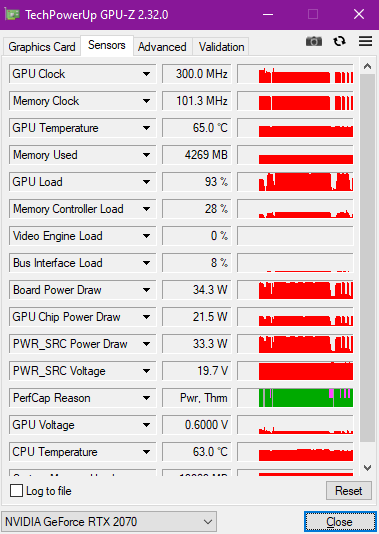
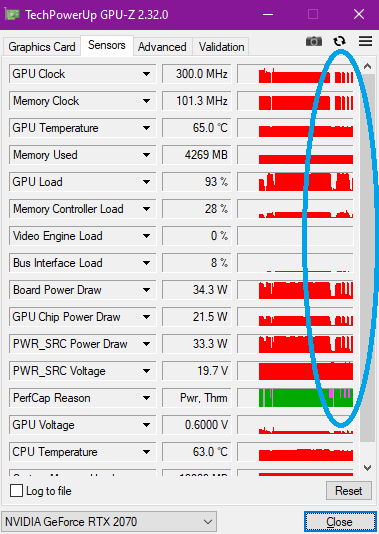
If you are talking about the sudden drop to 300MHz in previous post, we will need to check in what circumstances the MHz dropped to 300MHz and what game did the user play.

user posted image

If this happens during in-game loading screen and it's pretty normal. Alt+Tab out from game will also cause the clock dropped to 300MHz because technically you are not running your GPU under these circumstances.

I will screenshot our test result of both GPU-Z and Firestrike later.

This post has been edited by Prince J: Jun 19 2020, 04:35 PM
Prince J
post Jun 19 2020, 05:06 PM

Regular
******
Senior Member
1,272 posts

Joined: May 2010
From: Team ILLEGEAR


QUOTE(alexnvidia @ Jun 17 2020, 11:19 AM)
Hi Prince, you seemed active in this forum and willing to work with consumers and even provide us with insight to what you are doing with tong fang to provide better customer support experience. I hope you can study this post because i've tried going through your whatsapp sales channel and support channel and got empty results.

Just to be clear, there are two issues with your selenite series now. i'm not sure about selenite pro, but selenite G is definitely problematic. I will list the two main issues here so everyone especially illegear support can be crystal clear about it.

1. During gaming, the laptop will randomly start to stutter. This issue can be seen clearly using GPUZ, when you take a look at the frequency graph of the GPU, when the game stutters, the GPU frequency will drop to a very low state, then it will go back up and drop all the way down repeatedly. this effect can be felt in game as stuttering. this cycle will repeat itself and it happens randomly. two owners have already come forward to complain about this exact same issue and i'm sure there are more victims out there.

2. For those paying RM1399 to upgrade to RTX 2070 Super, you should run fire strike test and take a closer look at the graphics score. Dont look at the overall score, look at just the graphics score because that excludes the CPU score. The graphics score for illegear selenite G rtx 2070 super max P is about 20k. For those keeping track, 20k is the baseline score for regular RTX 2070 max P running at 115W.

For RTX 2070 SUPER Max P 115W, the baseline graphics score should be 22k. Anything lower is considered lackluster, meaning either there's thermal throttling/overheating, power delivery VRM cannot supply enough power, or there is something causing it to run much lower than expected (buggy vbios or something), or even max Q.

I have a 9th gen selenite with rtx 2070 115W max P and the baseline fire strike graphics score is about 20k, in line with what your salesperson showed me prior to buying this laptop. The selenite G with a higher priced rtx 2070 SUPER however, delivered the same 20k graphics score in fire strike and according to illegear team, this is completely normal??? shakehead.gif  rclxub.gif  sweat.gif

This is basically telling consumers to pay a lot more for the exact same or lower performance compared to previous gen selenite with a lower grade GPU. does this sound right to you guys?  mega_shok.gif Let me stress this again. we are talking about RTX 2070 SUPER MAX P 115W, not max q, not regular rtx 2070 max p.
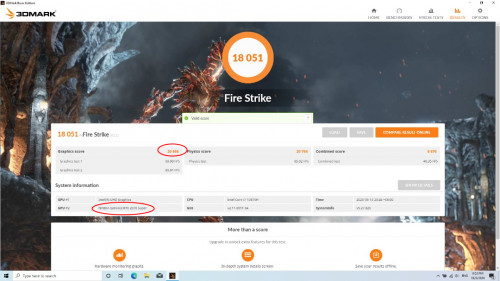
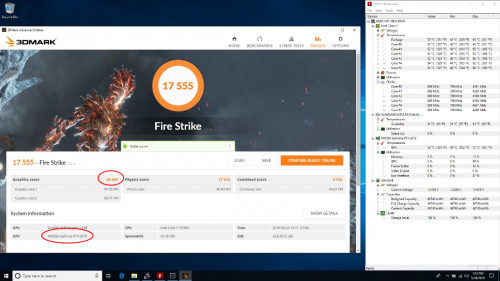
user posted image
user posted image

If you take a look at the youtube video links i posted below, other brands with the same tong fang chasis as your selenite pro performed way better with their rtx 2070 super max P. In fact, their elektroboost beast mode (same as your gpu boost) is working sooo well it allows their laptop to pull more than 115W power to provide extra 10-15% boost in performance compared to their baseline rtx 2070 super! This is the kind of performance illegear selenite series should be delivering to WOW customers.

References for you guys to look at
https://www.youtube.com/watch?v=wXrPUgWlVoA

https://www.youtube.com/watch?v=tPP1XXIn1w0&t=139s

https://www.youtube.com/watch?v=XYrItQZJpXc&t=573s

https://www.notebookcheck.net/Exclusive-fir...Q.459731.0.html

Please investigate this with your tong fang FAE and hopefully you can get back to us with some good results.
*
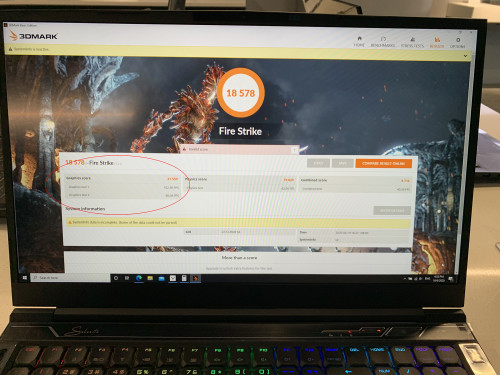
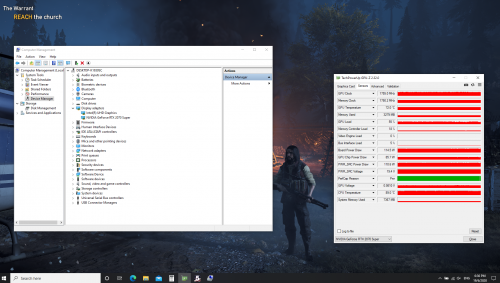
We have just run a firestrike test on our SELENITE G demo with 2070 Super and i got 21559 in graphics score.

user posted image

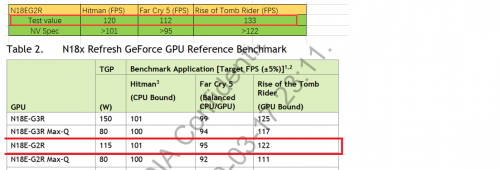
Below is the documentation of SELENITE G's 2070 Super out-performing the official benchmark score from Nvidia.

user posted image

In regards to your claim that the SELENITE G having stuttering issue, please refer to my comment above, and we will provide you the screenshot of the GPU-Z on our demo later.

Prince J
post Jun 19 2020, 07:21 PM

Regular
******
Senior Member
1,272 posts

Joined: May 2010
From: Team ILLEGEAR


QUOTE(Prince J @ Jun 19 2020, 05:06 PM)
We have just run a firestrike test on our SELENITE G demo with 2070 Super and i got 21559 in graphics score.

user posted image

Below is the documentation of SELENITE G's 2070 Super out-performing the official benchmark score from Nvidia.

user posted image

In regards to your claim that the SELENITE G having stuttering issue, please refer to my comment above, and we will provide you the screenshot of the GPU-Z on our demo later.
*
QUOTE(alexnvidia @ Jun 19 2020, 06:15 PM)
21.5k is much more acceptable, at least it's closer to 22k now even though it did not reach there. Please note that the RTX 2070 Super 115W Max P firestrike screenshot i posted earlier was give by YOUR side, i only highlighted it and posted it here because i tried checking it with your sales and support team and they feedback to me that 20k is normal which is totally unacceptable given how good reputation tong fang chasis perform. Maybe you need to have a good talk with your sales and service team about this.

Also, can i check with you, is your selenite G capable of gpu boost like i showed you in the youtube videos? the same tong fang chasis from eluktronics with their elektroboost (same as your gpu boost) is able to take advantage of gpu boost and increase GPU power to nearly 150W for a 15% performance improvement. does your selenite G do that?

also, with regards to the in game stuttering, i did not make this claim, rather TWO actual real owners of your selenite G posted here asking for help because during gaming they experienced stuttering. the GPUz shot was provided by them showing GPU frequency dropped to 300MHz during gaming, not loading. please refer to their posts.

EDIT: is your screenshot selenite using rtx 2070 super? cause it's not shown there.
*
Please refer to our SELENTE G RTX2070 Super's GPU-Z result in Farcry 5, there is no stuttering, lagging nor any issue. FYI We didn't tab-out in the recording process.

user posted image

As mentioned previously, boosting above 115W increases the risk of damaging GPU MOS.

This post has been edited by Prince J: Jun 19 2020, 07:22 PM
Prince J
post Jun 20 2020, 11:17 PM

Regular
******
Senior Member
1,272 posts

Joined: May 2010
From: Team ILLEGEAR


QUOTE(sengf @ Jun 20 2020, 01:37 PM)
website dont have this software , only driver
*
Soundblaster Cinema software needs to be downloaded from Microsoft Store. Kindly pm our tech support 0182618599 and we will guide you through.

QUOTE(Shadowhunt94 @ Jun 20 2020, 05:10 PM)
Due to i seldom gaming recently, so i couldn't replicate the issue frequently. Perhaps i really need to record myself in a video playing games until the issue happens to prove i'm not making this up after seeing Illegear's reply?  rolleyes.gif  smile.gif As first sentence stated, the issue still not resolved due the less interaction with the laptop.
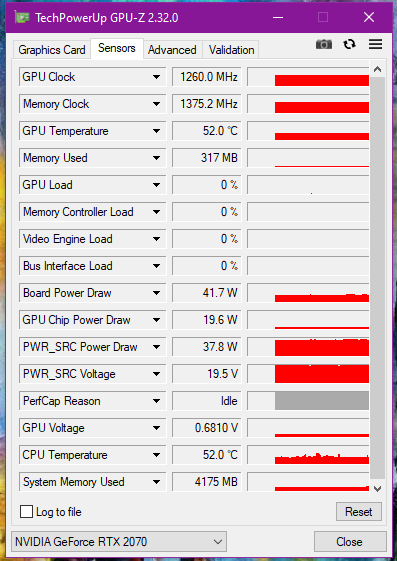
FYI, for the pink part at GPU-Z Per. Cap based on the image i uploaded above, the status there already states capped due to Thermal besides power. For a gpu in idling mode, the color of the graph is in gray instead of pink, just like the image below when the gpu is really in idle.

user posted image

Found a simple explanation of the perf cap reason Perf Cap Reason

One more thing, that time when the issue happening again is when i put gpu-z in background, play the game until the first stuttering came out, then i only tab out to capture gpuz info and show you guys about the  Pwr Thrm issue, so the sudden drop at all clocks speed has NOTHING to do with gpu idling since the game is still running in background. As you can see my image above, even i'm not playing games/idling the gpu & memory clock speed won't drop to 300MHz at all. Hope clarify.

I've set 2070 as my main display in Bios instead of MsHybrid, please let me know if you guys can verify this is the culprit of all the issues, shall you can prove with your demo unit.

I will continue to play games until the issue arise again, and record down the power usage also to see if it's the software issue leading to inconsistent power delivery, OR worst case it's really because of overheating of IC components surrounding the GPU itself due to bad heat dissipation of insufficient contact with thermal pads.
*
Can I have your BIOS, EC and Nvidia driver versions? You may press F2 to enter into BIOS and inform us the versions

Our office SELENITE G demo doesn't have any stuttering, let me see if your BIOS / EC is the same as our demo?

This post has been edited by Prince J: Jun 20 2020, 11:30 PM
Prince J
post Jun 21 2020, 01:17 PM

Regular
******
Senior Member
1,272 posts

Joined: May 2010
From: Team ILLEGEAR


QUOTE(sengf @ Jun 21 2020, 12:11 AM)
Dont have this software in windows store, i already contact your tech support but their just said not free, ask me to wait, i already waiting whiole day also no reply me, very bad service
*
Yesterday was weekend (Saturday) and we only had one staff serving walk in RMA. May i have your phone number so I can follow up for you tomorrow when the team has back to work?

This post has been edited by Prince J: Jun 21 2020, 01:19 PM
Prince J
post Jun 21 2020, 01:36 PM

Regular
******
Senior Member
1,272 posts

Joined: May 2010
From: Team ILLEGEAR


QUOTE(alexnvidia @ Jun 19 2020, 07:38 PM)
then this stuttering issue is considered isolated cases for those two selenite G owners? or it's a batch issue? i have no reason to believe they are making this up. and the probability of two different owners facing the same issue is very slim unless that batch of selenite G is problematic? have your support side resolved their gaming stuttering issue?

based on the youtube reviewer BOB of all trades, eluktronics work closely with tong fang to allow their RTX 2070 super to boost above 115W without any damage. he explicitly said it is PERFECTLY safe and their laptop is DESIGNED around this power envelope. obviously eluktronics dont do any design or manufacturing, it is all done by tong fang and if tong fang allows this, it means they have designed the GPU VRM to withstand the added power boost. maybe you can check with tong fang about this? being able to perform higher than standard rtx 2070 super can be a huge selling point for you guys too, just like how you guys advertise your rtx 2060 to being able to boost above nvidia spec 80W.
*
So far we only had one complain on the stuttering issue from forumer shadowhunt94. Static_365 issue is another FPS drop in game issue which is related to driver/game settings.
As per our test using our showroom SELENITE G demo and stock there is no stuttering / lag shown.

For the stuttering, it could be related to BIOS/EC version, driver, gameplay, background software or the hardware itself, it would be very helpful if we can receive the units back from shadowhunt94 to determine the root cause of the issue.

All tongfang OEM are having the same version of BIOS. As for the boosting above 115W on RTX2060, RTX2070, RTX2070 Super, ODM / Nvidia have made clear statement that boosting above 115W increases the chance of failing the GPU power MOS, we have the responsibility to inform you regarding this in the first place.

Perhaps you should consider buying your SELENITE G (ID-S) from Eluktronics rather than from Illegear? We do not have a service center in Brunei (you complained a few times in this thread that you need to ship the part to our KL center for RMA) so that makes no difference for you to buy from Eluktronics because you are going to import anyway. They also can provide you the guarantee of boosting above 115W, I believe they have the warranty in place if you failed the GPU.

This post has been edited by Prince J: Jun 21 2020, 01:41 PM
Prince J
post Jun 21 2020, 03:07 PM

Regular
******
Senior Member
1,272 posts

Joined: May 2010
From: Team ILLEGEAR


QUOTE(Shadowhunt94 @ Jun 21 2020, 02:35 PM)
I thought i have PMed you the info from bios? For Nvidia driver is the stock when the product came in, v442.53 DCH version.

I come across FB where there's a guy from your side telling me that you guys can deliver the thermal pads to me? Or shall i contact tech for more information?

Personally really hope that the issue is due to thermal pad insufficient contact la, would like to try this method first before sending back for your side to diagnose as i know a bit bout laptop servicing too. Because the game stuttering could happen anytime in any games i've tried, basically it's like betting your luck to witness the issue, so even i send it back to your company it might be no luck for you guys to see the miracle  sweat.gif

So far i have met stuttering in GTA V, Shadow of the Tomb Raider, and Borderlands 3. Have yet to play more games to monitor. My CPU & GPU temps averagely no more than 80c no matter what ambient temp it is.

Yesterday night i also benchmarked my rig for around an hour using Tomb Raider, and no luck to see the stuttering. Have to spend time to research how to make it happen.

I will update here again if i have any findings, appreciate for your side to have prompt respond since tech side might be too busy to serve me sometimes.  whistling.gif
*
We need the unit back to do multiple tests on the hardware, BIOS /EC and gameplay to identify the root cause so we can fix the issue effectively.

P/S: Found your BIOS / EC version in the pm, i mislooked it.
Prince J
post Jun 22 2020, 07:27 PM

Regular
******
Senior Member
1,272 posts

Joined: May 2010
From: Team ILLEGEAR


QUOTE(Shadowhunt94 @ Jun 21 2020, 02:35 PM)
I thought i have PMed you the info from bios? For Nvidia driver is the stock when the product came in, v442.53 DCH version.

I come across FB where there's a guy from your side telling me that you guys can deliver the thermal pads to me? Or shall i contact tech for more information?

Personally really hope that the issue is due to thermal pad insufficient contact la, would like to try this method first before sending back for your side to diagnose as i know a bit bout laptop servicing too. Because the game stuttering could happen anytime in any games i've tried, basically it's like betting your luck to witness the issue, so even i send it back to your company it might be no luck for you guys to see the miracle  sweat.gif

So far i have met stuttering in GTA V, Shadow of the Tomb Raider, and Borderlands 3. Have yet to play more games to monitor. My CPU & GPU temps averagely no more than 80c no matter what ambient temp it is.

Yesterday night i also benchmarked my rig for around an hour using Tomb Raider, and no luck to see the stuttering. Have to spend time to research how to make it happen.

I will update here again if i have any findings, appreciate for your side to have prompt respond since tech side might be too busy to serve me sometimes.  whistling.gif
*
Please flash the latest EC and BIOS from below link
https://support.illegear.com/Drivers/Laptop...2_FlashUtil.zip

Do note that during the flashing process be sure you are not working on anything. MAKE SURE YOU ARE PLUGGED IN WITH CHARGER source.
Open the F.bat in the Afuwin64 folder to process flashing the Bios and it will restart and enter bios few times.
After successfully flashed and entered into desktop, open the F.bat in the Afuwin64cap folder to proceed flashing and updating the EC.
Do note that during the flashing process the laptop will reboot few times, be sure to plug in the charger during the flashing process.

10th Gen. Command Center Update (Except IONIC and ARES)
https://support.illegear.com/Drivers/Laptop...32_ILLEGEAR.zip
Prince J
post Jun 23 2020, 06:30 PM

Regular
******
Senior Member
1,272 posts

Joined: May 2010
From: Team ILLEGEAR


QUOTE(alexnvidia @ Jun 21 2020, 06:09 PM)
I dont think eluktronics is able to write their own firmware to make them special. Just like illegear, everything from them is provided by tong fang. However, (this is just a speculation) i believe there might be two variants of the same ID-S motherboard from tong fang. one that is just designed to run a regular 115W GPU, and another that can boost past 115W. This is true in the previous models where for the same tong fang chasis from different companies, some companies offer GPU boost for rtx 2060 and some dont even though it is the exact same chasis ID-S. it does not matter if you on or off the gpu boost button, as long as you hardware ID-S do not allow for this, you will not get GPU boost. and this is not something that can be enabled by simply flashing the firmware. the hardware needs to be designed to take the extra power load. as a tong fang reseller, i'm sure you know more about this than me.

GPU boost from Eluktronics is done by pressing the GPU boost button (they call it elektroboost) next to the power button. To boost above 115W for their 2070 Super GPU, Tong fang will need to allow this to happen, meaning tong fang is the one who designed it to boost that high with the necessary power delivery VRM and firmware to do so. It is totally impossible for any selenite ID-S to boost past 115W as stated very clearly in the video unless tong fang allows it, so there is no risk of damage. Since you are so sure all tong fang OEM have the same BIOS, then your selenite G should be capable of boosting above 115W too without compromising the power delivery circuit.

which is why i wanted you guys to test if your variant can boost past 115W by pressing on the GPU boost button. perhaps it will cost more to bring in the variant that can boost past 115W? or perhaps your Selenite ID-S is already capable of this and you marketing/technical team overlooked this unique feature? Either way, it would be great if you could test this out (a simple comparison using firestrike with GPU boost on and off will do) or find out from from tong fang if your ID-S is capable of gpu boost past 115W. Again, there is no risk no damage because if tong fand does not allow it, you will not get gpu boost no matter what you do.

I have considered buying from eluktronics. As you said, it makes no difference for me buying from illegear or eluktronics because i'm basically getting no good aftersales support for being an international buyer. However, US is a lot further away than Malaysia and it will be a lot more expensive to ship the laptop to Brunei. Also, i was hoping illegear can be different when it comes to dealing with international customers. Since you guys are No.1 in malaysia now, the next step worth looking into is expanding to international waters, at least the nearby countries.

I hope you do understand why i'm being extra careful, persistent and asking so many questions most average buyers wont even bother. If anything went wrong with my purchase, the aftersales support for hardware will be non existence unless i ship back the laptop which can be very costly.

The support and info you provided in this forum really do help a lot to regain buyer's confidence and i thank you for that.
*
Let me reiterate that Tongfang TDP for 2060 / 2070 / 2070 Super is 115W maximum, this has been re-confirmed by the FAE contact window as well as the RD head in Tongfang who is also the one approved the design of these models.

Should you wish to boost your laptop GPU TDP to above 115W, you may purchase the ID-S from Eluktronics directly.

This post has been edited by Prince J: Jun 23 2020, 06:39 PM
Prince J
post Jun 29 2020, 12:01 AM

Regular
******
Senior Member
1,272 posts

Joined: May 2010
From: Team ILLEGEAR


QUOTE(amir.asyraf @ Jun 28 2020, 12:20 AM)
Well after several weeks of testing with all kinds of games and benchmarks, I've never been able to go anywhere near 115 W, according to HWiNFO anyway. Max I've gotten was only 81.695 W.

Benchmarks I've run:
Firestrike (Max score 6751)
Time Spy (Max score 15670)
Heaven
Valley

Games I've played:
Battlefield V (Aimed for 60+ FPS)
GTA V (Maxed out)
Fortnite (Maxed out)
Anthem (Maxed out (I think))
Just Cause 4 (Maxed out)
Forza Horizon 4 (Maxed out)
Paladins (Maxed out)
Apex (Aimed for 60+ FPS)

Software:
TensorFlow

At least with the benchmarks and TensorFlow (which are mostly GPU-only intensive), the GPU temperature is only hovering at around 69-75 °C, so temperature isn't the problem and it could push further.

Of course, all of the above was on Turbo mode.
*
Hi amir, can i have your BIOS/EC versions?

QUOTE(SaiyanGoku @ Jun 28 2020, 11:06 PM)
Any BIOS, driver, etc update for 9th gen Selenite? Could you work with ODM to make defect free >90 Whr battery for it?
*
Latest bios for selenite 9th gen is

Bios N.1.54 and EC 2.09.09

Kindly check if you are on this version.
Prince J
post Jun 29 2020, 10:35 PM

Regular
******
Senior Member
1,272 posts

Joined: May 2010
From: Team ILLEGEAR


QUOTE(SaiyanGoku @ Jun 29 2020, 12:08 AM)
MsInfo32 says they are Bios N.1.53 and EC 2.07
*
If you wish, you may update to the latest version. Do note that there is risk of reflashing BIOS/EC.

QUOTE(amir.asyraf @ Jun 29 2020, 08:13 AM)
BIOS Version/Date: American Megatrends Inc. N.1.54, 24/6/2019
SMBIOS Version: 3.2
Embedded Controller Version: 2.09

Is that it?
*
Can we test your system physically?
Prince J
post Jul 1 2020, 12:30 PM

Regular
******
Senior Member
1,272 posts

Joined: May 2010
From: Team ILLEGEAR


QUOTE(amir.asyraf @ Jun 30 2020, 09:06 AM)
Yeah that's the problem. I have several serious problems with the laptop already and really want to bring it in, but this is my main/daily driver. I can't go a day without it.

Unless of course you have an loaner unit that I can work with while you fix my laptop.
*
I will let you know when we have the loan unit ready.

QUOTE(clivengu @ Jul 1 2020, 01:29 AM)
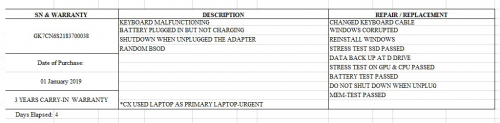
Few months ago my selenite's keyboard started cannot use, and battery seems to give issue until my windows corrupt. Send in for warranty service, and they said they have changed my Keyboard + Battery.

2 months later, i notice the underside of laptop start to kembang. I open inside and see the battery already kembang like going to explode anytime. Illegear technician asked me to remove the battery, as I couldnt send in my laptop due to in the middle of important work. So I use it without battery.. until today.. The keyboard starts to give way again. No lighting no input.

Both items that claim to have replaced , but now having similar issues again.. I am really starting to doubt the quality of the servicing. Maybe I look too highly on the brand .. sad.gif I still recommended a lot of ppl to buy this, but my laptop only entering 2nd year, and already meet with such issues.. aiks..
*
Hi clivengu,

According to your service report copy, keyboard and battery were not changed in last service.

We were given limited amount of time for this particular RMA because customer urgently needs the laptop ASAP for work and we also could not have the keyboard / battery replacement ready within 4 days time.

user posted image

To resolve your problem completely, can we arrange a reverse pickup / onsite service with you to replace the keyboard and battery?

This post has been edited by Prince J: Jul 1 2020, 06:30 PM

5 Pages « < 2 3 4 5 >Top
 

Change to:
| Lo-Fi Version
0.0445sec    0.46    7 queries    GZIP Disabled
Time is now: 3rd December 2025 - 02:03 AM