Welcome Guest ( Log In | Register )

5 Pages < 1 2 3 4 5 >Bottom

Outline · [ Standard ] · Linear+

 ILLEGEAR Selenite Discussion Thread V1, world’s first 17.3” bezel-less laptop

views
     
Prince J
post Apr 16 2020, 10:20 PM

Regular
******
Senior Member
1,272 posts

Joined: May 2010
From: Team ILLEGEAR


QUOTE(Jared21 @ Apr 16 2020, 08:34 PM)
Aww thats a shame. Looks much cleaner than what the selenite has

Although i feel that the best one is still the caps that XMG uses on their Neo 17
https://www.notebookcheck.net/fileadmin/_pr..._90ce05b488.jpg
*
It's the same cap as your selenite. The font is different because XMG bought the keycap without font and use laser machine to engrave themselves. Why you need the euro style keycap?

This post has been edited by Prince J: Apr 17 2020, 01:36 AM
Prince J
post Apr 27 2020, 04:54 PM

Regular
******
Senior Member
1,272 posts

Joined: May 2010
From: Team ILLEGEAR


QUOTE(amir.asyraf @ Apr 27 2020, 04:45 PM)
Prince J or anyone here

How many external monitors does the laptop support at once? Is it 3?
*
3x (excluded laptop display) for selenite without thunderbolt 3.

2x (excluded laptop display) for selenite with TB3
Prince J
post May 5 2020, 12:35 PM

Regular
******
Senior Member
1,272 posts

Joined: May 2010
From: Team ILLEGEAR


QUOTE(amir.asyraf @ May 4 2020, 12:55 PM)
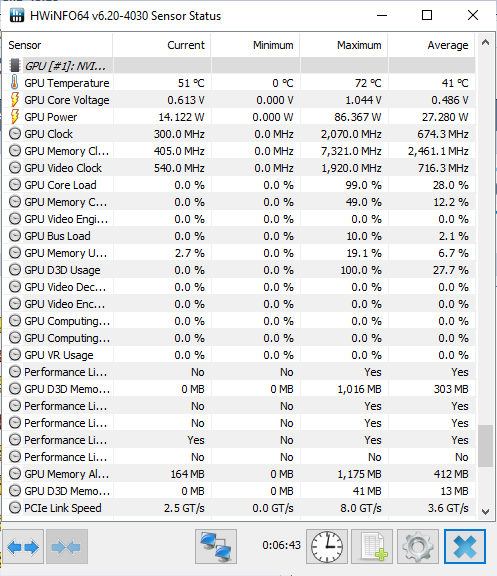
Max only goes up to 86W, I thought RTX 2060 GPU boost can go up to 115W? Or am I missing something here  hmm.gif

user posted image
*
Hi amir,

This is recorded during gaming?
Prince J
post May 5 2020, 01:01 PM

Regular
******
Senior Member
1,272 posts

Joined: May 2010
From: Team ILLEGEAR


QUOTE(amir.asyraf @ May 5 2020, 12:46 PM)
Benchmark on Unigine Heaven and Valley
*
For 9th gen selenite, the GPU is automatically boosted from 80W up to 115W depends on your gameplay. It's 115W by default on 10th gen.
Prince J
post May 6 2020, 12:07 PM

Regular
******
Senior Member
1,272 posts

Joined: May 2010
From: Team ILLEGEAR


QUOTE(amir.asyraf @ May 5 2020, 04:28 PM)
What do you mean by depends on gameplay? Does it detect the game? Or is it the Valley and Heaven benchmarks aren't GPU intensive enough?
*
As per ODM the GPU itself determine the application / game / software usage and boost the TDP accordingly between 80W -> 115W.
Prince J
post May 18 2020, 06:41 PM

Regular
******
Senior Member
1,272 posts

Joined: May 2010
From: Team ILLEGEAR


QUOTE(jason111785 @ May 18 2020, 04:04 PM)
any new selenite pro user experienced bottom left chassis wobble? It happened only when the lid is open. Worry is the chassis bend or something...
*
Hi jason, as per discussion kindly send in your laptop, will check together with your backlit bleed. Thanks!
Prince J
post May 21 2020, 12:58 AM

Regular
******
Senior Member
1,272 posts

Joined: May 2010
From: Team ILLEGEAR


QUOTE(SaiyanGoku @ May 20 2020, 11:11 PM)
My battery has swollen even though I rarely use the laptop on battery. It has been about 10 months since my purchase.
user posted image
user posted image

Links to large size images:
https://imgur.com/a/4mwgtCD
*
Hi Saiyan, can you send in for replacement? Can i also have your laptop serial number to check your warranty?

This post has been edited by Prince J: May 21 2020, 01:05 AM
Prince J
post May 22 2020, 12:54 AM

Regular
******
Senior Member
1,272 posts

Joined: May 2010
From: Team ILLEGEAR


QUOTE(xearsol @ May 21 2020, 08:20 PM)
Hi i;m having problem with my selenite, barely less than a year using, i have experienced what i believe to be the SSD issue.
The first time it happened was in march, when all of a sudden it does not boot, and in the APTIO UEFI, the ssd was not detected at all.

after leaving it for like a day, it resumed normal and could detect the SSD again.

and then today, after installing COD MW update, the windows fail to boot and it got stuck in the infinite boot loop of the APTIO UEFI, to the point it shows windows boot manager showing error 0xc00000185, AN unexpected error has occured.
I believe this is the same issue with the SSD but in the bios it detects the SSD. however i cannot boot into windows as it will stuck again at the infinite boot loop.

I have message the team on whatsapp. Whats frustrating is that it happens at night when I'm using it, and its not my daily driver laptop as i only use it at night, and i dont think the team is available at night. And i cannot afford to travel to KL now due to my location in sarawak right now where i am living. Thus sending the laptop to KL is not an option with the current situation.

IS there anyone having the same problem as i am? I am starting to suspect the SSD is the culprit here.
*
Hi xearsol,

Our Phison E12 last year july 2019 batch has very high failure rate (30~40%), kindly pm me your SN info and we will arrange for swapping smile.gif
Prince J
post May 25 2020, 02:26 PM

Regular
******
Senior Member
1,272 posts

Joined: May 2010
From: Team ILLEGEAR


QUOTE(SaiyanGoku @ May 23 2020, 11:42 PM)
Illegear should work with ODM and get this issue fixed ASAP (via a BIOS or firmware update). I am unaware if mine is an isolated incident but as a customer I shouldn't have to face this.

*
Hi SaiyanGoku

It's not related to BIOS/firmware, and it's normal for performance throttle after removing battery from the machine, and the throttle would be fixed after you get the battery replacement. Your laptop is still covered under 2 year carry-in warranty so kindly send in your laptop and we will replace the battery. Thanks!.

This post has been edited by Prince J: May 25 2020, 02:27 PM
Prince J
post May 27 2020, 11:38 PM

Regular
******
Senior Member
1,272 posts

Joined: May 2010
From: Team ILLEGEAR


QUOTE(alexnvidia @ May 27 2020, 08:25 PM)
this is the problem with companies like illegear. their support is basically limited to send in ONLY. No matter how much evidence you provided over the phone, email, whatsapp, even video, they will not entertain you other than you sending in your laptop. They will give you a bunch of reasons like they need to check the laptop, they dont want you to damage the laptop etc. But basically what what they meant were you don't know what you are doing, you are not qualified to service their laptop and they dont trust you at all. Which is why i really hate support from companies like this. sending in your laptop means you are without a laptop to use for days or weeks and there is no guarantee you'll get your laptop back problem free. Trust goes both ways and unfortunately, not all their support staff knows what they are doing. In the end, if the issues are not serious and you need to use your laptop, you'll have NO choice but to live with the problems.
*
Hi there,

SaiyanGoku is living in India and his warranty is a 2 year carry-in warranty. Moreover, we are unable to arrange the air shipping for battery only because it's considered as a dangerous goods. DHL and FedEX are more opened when we ship the battery inside the laptop, that's why we requested SaiyanGoku to send in their laptop for servicing.

QUOTE(SaiyanGoku @ May 27 2020, 09:44 PM)
There are no international flights from India till further notice because of Govt order. I found that DHL and FedEx can ship Li-Ion batteries if properly packed (gave references to support team) and I am ready to pay shipping for it. They shouldn't have any problem sending it.  unsure.gif  unsure.gif  unsure.gif
In my case, battery never got discharged during gaming. It was always at 100%. And yes, I used to loose that 1-2% after a cold boot.
*
If India DHL allows you to ship the battery only, we would recommend you to arrange a pickup with your local DHL, we will have the new battery to be prepared for your courier to pickup.

As per pm message I sent to you, DHL Malaysia hasn't gotten back to us on shipping the battery after we submitted the battery MSDS documents.
Prince J
post May 28 2020, 07:51 PM

Regular
******
Senior Member
1,272 posts

Joined: May 2010
From: Team ILLEGEAR


QUOTE(alexnvidia @ May 28 2020, 06:43 PM)
Hi there,

Thanks for the explaination. unfortunately, i had bad experience with your support before. I provided video proof of the issue with one of the USB 3 ports on my laptop and requested your side to send the daughterboard and flex cable for replacement which i'm happy to do it myself. however my request was denied citing i need to return the faulty item first in order for your side to "confirm" it's faulty even though i have done all the troubleshooting and given video proof of the issue. so it's obvious there is trust issue. sending in the USB board will basically cripple my laptop as the only other USB A port is a slow USB 2.0. I'm living in Brunei and this all happened long before covid. i have 3 years on site pickup warranty. Also, the issue with audio popping and crackling has not been resolved till this day. These are just some of the issues i had to live with. I do understand your warranty policy is limited to send in only especially in malaysia but perhaps you all need to come up with solution to support international customers other than sending which involves expensive shipping for a heavy laptop.
*
Hi alex,

It's not related to trust but the warranty SOP. For warranty part exchange, we have to receive the bad parts first to exchange a new one for two reasons:

1. ODM can do back-to-back RMA with their component suppliers.
2. ODM and their vendors can analyse the problem and prevent the same problem in the future.

If we do not receive the bad part / bad laptop from you, we are unable to arrange the RMA with the ODM, and ODM is unable to arrange the RMA with their vendors as well.

Our onsite warranty only limits to Malaysia at the moment.

We hope the above clarify.

Thank you.

This post has been edited by Prince J: May 28 2020, 07:52 PM
Prince J
post May 28 2020, 11:56 PM

Regular
******
Senior Member
1,272 posts

Joined: May 2010
From: Team ILLEGEAR


QUOTE(alexnvidia @ May 28 2020, 10:27 PM)
Yes it's clear and I appreciate you guys work with ODM to prevent future problems but it does not solve anything on the user side, does it? Owners are still faced with lengthy RMA process leaving us with no laptop to use.

What you do with the defective parts and how you deal with ODM is your back end process. What i'm suggesting is you should come up with solutions to better serve customers, putting customers first instead and reduce customer downtime. Your customers paid a lot of money and expect equally good experience within the warranty period. Speaking of experience, the software (apps, drivers, bios and firmware) support side of thing leaves a lot to be desired too.

And from the looks of it, illegear has international customers as well but has no support to service those customers. This is something you guys might want to explore or expand into.
*
Thank you for your feedback and comments and we definitely look forward to expand our service centre & showroom to international level (but not now).

We always try our best to do more than what we committed in the warranty and that's why we offered a new battery for Saiyangoku without having him to send back to faulty one.


Prince J
post May 30 2020, 01:22 AM

Regular
******
Senior Member
1,272 posts

Joined: May 2010
From: Team ILLEGEAR


QUOTE(Jared21 @ May 29 2020, 10:39 PM)
I'm just waiting for that day to happen. My gf uses my laptop for her AC and Overwatch and i've been keeping track of that trickle charge. Happens every single time. Tempted to unplug the battery and just use wall power since i can't even bring it out to classes yet
*
Hi Jared

Can share your EC / BIOS versions and serial numbers to me? I will send together to ODM to have them look at it.
Prince J
post May 30 2020, 01:03 PM

Regular
******
Senior Member
1,272 posts

Joined: May 2010
From: Team ILLEGEAR


QUOTE(alexnvidia @ May 30 2020, 08:30 AM)
My BIOS is v1.53 and EC firmware v2.09.09 with command center v1.0.0.50. Happened not just to him, i'm pretty sure every selenite owners, mine included.
*
Can i have your serial number too?
Prince J
post Jun 3 2020, 12:59 AM

Regular
******
Senior Member
1,272 posts

Joined: May 2010
From: Team ILLEGEAR


QUOTE(SaiyanGoku @ Jun 2 2020, 08:41 PM)
Is windows 10 version 2004 update safe to install on Selenite with 2060/9750H? Could you please share the full size logo or your OEM windows iso image (without license)? I would like to retain that logo and other OEM vendor info in Control Panel -> System after doing a fresh install.
*
Hi Saiyan,

Do you mean this logo?

user posted image
Prince J
post Jun 3 2020, 01:07 AM

Regular
******
Senior Member
1,272 posts

Joined: May 2010
From: Team ILLEGEAR


QUOTE(Shadowhunt94 @ May 31 2020, 05:16 PM)
Hi guys, just got my Selenite G on 14th May. Wanna share some of my usage review and questions after two weeks.

i7 10875H 8 cores, 16gb ddr4 ram, RTX 2070 max-p

If you find it long you can skip it, just sharing my honest review about the laptop.

Goods:
1. Built quality seem good. Screen also not much problem. Keyboard experience is weird initially, but after a while already got used to it.

2. Considered portable enough as my previous laptop Lenovo Y50 GTX860M is 15.6 inch but this 17.3 inch beauty is just unbeatable, having the almost same dimensions and weight.

3. Gaming is great on RTX2070 although it's a mobile version, FYI this is refreshed version (factory undervolted by Nvidia) having higher clock speed and reduced total bandwidth. Power consumption maintain the same 115W.

4. Windows Hello Camera, one of the reason to buy this laptop, save time on typing password  thumbup.gif

5. Sound wise, i salute the power of THX spatial audio software, but not the speaker itself hehe, overall listening feel is alright. Still prefer the JBL speakers+sub and Dolby software on my Lenovo Y50.

6. Price is unbeatable, been surveyed many brands of laptops with similar specs, but others just overpriced for the 2070 performance.
PROBLEMS:
1. At first i though Kryonaut will work on this laptop like a charm since it's considered a premium grade thermal paste for me. Somehow after some time of the usage, i've been experiencing a serious issue. The game framerate would drastically drop to unplayable frame rate for a while, then it become normal again. Using Afterburner monitoring during gameplay, can notice the cpu and gpu clock dropped to slowest speed too at the moment of stuttering frame rates. This problem happens intermittent one, not always. Not much background process which can interfere the game, just gaming no stream or others.

Used HWiNFO to monitor the status, found that cpu always more than 85c while gaming and all cores experiencing thermal throttling. To solve the issue i undervolted cpu more than -80mV to aid thermal reduction. Now the cpu mostly max up averagely 80c which won't have throttling on it.

OK, initially i thought thermal throttling could be the issue of the game stuttering, but somwhow yesterday the stuttering is coming back again with all undervolt, limit turbo boost, set dGPU at bios, max performance in Nvidia control panel, and no whisper mode at GeForce Experience, you name it. Can't figure out what else i can do to solve this frustrating problem. Maybe it's due to the 14nm++++++ process? sweat.gif  sweat.gif  sweat.gif

Another reason could be high ambient temp while gaming la, not at 25c air con room, so this issue could be subjective. Unfortunately didn't check for the power draw though at the moment.

2. The turbo and gaming fan mode is a bit problematic also before start using ThrottleStop. The temps are still good when in office mode, but when switching to Turbo from the AB i can see the CPU temp increased few degrees, turned off turbo it'll drop to normal again. Maybe it's the power delivery mode set by the command center there. After undervolting using TS it seem like dont have this issue already.

3. Keyboard RGB is kinda a joke, since i own Corsair mech KB i thought Selenite would be the same having function of import other user lighting effects/having smoother animations, turned out only those presets available. I'm not sure about other luxury laptop brands, or it's only Illegear doing so?

Command center is buggy, sometimes not detecting the hardware or the software can't be used properly, had to restart laptop or restart the process then only can work nicely. The fan button sometimes can't control the fan speed too due to buggy software. Having the feel of being trolled, but can't blame since i didn't perform thorough research enough about keyboard side, hunting for laptops and my friend (who using Laguna SE) to "poison" me to buy this brand, although i already know Illegear beforehand.

4. Rubberize palm rest. Okay thismay be my own preference but i prefer metal surface than this cuz rubberized is damn hard to take care of. When it ages it'll be sticky if you don't take care of it right.

Reviews aside, have some questions for gamers and enthusiasts here.

1. Cooling pad or vacuum cooler for you guys? I searched online and it's really dependent on laptops models, so you can't decide straightly which is better. Or you guys never use these at all?

2. Anyone owning 2070 variant mind to share their thermal performance? Would like to know whether it's me the unlucky one or everyone facing the same issue.

3. How to take care the rubberized surface? Researched online few methods, microfibre + alcohol OR microfibre + wash soap, then wipe with dry cloth. Would like to maximize the lifespan to prevent it become sticky since my previous Y50 also rubberized and unfortunately that moment i didn't realize the importance of taking care it.
That should be all about my review and concern about Selenite G. Any further issues or questions will be discussed in future. Thanks guys for spending time reading this and am happy to join the high end gaming for the first time!
*
Hi Shadow, may i know what's the average temperature you are getting on your i7-10875H?

The keyboard RGB only can function with preset animation profile, will feedback your suggestion of animation profile import to ODM. Thank you smile.gif

Prince J
post Jun 3 2020, 08:09 PM

Regular
******
Senior Member
1,272 posts

Joined: May 2010
From: Team ILLEGEAR


QUOTE(SaiyanGoku @ Jun 3 2020, 02:12 AM)
Yes Prince, I meant that logo (the new one is also good  icon_rolleyes.gif ). I can add it to my own windows iso.

BTW, could you ask the ODM about the possibility to make a 92Wh battery for Selenite (upgrade from 63Wh) like the Selenite Pro? Selenite chassis has enough empty space even after removing the 2.5" drive bay.
*
Sure i will ask my tech about this.
Prince J
post Jun 4 2020, 07:41 PM

Regular
******
Senior Member
1,272 posts

Joined: May 2010
From: Team ILLEGEAR


QUOTE(SaiyanGoku @ Jun 3 2020, 02:12 AM)
Yes Prince, I meant that logo (the new one is also good  icon_rolleyes.gif ). I can add it to my own windows iso.

BTW, could you ask the ODM about the possibility to make a 92Wh battery for Selenite (upgrade from 63Wh) like the Selenite Pro? Selenite chassis has enough empty space even after removing the 2.5" drive bay.
*
Will try to get the logo for you.

We tried but the selenite battery just doesn't fit the screw holes.

QUOTE(Jared21 @ Jun 4 2020, 02:59 AM)
A bigger battery would be amazing even though i personally am already getting some decent battery life when away from the wall with an aggressive undervolt.

Although with that whole 99% battery after every shutdown who knows how long my battery can hold out....
*
FAE told me there is a new EC / BIOS for alexnvidia ID-S machine to fix the power draw. Can you pm me your SN to see if yours is the same as alexnvidia??
Prince J
post Jun 4 2020, 10:51 PM

Regular
******
Senior Member
1,272 posts

Joined: May 2010
From: Team ILLEGEAR


QUOTE(SaiyanGoku @ Jun 4 2020, 10:35 PM)
Leave the screws, what about physical dimension? Does 92 Wh battery fits inside the chassis and charges? Also, is there any bios/ec update for Selenite?
*
Cannot fit, and the power delivery design is different. There are five types of batteries from Tongfang, and they are not from the same factories:

1. 3S1P/4S1P: RAVEN (2018)

2. 47Wh/63Wh: RAVEN SE, PRODIGY, ROGUE, ONYX V, ONYX (2018), SELENITE

3. ONYX PRO

4. SELENITE PRO / IONIC 15 / ID-T (a.k.a Eluktronics MAG-15)

5. IONIC 14

This post has been edited by Prince J: Jun 4 2020, 10:52 PM
Prince J
post Jun 6 2020, 12:52 AM

Regular
******
Senior Member
1,272 posts

Joined: May 2010
From: Team ILLEGEAR


QUOTE(Shadowhunt94 @ Jun 5 2020, 11:09 PM)
Annnnnnnnnd one more issue after another week of usage.

Owning a Seagate SSHD 5 years ago, checking on Acronis Disk Monitor it says there's some end-to-end transfer error, giving a sign that the hdd could fail. Sometimes it comes out some weird noise, and when i install it into the laptop, the temperature could reach more than 50 degrees Celsius when gaming, loading the files from it. When i install a game to the hdd the task manager shows it loads 100% fully, super long response time, then it just not working, no files transfer. OS could hang and disk management won't see the existence of the hdd, so i have to restart the laptop and it'll become fine again despite still high hdd temp.

Okay, thought that it has served me long, then i decided to buy another sshd and install into it. Just not more than 15 mins it boot up and start copying the files from external to the new sshd, the issue arise again.

Come on, don't tell me the new sshd has problem like the old one????  mad.gif  bangwall.gif  vmad.gif  ranting.gif

The old one i put it into external hdd controller, now it still works like a charm, heat reduced although still has some noise sometimes.  sweat.gif

What is happening to the laptop actually? I want to dedicated support as soon as possible guiding me to install the hdd properly remotely, assuming i DID it wrong. There's a flex cable beneath the hdd location, perhaps it's the cause? I don't know.  shakehead.gif

I know this laptop is not the most expensive but then 7k is considered bangsawan price for many people already, and the quality just like this?
*
There is no way the ODM cable causes your SSHD to lag, at least we have never experienced before. It's either the SSHD is not detected in your system (cable is faulty, very tiny chance) or it can detect your HDD and provide full functions.

The lag can be caused by many factors including SSHD's firmware, OS installation method as well as the compatibility of the SSHD with windows operating system.

If the drive has buggy firmware, it tends to have caching / incompatible problem with windows 10 system (especially Windows installed in drive C), sometimes a bad compatible secondary SSHD can cause your system to lag too.

If you wish, you also can bring in your own SSHD and we will assist you on the testing.

Thank you.

This post has been edited by Prince J: Jun 6 2020, 01:35 PM

5 Pages < 1 2 3 4 5 >Top
 

Change to:
| Lo-Fi Version
0.0414sec    0.46    7 queries    GZIP Disabled
Time is now: 2nd December 2025 - 11:18 AM