Welcome Guest ( Log In | Register )

Outline · [ Standard ] · Linear+

 How To Speed Up Your WordPress Website, The importants to speed up your website

views
     
TSrafiqhasrudin
post Feb 15 2019, 10:03 AM, updated 6y ago

New Member
*
Newbie
7 posts

Joined: Jan 2019
In an article from Crazyegg mentioned that:

" A one-second delay in page load time yields:

11% fewer page views
16% decrease in customer satisfaction
7% loss in conversions

A few extra seconds could have a huge impact on your ability to engage visitors and make sales. "

How to speed up our website?

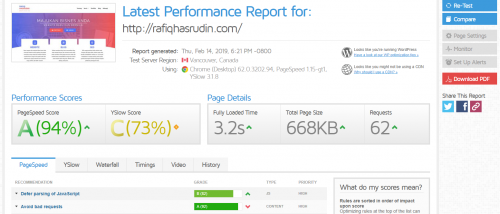
-->> This is one the tools that very useful we could try >> https://gtmetrix.com/


user posted image

If you can see in the image, the result i found for My Webpage
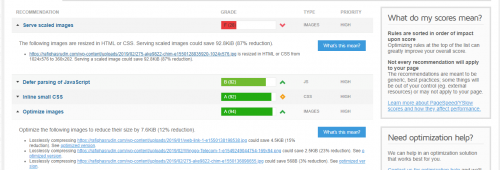
user posted image

So, you can see, the score from the top is the lowest. (the red colour).

From the result, we know the image we used is need to be scaled. You can scale by using the simple step from WordPress backend.(by: edit image)

I give you the plugin use for compressing image ->> TinyPNG.
I found this tool is very useful for compressing image but it has limited quota in a month.

I think thats all for now. I hope this is useful for you.

Please share your suggestion more about speeding website.. Thank you.

Thank you.
EdBaaBaa.
post Feb 15 2019, 10:07 AM

Getting Started
**
Junior Member
75 posts

Joined: Feb 2019
well.. this is a very board topic... sometime unnecessary webscript may bogged down the webpage itself
TSrafiqhasrudin
post Feb 15 2019, 10:25 AM

New Member
*
Newbie
7 posts

Joined: Jan 2019
QUOTE(EdBaaBaa. @ Feb 15 2019, 10:07 AM)
well.. this is a very board topic... sometime unnecessary webscript may bogged down the webpage itself
*
Sure..

Bro, could you please give some example for unnecessary webscript.. sometime we didnt notice about it..
TSrafiqhasrudin
post Feb 15 2019, 10:28 AM

New Member
*
Newbie
7 posts

Joined: Jan 2019
You can see the result after managing the image mentioned..

user posted image
UserU
post Feb 18 2019, 07:07 PM

CSONLINE2.NET - FREE COUNTER-STRIKE
Group Icon
Elite
5,093 posts

Joined: Mar 2009
From: Land of make believe

There are loads of settings you have to tinker, not just images.

Save yourself the hassle, and go for WP Rocket. It costs money, but guaranteed your site performance will improve. Tried and true.

Or if you can't afford it, there are free caching plugins that can help, albeit less effective.
UserU
post Feb 20 2019, 01:10 AM

CSONLINE2.NET - FREE COUNTER-STRIKE
Group Icon
Elite
5,093 posts

Joined: Mar 2009
From: Land of make believe

QUOTE(Korra99 @ Feb 20 2019, 12:46 AM)
does it make a significant difference for small content light blogs?
*
Totally depends, but every second counts. You can rely on good benchmarks such as GTMetrix and Pingdom.

WP Rocket also offers a money back if you're not satisfied. But once you buy, you'll be pleasantly surprised.
ladycooper
post Feb 25 2019, 09:53 PM

Enthusiast
*****
Senior Member
944 posts

Joined: Mar 2009
From: Penang Malaysia


WordPress user may also interested to explore WP Hosting from here

alvinarichard P
post Mar 30 2019, 09:40 PM

New Member
*
Probation
2 posts

Joined: Mar 2019
QUOTE(rafiqhasrudin @ Feb 15 2019, 10:03 AM)

In an article from Crazyegg mentioned that:

\" A one-second delay in page load time yields:

11% fewer page views
16% decrease in customer satisfaction
7% loss in conversions

A few extra seconds could have a huge impact on your ability to engage visitors and make sales. \"

How to speed up our website?

-->> This is one the tools that very useful we could try >> https://gtmetrix.com/
https://pictr.com/images/2019/02/15/0vtkfO.md.png

If you can see in the image, the result i found for My Webpage

https://pictr.com/images/2019/02/15/0vtqrZ.md.png

So, you can see, the score from the top is the lowest. (the red colour).

From the result, we know the image we used is need to be scaled. You can scale by using the simple step from WordPress backend.(by: edit image)

I give you the plugin use for compressing image ->> TinyPNG. 
I found this tool is very useful for compressing image but it has limited quota in a month.

I think thats all for now. I hope this is useful for you.

Please share your suggestion more about speeding website.. Thank you.

Thank you.
*


TTFB and server response times are two of the most important factors that rely on hosting.
Champinidan
post Apr 25 2019, 07:39 PM

Getting Started
**
Junior Member
135 posts

Joined: Jan 2019
Just go for solid VPS hosting at least and install some image optimisation plugins, caching plugins with minifying script capabilities and you will be set forever. As well as if possible use even that cloud hosting solution, not sure how faster it will make website. In fact sometimes slower cause of all that checks.
ladycooper
post Sep 9 2019, 11:31 PM

Enthusiast
*****
Senior Member
944 posts

Joined: Mar 2009
From: Penang Malaysia


exactly, VPS to host for WP website is getting more and more popular

However, you can also consider to get some of those higher specs Shared Hosting to run your WP website efficiently
- SSD Disk
- Higher Memory allocation
- http/2 & NGINX
- LiteSpeed
- etc

So that you only really manage your website instead of need to manage the entire VPS (if you are still not that familiar even on WP).
ericleeh
post Sep 22 2019, 08:50 PM

New Member
*
Newbie
10 posts

Joined: Nov 2012
Well, another way to speed up a website is to use a hosting service that provides the fastest response time. This is often overlooked by many people.

You can check out the speed test tool for your website and hosting at https://www.bitcatcha.com.my/

The tool will test out your server speed against Google's recommended server response time.
TSrafiqhasrudin
post Feb 19 2020, 10:08 AM

New Member
*
Newbie
7 posts

Joined: Jan 2019
QUOTE(Champinidan @ Apr 25 2019, 07:39 PM)
Just go for solid VPS hosting at least and install some image optimisation plugins, caching plugins with minifying script capabilities and you will be set forever. As well as if possible use even that cloud hosting solution, not sure how faster it will make website. In fact sometimes slower cause of all that checks.
*
Yes, agreed.
VPS is one the option preferred for web speed..
We could control the need of a website in the controller..
TSrafiqhasrudin
post Feb 19 2020, 10:14 AM

New Member
*
Newbie
7 posts

Joined: Jan 2019
QUOTE(ladycooper @ Sep 9 2019, 11:31 PM)
exactly, VPS to host for WP website is getting more and more popular

However, you can also consider to get some of those higher specs Shared Hosting to run your WP website efficiently
- SSD Disk
- Higher Memory allocation
- http/2 & NGINX
- LiteSpeed
- etc

So that you only really manage your website instead of need to manage the entire VPS (if you are still not that familiar even on WP).
*
Sure, this spec need to deep carefully..
For VPS, we need to think about the 'budget'
TSrafiqhasrudin
post Feb 19 2020, 10:15 AM

New Member
*
Newbie
7 posts

Joined: Jan 2019
QUOTE(ericleeh @ Sep 22 2019, 08:50 PM)
Well, another way to speed up a website is to use a hosting service that provides the fastest response time. This is often overlooked by many people.

You can check out the speed test tool for your website and hosting at https://www.bitcatcha.com.my/

The tool will test out your server speed against Google's recommended server response time.
*
Very good one!
Its a new for me!
Thnks bro smile.gif
TSrafiqhasrudin
post Feb 19 2020, 10:16 AM

New Member
*
Newbie
7 posts

Joined: Jan 2019
QUOTE(TerranceM @ Oct 7 2019, 11:37 PM)
Try not to install many plugins
Keep the images optimized
Make least https requests
add expires headers

You can also check the speed through various tools available online which also provides you the recommendation on how to improve the speed.

--
Terrance
Admin | https://www.Apps4Rent.com/
*
Yes, that's correct!
Thanks! smile.gif
RobertWilliams07 P
post Apr 13 2020, 10:54 PM

New Member
*
Probation
5 posts

Joined: Apr 2020
From: California, USA


Good discussion. I get some necessary resource and information to boost my website speed. thanks all
macrider
post Apr 17 2020, 06:47 PM

New Member
*
Junior Member
25 posts

Joined: Jul 2005


My golden rules are
1. Get good hosting.
2. Reduce 3rd party request
3. Optimise the images
4. Use a lightweight theme

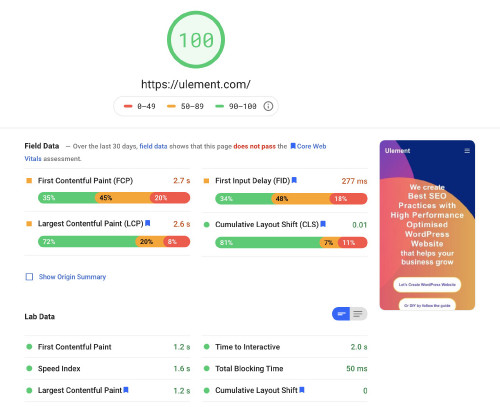
How to Speed Optimize Wordpress-website For Google PageSpeed Insights

user posted image

This post has been edited by macrider: Jun 12 2020, 11:23 PM
Just2centslah
post May 8 2020, 12:17 PM

Getting Started
**
Junior Member
261 posts

Joined: Apr 2020
I actually did everything to improve WP speed with all sorts of plug-ins compressing images and codes, etc

But only upgrading hosting plan located in North America solved this problem. Most of my views are from USA.
tekkaus
post May 28 2020, 01:56 AM

Casual
***
Junior Member
429 posts

Joined: May 2009


QUOTE(rafiqhasrudin @ Feb 15 2019, 10:03 AM)
In an article from Crazyegg mentioned that:

" A one-second delay in page load time yields:

11% fewer page views
16% decrease in customer satisfaction
7% loss in conversions

A few extra seconds could have a huge impact on your ability to engage visitors and make sales. "

How to speed up our website?

-->> This is one the tools that very useful we could try >> https://gtmetrix.com/
user posted image

If you can see in the image, the result i found for My Webpage

user posted image

So, you can see, the score from the top is the lowest. (the red colour).

From the result, we know the image we used is need to be scaled. You can scale by using the simple step from WordPress backend.(by: edit image)

I give you the plugin use for compressing image ->> TinyPNG.
I found this tool is very useful for compressing image but it has limited quota in a month.

I think thats all for now. I hope this is useful for you.

Please share your suggestion more about speeding website.. Thank you.

Thank you.
*
Unless your website is terribly super slow, it does not matter whether you website loads fast or not.

A lot of websites which rank in 1st page of search engines are slow, but still they are ranking well because of the links pointing back to them.

Website speed will only affect you when it takes too long to load.


Change to:
| Lo-Fi Version
0.1354sec    0.56    5 queries    GZIP Disabled
Time is now: 21st December 2025 - 12:41 AM