Welcome Guest ( Log In | Register )

Bump Topic Topic Closed RSS Feed
316 Pages « < 35 36 37 38 39 > » Bottom

Outline · [ Standard ] · Linear+

Unifi Official TM UniFi High Speed Broadband Thread V37, READ 1ST PAGE FOR TURBO SPEED INFO!

views
     
AVFAN
post Mar 2 2019, 05:57 PM

20k VIP Club
*********
All Stars
24,454 posts

Joined: Nov 2010
QUOTE(jhleo1 @ Mar 2 2019, 12:35 PM)
Ya lo same shoes as you. 300 will be better. Hope it will be priced same as those upgraded from 300mpbs at RM139.

I foreseen around March or April, but now already March. Lol...
*
since some users still haven't got turbo-ed, unifi first need to complete this.

also, TM earnings now very ugly, nobody dare approve new packages that get even less revenue!! tongue.gif

but biz is biz... i expect new packages 300, 500, 800 will come on in 3Q/4Q this year.
AhBoy~~
post Mar 2 2019, 05:57 PM

Regular
******
Senior Member
1,149 posts

Joined: Feb 2009


QUOTE(sgpdsmss @ Mar 1 2019, 07:46 AM)
better than ppl pay rm129 but only 100Mbps...
*
Im still on this for one my house..
sgpdsmss
post Mar 2 2019, 06:37 PM

Regular
******
Senior Member
1,704 posts

Joined: Jan 2005
QUOTE(AVFAN @ Mar 2 2019, 05:57 PM)
since some users still haven't got turbo-ed, unifi first need to complete this.

also, TM earnings now very ugly, nobody dare approve new packages that get even less revenue!! tongue.gif

but biz is biz... i expect new packages 300, 500, 800 will come on in 3Q/4Q this year.
*
so what's the price ? 139, 159, 189 ?

QUOTE(AhBoy~~ @ Mar 2 2019, 05:57 PM)
Im still on this for one my house..
*
so many house you have ...
AVFAN
post Mar 2 2019, 06:52 PM

20k VIP Club
*********
All Stars
24,454 posts

Joined: Nov 2010
QUOTE(sgpdsmss @ Mar 2 2019, 06:37 PM)
so what's the price ? 139, 159, 189 ?
*
who knows... just a guessing game at this time.

but i wud think it will be silly of them not to offer 139, 149, 159 to keep customers.

and quite fair, imo... now that they don't give new routers or stb's.

This post has been edited by AVFAN: Mar 2 2019, 06:52 PM
sgpdsmss
post Mar 2 2019, 06:54 PM

Regular
******
Senior Member
1,704 posts

Joined: Jan 2005
QUOTE(AVFAN @ Mar 2 2019, 06:52 PM)
who knows... just a guessing game at this time.

but i wud think it will be silly of them not to offer 139, 149, 159 to keep customers.

and quite fair, imo... now that they don't give new routers or stb's.
*
don't give new router for those downgrade...
new application still offer new router ...

stb...mostly customer not using the service or user bought other better stb ..
AVFAN
post Mar 2 2019, 07:06 PM

20k VIP Club
*********
All Stars
24,454 posts

Joined: Nov 2010
QUOTE(sgpdsmss @ Mar 2 2019, 06:54 PM)
don't give new router for those downgrade...
new application still offer new router ...

stb...mostly customer not using the service or user bought other better stb ..
*
if u upgrade later, will the ygive new router?!

STB... i like the STB, better video quality.
if the policy is no more stb, only use app+other device, that sucks.
it means unifitv is giving up on iptv, not investing, not competing with astro or netflix.
that is, it is planning to DIE.
5p3ak
post Mar 2 2019, 08:41 PM

CPE, FIG Certified Gymnastics Coach
*******
Senior Member
5,648 posts

Joined: Mar 2011
From: Jalan Tijani
QUOTE(sgpdsmss @ Mar 2 2019, 09:36 AM)
just done downgraded plan from 800 to 100 ...
*
Means new contract? hmm.gif
Archaven
post Mar 2 2019, 08:42 PM

It isn't Death you should be afraid of
******
Senior Member
1,201 posts

Joined: Jan 2003
From: Ampang


QUOTE(soonwai @ Mar 2 2019, 01:25 PM)
Here OK, must be your area.
*
after they reset my port.. seems ok already. thanks for checking!
Jeremy_John
post Mar 2 2019, 08:45 PM

Getting Started
**
Junior Member
147 posts

Joined: Jan 2010
From: Selangor


Anyone with ASUS RT-AC86U have this problem?

In the logs I get that message and then the router hangs completely for a whole 5 minutes and then rebooting it self.
CODE
Maximum number of concurrent DNS queries reached (max: 150)


Mine is brand new China version and I have also auto updated the firmware to the latest.

I have about 20-30 clients using it simultaneously.


sgpdsmss
post Mar 2 2019, 09:44 PM

Regular
******
Senior Member
1,704 posts

Joined: Jan 2005
QUOTE(AVFAN @ Mar 2 2019, 07:06 PM)
if u upgrade later, will the ygive new router?!

STB... i like the STB, better video quality.
if the policy is no more stb, only use app+other device, that sucks.
it means unifitv is giving up on iptv, not investing, not competing with astro or netflix.
that is, it is planning to DIE.
*
not sure about upgrade...wait new plan coming out only decide..


QUOTE(5p3ak @ Mar 2 2019, 08:41 PM)
Means new contract?  hmm.gif
*
yes sir ....
jpong1
post Mar 2 2019, 10:54 PM

Getting Started
**
Junior Member
292 posts

Joined: Jun 2016
QUOTE(Jeremy_John @ Mar 2 2019, 08:45 PM)
Anyone with ASUS RT-AC86U have this problem?

In the logs I get that message and then the router hangs completely for a whole 5 minutes and then rebooting it self.
CODE
Maximum number of concurrent DNS queries reached (max: 150)


Mine is brand new China version and I have also auto updated the firmware to the latest.

I have about 20-30 clients using it simultaneously.
*
buffer overloaded ?
danialefendy
post Mar 3 2019, 12:08 AM

Getting Started
**
Junior Member
103 posts

Joined: Apr 2010
From: Shah Alam


I have had my unifi tubo'ed to 800 Mbps since last year. I realized the speed capped at 300 Mbps after few days or a week using it. I have to reset the router to correct the speed back to 800 Mbps.

Does anyone have experienced the same before?
soonwai
post Mar 3 2019, 03:21 AM


********
All Stars
11,458 posts

Joined: Oct 2007
From: KL


QUOTE(danialefendy @ Mar 3 2019, 12:08 AM)
I have had my unifi tubo'ed to 800 Mbps since last year. I realized the speed capped at 300 Mbps after few days or a week using it. I have to reset the router to correct the speed back to 800 Mbps.

Does anyone have experienced the same before?
*
Also on 800Mbps, fine here. If rebooting your router fixes it then it could be caused by your router.
mmohdnor
post Mar 3 2019, 10:14 AM

Regular
******
Senior Member
1,021 posts

Joined: Aug 2006
From: Penang Island, Alor Star


Currently on unifi biz 500mbps turbo and paying RM274.55 monthly. I'm no longer under contract (RM259+6% sst)

Thinking to save the bill and change to maxis fiber biz 100Mbps RM139+sst. At least can save RM127 monthly.
Is this a good move? Maxis is a 2 yr contract too right?

Is there anything different between unifi and maxis fiber that maxis cannot do? U know... T*rrent, vpn, good stable speed, etc.
Been waiting for unifi to come up with new biz unifi packages. But no news so far.

Anyone had experience moving from unifi to maxis?

This post has been edited by mmohdnor: Mar 3 2019, 10:18 AM
crixalisrox
post Mar 3 2019, 10:47 AM

On my way
****
Junior Member
556 posts

Joined: Feb 2008
From: PJ

Is this info still valid? No quota for unifi basic until end of 2019? https://www.lowyat.net/2019/176932/tm-unifi...revision-jan19/

I saw some posts here mention the quota increase to 120gb. Can't find any info from official website.
ericpires
post Mar 3 2019, 11:23 AM

Arsenal FC
*******
Senior Member
2,657 posts

Joined: Feb 2008
From: Highbury House, 75 Drayton Park, London


May i know what DNS is the fastest for internet browsing? Cloudflare, Google or just use the default DNS?
ericpires
post Mar 3 2019, 11:23 AM

Arsenal FC
*******
Senior Member
2,657 posts

Joined: Feb 2008
From: Highbury House, 75 Drayton Park, London


Sorry double post

This post has been edited by ericpires: Mar 3 2019, 11:24 AM
blacktubi
post Mar 3 2019, 11:35 AM

-
Group Icon
Elite
8,413 posts

Joined: Jul 2008

QUOTE(Jeremy_John @ Mar 2 2019, 08:45 PM)
Anyone with ASUS RT-AC86U have this problem?

In the logs I get that message and then the router hangs completely for a whole 5 minutes and then rebooting it self.
CODE
Maximum number of concurrent DNS queries reached (max: 150)


Mine is brand new China version and I have also auto updated the firmware to the latest.

I have about 20-30 clients using it simultaneously.
*
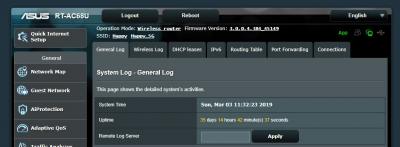
My 5 years old RT-AC68U local unit running without an issue. 35 days uptime as of now.
Attached Image

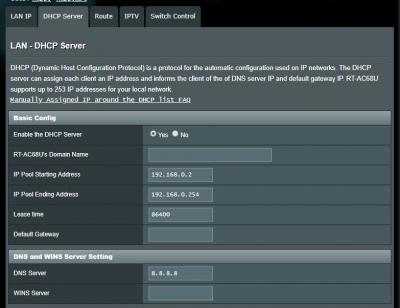
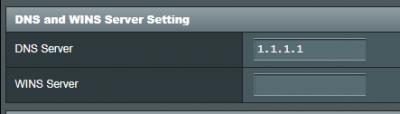
Do you have some device that spam the router with DNS query? In that case maybe you can change the DNS to be processed directly by the devices instead of router. Refer to picture below.
Attached Image

QUOTE(ericpires @ Mar 3 2019, 11:23 AM)
May i know what DNS is the fastest for internet browsing? Cloudflare, Google or just use the default DNS?
*
Won't be that significant to impact your speed these days.

I find Google DNS to be the most reliable. I won't use the default DNS since there's the history of DNS page blocking by the ISP. wink.gif

This post has been edited by blacktubi: Mar 3 2019, 11:37 AM
noobandroid
post Mar 3 2019, 11:37 AM

Audiophile
********
All Stars
11,836 posts

Joined: Mar 2011
From: Kota Kinabalu, Sabah


QUOTE(ericpires @ Mar 3 2019, 11:23 AM)
May i know what DNS is the fastest for internet browsing? Cloudflare, Google or just use the default DNS?
*
i myself use cloudflare

normal selection choices of mine:
adguard (dns level ad block)
google
cloudflare
"maybe" opendns
Jeremy_John
post Mar 3 2019, 02:13 PM

Getting Started
**
Junior Member
147 posts

Joined: Jan 2010
From: Selangor


QUOTE(jpong1 @ Mar 2 2019, 10:54 PM)
buffer overloaded ?
*
What's buffer overloaded and what can cause it?

QUOTE(blacktubi @ Mar 3 2019, 11:35 AM)
My 5 years old RT-AC68U local unit running without an issue. 35 days uptime as of now.
Attached Image

Do you have some device that spam the router with DNS query? In that case maybe you can change the DNS to be processed directly by the devices instead of router. Refer to picture below.
Attached Image
*
What device can spam the router with DNS query? Is it skype or torrent?
All the devices connected are iPhones, Androids, Macbooks, Laptops, Desktops (Ubuntu/Windows), Sony Android TV and Canon WiFi Printer.

I'm already using manual DNS for LAN but you can only change primary one and not secondary
Attached Image
the router sends secondary DNS as it's self
Attached Image

and WAN DNS is
Attached Image

This post has been edited by Jeremy_John: Mar 3 2019, 02:17 PM

316 Pages « < 35 36 37 38 39 > » Top
Topic ClosedOptions
 

Change to:
| Lo-Fi Version
0.0386sec    0.70    6 queries    GZIP Disabled
Time is now: 9th December 2025 - 02:50 PM