Outline ·
[ Standard ] ·
Linear+
Unifi Official TM UniFi High Speed Broadband Thread V37, READ 1ST PAGE FOR TURBO SPEED INFO!
|
blacktubi
|
 Apr 9 2019, 04:05 PM Apr 9 2019, 04:05 PM
|
-


|
QUOTE(gedebe @ Apr 9 2019, 01:57 PM) yes, they phone and said it is 842, so should i accept it since you claim it's the best? But upon searching, it is rated as the worst: https://www.techgearlab.com/reviews/small-a...-ac1200-dir-842Best among those free routers from TM A cheap TP-Link Archer A6 is a lot better than this. Your call. |
|
|
|
|
|
blacktubi
|
Apr 14 2019, 03:05 PM
|
-
|
QUOTE(Current Events guy @ Apr 14 2019, 01:52 PM) I have the DIR-842 router, can you use this as a repeater? No |
|
|
|
|
|
blacktubi
|
Apr 14 2019, 06:38 PM
|
-
|
QUOTE(Current Events guy @ Apr 14 2019, 03:07 PM) It has a repeater mode as an option in the internet settings drop down menu, what does that do? I guess I get a different hardware/firmware version without the option, maybe you can take a look at soonwai suggestion. |
|
|
|
|
|
blacktubi
|
Apr 17 2019, 12:29 AM
|
-
|
QUOTE(soonwai @ Apr 16 2019, 06:18 PM) Time did a speed guide to the stock routers we all know and love. It’s a quite good guide to what we can expect from them. Everything except our sucky upload speed. https://www.time.com.my/sites/default/files...Speed-Guide.pdfThose results are pretty accurate. I think they should note down the distance as well as those speed are only possible at short distance. |
|
|
|
|
|
blacktubi
|
Apr 21 2019, 01:23 PM
|
-
|
QUOTE(Sky.Live @ Apr 20 2019, 06:28 PM) Fast and wide kinda difficult, 5ghz is fast but less coverage 2ghz is wide but slower.. I bought Mikrotik HP AC2, the 2.4ghz seems not stable at all.. Got to be honest to you, Mikrotik APs aren't that great all the while. Their switch and routers are great anyways. UBNT are worth considering if you prefer something better than consumer level devices. This post has been edited by blacktubi: Apr 21 2019, 01:23 PM |
|
|
|
|
|
blacktubi
|
Apr 23 2019, 11:20 AM
|
-
|
QUOTE(k-rolll @ Apr 22 2019, 04:00 PM) which one is better between Archer C6 and DIR-842? I saw at wikidevi website, the spec exactly the same between that two. which one is better especially for wifi performance? Same AC1200 doesn't mean that they are built the same. Archer A6/C6 performs better than DIR-842 in our test. |
|
|
|
|
|
blacktubi
|
Apr 24 2019, 11:00 PM
|
-
|
QUOTE(EUPH0RIA @ Apr 24 2019, 09:51 PM) Hi guys why is my download speed is so slow? I'm using Archer T6E wifi adapter meanwhile on my iPhone im getting around 80mbps. It seems like something is bottlenecking my speed. My unifi plan is 800mbps with cable btw  Get Asus PCE-AC58BT. TP-Link PCIE adapters are kinda dated currently. |
|
|
|
|
|
blacktubi
|
Apr 25 2019, 12:01 PM
|
-
|
QUOTE(Johnslow @ Apr 25 2019, 11:56 AM) if i have 2 computer connected via CAT6 cables to TMNET TP-Link C1200. about how fast can i expect to transfer files between those computers? » Click to show Spoiler - click again to hide... «
BTW, i can get 300mbps internet speedtest CAT5e cable.
This is more to your computer disk speed and how the file sharing is configured. The router can do Gigabit LAN to LAN speed without an issue. |
|
|
|
|
|
blacktubi
|
Apr 27 2019, 05:24 PM
|
-
|
QUOTE(sHsIkuA @ Apr 27 2019, 12:08 PM) So my condo doesn't support fibre yet and I am still on RM179 package for 50mbps (since it cant be turboed). TM CS told me I can't "downgrade" to the 100mbps package as its only for fibre so I am left with the RM79 one with 60gb cap. Is there any other option for me or I will need to continue paying for this expensive un-turbo internet  Trigger a termination from the portal. They will call you to counter offer with something better. Another option is to move to another ISP. |
|
|
|
|
|
blacktubi
|
May 1 2019, 01:21 PM
|
-
|
QUOTE(geekystef @ May 1 2019, 12:47 PM) Hey guys, I have been on Unifi for many years now and the contract has expired a while ago. Been paying RM179 for 50mbps (upgraded from 30mbps about a year ago) every month. The connection is somewhat stable but occasional issues would pop up. Went to TM HQ at Taman Desa to sort this out. Was hoping to "downgrade" to 100mbps for RM129, only to be told that because of my condo's infrastructure (copper), it cannot be done. In fact, the CS personnel insisted that the condo building can only handle 30mbps but I told her that I have been receiving more than 30mbps and at times close to 50mbps (probably VDSL2). She refuses to believe me. So I was given the choice of either downgrading to a horrible deal of 30mbps for RM79 (she failed to mention about the 60gb cap) or continue to pay RM179 forever like a fool. Is there no other way out of this but to change to another ISP? Any advice about this issue? I know I'm not the only one with this problem. If you submit a termination request on the portal, they may be able to counter offer with some discount. Else it would be the best to switch to TIME. |
|
|
|
|
|
blacktubi
|
May 1 2019, 01:51 PM
|
-
|
QUOTE(geekystef @ May 1 2019, 01:39 PM) Thinking about switching. Just not sure about the stability of Time. Read about some growing problems at Time's thread on LYN. Also, I'm worried about property damage that I've seen at some of my neighbors' houses. It is not that bad as you thought. They are extremely stable but they do have occasional outage recently. I am a user of TIME for close to 2 years now, it is only down for less than 5 times and they all happen during midnights. |
|
|
|
|
|
blacktubi
|
May 8 2019, 09:40 PM
|
-
|
QUOTE(JohnLai @ May 8 2019, 09:29 PM) TR-069 is active and can't be disabled without going into hidden page.....(Malaysia firmware only) Random reboot every 1 or 2 weeks....3 weeks if you are lucky. IPv6 connectivity takes forever to be established. Router takes around 5 minutes to boot up completely. Malaysia firmware is missing 5ghz beamforming, but got UNII1 and UNII-3 channels available. EU firmware has 5ghz beamforming, but only support UNII-1 channels. The good thing is.....C1200 has firewall working for both IPv4 and IPv6 unlike some of its cheaper model.  IPV6 is firewall works very differently since there's not really a NAT anymore. Have you tried the same IPV6 settings of your C1200 on your C6/A6? |
|
|
|
|
|
blacktubi
|
May 8 2019, 09:48 PM
|
-
|
QUOTE(JohnLai @ May 8 2019, 09:44 PM) Same settings. C1200 and A6 GUI ain't that different. C1200 IPv6 firewall works as expected. A6 IPv6 firewall doesn't seem to work at all....... Wait a minute....didn't I post about it at lowyat TP-Link thread? How come the legendary blacktubi miss it?  Oh well, after emailing tplink support and doesn't get much respond, I am going to create a thread at tplink community forum........ I saw it but I didn't thought of this at the time.  I doubt you will get any fix in the short term considering this is a non-critical issue to them. |
|
|
|
|
|
blacktubi
|
May 10 2019, 11:38 AM
|
-
|
QUOTE(shinchan^^ @ May 10 2019, 10:50 AM) guys, the technician came and changed my unifi router today. Now have 5G and 2.4G SSID 5G one has internet 2.4G one no internet . how to fix this? It could be the interference is so bad till the point it is unusable. Try standing beside the router and try. |
|
|
|
|
|
blacktubi
|
May 10 2019, 12:17 PM
|
-
|
QUOTE(7cantona @ May 10 2019, 12:06 PM) so u r paying RM119 for 30mbps ? r u highrise or landed ? The maximum speed landed VDSL can get is 10Mbps. No more no less due to slightly different infrastructure. Think of a modernized Streamyx. |
|
|
|
|
|
blacktubi
|
May 10 2019, 02:48 PM
|
-
|
QUOTE(elmond @ May 10 2019, 02:11 PM) no true, my kanpung city got landed using copper vdsl 50Mbps This is probably one of the rare projects under landed HSBB. Landed under SUBB VDSL is limited to 10Mbps IINM. Correct me if I’m wrong. |
|
|
|
|
|
blacktubi
|
May 10 2019, 03:24 PM
|
-
|
QUOTE(squall0833 @ May 10 2019, 02:52 PM) so there are landed premises also use VDSL it's pretty much a better version of streamyx but still limited speed A stopgap measure to deal with the complaints from Streamyx users. No dedicated bandwidth for HyppTV but Internet is on VLAN 500. It is recorded as Streamyx in TM system. Attached thumbnail(s)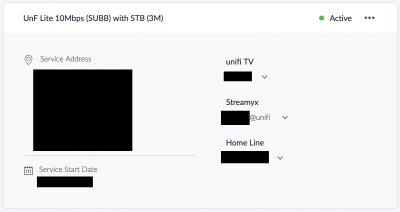
|
|
|
|
|
|
blacktubi
|
May 11 2019, 11:23 PM
|
-
|
QUOTE(Honto @ May 11 2019, 10:49 PM) Hi, guys where can i get a contractor to rewire back my unifi cable outside my hse ? The technician said the cable kaput already. TM should cover it until the fibre termination point, get TM back to fix it. |
|
|
|
|
|
blacktubi
|
May 12 2019, 01:46 PM
|
-
|
QUOTE(AVFAN @ May 12 2019, 01:02 PM) This kind of thing can be subjective. It depends on what is meant by outside and what caused the failure. If outside means outside yr land, u hv better argument. More so if reason is unclear and technician is kind. If it is within yr own land and he could tell someone or somethng within yr control damaged it, tough. Do lodge complaint if unsatisfied... but u may be left without service for days n weeks. If it’s a pole based installation, anywhere between the pole and the fibre termination point at the building will be external wiring in which TM is liable to fix it. I not sure about the newer underground wiring installation. |
|
|
|
|
|
blacktubi
|
May 13 2019, 09:46 PM
|
-
|
QUOTE(weikee @ May 13 2019, 09:42 PM) Now at the corner it can't be bend, if do so you may face bend losses or snapping the cable. Anyway, that not the best way to install, his workmanshop is lousy, the cable can go higher to the ceiling, and do a circular bending. That's totally fine and will last forever, I have seen worst installation that are highly abused and still work perfectly. Modern fibre optic is quite bendy. Attached image(s) |
|
|
|
|



 Quote
Quote
 0.2036sec
 0.23
0.23
 7 queries
 GZIP Disabled