Discoveries from UPB 2.0 (no pics)
Device name: unifi-TV
Printed on the box» Click to show Spoiler - click again to hide... «
> Supports IPTV
> Powered by Android TV
> Amlogic S905C1 chipset
> ARM Mali-G31 GPU
> 2GB DDR4 RAM
> 16GB Flash Storage
> Dolby Digital Plus
> High Dynamic Range 10
> 4K UHD Resolution
Contents in box» Click to show Spoiler - click again to hide... «
1x UPB 2.0 box
1x Remote (IR/BT)
2x AA batteries
1x AC adapter
1x 3.5mm AV cable
1x LAN cable
1x HDMI cable
1x Quick Start Guide
3x MAC address stickers
1x QC passed label
Software info» Click to show Spoiler - click again to hide... «
Factory firmwareAndroid 10
Security patch 5 Jul 2021
Kernel 4.9.180; #1 Thu Aug 12 16:17:04 CST 2021
Build QTT2.200720.001.P2.0.2_20210812 release-keys
Remote software version 0126
"Day one" (idk) updateAndroid 10
Security patch 5 Nov 2021
Kernel 4.9.180; #1 Fri Dec 31 15:35:11 CST 2021
Build QTT2.200720.001.P2.0.2_20211231 release-keys
Size: 815MB
Remote software unchanged
Update description
» Click to show Spoiler - click again to hide... «
New update:
1. IPTV Player Optimization
2. OTT Partner Preinstalled
3. New Android TV security patch
Enjoy the best experience with our latest system update
To install now, restart your device
Initial setup experience» Click to show Spoiler - click again to hide... «
Setup is apparently similar to UPB 1.0. Required Internet access and login Google account to setup. Very common to be stuck at "Please wait..." (same as UPB 1.0) after connecting to LAN (VLAN probably doesn't work yet), so best to use stock TM router/connect via WiFi until setup finishes. VLAN600 IPTV can be setup later.
Initial setup will prompt to pair with BT remote. Can skip but the IR performance is crippled. LED light on UPB will flash orange to indicate IR input received but will consistently miss inputs or require double pressing buttons. Everytime startup will nag to pair BT if remote is unpaired. BT mode has 0 problems so far, Google Assistant not tested.
Box startup with unifi TV as default app. UI is same as UPB 1.0 app, so no mosaic, no 3 digit channel numbers.
For users migrating from HyppTV/old Huawei box (EC2108E/EC6108V8)» Click to show Spoiler - click again to hide... «
unifi TV app will have no online connection in VLAN mode. Login with playTV username and password via WiFi/normal LAN first before switching to VLAN.
Reminder that you will not get mosaic screen anymore. IPTV stream will passthrough to unifi TV app when connected to VLAN600.
1. Disconnect from WiFi/normal LAN and connect to VLAN port on router (usually LAN4).
2. Launch "Skyworth IPTV service" app. Press OK as prompted to launch unifi TV app.
3. "Replace Device" screen will appear, select old device model to replace then press Confirm. This will remove access to the old HyppTV box.
Apps (YT, BBC, iQiYi etc) will not be usable when connected to VLAN only. "Catch Up" and "On Demand" in unifi TV app will work. Enable WiFi or plug into normal LAN to use apps.
Login via WiFi/normal LAN is only necessary for first time migrating from Huawei box. For future setup (eg. after factory reset) can skip Skyworth app while in VLAN, just open unifi TV and login.
Supported resolutions» Click to show Spoiler - click again to hide... «
> 4k2k(3840x2160)-59.94hz, 50hz, 29.97hz, 25hz, 23.976hz, smpte (4096x2160@24hz)
> 1080p-59.94hz, 50hz, 23.976hz
> 720p-59.94hz, 50hz
> 1080i-59.94hz, 50hz
> 576p-50hz
> 480p-59.94hz
Encountered issues» Click to show Spoiler - click again to hide... «
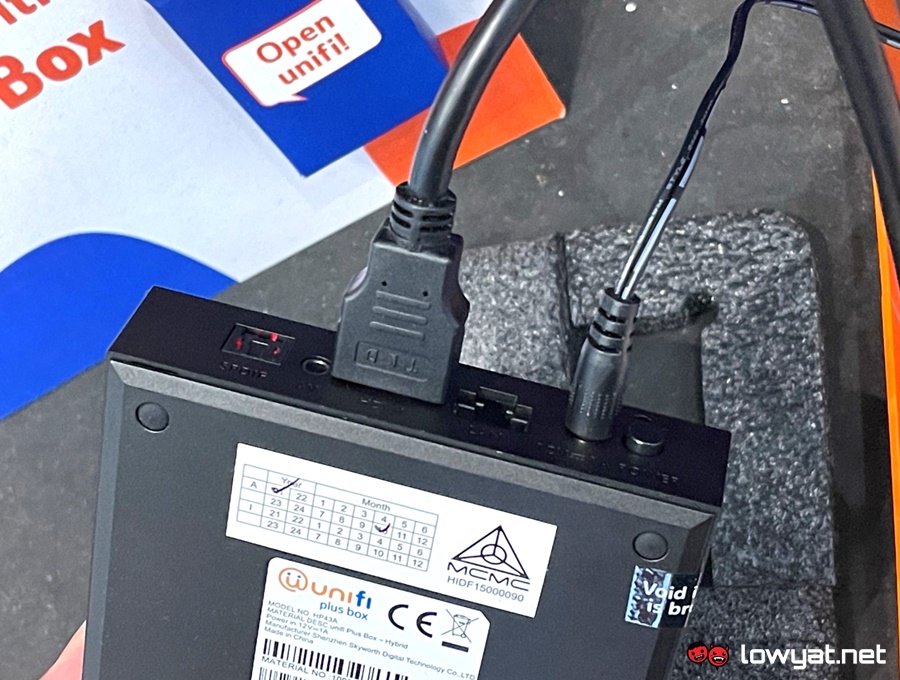
> Spacing between 3.5mm AV and HDMI is very tight, require narrow connector to accommodate both. Tested with plugging 3.5mm headset with HDMI and audio is very soft out of 3.5mm, HDMI is normal but delayed few milliseconds
> Adding Google account took >5 mins of loading. Use stock TM router to shorten loading time
> Can check but couldn't download firmware update with custom router (LAN/VLAN/WiFi). Had to use stock TM router to download
> Some TVs may randomly flash several times before losing video signal (HDMI). Issue may be caused by resuming UPB from sleep/standby. Try (A) putting TV/UPB into standby then turning back on, or (B) disabling "Auto switch to best resolution". If both doesn't work, restart the box
> "Oops, something went wrong... Press OK to reload app" issue from UPB 1.0 when using normal LAN/WiFi also affects new UPB. IPTV users can switch to VLAN to avoid issue, but other users will have to try using "Exit App" then relaunch (unifi logo animation must play), disconnect and reconnect LAN/WiFi or restart box
> Randomly when cold booting/clean shutdown (hold remote off button, press OK) UPB will be stuck on black unifi TV bootsplash. Have to power off and on again
> No sideloading of apps, even with app installer/file manager downloaded from Play Store
> Can access Developer options with Roy Solberg's app (
app) but USB debugging is disabled. Be careful to not turn off Developer options toggle otherwise everything will also be disabled, although can be restored with factory reset
> Encountered very strange message. When adjusting YT subtitles a message appeared "This operation cannot guarantee the safety of the device. Continue?" OK/Cancel is shown, but ~5 seconds later OK is automatically highlighted then disappeared. Was watching
with YT app and adjusting subtitle size on latest "day one" FW and YT version. Message box style is same as "confirm change resolution" message, so is probably caused by Skyworth. Remote and DS4 controller connected via BT, not sure what changed
Will update when new findings appear.
CHANGELOG» Click to show Spoiler - click again to hide... «
#03 (220518)
Initial setup experience
> Updated suggestion to speed up "Please wait..." screen. Found out that using stock TM router (tested with DIR-842 on TM FW) can shorten the wait time
HyppTV migration
> Added note for skipping Skyworth app after first time migration
Encountered issues
> Stuck on bootsplash issue can also occur during cold boot
#02 (220509)
> Added changelog
HyppTV migration
> Updated instructions to enter username/password first before entering VLAN
> Added "Catch Up" and "On Demand" working via VLAN
Supported resolutions
> Added resolution info for 4k2k and smpte options
> Removed no signal issue for 480p
Encountered issues
> Updated spacing issue between AV and HDMI
> Changed suggestion to resolve TV random flashing issue
> Added suggestion to fix "Oops, something went wrong" issue
> Added clean shutdown issue
> Updated "very strange message" info
#01 (220501)
> Initial post
This post has been edited by cns20: May 18 2022, 01:30 PM 

 Apr 12 2022, 01:57 PM


 Quote
Quote


 0.0340sec
 0.77
0.77
 7 queries
 GZIP Disabled