

QUOTE(Pulaboo @ Oct 7 2025, 10:51 AM)
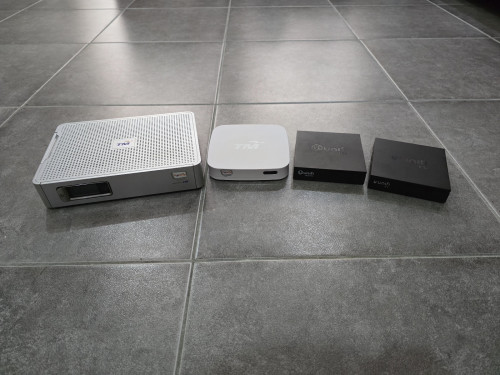
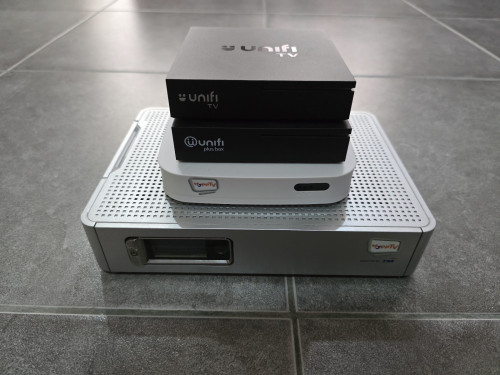
Just recently got the latest unifi tv stb (HP4B) and was a bit nostalgic, so I went and took out the older models. Here are 4 generations of hypp/unifi tv set-top boxes.

Unifi TV Ver 2, Formerly known as HyppTV
|
|
 Oct 7 2025, 10:53 AM Oct 7 2025, 10:53 AM
Show posts by this member only | IPv6 | Post
#8701
|
 
Probation
2 posts Joined: Jul 2024 
|
QUOTE(Pulaboo @ Oct 7 2025, 10:51 AM) Just recently got the latest unifi tv stb (HP4B) and was a bit nostalgic, so I went and took out the older models. Here are 4 generations of hypp/unifi tv set-top boxes. |
|
|
|
|
|
Oct 7 2025, 11:47 AM
|

Junior Member
189 posts Joined: Jul 2018 
|
QUOTE(coolguy_0925 @ Oct 6 2025, 08:32 PM) Anyone managed to switch to any of the new tv packs? I submitted my application through my unifi app on 27th Sep and call again to CS on 4th Oct when no one from unifi call to confirm my order.Mind sharing your experience? Thanks! The CS said will escalate the matter but until today my order is not shown in my app. Feliex liked this post
|
|
|
Oct 7 2025, 12:02 PM
|
|
Senior Member
1,026 posts Joined: Jan 2003 From: Kuala Lumpur, Malaysia
|
QUOTE(Pulaboo @ Oct 7 2025, 10:53 AM) Correction, HP4BF model best part is all the boxes is useable to watch Unifi tv doubleM2 liked this post
|
|
|
Oct 7 2025, 12:45 PM
Show posts by this member only | IPv6 | Post
#8704
|
|
Senior Member
1,024 posts Joined: Jun 2019
|
QUOTE(Pulaboo @ Oct 7 2025, 10:51 AM) Just recently got the latest unifi tv stb (HP4B) and was a bit nostalgic, so I went and took out the older models. Here are 4 generations of hypp/unifi tv set-top boxes. Pulaboo liked this post
|
|
|
Oct 7 2025, 01:42 PM
Show posts by this member only | IPv6 | Post
#8705
|
|
Newbie
9 posts Joined: Jul 2012
|
QUOTE(doubleM2 @ Oct 7 2025, 12:45 PM) 5 actually. You’re missing the first gen of Unifi Plus Box, the rounded square one (with no Netflix support). yes ada 5 |
|
|
Oct 7 2025, 04:42 PM
Show posts by this member only | IPv6 | Post
#8706
|
|
Junior Member
451 posts Joined: Apr 2018
|
QUOTE(doubleM2 @ Oct 7 2025, 12:45 PM) 5 actually. You’re missing the first gen of Unifi Plus Box, the rounded square one (with no Netflix support). QUOTE(cyruz @ Oct 7 2025, 01:42 PM) yes ada 5 Don't forget the smaller silver ones. 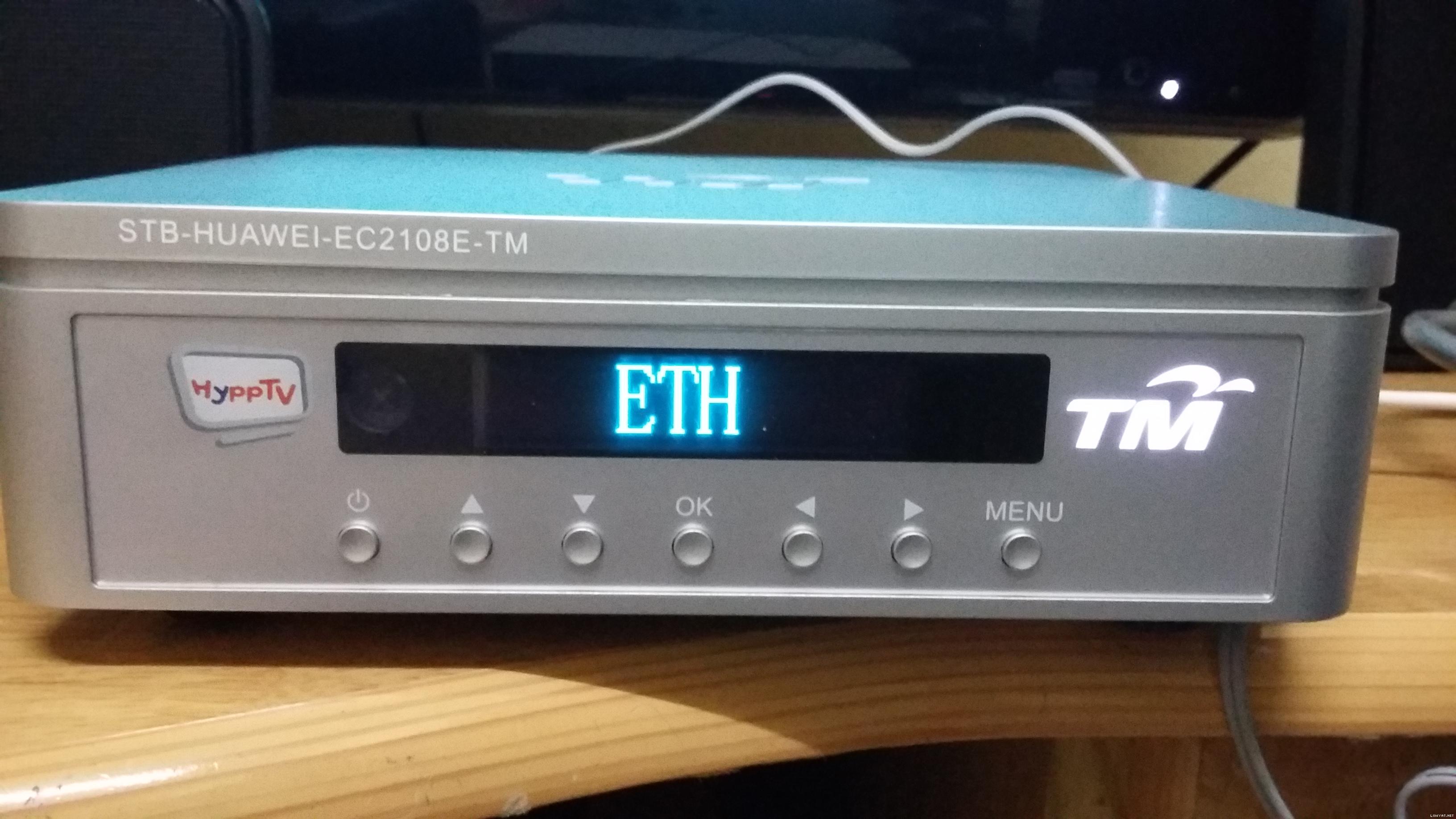 This post has been edited by AV_2018: Oct 7 2025, 04:46 PM |
|
|
|
|
|
Oct 7 2025, 07:53 PM
Show posts by this member only | IPv6 | Post
#8707
|
|
Probation
2 posts Joined: Jul 2024
|
My preliminary and incomplete review of the new unifi TV Plus Box (HP4BF model) due to the fact that I STILL can’t login to Unifi TV 2.0 (Belum migrated)
This review/impression might be a bit long. Initial box impression: The new box looks almost exactly the same compared to the HP43A, V2 model except for the embossed unifi TV characters on the front and also an updated logo on top of the box. The dimensions are almost identical with the same ports’ layout making upgrade easy. I tried it with the older power supply and it works flawlessly making it plug and play. TM did downgrade the USB ports making all of them USB 2.0 while the older one has 1 USB 2.0 and 1 USB 3.0. This did not bother as I had never even used the USB ports. Other than that, the box feels pretty solid. Software Experience: Onwards to the software experienceeeee. You turn it on, pair the given remote, log in to your Google account and you’re in. One sidenote is that when I got the older HP43A model, the remote that came with it was the older one from the 1st gen unifi TV Plus Box model (HP40A3), meaning that the remote has plastic buttons and most important for me, has no advertisement at all. The new one has four extra advertisements, namely Prime Video, Disney+ Hotstar, Netflix, YouTube and all the buttons are made of rubber. Once you finished setting up, you be redirected to a new launcher, no more Android TV Home, no Google TV Home, hellooooo Unifi TV CL (Unifi TV Custom Launcher). There are two sidebar options, Home and Apps. Pressing the home button on your remote will now direct you to Unifi TV while pressing the apps button will naturally bring you to menu page. Per the fact that I still have yet to be migrated to Unifi TV 2.0, the new home/unifi tv page is completely nonfunctional for me. Putting it the credentials will only pop up a warning telling me to go back to Unifi TV 1.0 🥲. The menu is exactly what you expect and it presents itself in a grid layout akin to android/google tv home launcher. As for my own opinions regarding the new Unifi TV Custom Launcher, I don’t quite like the fact that pressing home brings me back to Unifi TV itself. Pressing home should go back to home and if you want to, just add a unifi button that does the same thing, much better if I do say myself. Aside from the newly launched launcher, the performance also leaves a lot to desire. Going from an app or multiple apps, and back to home is quite laggy, taking more than 5-10 seconds to load. Worse yet, clicking the apps button is also unreliable, sometimes being instantaneous while other times it takes forever to load. It uhhhhhh, also has a tendency to crash 🥲. This is slightly problematic as crashing instantly turns your screen black, new user might not know if the launcher is at fault or the box is at fault. Contrast this with the v2 box, if the Unifi TV 1.0 app were to crash, it will simply boot you back to the home menu, most people will then click the Unifi TV app again and all is well. No IPTV: Since I have no access to Unifi TV 2.0, I thought of installing Unifi TV 1.0 to see if anything has changed. This brings me to the next part which for me is the worst change of all, the complete omission of IPTV. There is no longer an option to connect Unifi TV 1.0 with IPTV, meaning Unifi TV now uses regular internet to bring you all the broadcast. I made sure to use the same ethernet cable and confirmed IPTV is no available. This is quite disappointing as loading content will always be low resolution at first, then the resolution will slowly reach its highest setting. This part is also not completely true as based on my personal experience, only some channels will eventually load in HD/Full HD while others will linger forever in SD resolution. I need to reiterate that once more, I have no access to Unifi TV 2.0, so I really hope that it does not suffer from the same fate as Unifi TV 1.0. Positivity plssss: On a more positive note, the new HP4BF model now comes preloaded with Android 14 bringing you the latest features and security updates. The one new feature I’m genuinely glad for is the “Match Content Dynamic Range” option in the display and sound settings. The V3 is now capable of displaying SDR content in SDR while correctly switching to HDR mode when playing HDR/HLG content. I tested it with YouTube and Disney+ Hotstar, both worked seamlessly. Although, I am a bit sad that Dolby Vision is still not available, but I suspect that has to do with TM not wanting to pay for the hefty royalty fee 🙁. Haiihhh, you can’t have everything with a free set top box😔😔. The box that came with it does say that it supports HDR10+, unfortunately I only have a Sony TV (HDR10, HLG, Dolby Vision only) so if anyone has a compatible Philips, Panasonic, Hisense, Vizio, TCL or Samsung tv, do test it out. Another wonderful inclusion is the support for AV1 codec, which in my eyes is a surprise, to be sure, but a welcome one seeing that TM is not known to push the boundaries (Refer to complaint in the references). I tested it with YouTube, selected a few 4K60P HDR10 videos and they all say av01 in the stats for nerds, I am very, very satisfied. Conclusion, finally: Overall, I am cautiously happy with the upgrade/sidegrade??? The inclusion of match content frame rate and AV1 makes it a future ready device (5-7 years lah I think until the implementation of H266 and AV2 codecs). Unfortunately, I can’t test the core of Unifi which is Unifi TV itself and I hope I won’t be let down. One more thing, for whatever reason my box allows me to turn on “Install Unknown Sources” for everything. Have fun. References: Add the https yourself //unifi.com.my/tv/support/remote-control - For the remote, its actually missing the first gen silvery grey remote //www.androidtv-guide.com/pay-tv-provider/telekom-malaysia-unifi-tv-plus-box/ - 1st generation unifi TV Plus Box //www.androidtv-guide.com/pay-tv-provider/telekom-malaysia-unifi-tv-plus-box-v2/ - 2nd generation unifi TV Plus Box //www.androidtv-guide.com/pay-tv-provider/telekom-unifi-tv-box-v3/ - 3rd generation unifi TV Plus Box / It also says support for IPTV but I think TM disabled it or decided using the internet is just easier The complaint: I remember back then TM/Unifi was supposed to introduce 4k channels, which we all know never arrived. Whatever happened to my beloved Love Nature 4k. Also I still prefer the old, live grid options to see all the channels, easy to see what’s going on |
|
|
Oct 7 2025, 08:38 PM
Show posts by this member only | IPv6 | Post
#8708
|
|
Senior Member
3,032 posts Joined: Dec 2011
|
QUOTE(Pulaboo @ Oct 7 2025, 07:53 PM) My preliminary and incomplete review of the new unifi TV Plus Box (HP4BF model) due to the fact that I STILL can’t login to Unifi TV 2.0 (Belum migrated) Live grid not all channel can be viewed. Especially there is a lot new channel missing in live grid view. This review/impression might be a bit long. Initial box impression: The new box looks almost exactly the same compared to the HP43A, V2 model except for the embossed unifi TV characters on the front and also an updated logo on top of the box. The dimensions are almost identical with the same ports’ layout making upgrade easy. I tried it with the older power supply and it works flawlessly making it plug and play. TM did downgrade the USB ports making all of them USB 2.0 while the older one has 1 USB 2.0 and 1 USB 3.0. This did not bother as I had never even used the USB ports. Other than that, the box feels pretty solid. Software Experience: Onwards to the software experienceeeee. You turn it on, pair the given remote, log in to your Google account and you’re in. One sidenote is that when I got the older HP43A model, the remote that came with it was the older one from the 1st gen unifi TV Plus Box model (HP40A3), meaning that the remote has plastic buttons and most important for me, has no advertisement at all. The new one has four extra advertisements, namely Prime Video, Disney+ Hotstar, Netflix, YouTube and all the buttons are made of rubber. Once you finished setting up, you be redirected to a new launcher, no more Android TV Home, no Google TV Home, hellooooo Unifi TV CL (Unifi TV Custom Launcher). There are two sidebar options, Home and Apps. Pressing the home button on your remote will now direct you to Unifi TV while pressing the apps button will naturally bring you to menu page. Per the fact that I still have yet to be migrated to Unifi TV 2.0, the new home/unifi tv page is completely nonfunctional for me. Putting it the credentials will only pop up a warning telling me to go back to Unifi TV 1.0 🥲. The menu is exactly what you expect and it presents itself in a grid layout akin to android/google tv home launcher. As for my own opinions regarding the new Unifi TV Custom Launcher, I don’t quite like the fact that pressing home brings me back to Unifi TV itself. Pressing home should go back to home and if you want to, just add a unifi button that does the same thing, much better if I do say myself. Aside from the newly launched launcher, the performance also leaves a lot to desire. Going from an app or multiple apps, and back to home is quite laggy, taking more than 5-10 seconds to load. Worse yet, clicking the apps button is also unreliable, sometimes being instantaneous while other times it takes forever to load. It uhhhhhh, also has a tendency to crash 🥲. This is slightly problematic as crashing instantly turns your screen black, new user might not know if the launcher is at fault or the box is at fault. Contrast this with the v2 box, if the Unifi TV 1.0 app were to crash, it will simply boot you back to the home menu, most people will then click the Unifi TV app again and all is well. No IPTV: Since I have no access to Unifi TV 2.0, I thought of installing Unifi TV 1.0 to see if anything has changed. This brings me to the next part which for me is the worst change of all, the complete omission of IPTV. There is no longer an option to connect Unifi TV 1.0 with IPTV, meaning Unifi TV now uses regular internet to bring you all the broadcast. I made sure to use the same ethernet cable and confirmed IPTV is no available. This is quite disappointing as loading content will always be low resolution at first, then the resolution will slowly reach its highest setting. This part is also not completely true as based on my personal experience, only some channels will eventually load in HD/Full HD while others will linger forever in SD resolution. I need to reiterate that once more, I have no access to Unifi TV 2.0, so I really hope that it does not suffer from the same fate as Unifi TV 1.0. Positivity plssss: On a more positive note, the new HP4BF model now comes preloaded with Android 14 bringing you the latest features and security updates. The one new feature I’m genuinely glad for is the “Match Content Dynamic Range” option in the display and sound settings. The V3 is now capable of displaying SDR content in SDR while correctly switching to HDR mode when playing HDR/HLG content. I tested it with YouTube and Disney+ Hotstar, both worked seamlessly. Although, I am a bit sad that Dolby Vision is still not available, but I suspect that has to do with TM not wanting to pay for the hefty royalty fee 🙁. Haiihhh, you can’t have everything with a free set top box😔😔. The box that came with it does say that it supports HDR10+, unfortunately I only have a Sony TV (HDR10, HLG, Dolby Vision only) so if anyone has a compatible Philips, Panasonic, Hisense, Vizio, TCL or Samsung tv, do test it out. Another wonderful inclusion is the support for AV1 codec, which in my eyes is a surprise, to be sure, but a welcome one seeing that TM is not known to push the boundaries (Refer to complaint in the references). I tested it with YouTube, selected a few 4K60P HDR10 videos and they all say av01 in the stats for nerds, I am very, very satisfied. Conclusion, finally: Overall, I am cautiously happy with the upgrade/sidegrade??? The inclusion of match content frame rate and AV1 makes it a future ready device (5-7 years lah I think until the implementation of H266 and AV2 codecs). Unfortunately, I can’t test the core of Unifi which is Unifi TV itself and I hope I won’t be let down. One more thing, for whatever reason my box allows me to turn on “Install Unknown Sources” for everything. Have fun. References: Add the https yourself //unifi.com.my/tv/support/remote-control - For the remote, its actually missing the first gen silvery grey remote //www.androidtv-guide.com/pay-tv-provider/telekom-malaysia-unifi-tv-plus-box/ - 1st generation unifi TV Plus Box //www.androidtv-guide.com/pay-tv-provider/telekom-malaysia-unifi-tv-plus-box-v2/ - 2nd generation unifi TV Plus Box //www.androidtv-guide.com/pay-tv-provider/telekom-unifi-tv-box-v3/ - 3rd generation unifi TV Plus Box / It also says support for IPTV but I think TM disabled it or decided using the internet is just easier The complaint: I remember back then TM/Unifi was supposed to introduce 4k channels, which we all know never arrived. Whatever happened to my beloved Love Nature 4k. Also I still prefer the old, live grid options to see all the channels, easy to see what’s going on AV_2018 liked this post
|
|
|
Oct 7 2025, 08:40 PM
Show posts by this member only | IPv6 | Post
#8709
|
|
Junior Member
451 posts Joined: Apr 2018
|
QUOTE(jusbella @ Oct 7 2025, 08:38 PM) Live grid not all channel can be viewed. Especially there is a lot new channel missing in live grid view. Ya. Often have missing channels or channels no longer exist but still there. Sometimes when I enter a channel, the content is different from the preview! So I usually just use guide or info instead of grid. jusbella liked this post
|
|
|
Oct 7 2025, 08:44 PM
Show posts by this member only | IPv6 | Post
#8710
|
|
Senior Member
1,024 posts Joined: Jun 2019
|
QUOTE(AV_2018 @ Oct 7 2025, 04:42 PM) Don't forget the smaller silver ones. So 7 lah 😂Mine was getting this Huawei model during Streamyx bundle era (the 3-stripes LED one), the White Box, the first gen Unifi Plus Box, and the 2nd gen Unifi TV Box (with the new logo & remote). This post has been edited by doubleM2: Oct 7 2025, 08:49 PM |
|
|
Oct 7 2025, 09:16 PM
|
|
Senior Member
4,538 posts Joined: Jan 2003
|
QUOTE(Feliex @ Oct 7 2025, 10:03 AM) Using the Myunifi app to order last Wednesday, (My Order & My Activity is empty) already made 2 reports, till today no sound. I believe the data is missing / false in the wrong column. QUOTE(Aspick @ Oct 7 2025, 11:47 AM) I submitted my application through my unifi app on 27th Sep and call again to CS on 4th Oct when no one from unifi call to confirm my order. Thanks for the updateThe CS said will escalate the matter but until today my order is not shown in my app. Same here for me, the service request just stuck there for 2 weeks already Chat only reply asking to wait for respond from respective team without really helping Feliex liked this post
|
|
|
Oct 8 2025, 12:00 AM
|

Junior Member
835 posts Joined: Oct 2006 
|
QUOTE(coolguy_0925 @ Oct 7 2025, 09:16 PM) Thanks for the update Ask them open case and request the report number.Same here for me, the service request just stuck there for 2 weeks already Chat only reply asking to wait for respond from respective team without really helping |
|
|
Oct 8 2025, 12:33 AM
Show posts by this member only | IPv6 | Post
#8713
|
|
Senior Member
1,024 posts Joined: Jun 2019
|
QUOTE(Fantasia @ Oct 4 2025, 03:43 PM) I saw 1 instagram post said that it will still use Hotstar version https://www.instagram.com/p/DPVgnSPAccg/ 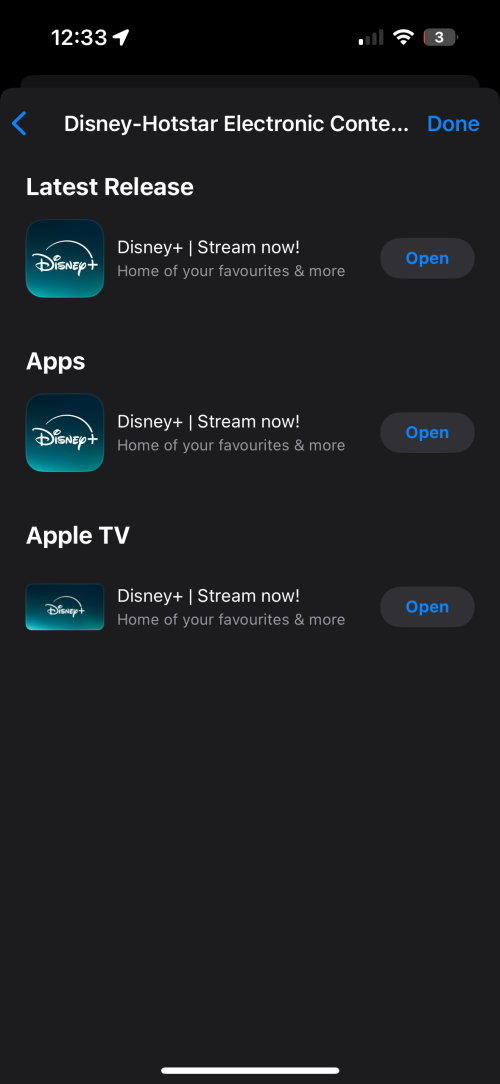 This post has been edited by doubleM2: Oct 8 2025, 12:34 AM |
|
|
|
|
|
Oct 8 2025, 12:34 AM
|
|
Senior Member
4,538 posts Joined: Jan 2003
|
QUOTE(Feliex @ Oct 8 2025, 12:00 AM) Ask them open case and request the report number. Already with report number (Service Request Number)But as always Level 1 chat can do nothing much Even I mentioned it has been more than a week the reply still the same, as if I was chatting with a bot Feliex liked this post
|
|
|
Oct 8 2025, 04:15 PM
|
|
Senior Member
4,381 posts Joined: Jan 2003
|
Just received HP4BF Unifi TV Box.
|
|
|
Oct 8 2025, 06:22 PM
Show posts by this member only | IPv6 | Post
#8716
|
|
Junior Member
189 posts Joined: Jul 2018
|
QUOTE(coolguy_0925 @ Oct 8 2025, 12:34 AM) Already with report number (Service Request Number) Went to Unifi Kepong branch today and complain about their zero response after submitting application to switch TV pack on 27th sep and after lodging a report on 4th Oct.But as always Level 1 chat can do nothing much Even I mentioned it has been more than a week the reply still the same, as if I was chatting with a bot The CS at the centre could not do much except acknowledging I had lodged a report and provide me the service report number. Their system showed my case is at hq level and it will take between 3 to 7 working days to resolve. Told me to call their hotline after 7 days if no response. Why launch unifi TV 2.0 in a hurry if their backend not ready to handle simple switching from old pack to new tv pack. Feliex and coolguy_0925 liked this post
|
|
|
Oct 8 2025, 08:55 PM
Show posts by this member only | IPv6 | Post
#8717
|
|
Senior Member
5,476 posts Joined: Feb 2009
|
QUOTE(doubleM2 @ Oct 8 2025, 12:33 AM) |
|
|
Oct 9 2025, 12:44 AM
Show posts by this member only | IPv6 | Post
#8718
|
|
Senior Member
1,024 posts Joined: Jun 2019
|
QUOTE(Fantasia @ Oct 8 2025, 08:55 PM) I opened the app in my TV just now. It still show Hotstar Fret not.It’s now Disney+ from today onwards. Despite the rebrand, the platform still runs on “Hotstar X,” worlds apart from the polished Disney+ app seen in the U.S. and Singapore. |
|
|
Oct 9 2025, 05:24 PM
Show posts by this member only | IPv6 | Post
#8719
|
|
Probation
2 posts Joined: Jul 2024
|
A friendly reminder to everyone using the older v2 (HP43A) model that once you are migrated to the new Unifi TV 2.0, you will be forced to update your box to the latest version which WILL replace the current Android TV Home Launcher to the Unifi TV Custom Launcher. If you want to keep the current android tv home launcher, you cannot update which means you will also lose access to unifi tv as once you are migrated to Unifi TV 2.0, you can no longer use the original Unifi TV 1.0 app, it will force you to the new app which will force you to update the whole box. My current suggestion if you want to keep the current android tv launcher, you can switch to the new V3 (HP4BF) box which comes preloaded with Unifi TV 2.0 and keep the old V2 box. This does mean your V2 box can no longer be used to watch Unifi TV channels.
|
|
|
Oct 9 2025, 07:07 PM
Show posts by this member only | IPv6 | Post
#8720
|
|
Junior Member
451 posts Joined: Apr 2018
|
QUOTE(kingkingyyk @ Sep 29 2025, 06:50 PM) Upgraded in my Sony TV and facing the same issue. So annoying. Works smooth on my Sony TV. Splash screen is longer than other apps at ~5 seconds but after that it's almost lag free. No crashes so far. You can only get into the main page by luck. The QA is a failure. You can only get into the main page by luck. The QA is a failure.  QUOTE(jhleo1 @ Oct 8 2025, 04:15 PM) Just received HP4BF Unifi TV Box. Received too.QUOTE(Fantasia @ Oct 8 2025, 08:55 PM) I opened the app in my TV just now. It still show Hotstar Updated on phone and Google TV. After restart become Disney+ only and inside have Hulu instead of Star.About the HP4BF STB It is smoother with way less lag compared to the previous gen STB that I used at relative's place but running the Unifi 2.0 app on Google TV is still smoother. It also has AV1 video decoder that works on YouTube up to 4K60 HDR as well as ability to match content dynamic range. Android 14 with 5 May 2025 security patch and 5.15 kernel. Hailstorm version 6.4.0. Compared to Google TV, it appears to be missing privacy section in settings menu. It appears to always output audio in Dolby MAT format where it is PCM but triggers Dolby Surround decoder on AV Receiver. The STB can be controlled with TV remote via HDMI CEC. Ports/buttons (back): TOSLINK Composite video + Analog audio 3.5mm HDMI Ethernet DC in Power button Ports/buttons (side): USB 2.0 USB 2.0 reset pin-hole Supported HDR formats: HDR10 HLG Disabled HDR formats: Dolby Vision Unknown: HDR10+ (shown on box but disabled in STB but my display does not support HDR10+) Supported audio formats: Dolby Digital Dolby Digital Plus Dolby Atmos with Dolby Digital Plus DTS Max power consumption: 12W About Unifi TV 2.0 Average bitrate is around 4Mbps measured with router. The quality looks good enough. It reaches max quality when opening channels in <= 3 seconds and before that it is instantly at close to max quality. Compared to Unifi 1.0 app, it is way better. Previous app takes longer time to load a channel, starts off with blurry low resolution and takes longer to reach max quality as well as often takes forever to load menus. The TV guide layout is also nicer to use compared to previous app and is closer to old VLAN STB. Difference between Unifi STB and running the Unifi 2.0 app on Google TV device: Although they look similar, the layout is actually different such as on catch-up page. Unifi TV 2.0 on STB has Netflix icon and content integrated in the home page but not in Unifi TV 2.0 app on Google TV. Apps page on STB and TV app is different. Google TV app can auto default to English subtitles but STB need to set subtitle every time change channel. The audio and subtitle setting page looks different on both. Google TV one shows more languages than STB. STB can sign in without phone app and can manage signed-in devices but Google TV app need phone app to sign-in and cannot manage signed-in devices. Both my Google TV and Unifi STB are connected via Ethernet with Wi-Fi disabled. This post has been edited by AV_2018: Oct 9 2025, 08:59 PM |
| Change to: |  0.0338sec 0.0338sec
 0.48 0.48
 6 queries 6 queries
 GZIP Disabled GZIP Disabled
Time is now: 3rd December 2025 - 05:38 AM |
 Quote
Quote