

Attached thumbnail(s)
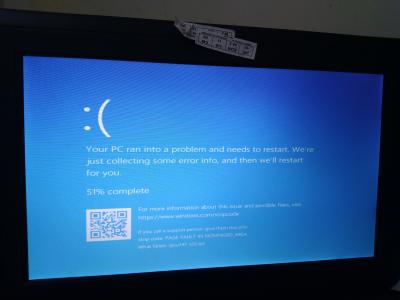
My laptop always restart, Laptop problem
|
|
 Jan 17 2019, 12:43 PM, updated 7y ago Jan 17 2019, 12:43 PM, updated 7y ago
Show posts by this member only | Post
#1
|
 
Junior Member
121 posts Joined: Aug 2012 
|
Recently I have changed ssd to my laptop, since that my laptop alway restart, I wonder why?? can you help me..and I already run windows 10..here example of the picture shown
Attached thumbnail(s)
|
|
|
|
|
|
Jan 17 2019, 12:49 PM
Show posts by this member only | Post
#2
|

Junior Member
976 posts Joined: Nov 2014 From: Sandakan, Sabah 
|
macam ram. you use CPUz to check it?
|
|
|
Jan 17 2019, 12:50 PM
Show posts by this member only | Post
#3
|

Junior Member
693 posts Joined: Jul 2017
|
perhaps your windows installation is corrupted
|
|
|
Jan 17 2019, 12:57 PM
Show posts by this member only | Post
#4
|

Junior Member
488 posts Joined: May 2009 From: damansara
|
Reinstall Windows if u cloned from hdd to ssd
|
|
|
Jan 17 2019, 01:29 PM
Show posts by this member only | Post
#5
|
|
Junior Member
121 posts Joined: Aug 2012
|
QUOTE(wailam @ Jan 17 2019, 01:49 PM) macam ram. you use CPUz to check it? Cpu z? |
|
|
Jan 17 2019, 01:35 PM
Show posts by this member only | Post
#6
|

Junior Member
931 posts Joined: Jan 2017 From: Kuala Lumpur
|
Page fault - either turn it off or set automatically managed by windows.
|
|
|
|
|
|
May 24 2019, 10:21 AM
Show posts by this member only | Post
#7
|

Probation
2 posts Joined: May 2019 
|
This is also the case with my computer. Is your solution solved? I called the computer technician and never answered the phone!
 |
|
|
May 24 2019, 11:26 AM
Show posts by this member only | Post
#8
|
|
Newbie
13 posts Joined: Dec 2017
|
If you interested in repairing your laptop send me a PM
 QUOTE(Quentin Moria @ May 24 2019, 10:21 AM) This is also the case with my computer. Is your solution solved? I called the computer technician and never answered the phone! |
|
|
Jun 24 2019, 09:36 AM
Show posts by this member only | Post
#9
|

Senior Member
2,348 posts Joined: Apr 2008
|
Look at your BSOD is caused by CPUZ141 x32.sys
my solution is very simple, just fully uninstall and clean out CPU-Z from your Windows system. Then redownload and install the latest version of CPU-z, the current latest version is 1.89 but yours is 1.41. Firstly, download and install Reg Organizer. You do not need to find it, just download the provided link below. I was uploaded to my cloud storage. Reg Organizer 8.29 Click on the install command to install Reg Organizer 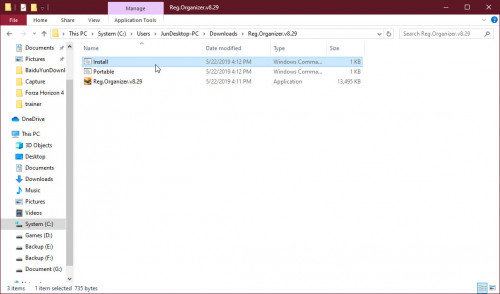 Start Reg Organizer then uninstall your CPU-Z by using their uninstaller. Make sure you have done a trace scanning and done remove all the registries. 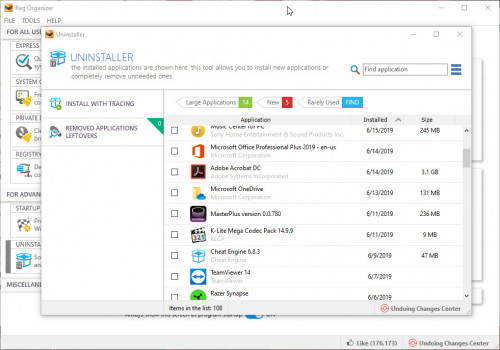 After done uninstall CPU-Z, go to "Registry Editor 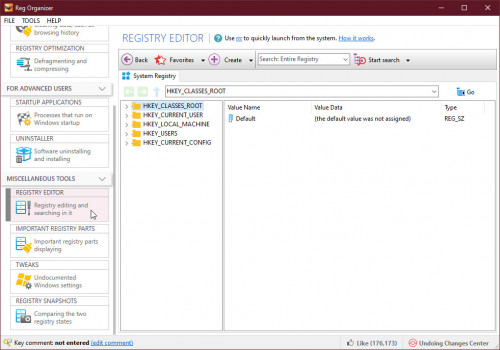 Then search for the keyword "cpuz". Scan for anything related to cpuz then remove them all. 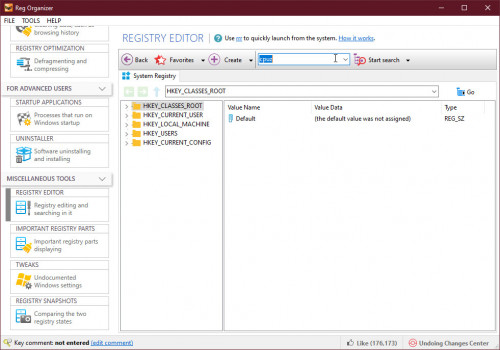 Restart Windows after done. Now visit https://www.cpuid.com/softwares/cpu-z.html to download the latest version and install it. If you are still facing this problem, I need to know your SSD is cloned from the old harddisk or just fresh clean install Windows 10? If you did this by cloning, perhaps you need to backup all the important data first, then boot install Windows by USB drive. You need 8GB pendrive + rufus. Make sure to choose Custom Install when you boot install Windows. You must first format the whole SSD first before to proceed for Windows installation. This post has been edited by junclj: Jun 24 2019, 09:48 AM |
| Change to: |  0.0161sec 0.0161sec
 0.81 0.81
 6 queries 6 queries
 GZIP Disabled GZIP Disabled
Time is now: 15th December 2025 - 03:45 PM |
 Quote
Quote