

 Oct 11 2020, 07:31 PM


QUOTE(andriyasuad @ Oct 8 2020, 08:23 PM)
Hello Guys,
Not sure if I am posting in the right channel. This is my first time posting here.
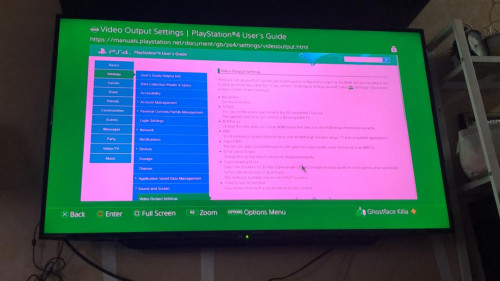
I've recently bought a new Sharp 4k UHD TV to pair with my PS4 (standard). Shockingly, its not compatible. I've tried to change HDMI, change display/rgb setting on PS4. The TV still shown green tint color back ground as PS4 output display. Change HDMI slot, it works perfectly fine with my Chromecast.
MY TV model are: Sharp 4tc50ah8x
Full description can be seen here: https://my.sharp/products/tvav/4tc50ah8x
I am using the first generation of PS4.
Sample of display as per below. Need kind Sifus here to guide me on how to move forward. Google have failed me.
Thank you in advance!

I would try to run in safe mode and see if it helps.Not sure if I am posting in the right channel. This is my first time posting here.
I've recently bought a new Sharp 4k UHD TV to pair with my PS4 (standard). Shockingly, its not compatible. I've tried to change HDMI, change display/rgb setting on PS4. The TV still shown green tint color back ground as PS4 output display. Change HDMI slot, it works perfectly fine with my Chromecast.
MY TV model are: Sharp 4tc50ah8x
Full description can be seen here: https://my.sharp/products/tvav/4tc50ah8x
I am using the first generation of PS4.
Sample of display as per below. Need kind Sifus here to guide me on how to move forward. Google have failed me.
Thank you in advance!
 Quote
Quote
 0.0574sec
 0.33
0.33
 7 queries
 GZIP Disabled