

QUOTE(phyz @ Nov 27 2021, 07:17 PM)
Did not work with mine too...is there any way to get into that page?Currently v3.07TM 

It still working. Copy this link (ftp://ftp2.dlink.com/PRODUCTS/DIR-842/REVC/) to your file explorer.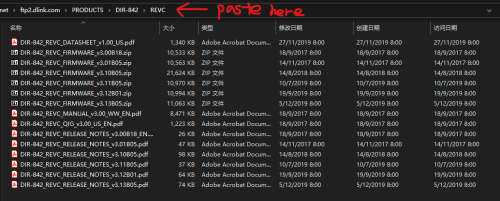
Unifi D-Link DIR-842 - Remove @unifi SSID
|
|
 Nov 28 2021, 01:07 AM Nov 28 2021, 01:07 AM
|
 
Junior Member
183 posts Joined: Jun 2020 From: IPOH  
|
QUOTE(phyz @ Nov 27 2021, 07:17 PM) Did not work with mine too...is there any way to get into that page?Currently v3.07TM It still working. Copy this link (ftp://ftp2.dlink.com/PRODUCTS/DIR-842/REVC/) to your file explorer. |
|
|
|
|
|
Dec 1 2021, 05:14 PM
|

Senior Member
966 posts Joined: Apr 2016
|
QUOTE(Cincai.La @ Nov 28 2021, 01:07 AM) It still working. Copy this link (ftp://ftp2.dlink.com/PRODUCTS/DIR-842/REVC/) to your file explorer. I cannot access the recovery room although follow all steps with button. |
|
|
Dec 12 2021, 06:09 PM
|

Senior Member
617 posts Joined: Mar 2005 From: Mars
|
1.Download the 2 firmware into your pc from DLINK FIRMWARE
2.You will need to download 3.10 and 3.13. You only need the DIR842C1_FW302b03_middle.bin from 3.10. 3.Extract the .bin into your pc. 4.Unplug the power. Poke the reset button and hold. Power on your router. Keep your eye on the power LED. Once it started to blink immediately let go of the reset button. 5.You can safely enter 192.168.0.1 now. (Remember to set the ip as in page 1) 6.Upload DIR842C1_FW302b03_middle.bin and start upgrading. 7.When the upgrading is completed, just login thru the DLINK UI by clicking login without typing any password. 8.Go to the upgrade page and upload the 3.13 .bin and upgrade. 9.Done. Do your UNIFI setting. MHaffiezMNazri tarpaucase Mushwashan JuneResources MIYK knzamy ThornsFC StevenL prokiller1199 phyz xjoshualaw29 This post has been edited by sailou: Dec 12 2021, 07:08 PM |
|
|
Dec 16 2021, 12:27 AM
|

Senior Member
4,168 posts Joined: Mar 2012 From: Kuala Lumpur   
|
QUOTE(sailou @ Dec 12 2021, 06:09 PM) 1.Download the 2 firmware into your pc from DLINK FIRMWARE Haha.. I done already. Use another dlink router can access Recovery Mode last few months2.You will need to download 3.10 and 3.13. You only need the DIR842C1_FW302b03_middle.bin from 3.10. 3.Extract the .bin into your pc. 4.Unplug the power. Poke the reset button and hold. Power on your router. Keep your eye on the power LED. Once it started to blink immediately let go of the reset button. 5.You can safely enter 192.168.0.1 now. (Remember to set the ip as in page 1) 6.Upload DIR842C1_FW302b03_middle.bin and start upgrading. 7.When the upgrading is completed, just login thru the DLINK UI by clicking login without typing any password. 8.Go to the upgrade page and upload the 3.13 .bin and upgrade. 9.Done. Do your UNIFI setting. MHaffiezMNazri tarpaucase Mushwashan JuneResources MIYK knzamy ThornsFC StevenL prokiller1199 phyz xjoshualaw29 I'm realize some of the dlink router unable to access Recovery mode. If cannot access Recovery mode, that means your dlink router semi-faulty (unable to access Recovery Mode). In this case, nothing can do... |
|
|
Dec 16 2021, 09:51 AM
|
|
Senior Member
617 posts Joined: Mar 2005 From: Mars
|
QUOTE(JuneResources @ Dec 16 2021, 12:27 AM) Haha.. I done already. Use another dlink router can access Recovery Mode last few months I have exactly same problem like everyone else. Tried multiple times until I use the bolded part method.I'm realize some of the dlink router unable to access Recovery mode. If cannot access Recovery mode, that means your dlink router semi-faulty (unable to access Recovery Mode). In this case, nothing can do... |
|
|
Dec 17 2021, 07:24 PM
|
|
Senior Member
966 posts Joined: Apr 2016
|
QUOTE(sailou @ Dec 16 2021, 09:51 AM) I have exactly same problem like everyone else. Tried multiple times until I use the bolded part method. so u can't access the recovery GUI before. now can? |
|
|
|
|
|
Dec 17 2021, 07:54 PM
|
|
Senior Member
617 posts Joined: Mar 2005 From: Mars
|
QUOTE(prokiller1199 @ Dec 17 2021, 07:24 PM) so u can't access the recovery GUI before. now can? Yes. At first totally cannot access the recovery GUI although the power LED blinking despite trying many times.Then I change method. Just kept my eye on the power LED. Once it blink immediately release reset button. It works on my first try and subsequent tries also good. |
|
|
Dec 17 2021, 07:55 PM
|
|
Senior Member
966 posts Joined: Apr 2016
|
QUOTE(sailou @ Dec 17 2021, 07:54 PM) Yes. At first totally cannot access the recovery GUI although the power LED blinking despite trying many times. okok I will try.Then I change method. Just kept my eye on the power LED. Once it blink immediately release reset button. It works on my first try and subsequent tries also good. |
|
|
Dec 17 2021, 10:43 PM
|
|
Senior Member
4,168 posts Joined: Mar 2012 From: Kuala Lumpur
|
QUOTE(sailou @ Dec 16 2021, 09:51 AM) I have exactly same problem like everyone else. Tried multiple times until I use the bolded part method. My old dlink router got try at least 1 or 2 years, no hope for it.Luckily one of my friend cancel the fiber package, so leave the router throw like trash. So request my friend give me the dlink router for doing some testing.. Who know use my friend very easy go to recovery GUI. Then I use the same method way for my old dlink. Unfortunately, "The Page was not found" and does not show any recovery GUI. I predict that some of dlink router uni** purposes remove the recovery GUI.. |
|
|
Dec 18 2021, 02:50 PM
Show posts by this member only | IPv6 | Post
#130
|

Junior Member
73 posts Joined: Mar 2007
|
I had the same problem initially but later reset to the factory default (192.168.0.1) and make sure router works in this range. After that the recovery appeared.
If your router was not in 192.168.0.x, maybe you can try this. This post has been edited by wsian: Dec 18 2021, 03:49 PM |
|
|
Mar 11 2022, 10:52 PM
|
|
Junior Member
345 posts Joined: Apr 2005 From: Kajang
|
For those on firmware 3.06TM, please try 192.168.0.10. I was about to give up after 2 days of trying to load openwrt before this works for me.
|
|
|
Mar 17 2022, 04:24 PM
|
|
Probation
2 posts Joined: Jul 2019
|
Evening,
#1 About downloading the firmware. If you paste the link given on file explorer it will request to open external software instead. This is because it leads to the file instead (i think?). You need to direct it to folder (picture shown) and it should work. I tell this because I literally download external software that requires money (I do trial instead) just to access it. #9 That part where you need to flash firmware through Recovery Mode sent me nuts for an hour. I used firefox and ms edge, after clicked upload, nothing freaking happens! Until I use Internet Explorer (don't know why), it finally works!!!! That's all from me incase somebody encounters the same problem as me, you can refer above for solution. My original router firmware was v3.06TM 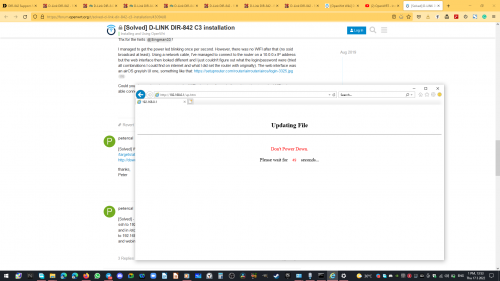 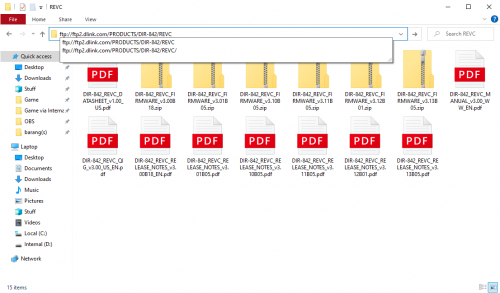 Attached thumbnail(s) 
|
|
|
Aug 14 2022, 09:06 AM
|
|
Senior Member
4,168 posts Joined: Mar 2012 From: Kuala Lumpur
|
Anybody already get the Dlink x1860z?
Can somebody share how about the wifi name still have @unifi suffix? Meanwhile, how the firmware? Is it original from dlink? |
|
|
|
|
|
Aug 30 2022, 11:38 AM
Show posts by this member only | IPv6 | Post
#134
|

Senior Member
1,705 posts Joined: Jan 2003 From: Sepang - Putrajaya - Cyberjaya
|
QUOTE(JuneResources @ Aug 14 2022, 09:06 AM) Anybody already get the Dlink x1860z? X1860Z doesnt have @unifi wifi suffix.Can somebody share how about the wifi name still have @unifi suffix? Meanwhile, how the firmware? Is it original from dlink? firmware customized for TM. doesn't have for download at DLink portal. only available X1860. |
|
|
Aug 30 2022, 05:37 PM
|
|
Senior Member
4,168 posts Joined: Mar 2012 From: Kuala Lumpur
|
QUOTE(Max @ Aug 30 2022, 11:38 AM) X1860Z doesnt have @unifi wifi suffix. Would you mind to share the bottom dlink of information? (of course if you want censored the serial number or MAC address, i'm understand of it)firmware customized for TM. doesn't have for download at DLink portal. only available X1860. Just curious that Z version is using what hardware version? I saw the X1860 official one is:- Hardware: A1 Firmware: v1.02B06 Mind to share the firmware n hardware details? Thanks a lot. This post has been edited by JuneResources: Aug 30 2022, 05:38 PM |
|
|
Aug 30 2022, 07:06 PM
Show posts by this member only | IPv6 | Post
#136
|
|
Senior Member
1,705 posts Joined: Jan 2003 From: Sepang - Putrajaya - Cyberjaya
|
QUOTE(JuneResources @ Aug 30 2022, 05:37 PM) Would you mind to share the bottom dlink of information? (of course if you want censored the serial number or MAC address, i'm understand of it) From DLink Wifi ConnectJust curious that Z version is using what hardware version? I saw the X1860 official one is:- Hardware: A1 Firmware: v1.02B06 Mind to share the firmware n hardware details? Thanks a lot. (This app only support TM Z router. X1860Z/X3060Z) 
This post has been edited by Max: Aug 30 2022, 07:08 PM |
|
|
Aug 30 2022, 07:45 PM
|

Senior Member
2,075 posts Joined: Sep 2021 From: nowhere
|
https://www.netis-systems.com/Home/detail/id/227.html
it seems like x1860z is ODM rebrand from infamous Netis (maker of crap orange 4-in-1 router-gateway) |
|
|
Aug 30 2022, 08:17 PM
Show posts by this member only | IPv6 | Post
#138
|
|
Senior Member
2,608 posts Joined: Nov 2020
|
QUOTE(MyProLife @ Aug 30 2022, 07:45 PM) https://www.netis-systems.com/Home/detail/id/227.html Huh? How do these 2 router share the same design yet different brandsit seems like x1860z is ODM rebrand from infamous Netis (maker of crap orange 4-in-1 router-gateway) https://www.dlink.com.my/product/ax1800-wi-...al-band-router/ |
|
|
Aug 30 2022, 08:27 PM
|
|
Senior Member
2,075 posts Joined: Sep 2021 From: nowhere
|
QUOTE(PRSXFENG @ Aug 30 2022, 08:17 PM) Huh? How do these 2 router share the same design yet different brands think this is like illegear laptophttps://www.dlink.com.my/product/ax1800-wi-...al-band-router/ illegear share same design with tongfang own mechrevo and also other brands like XMG or eleuktronics PRSXFENG liked this post
|
|
|
Aug 30 2022, 11:02 PM
|
|
Senior Member
4,168 posts Joined: Mar 2012 From: Kuala Lumpur
|
QUOTE(Max @ Aug 30 2022, 07:06 PM) From DLink Wifi Connect Just wondering if use firmware X1860 (without Z version) root to X1860Z device, whether can work or not? (This app only support TM Z router. X1860Z/X3060Z)
 That's damn high risk since there is no recovery original IMG file firmware..  QUOTE(PRSXFENG @ Aug 30 2022, 08:17 PM) Huh? How do these 2 router share the same design yet different brands https://www.dlink.com.my/product/ax1800-wi-...al-band-router/ QUOTE(MyProLife @ Aug 30 2022, 08:27 PM) think this is like illegear laptop Can't believe got copy cat either Dlink or Netis...illegear share same design with tongfang own mechrevo and also other brands like XMG or eleuktronics Look same design, but spec slightly different? Netis - 880MHz dual-core CPU Dlink - 1GHz dual-core CPU Start to suspect nowadays Dlink quality not like what I'm thinking before...  This post has been edited by JuneResources: Aug 30 2022, 11:03 PM |
| Change to: |  0.0369sec 0.0369sec
 0.39 0.39
 6 queries 6 queries
 GZIP Disabled GZIP Disabled
Time is now: 9th December 2025 - 08:20 AM |
 Quote
Quote