Outline ·
[ Standard ] ·
Linear+
NEW Acer monitor KG241QP? Need review, 1ms , 144hz 1920x1080
|
TScaloyness
|
 Nov 30 2018, 03:24 PM, updated 7y ago Nov 30 2018, 03:24 PM, updated 7y ago
|
Getting Started


|
new budget 144hz in the market.. if someone buy , please make a review. https://www.facebook.com/JustItTechnology/p...64713420233459/This post has been edited by caloyness: Nov 30 2018, 03:24 PM |
|
|
|
|
|
luqmanz
|
Jan 11 2019, 09:18 PM
|
|
|
just wanna know what is the Freesync range ? 30-144 ?
|
|
|
|
|
|
jetblast
|
Jan 17 2019, 11:51 PM
|
|
|
Good news. Can use nvidia GPU for G-sync. Tested G-sync compatible
|
|
|
|
|
|
konchy
|
Jan 18 2019, 09:02 PM
|
New Member
|
QUOTE(jetblast @ Jan 17 2019, 11:51 PM) Good news. Can use nvidia GPU for G-sync. Tested G-sync compatible Thanks for the update. I'm considering this monitor also. Any pros and cons with this monitor? I'm also considering the ViewSonic XG2402. Thanks This post has been edited by konchy: Jan 18 2019, 09:02 PM |
|
|
|
|
|
jetblast
|
Jan 18 2019, 10:17 PM
|
|
|
QUOTE(konchy @ Jan 18 2019, 09:02 PM) Thanks for the update. I'm considering this monitor also. Any pros and cons with this monitor? I'm also considering the ViewSonic XG2402. Thanks Really cheap for a 144hz monitor so I don't see any cons. Colour also not too bad for a TN. |
|
|
|
|
|
konchy
|
Jan 18 2019, 10:30 PM
|
New Member
|
Ok, can you share the link for the G-sync compatible confirmation? or you tested this yourself? Thanks
|
|
|
|
|
|
konchy
|
Jan 18 2019, 10:31 PM
|
New Member
|
QUOTE(jetblast @ Jan 18 2019, 10:17 PM) Really cheap for a 144hz monitor so I don't see any cons. Colour also not too bad for a TN. Ok, can you share the link for the G-sync compatible confirmation? or you tested this yourself? Thanks |
|
|
|
|
|
jetblast
|
Jan 19 2019, 05:48 AM
|
|
|
QUOTE(konchy @ Jan 18 2019, 10:31 PM) Ok, can you share the link for the G-sync compatible confirmation? or you tested this yourself? Thanks I tested it myself. But you should watch the hardware unboxed video on YouTube on how it works. |
|
|
|
|
|
luqmanz
|
Jan 21 2019, 11:46 PM
|
|
|
QUOTE(caloyness @ Nov 30 2018, 03:24 PM) new budget 144hz in the market.. if someone buy , please make a review. https://www.facebook.com/JustItTechnology/p...64713420233459/Just bought it today. The bezel is actually thicker than it seems in photo .but no problem for me. Color isnt too bad initially. I recalibrated using Spyder5 and now it looks like my LG ips monitor. The freesync range is 48-144. I changed to 35-144 and have no problem gaming so far. At this price.. its a STEAL ... its much better than I expected.. no ghosting so the 1ms claim is real i think. Worth every penny. The leg isnt very flexible.. can tilt up/down only.. but sturdy enough |
|
|
|
|
|
TScaloyness
|
Jan 22 2019, 10:36 AM
|
Getting Started
|
QUOTE(luqmanz @ Jan 21 2019, 11:46 PM) Just bought it today. The bezel is actually thicker than it seems in photo .but no problem for me. Color isnt too bad initially. I recalibrated using Spyder5 and now it looks like my LG ips monitor. The freesync range is 48-144. I changed to 35-144 and have no problem gaming so far. At this price.. its a STEAL ... its much better than I expected.. no ghosting so the 1ms claim is real i think. Worth every penny. The leg isnt very flexible.. can tilt up/down only.. but sturdy enough good to hear about that, some people are skeptical about this monitor due to very low price. |
|
|
|
|
|
Azureknight94
|
Jan 22 2019, 06:45 PM
|
|
|
QUOTE(luqmanz @ Jan 21 2019, 11:46 PM) Just bought it today. The bezel is actually thicker than it seems in photo .but no problem for me. Color isnt too bad initially. I recalibrated using Spyder5 and now it looks like my LG ips monitor. The freesync range is 48-144. I changed to 35-144 and have no problem gaming so far. At this price.. its a STEAL ... its much better than I expected.. no ghosting so the 1ms claim is real i think. Worth every penny. The leg isnt very flexible.. can tilt up/down only.. but sturdy enough Can share your color profile? Only thing holding me back right now is whether the colors are decent or not. The older xf model rm7xx with height adjustable stand has more info/reviews on it |
|
|
|
|
|
luqmanz
|
Jan 22 2019, 08:21 PM
|
|
|
QUOTE(Azureknight94 @ Jan 22 2019, 06:45 PM) Can share your color profile? Only thing holding me back right now is whether the colors are decent or not. The older xf model rm7xx with height adjustable stand has more info/reviews on it KG241QP color profile and settings Here you go .... 1) reset to factory settings first ... 2) use settings as in pictures 3) install the profile  drive_download_20190122T121818Z_001.zip
 ( 1mb )
Number of downloads: 1414 |
|
|
|
|
|
Azureknight94
|
Jan 22 2019, 08:33 PM
|
|
|
QUOTE(luqmanz @ Jan 22 2019, 08:21 PM) KG241QP color profile and settings Here you go .... 1) reset to factory settings first ... 2) use settings as in pictures 3) install the profile
drive_download_20190122T121818Z_001.zip ( 1mb )
Number of downloads: 1414Thanks a lot! Got color profile then no worries d haha i can order the monitor now  |
|
|
|
|
|
konchy
|
Jan 23 2019, 09:52 PM
|
New Member
|
QUOTE(luqmanz @ Jan 22 2019, 08:21 PM) KG241QP color profile and settings Here you go .... 1) reset to factory settings first ... 2) use settings as in pictures 3) install the profile
drive_download_20190122T121818Z_001.zip ( 1mb )
Number of downloads: 1414Did it come with any display cables? displayport / hdmi? |
|
|
|
|
|
seanlee89
|
Jan 24 2019, 12:41 AM
|
|
|
Just got this monitor as well. I felt the settings made the monitor kinda reddish.
|
|
|
|
|
|
seanlee89
|
Jan 24 2019, 12:42 AM
|
|
|
QUOTE(luqmanz @ Jan 21 2019, 11:46 PM) Just bought it today. The bezel is actually thicker than it seems in photo .but no problem for me. Color isnt too bad initially. I recalibrated using Spyder5 and now it looks like my LG ips monitor. The freesync range is 48-144. I changed to 35-144 and have no problem gaming so far. At this price.. its a STEAL ... its much better than I expected.. no ghosting so the 1ms claim is real i think. Worth every penny. The leg isnt very flexible.. can tilt up/down only.. but sturdy enough Hi Luqmanz, may I know how you change the range? Thx |
|
|
|
|
|
Azureknight94
|
Jan 24 2019, 01:14 PM
|
|
|
QUOTE(seanlee89 @ Jan 24 2019, 12:41 AM) Just got this monitor as well. I felt the settings made the monitor kinda reddish. Just got the monitor as well and tried the settings. Agree it makes it kinda reddish  but maybe need sometime to adjust to it. Anyways can always just revert to the default settings if we prefer it later on. Bezels are definitely larger than my previous Dell monitor but the 144hz does make a difference IMO  even scrolling etc seems much smoother now |
|
|
|
|
|
TScaloyness
|
Jan 24 2019, 01:28 PM
|
Getting Started
|
QUOTE(Azureknight94 @ Jan 24 2019, 01:14 PM) Just got the monitor as well and tried the settings. Agree it makes it kinda reddish but maybe need sometime to adjust to it. Anyways can always just revert to the default settings if we prefer it later on. Bezels are definitely larger than my previous Dell monitor but the 144hz does make a difference IMO even scrolling etc seems much smoother now once you get 120hz above, there's no going back to 60hz haha |
|
|
|
|
|
luqmanz
|
Jan 24 2019, 01:43 PM
|
|
|
QUOTE(seanlee89 @ Jan 24 2019, 12:42 AM) Hi Luqmanz, may I know how you change the range? Thx Using CRU ... Custom Resolution Utility .. but I think default one is better ... |
|
|
|
|
|
luqmanz
|
Jan 24 2019, 01:43 PM
|
|
|
QUOTE(konchy @ Jan 23 2019, 09:52 PM) Did it come with any display cables? displayport / hdmi? HDMI cable only ... |
|
|
|
|
|
seanlee89
|
Jan 24 2019, 04:22 PM
|
|
|
Hmm...not sure if it's me but I dont think the colour profile does anything?
|
|
|
|
|
|
luqmanz
|
Jan 24 2019, 05:01 PM
|
|
|
QUOTE(seanlee89 @ Jan 24 2019, 04:22 PM) Hmm...not sure if it's me but I dont think the colour profile does anything? U need to install DisplayCal ... the software manage the color profile better than Window |
|
|
|
|
|
TScaloyness
|
Jan 29 2019, 02:57 PM
|
Getting Started
|
QUOTE(luqmanz @ Jan 24 2019, 05:01 PM) U need to install DisplayCal ... the software manage the color profile better than Window but displayCal need instrument right? like sypder5 and other external tools to calibrate. |
|
|
|
|
|
luqmanz
|
Jan 29 2019, 07:11 PM
|
|
|
QUOTE(caloyness @ Jan 29 2019, 02:57 PM) but displayCal need instrument right? like sypder5 and other external tools to calibrate. Need instrument if you want to make own calibration ... but if u just want to apply calibration profile .. no need instrument... |
|
|
|
|
|
mazda
|
Feb 2 2019, 12:50 AM
|
Getting Started
|
does this monitor got audio out port?
|
|
|
|
|
|
gamerz6109
|
Feb 16 2019, 09:31 PM
|
New Member
|
What happen if this free-sync monitor pairs with GTX graphic card? Would it be terrible?
|
|
|
|
|
|
TScaloyness
|
Feb 18 2019, 09:37 AM
|
Getting Started
|
QUOTE(gamerz6109 @ Feb 16 2019, 09:31 PM) What happen if this free-sync monitor pairs with GTX graphic card? Would it be terrible? Freesync off = nothing , will work fine like ordinary monitor. Freesync on = freesync will work if your monitor is supported, else will work like ordinary monitor. |
|
|
|
|
|
gamerz6109
|
Feb 18 2019, 11:46 AM
|
New Member
|
QUOTE(caloyness @ Feb 18 2019, 09:37 AM) Freesync off = nothing , will work fine like ordinary monitor. Freesync on = freesync will work if your monitor is supported, else will work like ordinary monitor. Thanks for clearing my doubt, now i have no reason not to buy this monitor. |
|
|
|
|
|
queenc
|
Feb 18 2019, 11:49 AM
|
|
|
QUOTE(gamerz6109 @ Feb 16 2019, 09:31 PM) What happen if this free-sync monitor pairs with GTX graphic card? Would it be terrible? QUOTE(caloyness @ Feb 18 2019, 09:37 AM) Freesync off = nothing , will work fine like ordinary monitor. Freesync on = freesync will work if your monitor is supported, else will work like ordinary monitor. i thought nvidia already enable free snyc QUOTE One final note, G-Sync compatible and FreeSync monitors only work with Nvidia’s GTX 10 series or newer. We tested a variety of monitors with a GeForce RTX 2080 Ti, but all Pascal cards should also work. This is different to G-Sync monitors, which work with GPUs back to Nvidia’s GeForce 600 series. We believe this is because Pascal is the first GPU architecture to support adaptive sync as well as G-Sync, while older architectures supported just G-Sync. |
|
|
|
|
|
TScaloyness
|
Feb 18 2019, 01:18 PM
|
Getting Started
|
QUOTE(queenc @ Feb 18 2019, 11:49 AM) i thought nvidia already enable free snyc not guaranteed to work on all freesync monitor. they have list of tested working monitors provided online, you can google it. |
|
|
|
|
|
queenc
|
Feb 18 2019, 01:45 PM
|
|
|
QUOTE(caloyness @ Feb 18 2019, 01:18 PM) not guaranteed to work on all freesync monitor. they have list of tested working monitors provided online, you can google it. aww shit  |
|
|
|
|
|
luqmanz
|
Feb 18 2019, 02:01 PM
|
|
|
QUOTE(queenc @ Feb 18 2019, 01:45 PM) aww shit Even if its not in the list .. you can turn it on ... its just not guaranteed to work correctly ... |
|
|
|
|
|
jetblast
|
Feb 25 2019, 08:58 PM
|
|
|
I have this monitor and it works with gsync on my 1080ti.
|
|
|
|
|
|
sammm33
|
Jun 10 2019, 01:07 PM
|
|
|
hi guys wanna check , to use this monitor free sync via nvidia card , must connect via displayport ?
tried using the provided hdmi cable , but my 1080 no show the gsync compatibility mode in control panel ...
|
|
|
|
|
|
Snoopycute98
|
Jun 12 2019, 12:43 PM
|
|
|
QUOTE(sammm33 @ Jun 10 2019, 01:07 PM) hi guys wanna check , to use this monitor free sync via nvidia card , must connect via displayport ? tried using the provided hdmi cable , but my 1080 no show the gsync compatibility mode in control panel ... "No NVIDIA card to date supports any kind of adaptive sync over HDMI. DisplayPort only, if at all. On HDMI, you'll just get the static refresh rate the monitor supports (see monitor tech specs for details). The monitor will not match the frequency of the frame rate. GTX 970 has DisplayPort 1.2 (HBR2) and is G-Sync ready. What model is the monitor?" Source : https://www.techpowerup.com/forums/threads/...layport.252231/So this monitor supports G-Sync ? I am using GTX1060, feels like wanna change to this monitor |
|
|
|
|
|
sammm33
|
Jun 12 2019, 04:03 PM
|
|
|
QUOTE(Snoopycute98 @ Jun 12 2019, 12:43 PM) "No NVIDIA card to date supports any kind of adaptive sync over HDMI. DisplayPort only, if at all. On HDMI, you'll just get the static refresh rate the monitor supports (see monitor tech specs for details). The monitor will not match the frequency of the frame rate. GTX 970 has DisplayPort 1.2 (HBR2) and is G-Sync ready. What model is the monitor?" Source : https://www.techpowerup.com/forums/threads/...layport.252231/So this monitor supports G-Sync ? I am using GTX1060, feels like wanna change to this monitor That's the reason why I'm asking for confirmation. Some claim this monitor is G-sync compatible, but upon search no confirmation on that , most of the seller also never really reply and confirm, even thou they did market the monitor as g-sync compatible. My understanding is (correct me if I'm wrong) a true g-sync compatible monitor should have an option to setup that at nvidia control panel after plug in. But when plug in to this Acer monitor , even with a 1080 graphic card + latest driver+ display port cable, I don't see that option for enable g-sync compatible. This post has been edited by sammm33: Jun 12 2019, 04:05 PM |
|
|
|
|
|
luqmanz
|
Jun 12 2019, 04:35 PM
|
|
|
QUOTE(sammm33 @ Jun 12 2019, 04:03 PM) That's the reason why I'm asking for confirmation. Some claim this monitor is G-sync compatible, but upon search no confirmation on that , most of the seller also never really reply and confirm, even thou they did market the monitor as g-sync compatible. My understanding is (correct me if I'm wrong) a true g-sync compatible monitor should have an option to setup that at nvidia control panel after plug in. But when plug in to this Acer monitor , even with a 1080 graphic card + latest driver+ display port cable, I don't see that option for enable g-sync compatible. Are u using Displayport? u must use DisplayPort to get variable refresh rate with Nvidia. This post has been edited by luqmanz: Jun 12 2019, 04:35 PM |
|
|
|
|
|
sammm33
|
Jun 12 2019, 05:46 PM
|
|
|
QUOTE(luqmanz @ Jun 12 2019, 04:35 PM) Are u using Displayport? u must use DisplayPort to get variable refresh rate with Nvidia. yes, using latest driver + display port. or did i miss any other setting? some mention if no setting for setup G-sync compatible, there is another related setting under : > manage 3D settings > Global setting > vertical sync > adaptive is this true ?? |
|
|
|
|
|
Snoopycute98
|
Jun 12 2019, 07:15 PM
|
|
|
I just bought this monitor (QA latest variant), see how.
Btw, after I bought and told my friend, he sent me this model "ViewSonic vx2458-c-mhd" , curved 144hz.
Ayam a bit sad now, cuz that one curved has higher color gamut (85% ntsc) and slimmer bezels.
Did i made the wrong purchase tho?? Cuz this monitor is for family PC, parents x suka curved monitor.
|
|
|
|
|
|
zhi95
|
Jun 12 2019, 10:32 PM
|
New Member
|
QUOTE(Snoopycute98 @ Jun 12 2019, 07:15 PM) I just bought this monitor (QA latest variant), see how. Btw, after I bought and told my friend, he sent me this model "ViewSonic vx2458-c-mhd" , curved 144hz. Ayam a bit sad now, cuz that one curved has higher color gamut (85% ntsc) and slimmer bezels. Did i made the wrong purchase tho?? Cuz this monitor is for family PC, parents x suka curved monitor. any your review about the monitor, planning to buy the QA variant too |
|
|
|
|
|
Snoopycute98
|
Jun 12 2019, 11:49 PM
|
|
|
QUOTE(zhi95 @ Jun 12 2019, 10:32 PM) any your review about the monitor, planning to buy the QA variant too Waiting it to ship to my doorstep Will do a comparison between my old VE228H and my MSI PS42( 100% sRGB) But I dont have any professional tools la, jz compare with my naked eyes. |
|
|
|
|
|
Snoopycute98
|
Jun 13 2019, 07:46 PM
|
|
|
QUOTE(Snoopycute98 @ Jun 12 2019, 11:49 PM) Waiting it to ship to my doorstep Will do a comparison between my old VE228H and my MSI PS42( 100% sRGB) But I dont have any professional tools la, jz compare with my naked eyes. Monitor just arrive.. will do the testing tomorrow. |
|
|
|
|
|
Snoopycute98
|
Jun 14 2019, 01:23 PM
|
|
|
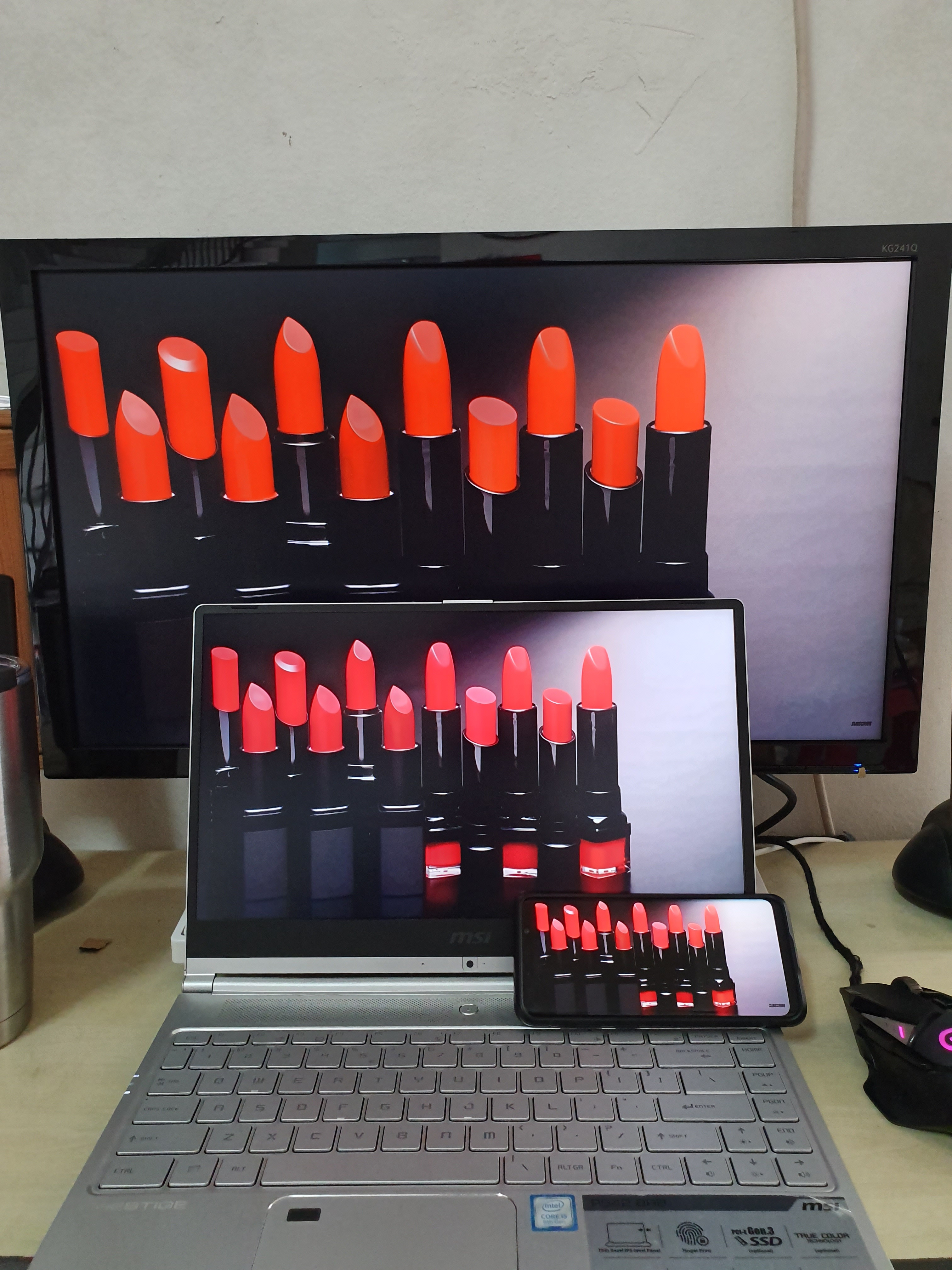 Applied color profile from luqmanz , for my QA variant. Color looks like Galaxy S9 (AMOLED Photo mode) However my PS42 was set to sRGB mode, but the color looks more vivid than others. This post has been edited by Snoopycute98: Jun 14 2019, 01:38 PM |
|
|
|
|
|
zhi95
|
Jun 14 2019, 10:43 PM
|
New Member
|
so do you like the monitor? any comment after using
|
|
|
|
|
|
schuessler
|
Jun 20 2019, 10:29 AM
|
Getting Started
|
Any comment on acer kg241qa lately?
|
|
|
|
|
|
Hou_JaI
|
Jun 20 2019, 02:48 PM
|
|
|
can some owner please capture a video during gameplay for this monitor?! the price is just too good to be left ALONE!
i am using a 1080ti, so g sync will work nicely? and i would need to get a displayport cable right?
This post has been edited by Hou_JaI: Jun 20 2019, 02:51 PM
|
|
|
|
|
|
Snoopycute98
|
Jun 21 2019, 05:33 PM
|
|
|
QUOTE(zhi95 @ Jun 14 2019, 10:43 PM) so do you like the monitor? any comment after using QUOTE(schuessler @ Jun 20 2019, 10:29 AM) Any comment on acer kg241qa lately? Yes.. Not bad for this price and for this monitor. QUOTE(Hou_JaI @ Jun 20 2019, 02:48 PM) can some owner please capture a video during gameplay for this monitor?! the price is just too good to be left ALONE! i am using a 1080ti, so g sync will work nicely? and i would need to get a displayport cable right? G-Sync does work. U need a DisplayPort cable. 
Can try to look for viewsonic curved 144HZ (around RM650), not sure about that one G-Sync tho. |
|
|
|
|
|
arefiq09
|
Jul 5 2019, 10:09 AM
|
Getting Started
|
Regarding the Acer KG241QA. I got a slight issue with it. When Im using HDMI cable, I can get 144hz. But when I use DisplayPort, 1.1 (change through monitor physical button) allow me to get up to 144Hz, however 1.2 only gets me to 92Hz, if I set higher than that it will become black screen with flicker. This is weird considering 1.2 supposed to be better than 1.1. I'm using Gigabyte GTX 1070 G1 Gaming btw, it has 3 DP ports, and all end in same result. I bought new DP cable thinking old one is damaged, but no avail.
|
|
|
|
|
|
gobiomani
|
Aug 13 2019, 12:01 PM
|
|
|
QUOTE(arefiq09 @ Jul 5 2019, 10:09 AM) Regarding the Acer KG241QA. I got a slight issue with it. When Im using HDMI cable, I can get 144hz. But when I use DisplayPort, 1.1 (change through monitor physical button) allow me to get up to 144Hz, however 1.2 only gets me to 92Hz, if I set higher than that it will become black screen with flicker. This is weird considering 1.2 supposed to be better than 1.1. I'm using Gigabyte GTX 1070 G1 Gaming btw, it has 3 DP ports, and all end in same result. I bought new DP cable thinking old one is damaged, but no avail. Maybe you need a better quality DP cable? Many cheap DP cables are rubbish and cause problems when higher refresh rate, higher bandwidth are required. Just use the old cable if its working already. Does DP 1.2 cable add anything other than higher bandwidth for 4k 120hz? |
|
|
|
|
|
arefiq09
|
Aug 13 2019, 03:46 PM
|
Getting Started
|
QUOTE(gobiomani @ Aug 13 2019, 12:01 PM) Maybe you need a better quality DP cable? Many cheap DP cables are rubbish and cause problems when higher refresh rate, higher bandwidth are required. Just use the old cable if its working already. Does DP 1.2 cable add anything other than higher bandwidth for 4k 120hz? There is no version for DP cable, I did try with 2 cables. Right now I just settled with DP1.1 config on the monitor. I still somehow can enable Freesync with 144Hz. I have feeling it's just software bug. |
|
|
|
|
|
gobiomani
|
Aug 13 2019, 04:19 PM
|
|
|
QUOTE(arefiq09 @ Aug 13 2019, 03:46 PM) There is no version for DP cable, I did try with 2 cables. Right now I just settled with DP1.1 config on the monitor. I still somehow can enable Freesync with 144Hz. I have feeling it's just software bug. Oh I see. So your 1.1 and 1.2 is based on choosing on the monitor OSD? That's quite weird. Maybe try a firmware update if its available for your monitor? |
|
|
|
|
|
arefiq09
|
Aug 13 2019, 04:42 PM
|
Getting Started
|
QUOTE(gobiomani @ Aug 13 2019, 04:19 PM) Oh I see. So your 1.1 and 1.2 is based on choosing on the monitor OSD? That's quite weird. Maybe try a firmware update if its available for your monitor? Yeah, I will try the firmware update if there is any. But as of now, everything is fine so I won't bother much. |
|
|
|
|
|
nerodante80
|
Aug 18 2019, 01:30 AM
|
Getting Started
|
So do ACER KG241QA support g sync over display port? I'm planning to get this
Edit: Oh answered already, thanks
ACER KG241QA vs Viewsonic VX2458-C-MHD, TN vs VA, new dilemma. I know VAs have better colour and contrast, but I cant stand motion blur and ghosting..... and the curve is so unnecessary...
Guess I will go with the acer...
This post has been edited by nerodante80: Aug 18 2019, 01:38 AM
|
|
|
|
|
|
zhi95
|
Nov 16 2019, 12:20 AM
|
New Member
|
finally just bought kg241qa, but dont know why in properties it wrote kg241QP, any user can feed back on that?
And the color profile is it just set up using setting inside the monitor? anything else need to done?
|
|
|
|
|
|
NOTORIOUS47 P
|
Jan 4 2020, 08:25 PM
|
New Member
|
QUOTE(zhi95 @ Nov 16 2019, 12:20 AM) finally just bought kg241qa, but dont know why in properties it wrote kg241QP, any user can feed back on that? And the color profile is it just set up using setting inside the monitor? anything else need to done? how is it so far? are the shades of black good? Is the 144hz smooth? I'm planning on getting the qa model too but I'm kinda sketched out by how few video reviews there are so you guys are my only bet I don't make the wrong decision |
|
|
|
|
|
luqmanz
|
Jan 4 2020, 10:22 PM
|
|
|
QUOTE(NOTORIOUS47 @ Jan 4 2020, 08:25 PM) how is it so far? are the shades of black good? Is the 144hz smooth? I'm planning on getting the qa model too but I'm kinda sketched out by how few video reviews there are so you guys are my only bet I don't make the wrong decision If you are ok with TN panel .... this monitor is good ... 144hz is smooth and color just need little bit tweaking to your liking ... it even works with Nvidia Gsync on Displayport |
|
|
|
|
|
NOTORIOUS47 P
|
Jan 5 2020, 02:48 AM
|
New Member
|
QUOTE(luqmanz @ Jan 4 2020, 10:22 PM) If you are ok with TN panel .... this monitor is good ... 144hz is smooth and color just need little bit tweaking to your liking ... it even works with Nvidia Gsync on Displayport thanks for the input! yeah I'm fine with it being a tn monitor I want the best response times for R6 and similar games just a lil worried about buyer remorse cause the Rm500-800 144hz monitor options are so damn confusing. But if there aren't any obvious downsides, for the price I can't complain  |
|
|
|
|
|
red-queen
|
Apr 14 2020, 01:49 PM
|
|
|
QUOTE(luqmanz @ Jan 21 2019, 11:46 PM) Just bought it today. The bezel is actually thicker than it seems in photo .but no problem for me. Color isnt too bad initially. I recalibrated using Spyder5 and now it looks like my LG ips monitor. The freesync range is 48-144. I changed to 35-144 and have no problem gaming so far. At this price.. its a STEAL ... its much better than I expected.. no ghosting so the 1ms claim is real i think. Worth every penny. The leg isnt very flexible.. can tilt up/down only.. but sturdy enough thanks for sharing the colour profile. followed yours and it's so much better than the default settings. |
|
|
|
|



 Quote
Quote









 0.0433sec
 1.36
1.36
 6 queries
 GZIP Disabled