Outline ·
[ Standard ] ·
Linear+
The iPhone XS / XS Max Discussion Thread | V4, Welcome to the big screens.
|
AlexisStarZ
|
 Nov 26 2018, 12:09 PM Nov 26 2018, 12:09 PM
|

|
Just got my iphone xs yesterday
However how come I cannot update the apps from app store via Wi-Fi and data
tried following method still the same
1. restart iphone
2. reset network settings
3. sign out and in Apple ID in iTunes > Restart
anyone can help ?
|
|
|
|
|
|
AlexisStarZ
|
Nov 26 2018, 02:49 PM
|
|
|
QUOTE(giggs_509 @ Nov 26 2018, 12:19 PM) What telco? Tried vpn connection? Maxis, but I buy outright, not via telco haven't tried using vpn yet just wondering, is it possible to update the apps by connecting iPhone to computer, then update via iTunes? As I need to update Clips, Keynote, Numbers, Pages and Apple Store only |
|
|
|
|
|
AlexisStarZ
|
Nov 26 2018, 03:22 PM
|
|
|
QUOTE(ejump82 @ Nov 26 2018, 02:58 PM) u purchase it using your ID? what do you mean purchased by ID? those are the apps already installed on my iPhone, so I think is FOC? As I am new to Apple, 1st time using Apple product *edit, tried to Google about unable to update Apple Store and Clips found that I must the apps once before can update  This post has been edited by AlexisStarZ: Nov 26 2018, 03:25 PM This post has been edited by AlexisStarZ: Nov 26 2018, 03:25 PM |
|
|
|
|
|
AlexisStarZ
|
Nov 26 2018, 05:31 PM
|
|
|
QUOTE(k8zw3ll @ Nov 26 2018, 04:33 PM) Have you opened these apps before? no, after I opened them then can update in App Store already before you quote me I already edit my post anyway thanks for the reply  |
|
|
|
|
|
AlexisStarZ
|
Nov 29 2018, 11:53 AM
|
|
|
anyone can recommend me the apps to allow us to transfer files like photos and music via WiFi from iPhone to computer or vice versa? lazy to use iTunes |
|
|
|
|
|
AlexisStarZ
|
Nov 29 2018, 12:12 PM
|
|
|
QUOTE(bernard90 @ Nov 29 2018, 11:59 AM) thanks, just installed it tried to transfer a PDF file from computer to my iPhone I can open the PDF file in send anywhere app, but when I tried to open using Adobe Reader Adobe Reader doesn't able to find the PDF file, can you assist on this issue? |
|
|
|
|
|
AlexisStarZ
|
Nov 29 2018, 05:25 PM
|
|
|
QUOTE(bernard90 @ Nov 29 2018, 02:20 PM) when you open pdf file in the apps, top right part got 1 share logo, u click it and you can find "open in adobe reader app" wow thanks for the tips how about song? I tried to transfer the song from computer to my iPhone How do I make it show and play on Music app? QUOTE(calvin_gsc @ Nov 29 2018, 03:25 PM) For photos specifically, i like to use http://rambax.com/simpletransfer Uses wifi rather than a cloud server for transfers. CODE Simple Transfer does not use or transfer your files to any external server. It provides a completely private website that can only be accessed by computers connected directly to your local WiFi network. Your photos and videos cannot be accessed from the Internet. thanks for the recommendation, will look for it |
|
|
|
|
|
AlexisStarZ
|
Dec 13 2018, 07:07 PM
|
|
|
just wondering does iphone able to do translation within the app? as previously I using Android, I can highlight the words then straight away convert to the language that I want as I just try to convert my email that I just received, it doesn't have the option to translate  |
|
|
|
|
|
AlexisStarZ
|
Dec 13 2018, 09:06 PM
|
|
|
QUOTE(mamamia @ Dec 13 2018, 08:06 PM) I normally use look up. Highlight the word n it will appear the option Thanks, I did tried to translate the email Is Japanese email, but when I tried to highlight the whole email or the whole sentence then is not working I did add the dictionary which is Japanese-English What wrong?? 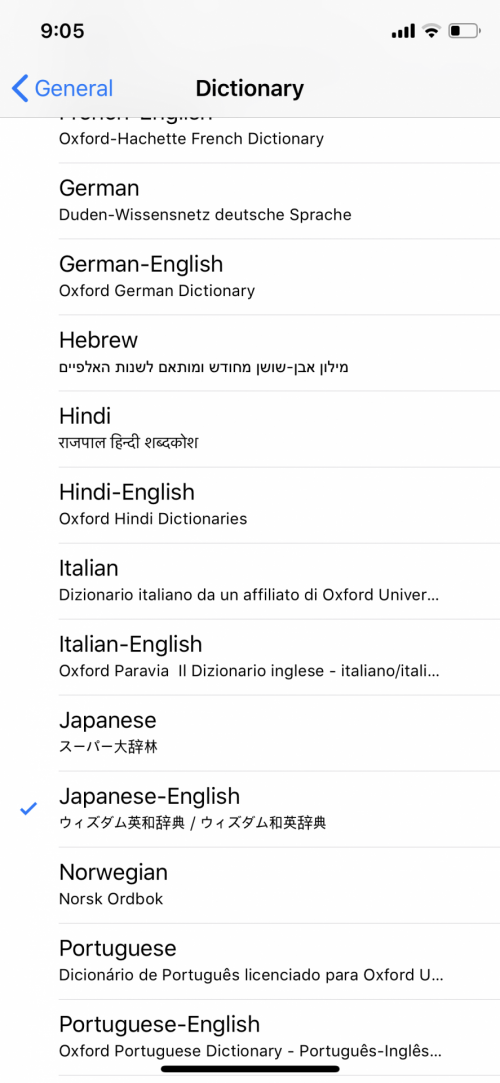 |
|
|
|
|



 Quote
Quote

 0.0581sec
 0.60
0.60
 7 queries
 GZIP Disabled