Joined: Feb 2006
From: s a n t i a g o . b e r n a b e u
QUOTE(deric79k @ Nov 21 2018, 11:09 PM)
oh my god, than this is the big problem , bcoz can't browse with high speed..
did u try take out the sim car from another phone put in to ur E sim iPhone , it works with dual sim?
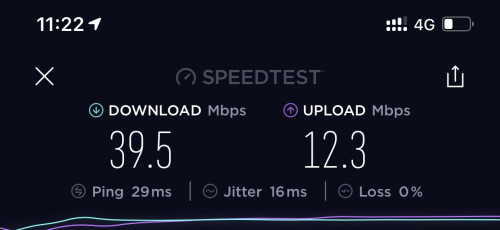
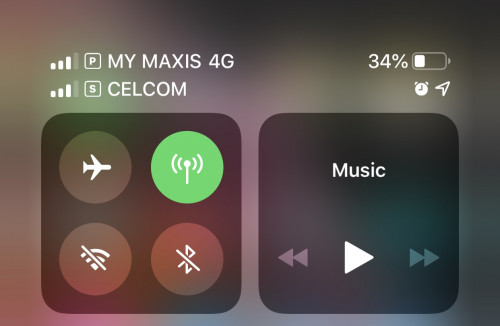
I go back home and put my celcom sim (as my secondary), and it work great now. Couldn’ be that The Gardens area is having bad signal connection because my second phone P20 Pro also on maxis is having very fast data connection. Idk whats wrong but now all good 👍👍
This post has been edited by carlitofreak: Nov 21 2018, 11:29 PM
I go back home and put my celcom sim (as my secondary), and it work great now. Couldn’ be that The Gardens area is having bad signal connection because my second phone P20 Pro also on maxis is having very fast data connection. Idk whats wrong but now all good 👍👍
For me esim not useful unless I travel. Last time use p20 pro having dual physical sim. Very easy to travel with tourist SIM card as well as maintaining primarily sim
Joined: Feb 2006
From: s a n t i a g o . b e r n a b e u
QUOTE(adriankhoo153 @ Nov 21 2018, 11:34 PM)
For me esim not useful unless I travel. Last time use p20 pro having dual physical sim. Very easy to travel with tourist SIM card as well as maintaining primarily sim
True. I always on my Celcom Prepaid when ever I travel because its only RM5/day roaming for 500mb data iinm on selected country compared to Maxis RM38/day 🤦🏻♂️🤦🏻♂️
Anyone using Truecaller? For some reason it doesn't show the Live Caller ID when unknown number calls in... any idea how to enable it? On my wife's phone some numbers would show and most would not (and those which did not show, if I manually search from the app the number is valid and in the database).
Anyone using Truecaller? For some reason it doesn't show the Live Caller ID when unknown number calls in... any idea how to enable it? On my wife's phone some numbers would show and most would not (and those which did not show, if I manually search from the app the number is valid and in the database).
I am using Truecaller on my iPhone XS . It works fine for me . Tried reinstalling it ?
I am using Truecaller on my iPhone XS . It works fine for me . Tried reinstalling it ?
Installed several times... enabled in settings -> phone, and also updated to latest copy.. wonder is it cause I'm using Digi, the incoming calls don't show with the international prefix?
Not long. Just 10mins of waiting. Mine replacement for current no. Immediately after i left the counter, take out my iPhone from my pocket and saw my physical sim no longer working
Was the same for me. Went to get one with my brother for his phone, ended up waiting for 2 hours. And that not for our turn, at the counter where the staff had to consult with supervisor, manager, backend and what not. In the end he still got it but don't know why it took 2 hours.
Installed several times... enabled in settings -> phone, and also updated to latest copy.. wonder is it cause I'm using Digi, the incoming calls don't show with the international prefix?
I am using Digi too . Dont think the telco is the issue
For me esim not useful unless I travel. Last time use p20 pro having dual physical sim. Very easy to travel with tourist SIM card as well as maintaining primarily sim
yes , this is the main reason i buy iPhone xs . for me travel oversea is easy . reach there buy one local sim card , than malaysia ppl can reach me watapps, and also can reach me by call. don't need carry two phone .
True. I always on my Celcom Prepaid when ever I travel because its only RM5/day roaming for 500mb data iinm on selected country compared to Maxis RM38/day 🤦🏻♂️🤦🏻♂️
normally i will get local sim card , but need bring extra phone. now have iPhone XS , next time more easy .
yes , this is the main reason i buy iPhone xs . for me travel oversea is easy . reach there buy one local sim card , than malaysia ppl can reach me watapps, and also can reach me by call. don't need carry two phone .
That’s what I do when I go overseas as well, which is why a dual sim iPhone is very useful. Hopefully by next year eSIM will be widely adopted by all our telcos otherwise I’d be buying HK iPhones from now on
The latest version of the iOS Google Assistant app now creates Siri Shortcuts for you.
Using this new feature, you can use the “OK Google” hotword on the iPhone — but you have to say “Hey Siri” first.
You can also set up other custom Google Assistant routines.
Android users have been able to use the “OK Google” hotword to launch Google Assistant for a while now. However, iPhone users have had to open up the Google Assistant app manually and then issue voice commands to get things done.
Now, though, the latest version of the Google Assistant iOS app will help you make custom Siri Shortcuts, which will allow you to issue “OK Google” hotword commands (via The Verge). The only drawback is that you’ll have to invoke Siri first.
To be clear, all you are doing with this new feature is creating a Siri Shortcut which then launches the Google Assistant app and starts it listening for a command. As such, you are not confined to using the traditional “OK Google” or “Hey Google” commands — you can make it anything you like.
Whatever you decide you want your hotword(s) to be, you will have to call on Siri first before issuing your command. For example, if you use the default “OK Google,” you’ll have to say, “Hey Siri, OK Google…” and then issue your voice command.
Yes, it’s clunky. But hey, this is the best way for iPhone users to have easy access to Google Assistant voice commands for now.
To get started, make sure you are on the latest version of the Google Assistant iOS app. When you open the app, you should be prompted to add “OK Google” to Siri. Tap the “Add to Siri” button and follow the instructions.
Once you’re all set up, you can then create Siri Shortcuts which call on Google Assistant Routines you’ve already created. For example, if you have a Google Assistant Routine called “Going to bed” set up to turn off the lights and drop your thermostat to a lower temp, you can coordinate a new Siri Shortcut to then call on that command. If you used the same name for your Shortcut, you could simply say, “Hey Siri, going to bed,” which will call on the Assistant Routine and perform the action.
Yes, this is complicated. However, for iOS users out there who want to use Google Assistant over Siri (which they could for many reasons), this is the best you’ve got for now.
True. I always on my Celcom Prepaid when ever I travel because its only RM5/day roaming for 500mb data iinm on selected country compared to Maxis RM38/day 🤦🏻♂️🤦🏻♂️
The 6 Axiata countries, the 1-day internet pass is going for only RM4.99 and it also comes with 1GB of data. This RM4.99/day rate covers Bangladesh, Cambodia, Indonesia, Nepal, Singapore and Sri Lanka. Quite good deal I must say though the countries covered are quite limited.
That’s what I do when I go overseas as well, which is why a dual sim iPhone is very useful. Hopefully by next year eSIM will be widely adopted by all our telcos otherwise I’d be buying HK iPhones from now on
but since u already get the E sim now , and confirm that u put another normal sim card in , it works. should be ok right .
example : ur main is E sim , watapps num also this . if u switch off this data , ur second sim ( celcom) is on data . can the watapps still function ?


 Nov 21 2018, 11:27 PM


 Quote
Quote








 0.0182sec
 0.15
0.15
 6 queries
 GZIP Disabled