Welcome Guest ( Log In | Register )

Bump Topic Topic Closed RSS Feed

Outline · [ Standard ] · Linear+

Unifi Official TM UniFi High Speed Broadband Thread V36, READ 1ST PAGE FOR TURBO SPEED INFO!

views
     
ijibang
post Nov 11 2018, 04:41 AM

Getting Started
**
Junior Member
100 posts

Joined: Dec 2010
After 3 months of waiting for my turbo-10X upgrade (50Mbps package with HyppTV Ruby @180/month) to no avail, I tried my luck by starting writing to TM to "APPLY" (aka soft soft complaint) one instead of envying those who got it.
Below were what I did it :

(1) On Nov 7, I e-mailed my "Application Letter" to (help@tm.com.my) with cc and bcc to the same email address (to ensure they will receive 3 similar emails).
(2) Then I followed up by e-mailing similar text to (ccx@tm.com.my) at the same time.
(3) On the same day, I posted a hard copy of the "Application Letter" to Menara TM, KL.

In my "Application Letter", I touched on the following points, that :

..... I'm their "old" customer for more than 6 years (longer if streamyx is taken into account).
..... I'm "loyal" as I have never defaulted my monthly bills, not even for a single day all these years (short for "super pay master").
..... I am disappointed I could not get any decent answers from the LIVE CHAT, FACE BOOK, and even when visiting their TM Points.
..... I could not comprehend their staffs' explanation that the "selection criteria" is by "RANDOM" basis and by "PHASE to PHASE" which would prolong into 2019.
..... I am anguish because I don't know if I will be selected, and if selected, when? as every passing month is an extra RM50 when comparing to their new offer. Some more their new offer speed is 2X faster than mine.
..... I feel "unfair" I am kept in the dark and cold. So I am appealing for their favorable considerations to upgrade my package to 500Mbps ASAP.
..... I gave details on my Account/Name/IC/Address/Type of package (Voice,Internet,unifi TV etc).
..... I also included full details of all the equipment list on BTU/Gateway (Router)/HyppTV STB (this one in 2012----heck!)

A day later, Miracles happened.

On 8 Nov, somebody called me (I presumed this guy is one with higher up authority) to tell my they will upgrade my package to 500Mbps at no extra cost within the next 2 weeks or so.
They will have to change the router because my old one (L7-N-R2000) cannot handle the speed. The router will cost me RM200 if I elect not to extend the 2 year contract (mine already expired). Free if I extend for another 2 years. An installation charge of RM50+ will appear in my new bill which will be deducted in the following bill (meaning free installation-----what the heck, changing router and setting it up only! What installation???).

On Nov 9, I received a text message that my report would be resolved within the next working day (I guess its from another person since I've sent several emails).

On 10 Nov (yesterday), I received a text message. (Yay! unifi svc : 60XXXXXXXXX has been TURBO-ed) for FREE! and asked me to log into my unifi a/c page to see the change.
I did, and there comes "unifi 500Mbps (Turbo Upgrade 2018)" ; service start date 9 Nov 2018.
I did a check (switch off the BTU and Router for 10 min and then back on as instructed).
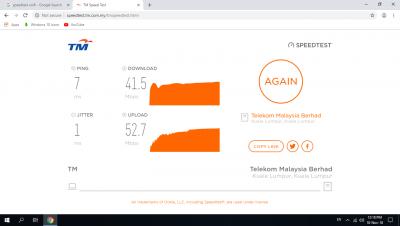
My connections were 41.5Mbps/DL 52.7Mbps/UL (WIFI---DLink DWA-171 USB Adaptor) and 92.7Mbps/DL 88.5Mbps/UL (CAT 6 Ethernet Port).
I logged into YouTube and were able to watch 4K UHD video smoothly (8K UHD was however lagged). Previously I could only watch 1080p over the 50Mbps subs.
So I presume the missing link left for the 500Mbps is a new Router.

I need some advice :

(a) My very old BTU is Alcatel-Lucent I-240G-P (6 years +).
Can it support gigabit?
Any chance if I ask for a free replacement?
(b) What Router TM normally provides for the 500Mbps upgrade? I forgot to ask for the brand and model when talking to the unifi guy over the phone. I remember asking how many antenna and the answer is 3!
© how do I check if my devices (PC/Laptop etc) has gigabit or only fast ethernet LAN Port???

This is my personal experience to share with you guys.
Maybe I am just lucky, but if you don't try, you will never know..........
So give it a try...........your methods, maybe!!!

This post has been edited by ijibang: Nov 11 2018, 04:58 AM
ijibang
post Nov 12 2018, 03:32 AM

Getting Started
**
Junior Member
100 posts

Joined: Dec 2010
QUOTE(sHawTY @ Nov 11 2018, 12:45 PM)
A - Yes it can support Gigabit
B - Doesn't matter what they give you it will still be crap. Get your own router instead. I suggest ASUS RT-AC86U
*
Thanks dude,
but the ASUS router will cost me RM700+
this 500Mbps upgrade cost me no extra when they provide the new router (brand? model? yet to know) and if I extend the contract for 2 years.
probably i shall stick to their router for a while first and see what happens.
current old old router capable of 80-90Mbps. if new crappy router will give 300+Mbps, i shall probably be happy enough as it is still better than my old 50Mbps.
Thanks again.
ijibang
post Nov 12 2018, 03:35 AM

Getting Started
**
Junior Member
100 posts

Joined: Dec 2010
QUOTE(sakuraboo @ Nov 11 2018, 06:41 PM)
Downgraded today

Hi everybody I successfully downgraded from 800mbps to 100mbps

All you have to do is just call tm hotline then ask for downgrade. You can't do termination or downgrading in most tm points, and I still don't know which tm point you can downgrade at despite emailing tm. Most places that used to do termination couldn't do so after 1st July.

My contract is over, so I'm lazy to pay extra for my broken stb and dect phone. And I wanna opt for the cheapest option without quota despite my modem and pc able to support 800mbps

As for the experience:
No difference in browsing
Just downloading is obviously going to take a hit
*
my old working router capable of 100Mbps.
want to swap yours? PM me for nego.
thanks.
ijibang
post Nov 16 2018, 03:16 AM

Getting Started
**
Junior Member
100 posts

Joined: Dec 2010
500Mbps TurboED
TM guys finally visited with a new router RG-DLINK-DIR842 (my old router was L7N-R2000). The old BTU (>6years) Alcatel-Lucent I-240G-P was not replaced although I requested for a new replacement.
When the TM guys came, my 50Mbps account was still active.
I thought it was just a simple job of replacing the router and do some settings. It turned out not to be.
The new router worked but could not connect to my internet account even after much un-plugging and re-plugging job.
Re-connecting to my old L7N-R2000 worked fine though.
Thinking that the new router might be faulty, I suggested to them to change to another unit which they did. Problems still persisted.
Finally, I suggested to them to phone up their Unifi HQ to see if something was amissed, because all the while I saw them doing settings on the router's home page only.
Sure enough, after some deliberations and 1-1/2 hours gone down the drain, it turned out that their server needed to flush my old account password settings and reassigned a new one. And this profile update could only be done at their HQ.
This account password comprises 13 digits of characters (upper and lower) and numbers. It is different from the SSID password which we can change by logging into the router's home page.
The TM guys told me to copy and keep it very safely (must be very important). Damn, I don't even have an account password when I signed up the last time. I am thinking maybe this can be used to login and tweak something??????
After assigning the new account password by their HQ personnel, the TM guys were then able to establish 2 wifi SSID, one for 2.4GHz and one for 5GHz. I chose to use the same password for the 2 SSID.
On newer devices (phone/laptop/usb wifi adaptor), can detect 2 SSID, but old ones can detect the 2.4GHz SSID only. The 5GHz SSID was assigned something like xxxxx_5G@unifi.
Everything ran well soon after.

Following are my speed test results to share ...
Old router cat 6 cable Attached Image
Old router wifi Attached Image
Old router cat 6 cable Utorrent D/L Attached Image
New router cat 6 cable Attached Image
New router wifi Attached Image

The old HyppTV Box was tested to be working good as usual.
An additional RM10/month was offered to subscribe to the ultimate pack (all channels) against my current Ruby Pack, which I accepted.
Now my monthly bill would become about RM190 as compared to my old bill of RM180 for the 50Mbps (can't complaint anymore leh!)

I hope to have provided some good sharing experience for my 10X-turboED free upgrade ....................

This post has been edited by ijibang: Nov 16 2018, 05:14 AM
ijibang
post Nov 16 2018, 12:49 PM

Getting Started
**
Junior Member
100 posts

Joined: Dec 2010
QUOTE(SilentVampire @ Nov 16 2018, 09:06 AM)
Yes, you did provide some good info and thank you for that. You should have asked here first though. That account password is the PPPoE password. It is definitely differmry from the SSID password that you can set yourself on the router. You do hav an account password last time. You just don’t remember it. This is used to login to your PPPoE account and is a way for TM to track and know what speed and wheat account is being used. 
Of course, old devices can only detect 2.4GHz as it does not support 5GHz. New devices does support 5GHz, so can detect it. Anyway, get your own router if you want to enjoy full speed on wireless. Check 1st page, 1st post, green text, for list of compatible third-party routers for your speed and other general info. Changing router to your own router is much better as there is no ‘@unifi’ on your SSID and no TR-069.
*
Thank you for taking time to read my post and provided useful info.
At the moment I intend to use the provided router for one year (TM's warranty period) since the cable speed can reach the 500 Mbps mark and the 5GHz Wifi can provide 200+ Mbps and the 2.4GHz Wifi can yield about 70+ Mbps.
I can now watch Youtube in 4K which I can't before the upgrade.
My torrent-ing becomes faster and more stable comparatively.
Thank you once again.

ijibang
post Nov 22 2018, 04:45 PM

Getting Started
**
Junior Member
100 posts

Joined: Dec 2010
Need help

I was turbo-ed to 500Mbps a week plus back
speed test on wire (cat 6 ; 1m away from router) is 500+ Mbps
speed test on wifi (dual band usb wifi adaptor on laptop ; 1m away from router) yields about 50 to 60 Mbps for both 5GHz and 2.4BHz

Questions :

(1) I don't feel the "PUNCH" of a 500Mbps connection when surfing the net or watching youtube. There's not much difference compared to the old timer 50Mbps
(2) Why is there no speed difference when connecting between 5GHz wifi and 2.4GHz wifi
(3) Is there a need to "TWEAK" the new profile before we can feel the "real speed"? (I logged in the Dlink router panel and did not see much to be tweaked)

FYI, the router is a brand new one provided by TM (D-Link DIR842). Test was done with only 1 connection (either on pc via cable or on laptop via wifi)

Please shade some lights...........thank you very much!

This post has been edited by ijibang: Nov 22 2018, 04:50 PM
ijibang
post Dec 7 2018, 03:19 AM

Getting Started
**
Junior Member
100 posts

Joined: Dec 2010
What is the Maximum download speed (MB/sec) in U-torrent downloads for the unifi 500Mbps ?
Anyone ?

Topic ClosedOptions
 

Change to:
| Lo-Fi Version
0.2196sec    1.14    7 queries    GZIP Disabled
Time is now: 9th December 2025 - 09:43 PM