

jus wanna check...
hypptv box once activated...is it tied to own account ?
or can be used by other ppl’s unifi account ?
Unifi Official TM UniFi High Speed Broadband Thread V36, READ 1ST PAGE FOR TURBO SPEED INFO!
Unifi Official TM UniFi High Speed Broadband Thread V36, READ 1ST PAGE FOR TURBO SPEED INFO!
|
|
 Jan 3 2019, 05:13 PM Jan 3 2019, 05:13 PM
Return to original view | Post
#61
|
 
Senior Member
2,329 posts Joined: Jun 2015 
|
jus wanna check...
hypptv box once activated...is it tied to own account ? or can be used by other ppl’s unifi account ? |
|
|
|
|
|
Jan 11 2019, 11:09 AM
Return to original view | Post
#62
|
|
Senior Member
2,329 posts Joined: Jun 2015
|
QUOTE(JohnLai @ Jan 7 2019, 08:41 PM) Begin with updating your cpu microcode from microsoft. What is your win10 version and CPU model?  QUOTE(JohnLai @ Jan 7 2019, 09:16 PM) Well, either way, my condolences, microsoft hasn't release latest Intel microcode version for Kaby Lake S (I5-7400) yet. IT noob here...so bear with meSince win10 auto update is turned on, you have the problematic microcode version installed. Consider disabling Spectre mitigation via registry. currently on 500Mbps plan... my current setup on modem and router: alcatel 240G BTU ac86u - connected via ugreen cat7 cable my current desktop setup: i3-8100 cpu tp-link t9uh wifi adapter win10 1809 which was just updated recently updated usb 3.0 drive disabled mitigations for CVE-2017-5715 (Spectre Variant 2) and CVE-2017-5754 (Meltdown) LAN test: connect cat6 / cat5e cable from router to desktop, speed test on both ookla & tm only managed to get 300+ Mbps DL Wifi test: speed test on both ookla & tm only managed to get 200-300 Mbps DL even though full 5Ghz bar anything else i can do here to improve the DL speed ? thanks |
|
|
Jan 12 2019, 11:40 PM
Return to original view | Post
#63
|
|
Senior Member
2,329 posts Joined: Jun 2015
|
QUOTE(JohnLai @ Jan 11 2019, 12:30 PM) AC86U? Go to Advanced ---> LAN ---> Switch Control. Check if the NAT Acceleration is set to Auto and the yellow wording next to it is displaying "CTF (Cut Through Forwarding) is enabled". I3-8100 with Win10 1809*? K, install this http://www.catalog.update.microsoft.com/Se....aspx?q=4465065 2018-10 Update for Windows Server 2019 (1809) for x64-based Systems (KB4465065) Cause WIN10 has tendency to automatically re-enabled spectre + meltdown mitigations after "windows update"  So, installing the optimized/latest microcode is a better solution. KB4465065 has to be installed manually! Reboot required. After that....test again.....via wired.... 
I can't find the CTF... after installing KB4465065...speed only improved slightly |
|
|
Jan 14 2019, 01:07 PM
Return to original view | Post
#64
|
|
Senior Member
2,329 posts Joined: Jun 2015
|
QUOTE(JohnLai @ Jan 13 2019, 12:13 AM)  Maybe AC86U supports different form of NAT Acceleration as SzeMeng76 said? Any weird antivirus or firewall? Can you get 500Mbps when running I3-8100 via wired in safe mode? Also, please check your CPU temperature and CPU clock rate during the speedtest. There are few people with improper cpu cooling....(eg, 5 years never clean the fan+heatsink+repaste, broken CPU fan pins resulted in 'suboptimal' contact between cpu and cooler, improper installation of cpu cooler resulting in loose contact) Then, there are cases where few people had wrong max cpu multipliers configured......  i have kapersky 2018, disabled it while doing speed test win10 in safe mode also can't reach 500Mbps...funny CPU usage while speed testing is 50%+ btw...my cpu was newly assembled in june 2018 |
|
|
Jan 17 2019, 11:32 AM
Return to original view | Post
#65
|
|
Senior Member
2,329 posts Joined: Jun 2015
|
QUOTE(BladeRider88 @ Jan 17 2019, 11:17 AM) I am on Turbo800, This is my max cum best speed my max only around 10MBps...on turbo 500 I am not very good with the data transfer conversion, hopefully someone can shed some light for me If anyone want me to do testing with turbo 800, i am happy to help out |
|
|
Jan 17 2019, 04:39 PM
Return to original view | Post
#66
|
|
Senior Member
2,329 posts Joined: Jun 2015
|
QUOTE(Car_Kai @ Jan 17 2019, 03:05 PM) So for the new customer still have to pay Rm30 but no STB and HyppTv only through apps? slow slow wait...Im willing to give my STB just to cancel the subscription for HyppTv.  that's on the wishlist by majority of ppl here |
|
|
Jan 28 2019, 01:44 PM
Return to original view | Post
#67
|
|
Senior Member
2,329 posts Joined: Jun 2015
|
QUOTE(salveusassault @ Jan 26 2019, 01:22 PM) I got the turbo upgrade 500Mbps and have changed the router to Asus RT-AC86U, so able to support the speed. The problem right now is, I couldn't get the wifi speeds up to 500Mbps. Where I could get it few weeks ago (attachment) compared to now just around 240-300Mbps. same situation here...Any sifu can enlighten this? 🤔 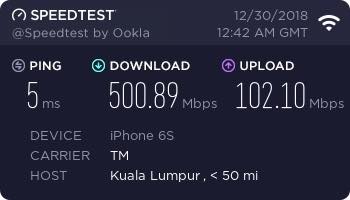 the highest is 320 on my iphone 7+.... |
|
Topic ClosedOptions
|
| Change to: |  0.2232sec 0.2232sec
 0.45 0.45
 7 queries 7 queries
 GZIP Disabled GZIP Disabled
Time is now: 3rd December 2025 - 06:46 AM |
 Quote
Quote