Welcome Guest ( Log In | Register )

Bump Topic Topic Closed RSS Feed
4 Pages < 1 2 3 4 >Bottom

Outline · [ Standard ] · Linear+

Unifi Official TM UniFi High Speed Broadband Thread V36, READ 1ST PAGE FOR TURBO SPEED INFO!

views
     
lyc1982
post Nov 30 2018, 01:10 PM

ExpectNoMercy
*******
Senior Member
2,329 posts

Joined: Jun 2015
QUOTE(PowerGadget @ Nov 29 2018, 06:27 PM)
Thanks mate for your reply, I just bought my TP-Link T9UH wireless adapter, so far so good with the perfromance. Can get 300Mbps Wi-Fi Speed from my Turbo 300 package
*
what is the distance between your router and t9uh ?

QUOTE(jai2power @ Nov 29 2018, 11:07 PM)
Guys want to ask...i just subscribe 100mbps package rm129..for new subscriber do TM will upgrade to 800mbps?
*
mang...if new subscribers of rm129 can get free turbo to 800Mbps...all of us here will immediately terminate our existing package and resign new plan

QUOTE(daigo2008v6 @ Nov 30 2018, 09:20 AM)
Yea i had the same issue when using on 1st floor, issue is 5Ghz range is very short, cant really penetrate wall let alone if use on 2nd floor.
so Im using another router on 2nd floor as access point, i can get the same speed on 2nd floor now on 5Ghz, about 400mbps.
*
do you mean now your t9uh is connected to 2nd floor’s access point ?

last night i updated my t9uh driver to the latest one (dl from official tp-link site)...managed to get 200+ on speedtest on first 3 attempts on 2.4Ghz while 5Ghz only managed to get 50+, afterwards dropped back to 50+ on 2.4Ghz...not sure what went wrong
all settings remain the same...l rclxub.gif

This post has been edited by lyc1982: Nov 30 2018, 01:17 PM
lyc1982
post Dec 5 2018, 10:10 AM

ExpectNoMercy
*******
Senior Member
2,329 posts

Joined: Jun 2015
QUOTE(crixalisrox @ Dec 5 2018, 09:18 AM)
Do we get acknowledge email if I write in to help@tm.com.my?

Email them few days ago but didn't receive any reply. While mcmc do have acknowledgement email.
*
don't bother writing to help@tm because tm is swarmed with complaints now...

just keep adding comments on your mcmc complaint report
lyc1982
post Dec 6 2018, 04:25 PM

ExpectNoMercy
*******
Senior Member
2,329 posts

Joined: Jun 2015
QUOTE(pizzaboyj @ Dec 6 2018, 02:40 PM)
in a dilemma, sitting at very underutilized 800mbps, tplink ac1200 that cant even reach 500mbps, i guess the best option would be to drop to 100mbps for now and once 300mbps launches in q1 2019 ill just upgrade.

thoughts?
*
you already answered your own question...

everyone's need for higher speed is different...everyone's monthly commitment is different, only you yourself can make the final decision
lyc1982
post Dec 11 2018, 03:24 PM

ExpectNoMercy
*******
Senior Member
2,329 posts

Joined: Jun 2015
QUOTE(neekun @ Dec 11 2018, 02:56 PM)
I had same problem and solution is to reboot the modem. Called 100 and technical team came to replace my modem the next day, so far so good.
*
what was your modem (BTU) model before replacement ?

and after replacement ?
lyc1982
post Dec 17 2018, 10:17 AM

ExpectNoMercy
*******
Senior Member
2,329 posts

Joined: Jun 2015
whoa....quite a few here got 800Mbps for rm159...looks like i have to continue my fight for 800Mbps from 500Mbps
lyc1982
post Dec 19 2018, 12:03 PM

ExpectNoMercy
*******
Senior Member
2,329 posts

Joined: Jun 2015
QUOTE(Mazda9 @ Dec 18 2018, 10:39 PM)
I have a 800 mbps package + ultimate pack + free calls package for rm159. Can I transfer it to another user?

I’m thinking of moving on to maxis prime as my whole family is maxis line users and it comes with unlimited data plan.
*
you are one of the few lucky ones to get 800Mbps at rm159...
lyc1982
post Dec 19 2018, 02:04 PM

ExpectNoMercy
*******
Senior Member
2,329 posts

Joined: Jun 2015
QUOTE(SzeMeng76 @ Dec 19 2018, 12:34 PM)
I got it rm149.. is it the lowest plan now for 800mbps+freevoice+ultimate? blink.gif

---

and to ask everyone expert here, plan to upgrade my router to C3150 from my c1200, is it a good move? asus router out of my budget  cry.gif
I only can get 5ghz wifi max 300 mbps (after all the 80mhz settings and with asus usc ac68 wifi adapter) & 800mbps in LAN (safe mode). but seldom use LAN, because im staying double storey.
*
you are even luckier...
lyc1982
post Dec 20 2018, 01:59 PM

ExpectNoMercy
*******
Senior Member
2,329 posts

Joined: Jun 2015
QUOTE(tumira @ Dec 20 2018, 01:50 PM)
Today just updated Windows 10 to version 1809 and it also updated my wifi adapter drivers and now I finally able to get 430ish on wifi (unifi speedtest).

Previously only able to get around 350 on wifi.

Using Tplink T9uh and Tplink AC3150v2

Also dont forget to update your USB3.0 drivers.
A big thank you to the person who wrote the Green Text guide at the first page. Really helps.
*
i am on win10 too...
how to update usb3.0 drivers ?

edit: ok i know how to update usb3.0 drivers already

i am also using t9uh adapter

This post has been edited by lyc1982: Dec 20 2018, 02:00 PM
lyc1982
post Dec 20 2018, 02:59 PM

ExpectNoMercy
*******
Senior Member
2,329 posts

Joined: Jun 2015
QUOTE(tumira @ Dec 20 2018, 02:23 PM)
Windows 10 also got different version. Previously I'm on version 1803 and today it just updated to 1809.

To know which version of your os, right click on the start or windows logo->Settings->System->About

My experience with T9UH are

1)If I dont installed any drivers and just use windows default (with windows 10 version 1803), I will only get around 200

2)After I installed the latest driver from tplink I can get around 330

3)After updated Windows to latest version and the wifi driver is updated too(windows 10 version 1809) , surprisingly I managed to get more than 400 after windows restart.

So happy with the result.

Just dont forget to update your USB3.0 drivers. My motherboard is really old one and the usb3.0 are made by Etron which is slower compare to native USB3.0.
*
thanks bro !

just few more questions...

how to update wifi driver ? i mean how to navigate to there ? will win10 auto search for latest driver ?

for usb 3.0 driver as well, will win10 auto search for latest driver ?

edit: i couldn't find the usb 3.0 driver to download for my MSI mobo at its official website...

This post has been edited by lyc1982: Dec 20 2018, 03:00 PM
lyc1982
post Dec 21 2018, 02:56 PM

ExpectNoMercy
*******
Senior Member
2,329 posts

Joined: Jun 2015
QUOTE(tumira @ Dec 20 2018, 03:14 PM)
For the WIFI adapter right click on Windows logo ->Device Manager->Network Adapter->TP Link wireless USB Adapter-> Driver and you can see the driver version 1030.27.425.2018 and dated 25/04/2018 (For windows 10 version 1809)

For usb3.0 usually new motherboard already comes with native usb3.0. So by installing latest Intel Chipset or AMD Chipset driver is already enough. My case is old motherboard (year 2011 I think) at that time usb3.0 is still new and motherboard maker will add in third party usb 3.0 into the motherboard. So for my case I need to find the latest driver my usb3.0 which is from Etron and not Intel or AMD.
*
QUOTE(cskean @ Dec 20 2018, 11:27 PM)
How do you guys update to Win10 1809? Mine is 1803 and I try to get the updates via Windows Update, and it says I have the latest version of Win10 already~

As for the TP Link T9UH wifi adapter, I downloaded and installed the latest driver from tplink site, Archer T9UH(US)_V2_181023_Win (published 2018-11-09), but when I check my driver from the adapter properties, it only shows Driver Version : 1030.22.405.2017, Driver Date : 11/9/2017....

Any T9UH users mind to share which driver version and driver date you guys are using?
*
i have updated my win10 to 1809, and the tplink usb adapter driver is newer compared to the one you can get from Tp-link official website..

usb 3.0 driver also updated to the latest one from MSI official website since i am using MSI mobo...

the outcome isn't that great...only improvement from 200+ to 300+ sadly...

next i will try to extend the t9uh wuth usb 3.0 extension and see if it improves the DL / UL
lyc1982
post Dec 23 2018, 12:35 AM

ExpectNoMercy
*******
Senior Member
2,329 posts

Joined: Jun 2015
QUOTE(vez @ Dec 22 2018, 02:55 PM)
means yours also RM210 right? how about STD20? mine charge RM20  sweat.gif
my case could be quite similar to yours, just that they remove ruby, so i dont have additional RM30 like yours, only ultimate RM60

since some reported 800mbps cheaper is RM159, most of them from RYE package i guess, like me from RYE, i suppose entitle RM129 for 500Mbps lol, anything more than RM129 consider expensive  sweat.gif but now RM99 i gonna keep quiet first haha

in fact one of my real life friend also 800mbps and pay RM159 + 6% only, he got upgraded last month
*
did you try complain for 800Mbps ?
If yes...wad did you say ?
any evidence given to support your complaint ?
lyc1982
post Dec 24 2018, 04:26 PM

ExpectNoMercy
*******
Senior Member
2,329 posts

Joined: Jun 2015
QUOTE(chocobo7779 @ Dec 23 2018, 08:32 PM)
Some Asus routers may need beta firmware, as blacktubi highlighted:

https://www.blacktubi.com/guide/performance...or-asus-router/
SilentVampire Might want to add about this info for those who has those routers icon_idea.gif
*
just wanna check...

if my asus ac86u stock firmware is not faulty, is it still advisable to update to latest driver ?

or flash to merlin firmware ?
lyc1982
post Dec 27 2018, 09:43 AM

ExpectNoMercy
*******
Senior Member
2,329 posts

Joined: Jun 2015
QUOTE(dirk_diggler @ Dec 26 2018, 10:17 PM)
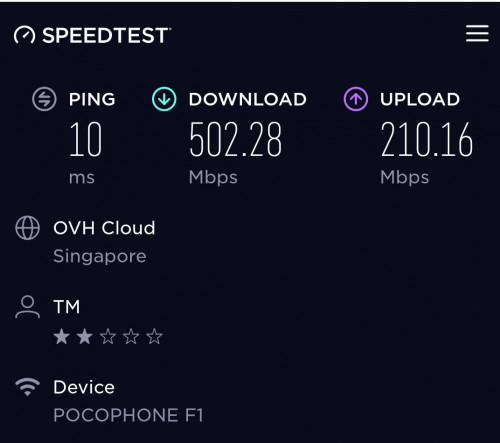
Next phase, testing wifi. 500mbps on 5ghz using Asus AC86U. Good? Not good? Normal?

user posted image
*
QUOTE(soultaker @ Dec 27 2018, 05:31 AM)
This is the max speed you can get using hp with 2x2 antenna. See mine below, also using AC86U.

user posted image
*
first...how come you guys are getting 200Mbps UL, i thought it's suppose to be 100Mbps UL only ?

second...i am on 500Mbps and using ac86u with cat7 cable...however speedtest on my iphone 7+ only can reach 200-300-ish

This post has been edited by lyc1982: Dec 27 2018, 09:44 AM
lyc1982
post Dec 27 2018, 10:31 AM

ExpectNoMercy
*******
Senior Member
2,329 posts

Joined: Jun 2015
QUOTE(miloaisdino @ Dec 27 2018, 10:29 AM)
same... i use poco f1 with rm120 xiaomi router get same result lol
*
xiaomi router mini ?

can be used on unifi ?
lyc1982
post Dec 27 2018, 11:18 AM

ExpectNoMercy
*******
Senior Member
2,329 posts

Joined: Jun 2015
QUOTE(SilentVampire @ Dec 27 2018, 11:06 AM)
Sounds like TM issue. They are probably capping your speed. I know there are someone here who got capped as well, as they are not paying enough.
*
when you say not paying enough...means 800Mbps for less than rm189 hence the tm capped the speed ?

QUOTE(go626201 @ Dec 27 2018, 11:14 AM)
They are on 800mbps plan thats why 200mbps upload speed...
*
ahh ok...i was under the impression that they are on 500Mbps plan
lyc1982
post Dec 27 2018, 12:22 PM

ExpectNoMercy
*******
Senior Member
2,329 posts

Joined: Jun 2015
can you guys login to unifi account on unifi page now...?

mine seems to be unable to login
lyc1982
post Dec 27 2018, 01:13 PM

ExpectNoMercy
*******
Senior Member
2,329 posts

Joined: Jun 2015
QUOTE(go626201 @ Dec 27 2018, 12:24 PM)
TM's problem. Try login later.
*
QUOTE(Yluxion @ Dec 27 2018, 12:25 PM)
Yupe, I can't too. Tried with multiple accounts, all unable to login.
*
now can login dy...
lyc1982
post Dec 28 2018, 03:26 PM

ExpectNoMercy
*******
Senior Member
2,329 posts

Joined: Jun 2015
QUOTE(soultaker @ Dec 27 2018, 09:34 PM)
yes, we are on 800mbps plan.

as for your iphone 7+, how far are you from your router? possibly there is a wall between your iphone and router. actually, 200-300mbps is already good. i doubt you'll need 500mpbs on iphone.
*
it's literally above the router only....haha
lyc1982
post Jan 1 2019, 09:12 PM

ExpectNoMercy
*******
Senior Member
2,329 posts

Joined: Jun 2015
QUOTE(KKW @ Jan 1 2019, 12:20 PM)
I just checked my UniFi dashboard this morning. Seem they change my UniFi 500Mbps to 800Mbps on the Christmas  rclxm9.gif

[attachmentid=10150078]
*
how much are you paying now...?

did you request tm to upgrade from 500 to 800 ?
lyc1982
post Jan 2 2019, 10:42 AM

ExpectNoMercy
*******
Senior Member
2,329 posts

Joined: Jun 2015
QUOTE(KKW @ Jan 1 2019, 11:43 PM)
I am paying rm179 for RYE 100Mbps and entitled to get 800Mbps speed but they upgraded my plan to 500Mbps only.

After complain with MCMC and 2 months wait finally get back my 800Mbps  biggrin.gif
*
how did you complain ?

did you use shawty template ?

4 Pages < 1 2 3 4 >Top
Topic ClosedOptions
 

Change to:
| Lo-Fi Version
0.2486sec    0.25    7 queries    GZIP Disabled
Time is now: 8th December 2025 - 01:27 AM