Outline ·
[ Standard ] ·
Linear+
AMDŽ Socket-AM2 Overclocking thread (V2), discuss our setup/overclocking issues
|
beast921
|
 Aug 8 2007, 11:39 AM Aug 8 2007, 11:39 AM
|

|
hi all,
Just bought a new system yesterday:
AMD 64 X2 4000
Biostar TA690G AM2
512MB x 2 Micron D9KGX DDR2 800
I can only go till 2.41Ghz only above that it will not post or load to window.
btw any one here know where can I get the patch for amd cpu
|
|
|
|
|
|
beast921
|
Aug 9 2007, 10:44 PM
|
|
|
 after 2-3 day playing around with the Bios, I manage to overclock my X2 4000 before this can only go 2.41GHz. The specs: AMD 64 X2 4000++ 2.1 Biostar TA690G AM2 Micron D9KGX 512MB X 2 Coolermaster GeminII + 2 x 12CM Stock Lian LI Seagate 250GB SataII 16MB Silverstone Strider 560W Panasonic DVRW Sata Now just need to Orthos / Prime it   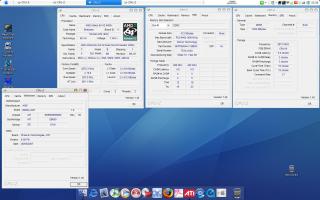
BTW I enable my Cool N Quiet option....  EDIT: 19 August 2007, 2.16AM. Manage to get 3Ghz on my Biostar TF TA690G AM2. now just need to run orthos / prime it This post has been edited by beast921: Aug 19 2007, 12:16 PM Attached thumbnail(s)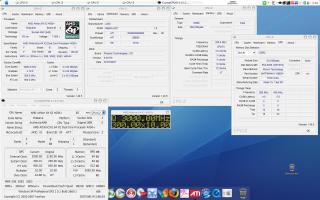
|
|
|
|
|
|
beast921
|
Aug 16 2007, 03:47 AM
|
|
|
any one having problem with TA690G AM2 temperature reading?
mine show Idle 26'c and full load 29'c only. any way fixing this problem?
same goes to my Smart T-fan utilities control only show CPU & System fan reading only, even I have install speedfan 4.32 still no reading on the fan speed. ( btw I got 3x12CM connected to mobo fan header) Stock Lian LI each 1500RPM and Vizo 2000RPM
This post has been edited by beast921: Aug 16 2007, 03:52 AM
|
|
|
|
|
|
beast921
|
Aug 18 2007, 10:38 PM
|
|
|
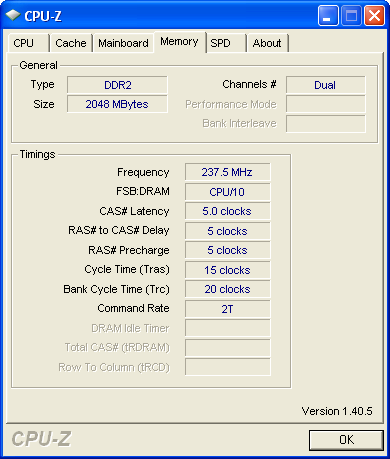
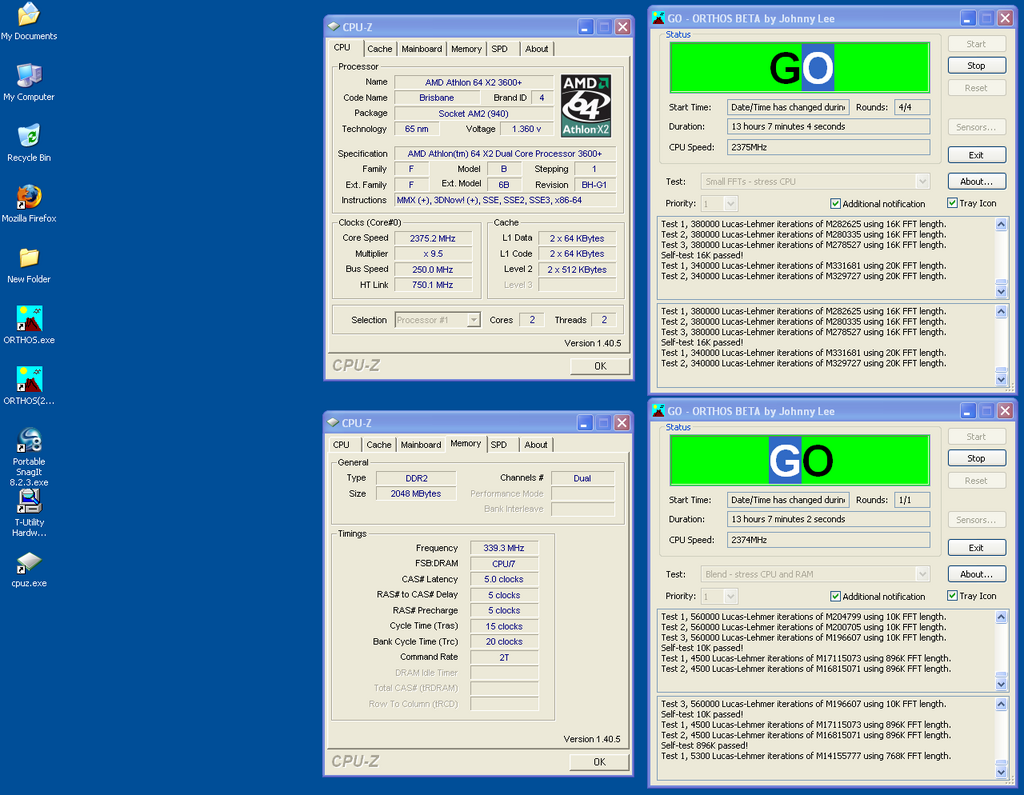
QUOTE(waifaq @ Aug 18 2007, 03:15 AM) BioStar TA690G user I need some advice, i stuck at 250(cpu clock), anything above it won't POST. Is there any relationship, increasing HT Voltage Regulator ? NB/SB Voltage Regulator ? then i can only go beyond 250(cpu clock), since i keep the HT link below 1000. My PC spec X2 3600+ Brisbane 2x1GB KVR667 DDR2 BIOS 605 » Click to show Spoiler - click again to hide... « CPU multiplier I already try 9.0x still same 250max 8.0x won't POST with 250 Try to update your bios, If you want, I can email it to u the latest bios Biostar Support send to me a few day back. |
|
|
|
|
|
beast921
|
Aug 19 2007, 04:26 PM
|
|
|
bro the latest bios, is 27/7/2007(R69AM727), I got from Biostar support.
This post has been edited by beast921: Aug 19 2007, 04:26 PM
|
|
|
|
|
|
beast921
|
Aug 20 2007, 09:53 AM
|
|
|
Biostar TA690G AM Latest Bios from Biostar Support. R69AM727: http://rapidshare.com/files/50059787/R69AM727.rar.htmlEven with this latest Bios, I manage to get 3Ghz with my X2 4000+ but failed on first minute Orthos. This post has been edited by beast921: Aug 20 2007, 10:49 AM |
|
|
|
|
|
beast921
|
Sep 12 2007, 12:18 AM
|
|
|
For Biostar TA690G AM2 user. New bios R69AM828 I got it yesterday. http://rapidshare.com/files/54960947/R69AM828.rar.html |
|
|
|
|
|
beast921
|
Sep 12 2007, 12:53 AM
|
|
|
Got it from Biostar china, sorry I cant read chinese. http://www.biostar.cn/supports/BIOS.asp?vI...ID=26&Value=551I think the bios corrected the Brisbane Chip temperature reading, I might be wrong tho. Plus I already update/flash to R69AM828 also. its seems just the same like the previous R69AM727 bios. |
|
|
|
|
|
beast921
|
Sep 12 2007, 09:54 AM
|
|
|
Dont know about others but my Biostar TA690G give me Idle 26'C and load 29'C which is nonsence. Temperature below ambient.(window enviroment)
But in Bios its around 35'C-42'C.
But after I flash the lastet bios R69AM828 the temperature slightly increase and almost the same as in Bios (34'C-40'C).
|
|
|
|
|
|
beast921
|
Sep 22 2007, 06:14 AM
|
|
|
AMD X2 4000+ 2.1GHz (Brisbane Core) Biostar TA690G AM2 Micron D9GKX 512MB x 2 CoolerMaster GeminII + Lian Li Stock Fan x 2 Seagate Barracuda 250GB Sata2 16mb 7200rpm Panasonic DVDRW Sata Silverstone Strider 560W Hope MOD can put me in one of list also. Attached thumbnail(s)
|
|
|
|
|
|
beast921
|
Sep 22 2007, 09:10 AM
|
|
|
Added on September 22, 2007, 7:36 amnice oc there... [/quote] thanks, it takes like more then 20 over attempts to surpass the SuperPI.  |
|
|
|
|
|
beast921
|
Sep 28 2007, 11:15 AM
|
|
|
QUOTE(dblooi @ Sep 27 2007, 11:11 PM) For Biostar TA690G user, anyone has try the latest BIOS from the taiwan website? (0913) heard that it has big improvement, something like unlocking hidden graphic performance of the 1250 chipset ( not sure what is that as i'm not user of TA690G). Worth for a try Last night updated to the latest bios R69AM913.........its seems similar to R69AM828 bios notin so special about it tho... Its just when I upadated to the latest R69AM913 some how my speed decrease 0.25% from default speed 2.1Ghz it become 2.094Ghz. Same goes to my RAM Frequency / my HTT all decerease 0.25%. I haven't overclock with the new bios, perhaps this weeked I will try. As for graphic performance, it still the same as R69AM828, notin new function came with this new bios This post has been edited by beast921: Sep 28 2007, 11:16 AM |
|
|
|
|
|
beast921
|
Sep 28 2007, 12:19 PM
|
|
|
QUOTE(dblooi @ Sep 28 2007, 11:56 AM) check this out, http://www.theinquirer.net/en/inquirer/new...pgrade-for-690gAMD brings hefty free upgrade for 690G -this BIOS update brings DVD/HD hardware decoding in both 720p and 1080p resolutions, making 690G cheapest graphics subsystem that can decode 1080p video. -this BIOS update also brings overclocking features to the table. New BIOSes bring voltage adjustments, memory timings and of course, multiplier changes for the CPU and HyperTransport clock. ( i think is 1 already available on biostar TA690G ) The graphic: not really sure have to check it tonight, but in Bios IGP/IGX seems all the function same as R69Am828. Overclocking function: already have in R69AM605 / R69AM727 and R69AM828. This post has been edited by beast921: Sep 28 2007, 12:21 PM |
|
|
|
|
|
beast921
|
Sep 28 2007, 12:34 PM
|
|
|
QUOTE(dblooi @ Sep 28 2007, 12:23 PM) did u check the bios OC options? people said that the 0.5 cpu multiplier is now available in the bios.  OK will check it tonight when I at home, now I in my office. |
|
|
|
|
|
beast921
|
Sep 29 2007, 10:43 AM
|
|
|
QUOTE(dblooi @ Sep 28 2007, 12:23 PM) did u check the bios OC options? people said that the 0.5 cpu multiplier is now available in the bios. Yup its true, just try it last night.....it got the 0.5 cpu multiplier. I also tried to see what and how far this new bios can push my X2 4000+.............at first try it got me at 2.96Ghz with X9.5 multiplier /+0.75Vcore/bus speed 300Mhz/HT 1204. then I continue to increase the Vcore(+0.87) and Vdimm(2.15) and cpu clock at 310/X10 multiplier................after rebooting and not post at all and wont even load to window.......and try again with minor changes with the voltage and the multiplier and ram timing. ...............then boom..........my system got corrupted........now re-formating and will try again later tonight. |
|
|
|
|
|
beast921
|
Sep 29 2007, 10:47 AM
|
|
|
QUOTE(dblooi @ Sep 28 2007, 06:55 PM) here's a link that u can download some 720p 1080p short clips. http://www.microsoft.com/windows/windowsme...ntshowcase.aspxtry to run it and take a look at the cpu usage. Maybe you can find out some difference before and after flashing the new bios Thanks mate  I always want to try HD video clips and see what are the outcome. appreciate it |
|
|
|
|
|
beast921
|
Sep 29 2007, 09:36 PM
|
|
|
QUOTE(dblooi @ Sep 28 2007, 06:55 PM) here's a link that u can download some 720p 1080p short clips. http://www.microsoft.com/windows/windowsme...ntshowcase.aspxtry to run it and take a look at the cpu usage. Maybe you can find out some difference before and after flashing the new bios hehehe...ok my system up and running now. Just now testing to see HD video clips 720p & 1080p seriously have to overclock up to 2.52Ghz to see those movie clips smoothly. 720p take up 25%-35% CPU usage at 2.52Ghz - running smoothly at 19" 1440x900 1080p take up 40%-55% CPU usage at 2.52Ghz - facing a jerk in some of the scenes. All done with onboard graphic X1250 ATI Radeon (stock did not overclock IGX/IGP). |
|
|
|
|
|
beast921
|
Oct 3 2007, 01:34 PM
|
|
|
QUOTE(dblooi @ Oct 3 2007, 12:29 PM) TF7050 user here.... To be frank to u..lately i gonna change my mobo to TA690G TA690G is not a good overclocker? hmmm.... no comment for now but i will show u something later on Cant wait for you to change to TA690G, perhaps you can help me with the new bios R69AM913 and give some tips to o'c ram kaw kaw.  |
|
|
|
|
|
beast921
|
Oct 10 2007, 04:41 PM
|
|
|
QUOTE(dblooi @ Oct 10 2007, 03:10 PM) a while ago, some guys claimed that TA690G is not a good oc mobo, and i promise to show them some results. here u go.... CPU: Athlon64 X2 5200+ Mobo: Biostar TA690G Ram: Crucial 10th anni settings vcore : 1.4v vdimm: 2.6v ( max vdimm of the mobo) HT voltage: 1.35v Cpu clock speed: 3000MHz Ram speed: 1200MHz Ram timings: 5-5-4-3-2T HT link: 1500MHz Pi 1M result: 26.875s CPU-Z validation: http://valid.x86-secret.com/show_oc.php?id=252853any question?   nice going there bro is that the max, u can push your X2 5200? I would love to see some one can push it till 3.5Ghz |
|
|
|
|





 Quote
Quote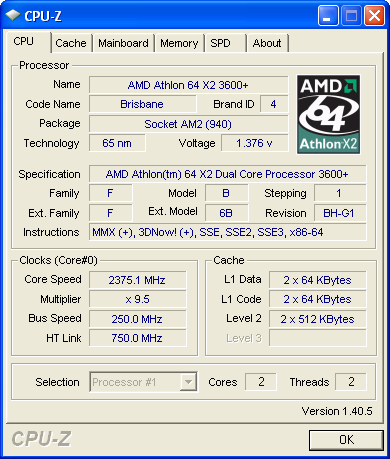


 0.0461sec
 0.32
0.32
 7 queries
 GZIP Disabled