Welcome Guest ( Log In | Register )

Outline · [ Standard ] · Linear+

 Digi Infinite Fan Club [V4], Infinite 150, 100, 80

views
     
SUSlurkingaround
post May 26 2020, 10:59 PM

Rule of Law
*******
Senior Member
7,066 posts

Joined: Sep 2019
From: South Klang Valley suburb


QUOTE(destiny017 @ May 26 2020, 03:08 PM)
It quite easily to reach 300gb monthly if you stream 1080p60 on twitch for 2-4 hour on working day and more on weekens/holiday. Just ytday stream twitch like 4-5 hour already ate my quota like 10-11gb ,using celcom atm.
*
QUOTE(Candy12 @ May 26 2020, 06:51 PM)
» Click to show Spoiler - click again to hide... «


A HD movie is with a length of 90mins on average(1 and a 1/2 hr) is about 2GB in size, how many hours can you sit in front of the TV streaming?10 hours per day and consistently every day 24/7 365 days a week?

When I was subscribing to DiGi Infinite 150 2 years ago, with me being the only user I only get to use my internet at home only after working hours before sleep and on weekends. Even 250GB was difficult to reach.
For the 12 months of using it, I barely could even reach 500GB with heavy downloads despite having a TV box and using simultaneously with a laptop.

So as you can see content and VPN providers are also implementing hidden quotas on their accounts to prevent abuse of sharing accounts with many users and from ripping their entire library of movies/contents overnight by media pirates.
*
.
https://www.androidcentral.com/how-much-dat...aming-media-use

''''''' Here's how the streams break down on average.

Low quality video is very low-quality. think 240p or 360p. Low-quality settings will use about 0.3GB (300MB) per hour.

SD quality video is standard 480p video. SD-quality video uses about 0.7GB (700MB) per hour.

HD quality video is between 720p and 2K (remember, the app adjusts the stream). HD-quality video uses about 0.9GB (720p), 1.5GB (1080p) and 3GB (2K) per hour.

UHD quality video uses a lot of data. A 4K stream uses about 7.2GB per hour.

.

Afaik;

In general, 360p/SD video quality is good enough for the 6" screen of smartphones; 720p/HD is good enough for 14" laptops; 1080p/FHD is good enough for 21" desktop monitors and large TV up to 55" and 4k/2160p/UHD is needed for screens larger than 55", eg projectors.

For those who watch videos on large TV of more than 55", they need to stream at 4k/2160p/UHD. A 1-hour video = 7GB of data consumed. 4-hours daily = about 30GB. 1 month = about 900GB.
....... So, the Digi Infinite 150 phone/modem plan boleh pakai in this case since throttling to 5Mbps only happen when exceeded 1TB of data used per month. Otherwise go for unlimited TM Unifi Home Fiber or other Home Fiber plans.

I'm not sure whether watching Live TV or Live sports from the web uses more data than the above figures.
.

PS - https://support.google.com/youtube/answer/78358?hl=en

''''''' The table below shows the approximate speeds recommended to play each video format.

Video Resolution/Recommended sustained speed
4K ...............20 Mbps
HD 1080p ... 5 Mbps
HD 720p ... 2.5 Mbps
SD 480p ... 1.1 Mbps
SD 360p ... 0.7 Mbps '''''''


Other video-streaming sites may have different or higher speed recommendation.

For live-streaming, eg Live TV and Live Sports, double the above Mbps figures.
.

This post has been edited by lurkingaround: May 27 2020, 10:59 AM
SUSlurkingaround
post May 27 2020, 12:25 AM

Rule of Law
*******
Senior Member
7,066 posts

Joined: Sep 2019
From: South Klang Valley suburb


QUOTE(destiny017 @ May 26 2020, 11:41 PM)
But seriously once you go 480 or higher, u cant even go back 240 or even 360 edy...sakit mata oh cry.gif
*
.
https://animoto.com/blog/news/hd-video-creation-sharing

''''''' 360p

Videos at 360p are well-suited to smartphones and other mobile devices since they use up less data, but may appear a bit blurry on larger screens. ...

1080p

For an even higher resolution, you can download your videos at 1080p, another favorite for HD television stations. We recommend this resolution for sharing on social media or for showing videos on larger screens and TVs, since it’ll give your audience the highest possible quality display, with crystal clear playback. '''''''

.

Watching videos at 1080p instead of 360p on a 6" screen smartphone does not give a big visual advantage. OTOH, watching videos at 360p instead of the optimum 1080p on a 39" screen TV gives a big visual disadvantage, ie very blurry videos.
....... Similarly, watching videos at 1080p instead of the optimum 2160p/4k on a 75" screen TV gives a big visual disadvantage, ie blurry videos.
.

This post has been edited by lurkingaround: May 27 2020, 01:17 PM
SUSlurkingaround
post May 27 2020, 11:12 AM

Rule of Law
*******
Senior Member
7,066 posts

Joined: Sep 2019
From: South Klang Valley suburb


QUOTE(Khuan0813 @ May 27 2020, 03:24 AM)
Brother, it's a big difference to watch a 360p and 720p video in a 6" screen smartphone.

For 360p, you can see a lot of boxes in the videos and all the scenes are blurred.

But for 720p, you can see less boxes and the scenes are clearer.
*
.


I streamed and watched the above Youtube MV at 360p on my 6" mid-end Honor 7X smartphone, the video is clear and without any empty pixel boxes = watching it at 1080p or 720p does not give a big visual advantage = mostly a waste of bandwidth speed and data consumed.
.
SUSlurkingaround
post May 27 2020, 12:18 PM

Rule of Law
*******
Senior Member
7,066 posts

Joined: Sep 2019
From: South Klang Valley suburb


QUOTE(syahpian @ May 27 2020, 11:43 AM)
depend on your phone screen resolution also, if 720p then ok lor, if full HD or higher, then you gonna see pixelated picture  laugh.gif
*

Khuan0813
.
The screen resolution of most Android smartphones can be lowered, eg if the default highest screen resolution is giving problem during video-streaming, especially during live video-streaming and Zoom conference live video-calls. .......

https://www.androidcentral.com/how-change-y...nd-refresh-rate - 29 Jan 2020

''''''' How to change your phone's resolution

Whether you already have one of the aforementioned phones, or you're gearing up for the upcoming Galaxy S20 and its rumored 120Hz WQHD+ display, lowering your phone's resolution is a quick and simple process. Just bear in mind that the exact steps will differ a bit depending on what kind of phone you're using — we're using a Galaxy Note 10+ for the sake of this guide, but the steps are generally the same across the board.

Open the Settings app.
Tap Display.
Tap Screen resolution.
Choose your desired resolution. Generally speaking, the higher the resolution, the sharper your text will be, along with the accompanying battery drain.

Another important thing to note is that not every phone supports reduced resolutions. The smaller Galaxy Note 10, for example, can't be configured up or down from its default FHD+ (2280x1080) resolution. '''''''


.
https://www.techradar.com/sg/news/phone-and...promise-1282880 - 4K smartphone displays require big battery life compromise - January 30, 2015

''''''' "For the large screen 4K is very good, but on a smaller smartphone display our eyes may not be able to see the difference between this and 2K resolutions.

"4K requires a lot of power, so if you use it you need to make compromises. A 4K display on a smartphone will give you half a day of battery life, but a 2K display can give you over a day of usage from a single charge." '''''''


I think 4k/2160p displays are also very taxing on the phone's processors and RAM = require high-end or flagship phone specifications.
.

This post has been edited by lurkingaround: May 27 2020, 12:40 PM
SUSlurkingaround
post May 27 2020, 02:05 PM

Rule of Law
*******
Senior Member
7,066 posts

Joined: Sep 2019
From: South Klang Valley suburb


QUOTE(Khuan0813 @ May 27 2020 @ 03:24 AM)
Brother, it's a big difference to watch a 360p and 720p video in a 6" screen smartphone.

For 360p, you can see a lot of boxes in the videos and all the scenes are blurred.

But for 720p, you can see less boxes and the scenes are clearer.
*
QUOTE(Khuan0813 @ May 27 2020 @ 11:41 AM)
Maybe my eyes are not good, so I can see many empty pixel boxes in 360p and 480p videos. laugh.gif
*
QUOTE(Khuan0813 @ May 27 2020, 01:11 PM)
I have phones with HD+ and FHD+ screen resolution.

But I still can see pixelated pictures on both phones if the video is not 720p.
*
.
That's odd. I don't have that problem with my past and present Android mobile devices - mostly low-end to mid-end ones, ie no problem streaming 360p videos with Internet download speed of at least 1Mbps. Maybe it's because you are using too high-end Android phones that do not support the streaming of low quality SD/480p/360p videos, ie can only smoothly stream HD/720p or above videos.
....... So, you should stick to streaming 720p or above videos, as per your Android device's built-in preference and your own personal preference.

.......
https://recoverit.wondershare.com/video-rep...on-android.html - How to fix pixelated videos on android - March 10, 2020

''''''' 480p provides a good viewing experience in mobile phones and other handheld devices. However, as the screen size increases, the resolution should also be increased. That is because for a tiny screen, the pixel density of 480p is enough. However, as the screen gets bigger, more pixel density is required for clearer images. So, in a 32” TV, 480p video will be blurry and 720p would be the best choice of video watching. '''''''
.

This post has been edited by lurkingaround: May 27 2020, 04:42 PM
SUSlurkingaround
post Jun 23 2020, 02:23 PM

Rule of Law
*******
Senior Member
7,066 posts

Joined: Sep 2019
From: South Klang Valley suburb


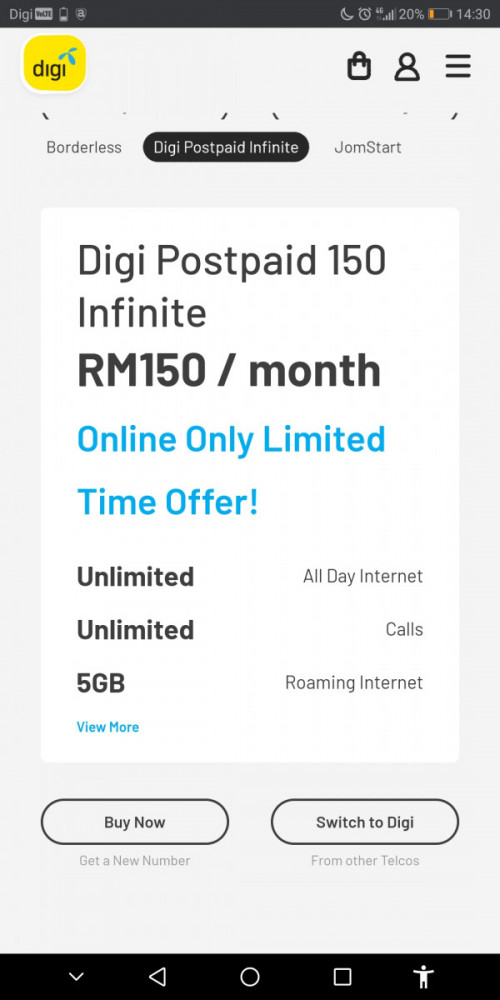
Seems, the postpaid Digi Infinite 150 phone plan is not on offer at its website. If people want to subscribe, how.? Is it only available at Digi shops/centers.? If so, why is this.?
.
SUSlurkingaround
post Jun 23 2020, 02:37 PM

Rule of Law
*******
Senior Member
7,066 posts

Joined: Sep 2019
From: South Klang Valley suburb


QUOTE(tympg @ Jun 23 2020, 02:32 PM)
You're not looking hard enough.

user posted image
*
.
So, Digi Infinite 150 is only available in the Digi phone app.? Why is this.? If so, it means new customers cannot get it straightaway.?
.

This post has been edited by lurkingaround: Jun 23 2020, 02:38 PM
SUSlurkingaround
post Jun 23 2020, 03:00 PM

Rule of Law
*******
Senior Member
7,066 posts

Joined: Sep 2019
From: South Klang Valley suburb


QUOTE(tympg @ Jun 23 2020, 02:40 PM)
Who told you that?

That is a screenshot from the website.  I'm not going to give you a tutorial on how to navigate the Digi website.
*
.
Ah.! Thanks, found it by clicking "Browse All Plans". ... Wonder why Digi left out the Infinite 150 plan from the front page for its postpaid plans, ie no need to click "Browse All Plans" to see it.?

Seems, you can straightaway subscribe online for the postpaid Digi Infinite 150 plan, ie no need to be an existing Digi postpaid customer.
.

This post has been edited by lurkingaround: Jun 23 2020, 03:04 PM
SUSlurkingaround
post Oct 3 2020, 09:20 PM

Rule of Law
*******
Senior Member
7,066 posts

Joined: Sep 2019
From: South Klang Valley suburb


QUOTE(matt_rix @ Oct 3 2020, 06:26 PM)
Thats above my budget unfortunately. Is it possible to get anything cheaper? How do i check if the router support lte advanced?
*
.
4G LTE-Advanced or 4G+ is LTE Cat 6 or above, eg https://www.4gltemall.com/blog/tag/huawei-b525-specs/
.

SUSlurkingaround
post Oct 9 2020, 05:44 PM

Rule of Law
*******
Senior Member
7,066 posts

Joined: Sep 2019
From: South Klang Valley suburb


QUOTE(jaycee1 @ Oct 9 2020, 02:25 PM)
Ah... Thanks.

Going to test again.

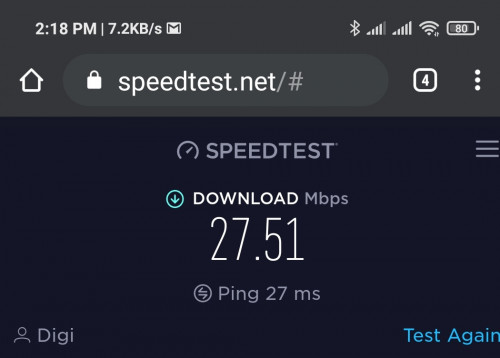
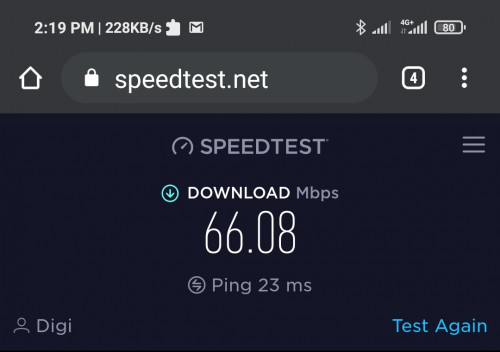
user posted image

Infinite 150 on router. (I probably need to upgrade it)
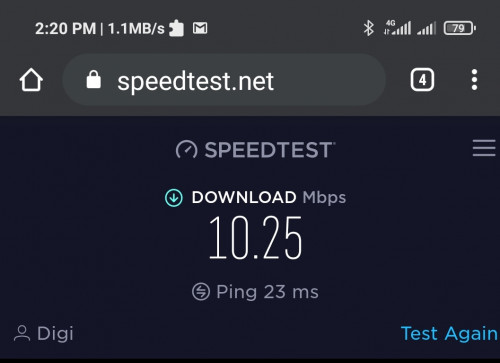
user posted image

Umobile GX35
(Btw umobile says the GX35 only says they do 6mbs only)

user posted image

Infinite 100
So now it makes sense with the 10mbs cap on infinite 100.

Thanks guys.

Those are the speeds I am getting. Full bar. At the office.

Unfortunately my condo is in a deadzone. But umobile is still 10x faster. I guess I will have to shop around. But I thought just to drop in and ask here first.
*
.
I'm on postpaid U Mobile GX50 = 5Mbps and video-streaming limited to 1080p/FHD/3Mbps. My home location has 4 bars out of 5 bars 4G cellular signal strength. My speedtestdotnet on a 2 year old Android 4G device indicates about 13Mbps and my fastdotcom test indicates about 3Mbps. When downloading apps, I get about 5Mbps indicated by the Internet Speed Meter Lite app.

Prepaid GX38 = 6Mbps and video-streaming also limited to 1080p/FHD/3Mbps. So, you won't get >6Mbps actual download speed.

GX68 will give you actual unlimited speed, eg 60+Mbps, except for music/video-streaming.

Postpaid Hero P139 may give you unlimited video-streaming, eg 8k. Please confirm with U Mobile.

TV of >54" and AR/VR headsets require 4k/2160p/UHD/8Mbps video resolution.
.

This post has been edited by lurkingaround: Oct 9 2020, 05:47 PM
SUSlurkingaround
post Mar 3 2023, 06:18 PM

Rule of Law
*******
Senior Member
7,066 posts

Joined: Sep 2019
From: South Klang Valley suburb


QUOTE((_HolySatan) @ Feb 16 2023, 04:28 PM)
U Postpaid 98
1Tb quota & hotspot + 5G
better than i150 legacy?

user posted image

user posted image
*
QUOTE(STEVE75 @ Feb 16 2023, 09:13 PM)
Good for hotspot from phone
Can't hotspot from modem unless the modem is modded
*
.
Afaik, U Mobile can also detect "illegal" use of modded 4G modems for it's Mobile Postpaid and Prepaid plans with Ultra 5G Hotspot.


Change to:
| Lo-Fi Version
0.1394sec    0.69    7 queries    GZIP Disabled
Time is now: 9th December 2025 - 03:58 PM