

QUOTE(torpor @ Nov 27 2018, 11:17 PM)
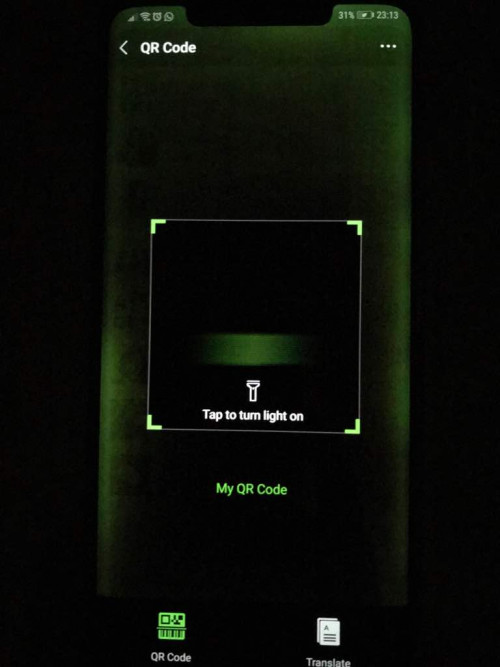
Hi, would like to know whether this condition is considered as greengate? Brightness was set at 0.
My screen insurance only valid until 30th November 2018...

How come you got extra insurance for your screen
Huawei Mate 20/20 Pro/20 X & Huawei GT
|
|
 Nov 27 2018, 11:29 PM Nov 27 2018, 11:29 PM
Return to original view | IPv6 | Post
#21
|
 
Senior Member
1,604 posts Joined: Aug 2009 From: Kuala Lumpur 
|
QUOTE(torpor @ Nov 27 2018, 11:17 PM) Hi, would like to know whether this condition is considered as greengate? Brightness was set at 0. My screen insurance only valid until 30th November 2018... How come you got extra insurance for your screen |
|
|
|
|
|
Nov 27 2018, 11:39 PM
Return to original view | IPv6 | Post
#22
|
|
Senior Member
1,604 posts Joined: Aug 2009 From: Kuala Lumpur
|
QUOTE(torpor @ Nov 27 2018, 11:33 PM) So with this issue I should go to SC to get a replacement right? Yes you should to sc and get a replacement.The screen insurance validity was in the HiCare.. I'm still confused about the screen warranty. Isn't it supposed to be same with the phone |
|
|
Nov 28 2018, 08:48 AM
Return to original view | Post
#23
|
|
Senior Member
1,604 posts Joined: Aug 2009 From: Kuala Lumpur
|
QUOTE(jhleo1 @ Nov 28 2018, 08:05 AM) Yes this is for screen crack only. Green tint under phone warranty of 1 year warranty. Yup. I think hulk issue is covered under phone warranty. |
|
|
Nov 30 2018, 01:02 PM
Return to original view | IPv6 | Post
#24
|
|
Senior Member
1,604 posts Joined: Aug 2009 From: Kuala Lumpur
|
|
|
|
Dec 1 2018, 10:45 AM
Return to original view | IPv6 | Post
#25
|
|
Senior Member
1,604 posts Joined: Aug 2009 From: Kuala Lumpur
|
QUOTE(VeeJay @ Nov 30 2018, 02:03 PM) My friend is using it....he bought at local store for rm33...any specific question? How's the fit, how's the screen response and feel. Is it smooth ? Any colour tints ? |
|
|
Dec 5 2018, 10:39 PM
Return to original view | IPv6 | Post
#26
|
|
Senior Member
1,604 posts Joined: Aug 2009 From: Kuala Lumpur
|
QUOTE(joytest @ Dec 5 2018, 09:22 PM) Desktop mode is pretty neat. Just hooked it up to a regular multi function hub and it allows desktop mode without needing a fancy expensive DeX hub. Impressive. What hub are you using.It even supports the built in touch screen driver of my USB monitor. Haha I can make a Tesla-like console with the correct mounts in the car LoL 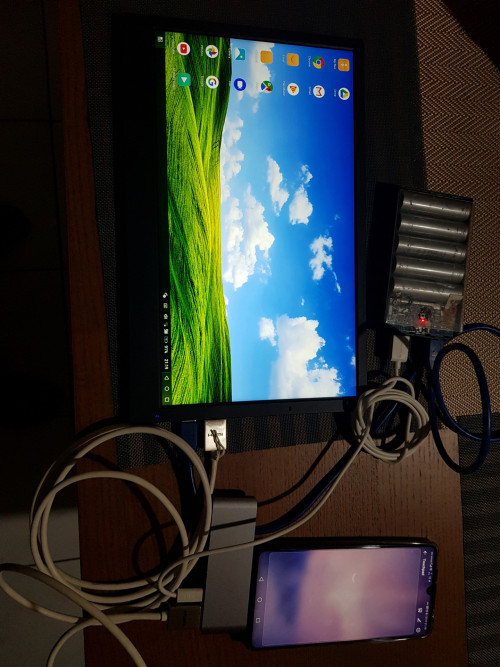 |
|
|
|
|
|
Dec 9 2018, 10:28 PM
Return to original view | Post
#27
|
|
Senior Member
1,604 posts Joined: Aug 2009 From: Kuala Lumpur
|
guys suggest me a good phone case for M20P.
looking for a simple yet good one. simple in the sense its looks not so thick keyword : minimalist. and also screen protector, saw a few in lazada but not sure if its good. |
|
|
Dec 12 2018, 01:27 PM
Return to original view | IPv6 | Post
#28
|
|
Senior Member
1,604 posts Joined: Aug 2009 From: Kuala Lumpur
|
Super curious abt this.
M20P is IP57 right, anyone tried to test it ?? |
|
|
Dec 12 2018, 01:29 PM
Return to original view | IPv6 | Post
#29
|
|
Senior Member
1,604 posts Joined: Aug 2009 From: Kuala Lumpur
|
QUOTE(haziqmck7 @ Dec 12 2018, 12:37 PM) Planning to get m20pro but how to check display panel from BOE? Install Hardware info app from playstore. |
|
|
Dec 12 2018, 09:15 PM
Return to original view | IPv6 | Post
#30
|
|
Senior Member
1,604 posts Joined: Aug 2009 From: Kuala Lumpur
|
QUOTE(josh5671 @ Dec 12 2018, 02:55 PM) Me already wash the m20p. Damn.. this is interesting. Everything ok ??Didt have pool here.... Sorry, never owned IP rated phone before. |
|
|
Jan 1 2019, 04:19 AM
Return to original view | IPv6 | Post
#31
|
|
Senior Member
1,604 posts Joined: Aug 2009 From: Kuala Lumpur
|
QUOTE(emy_xvidia @ Jan 1 2019, 01:26 AM) Anyone here has any issues with Google Calendar not syncing with the stock Huawei calendar app? I'm having the issue yes. Solution not found yet. |
|
|
Jan 7 2019, 12:03 PM
Return to original view | IPv6 | Post
#32
|
|
Senior Member
1,604 posts Joined: Aug 2009 From: Kuala Lumpur
|
Anyone updated new FW and have buggy face detection. It's super laggy, and fails most of the time.
|
|
|
Jan 7 2019, 01:38 PM
Return to original view | IPv6 | Post
#33
|
|
Senior Member
1,604 posts Joined: Aug 2009 From: Kuala Lumpur
|
QUOTE(jhleo1 @ Jan 7 2019, 12:23 PM) It's better you redo the face recognition after FW updated. Will do that bro. |
|
|
|
|
|
Jan 11 2019, 12:48 PM
Return to original view | IPv6 | Post
#34
|
|
Senior Member
1,604 posts Joined: Aug 2009 From: Kuala Lumpur
|
QUOTE(e_mc_square @ Jan 11 2019, 09:05 AM) Those who found buggy in 3rd party launcher can try below suggestion. Thx men.It will disable the default launcher MAKE SURE YOU HAVE 3RD PARTY LAUNCHER INSTALL BEFORE YOU STARTED!!! 1) Enable USB debugging in your phone. 2) Install adb in your computer. 3) Launch adb and type below adb shell pm disable-user --user 0 com.huawei.android.launcher if you want to enable back the huawei launcher, below are the command. adb shell pm enable --user 0 com.huawei.android.launcher The disadvantage of disabling the default launcher is you will lost gesture control. Only the bottom gesture, left right still able to work. You can install Fluid N.G. to solve that. The advantages of disabling the default launcher is you will get rid of those bugs of using 3rd party launcher. And it will bring back card style/oreo style recent apps. https://forum.xda-developers.com/mate-20-pr...oyance-t3861235 https://forum.xda-developers.com/mate-20-pr...16#post78096616 |
|
|
Jan 11 2019, 12:48 PM
Return to original view | Post
#35
|
|
Senior Member
1,604 posts Joined: Aug 2009 From: Kuala Lumpur
|
Anyone here using true caller app to block private numbers. ????
|
|
|
Jan 11 2019, 02:56 PM
Return to original view | IPv6 | Post
#36
|
|
Senior Member
1,604 posts Joined: Aug 2009 From: Kuala Lumpur
|
QUOTE(jhleo1 @ Jan 11 2019, 12:49 PM) Original app not good? Didn't know original app could block private numbers. I'll have to check it out. |
|
|
Jan 12 2019, 09:44 AM
Return to original view | IPv6 | Post
#37
|
|
Senior Member
1,604 posts Joined: Aug 2009 From: Kuala Lumpur
|
QUOTE(benny888 @ Jan 11 2019, 03:21 PM) I had been using it for past 2 years on all my Android Is it working fine on M20P. I still get private calls, I checked permission, I checked settings. Restarted the app, also set and default dialer.A list of spam numbers are constantly updated by users Pretty good app |
|
|
Jan 14 2019, 07:59 PM
Return to original view | IPv6 | Post
#38
|
|
Senior Member
1,604 posts Joined: Aug 2009 From: Kuala Lumpur
|
Guys any method to check Infrared on M20P. I tried mine for few different equipments as a remote but no response
|
|
|
Jan 15 2019, 08:02 AM
Return to original view | IPv6 | Post
#39
|
|
Senior Member
1,604 posts Joined: Aug 2009 From: Kuala Lumpur
|
QUOTE(aurion @ Jan 14 2019, 08:54 PM) There is another way for checking if IR is working or not. It requires another phone. Thanks. Will do this.1)On your M20P, randomly set up a device for testings sake. 2)On the other phone, launch the camera and point the viewfinder to the M20P's IR blaster You should see a purplish red LED blinking on the screen of the other phone which has the camera turned on, when pressing the buttons in SmartRemote on your M20P (after setting up) |
|
|
Feb 7 2019, 09:32 AM
Return to original view | IPv6 | Post
#40
|
|
Senior Member
1,604 posts Joined: Aug 2009 From: Kuala Lumpur
|
 Random pic post passing through. |
|
Topic ClosedOptions
|
| Change to: |  0.1181sec 0.1181sec
 0.15 0.15
 7 queries 7 queries
 GZIP Disabled GZIP Disabled
Time is now: 6th December 2025 - 08:37 PM |
 Quote
Quote