Outline ·
[ Standard ] ·
Linear+
TIME [OFFICIAL] TIME Fibre Broadband™ v4, Experience the ONE TRUE 2Gbps
|
senscents
|
 Oct 15 2018, 06:36 PM Oct 15 2018, 06:36 PM
|

|
Hi !! Sifu.
Is it being fully implemented on the speed upgrade? mine previously was on 100mbs package and was notified by email and my self care portal show that it has been upgraded to 500mbs few days back. Till today (as of now) the speed test still show 90+mbs.
I've already switch on and off the both routers but still the same old speed of 90+mbs. Anything else i need to do?
BTW I'm in the Bandar Sri Permaisuri area. Tq and appereciate your advise
|
|
|
|
|
|
senscents
|
Oct 15 2018, 07:58 PM
|
|
|
QUOTE(ryansxs @ Oct 15 2018, 07:47 PM) did everything... even technician came...still cannot solve the issue!  If technician can not solve, Who can? So what's the next course of action, did the technician advise? |
|
|
|
|
|
senscents
|
Oct 15 2018, 08:10 PM
|
|
|
QUOTE(wirelessbuyer @ Oct 15 2018, 01:51 AM) Should be the same issue that I faced last time with my AC1200. See my previous reply below. Hi !! Where to access the advance for the nap. Tq |
|
|
|
|
|
senscents
|
Oct 15 2018, 08:29 PM
|
|
|
QUOTE(wirelessbuyer @ Oct 15 2018, 08:14 PM) Nap? If you want to access the 'Advance' its at at the top tab navigation there Quick Setup | Basic | "Advance"I'm refering to the reply below. How to access the NAT Boost from the Advance setting. Where to locate it? Tq Advance > System Tools > System Parameters > NAT > NAT Boost (make sure checkbox is checked) |
|
|
|
|
|
senscents
|
Oct 15 2018, 08:37 PM
|
|
|
QUOTE(SilentVampire @ Oct 15 2018, 08:30 PM) The instructions is there lol. Please advise.. Noob here. Is it from the System Properties > Advance or Internet Properties > Advance ? Seems, i can not locate it ? |
|
|
|
|
|
senscents
|
Oct 15 2018, 08:42 PM
|
|
|
QUOTE(FusionXY @ Oct 15 2018, 08:39 PM) Which router that you're using? The TIME stock router C1200? Thanks. Yes.. Acher C1200. Tq |
|
|
|
|
|
senscents
|
Oct 15 2018, 08:43 PM
|
|
|
QUOTE(wirelessbuyer @ Oct 15 2018, 08:41 PM) Ahh, you need to login to your router to change the setting that I've mention above not in your windows. URL and username/password to login to your router usually printed at the bottom at your router. Ohhh. Thanks a million. Will give it a try |
|
|
|
|
|
senscents
|
Oct 15 2018, 09:09 PM
|
|
|
QUOTE(FusionXY @ Oct 15 2018, 08:50 PM) First thing, login to your router via 192.168.0.1 on your browser. Key in your login ID and Password. The Password is TIMEXXXX, the XXXX is the last 4 Mac address of your router. Go to Advance tab and follow the instructions. Thanks. Thanks for the detail. Just login and saw the the NAT Enable and Boost are both Checked. Uncheck and Recheck again and then save. Still can not get the 500mbps to work. Reboot from the tplink login also can not solve the problem of the said upgrade to 500mbps. it is still app 90+mbps Any other advise that i can try. |
|
|
|
|
|
senscents
|
Oct 15 2018, 09:24 PM
|
|
|
QUOTE(FusionXY @ Oct 15 2018, 09:18 PM) Hi, try to perform direct connection to ONU and check whether you can get full speed of 500Mbps. To perform direct connection, you must get your PPPoE details ready. Or alternatively, you may try to restart your both equipments. Check whether your PCs is capable of getting above 100Mbps over LAN which the link speed shows 1Gbps on your laptop. You may WhatsApp me if you need a faster response. Thanks. Thanks again. Greatly appreciate your advise. |
|
|
|
|
|
senscents
|
Aug 21 2019, 04:07 AM
|
|
|
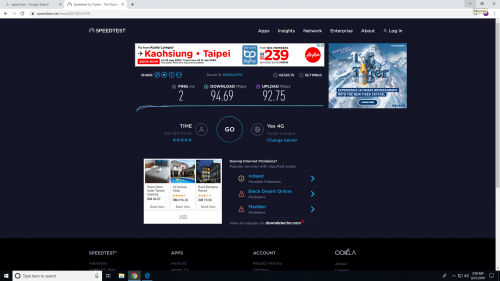 Why am i still getting <100Mbps on the speed test. tried the speed test for a couple times for about 2weeks. I'm on the 500Mbps package. Anything can i do to speed it up? Appreciate sifu help. Thanks |
|
|
|
|
|
senscents
|
Aug 21 2019, 04:22 AM
|
|
|
QUOTE(yeapch01 @ Aug 21 2019, 04:13 AM) Dear bro , Have you tried doing the speed test by using direct thru lan connection to your router or using Wi-Fi under 5Ghz Also try to change your DNS mode to Goggle DNS if you have not done it before. Feel free to contact us if need further assistance. Thanks Thanks for the reply. I've check the network properties. I think the ethernet was limited to 100Mbps. It say the Link spped receive/transmit 100mbps. How to change it? |
|
|
|
|
|
senscents
|
Aug 21 2019, 03:02 PM
|
|
|
QUOTE(jjj2 @ Aug 21 2019, 07:31 AM) Hi, For Ethernet connection, you will need to make sure your laptop/pc network adaptor is Gigabit supported. Thanks. How to check if it is gigabit supported. Just recently change to new desktop.. |
|
|
|
|
|
senscents
|
Aug 21 2019, 03:05 PM
|
|
|
QUOTE(mushigen @ Aug 21 2019, 10:40 AM) Please use a true Cat 5e or Cat 6 LAN cable. I said true Cat 5e because I've had cables labelled as Cat 5e that still cap my limit to 100Mbps. Do they (installer) provide the Lan Cable. If i remember correctly, i did not purchase any cable for the installation of time. |
|
|
|
|
|
senscents
|
Aug 21 2019, 03:44 PM
|
|
|
Good to know that they (installer) do provide the said cable.
If not i need to hunt foe the cable. 😁
|
|
|
|
|
|
senscents
|
Aug 21 2019, 04:21 PM
|
|
|
QUOTE(xSean @ Aug 21 2019, 04:07 PM) actually no provide from installer, the router and modem come with it...usually 1m only Seems 1m of cable is just enough, from the desk to the cpu under the desk. Can any sifu recommend cat5 or 6 cable, might consider to purchase it. |
|
|
|
|
|
senscents
|
Aug 21 2019, 04:43 PM
|
|
|
QUOTE(mushigen @ Aug 21 2019, 10:40 AM) Please use a true Cat 5e or Cat 6 LAN cable. I said true Cat 5e because I've had cables labelled as Cat 5e that still cap my limit to 100Mbps. I've check the network properties. I think the ethernet was limited to 100Mbps. It say the Link speed receive/transmit 100mbps. How to change it ? Maybe the my cable are the same case like yours. Any other ways to go about it ? |
|
|
|
|
|
senscents
|
Aug 21 2019, 08:39 PM
|
|
|
QUOTE(1designs @ Aug 21 2019, 05:37 PM) I got the same issue as you too! I called in to Time, thinking that the problem was on my end. I had to call in 3 times on 3 different occasions and all 3 times telling me it was because there are many downloads going on. On the forth time I called, they finally "reset" the connection and it's finally back to 500Mbps. You need to call them, the problem is from their side. The time of this occurrence is also the same time you posted this so I'm sure it happens to a lot more people. Thanks, will try calling CS Hope will settle the problem.😀 |
|
|
|
|
|
senscents
|
Aug 22 2019, 12:48 AM
|
|
|
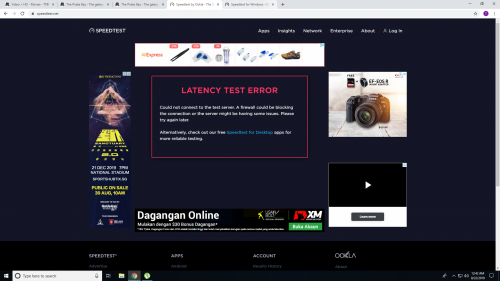 Tonight problem with the speedtest. Tried a few times, it say problem with Latency test |
|
|
|
|
|
senscents
|
Aug 22 2019, 01:45 AM
|
|
|
Found the problem on the <100Mbps connection. It the cable. It's written Verified ETL AMP NETCONNECT Category 6 Cable 1714-S2 E138034 CMR C (UL) 4 PR 23 AWG UPT 75C. Change to an old Cat 5e cable, seems to be better. The connection status read 1.0Gbps. 😁 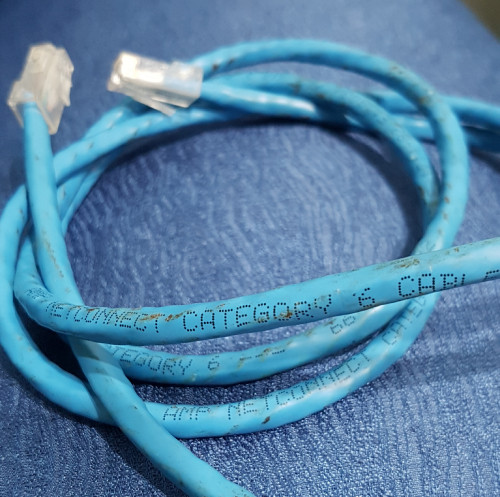 This post has been edited by senscents: Aug 22 2019, 01:47 AM This post has been edited by senscents: Aug 22 2019, 01:47 AM |
|
|
|
|
|
senscents
|
Aug 23 2019, 04:03 PM
|
|
|
QUOTE(voncrane @ Aug 23 2019, 07:46 AM) I'm using Ugreen CAT6A cables all around.. Even at 15m, can still easily max out speeds. Highly recommended. Good to know this reliable brand of cable, mind to share where did you purchase it? I need around 18meters for the furthest room. Can pm. Thanks |
|
|
|
|



 Quote
Quote

 0.0283sec
 0.26
0.26
 7 queries
 GZIP Disabled