Welcome Guest ( Log In | Register )

45 Pages « < 19 20 21 22 23 > » Bottom

Outline · [ Standard ] · Linear+

TIME [OFFICIAL] TIME Fibre Broadband™ v4, Experience the ONE TRUE 2Gbps

views
     
FusionXY
post May 19 2020, 10:18 AM

LAZZIE ON VACATION
*******
Senior Member
3,834 posts

Joined: Aug 2016

QUOTE(RagingCandy @ May 19 2020, 04:30 AM)
No more warranty.  I should avoid the hassle to flash the firmware then.  My reading room hardly get good connection even router already at middle of the house. Any good recommendation for a condo size of 1110sqft? Using Time 100Mbps.
*
What's your budget bro?

Thanks.
FusionXY
post May 19 2020, 05:29 PM

LAZZIE ON VACATION
*******
Senior Member
3,834 posts

Joined: Aug 2016

QUOTE(RagingCandy @ May 19 2020, 05:22 PM)
Rm300-400 range.
*
You may get the TP-Link AX10.

Thanks.
FusionXY
post May 19 2020, 11:27 PM

LAZZIE ON VACATION
*******
Senior Member
3,834 posts

Joined: Aug 2016

QUOTE(RagingCandy @ May 19 2020, 11:19 PM)
Haha... looking for that too.
I just found out my company laptop is ax enable. Might getting ax...
*
biggrin.gif biggrin.gif

Or you can upgrade to AX50..

Thanks.
FusionXY
post May 19 2020, 11:57 PM

LAZZIE ON VACATION
*******
Senior Member
3,834 posts

Joined: Aug 2016

QUOTE(athlon @ May 19 2020, 11:44 PM)
Im on Time 500mbps, just curious, asus rt-ax56u or tp-link ax10 is better in term of performance and signal coverage?
I have 6 devices with AX chipset and 11 devices with AC chipset. Condo size is 2,600sqft.
*
You may get the AX56U or alternatively you can upgrade to AX50..

Need help from this guy prs516 as I answered him that ASUS AX56U can work with TIME.
Need comments from him..

Thanks.

This post has been edited by FusionXY: May 19 2020, 11:57 PM
FusionXY
post May 20 2020, 07:14 PM

LAZZIE ON VACATION
*******
Senior Member
3,834 posts

Joined: Aug 2016

QUOTE(stryfox @ May 20 2020, 06:46 PM)
help. just change router to DIR-868L but cannot connect?
*
Did you key in the PPPoE details correctly?
New router or use back from TM?

Did you connect back to the same port?

Thanks.

FusionXY
post May 23 2020, 02:36 PM

LAZZIE ON VACATION
*******
Senior Member
3,834 posts

Joined: Aug 2016

QUOTE(RagingCandy @ May 23 2020, 02:08 PM)
Bought AX10 today. So far very satisfied with the speed.  5GHz performance is very stable compare to C1200.
Setup only take few minutes using Tp Link Tether App (Tips - turn off your data plan. else the app will not detect the new router).
Below are the results with following conditions

- Time 100Mbps subscription
- 5GHz wifi
- mother in law streaming Kodi iCdrama and wifi streaming Youtube while cooking

1) PC with Intel WiFi Link 5300. Located in a room that furthest in the house and placed on a floor  (2 walls and 1 door). Since it is Wireless G adapter - max upload speed is 54Mbps.
user posted image

2) A laptop with Intel AX200. Same location.
user posted image
*
Thanks for the feedback.

I hope that you enjoy using the new router.
Compared to the previous router.
Speed is lower than before when using C1200?
Maybe you can post the comparison so that we know more.

The speed is very good with AX Adapter/Chipset.

TP-Link Archer AX10 is suitable for 100Mbps...
TP-Link Archer AX50 is suitable for 300Mbps and above.

Have a nice day bro... biggrin.gif biggrin.gif biggrin.gif biggrin.gif

FusionXY
post May 23 2020, 10:14 PM

LAZZIE ON VACATION
*******
Senior Member
3,834 posts

Joined: Aug 2016

QUOTE(teamjoker @ May 23 2020, 10:02 PM)
I am going to subscribe to TIME. Want to ask whether the installation team will charge if I want to put the router beside my TV? Is there a standard length of installation? Thks.
*
Thanks for the interest on TIME Fibre.

Refer to your PM for more details.

Thanks.
FusionXY
post May 24 2020, 01:37 AM

LAZZIE ON VACATION
*******
Senior Member
3,834 posts

Joined: Aug 2016

QUOTE(RagingCandy @ May 24 2020, 01:21 AM)
When I first subscribed Time 4 years ago, some guru ask me not to turn on IPv6 as it was not stable during that time.  Is it good to turn it back now?
*
Hello, I enabled IPv6.
Never had complaints.

I think the purpose is to have more IP Address...

Thanks.
FusionXY
post May 24 2020, 09:06 AM

LAZZIE ON VACATION
*******
Senior Member
3,834 posts

Joined: Aug 2016

QUOTE(RagingCandy @ May 24 2020, 07:40 AM)
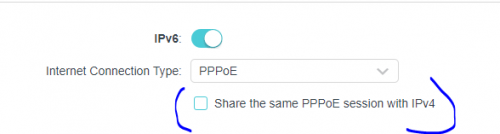
Oh... I should enable then. Shall I check to share session with ipv4?

user posted image
*
Yes, you're right.

I share session with IPv4.

Thanks.
FusionXY
post May 25 2020, 02:28 AM

LAZZIE ON VACATION
*******
Senior Member
3,834 posts

Joined: Aug 2016

QUOTE(#Victor @ May 25 2020, 02:13 AM)
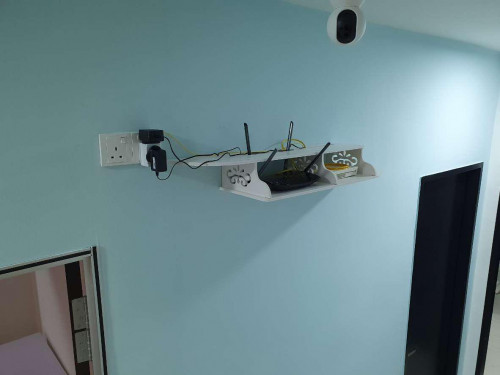
just done installed TIME, technician said only 6 metres cabling for fiber standard installation, but had chit-chat with technician and finally he gave 10 metres fiber cable without additional charges biggrin.gif
» Click to show Spoiler - click again to hide... «

*
Wow!

Nice and neat setup there.
The Fibre Cable Concealed inside the wall?

Mind to share where did you get the wall shelf?

Thanks.
FusionXY
post May 25 2020, 02:19 PM

LAZZIE ON VACATION
*******
Senior Member
3,834 posts

Joined: Aug 2016

QUOTE(#Victor @ May 25 2020, 02:17 PM)
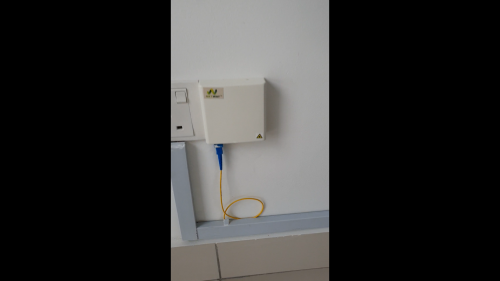
yes, fiber concealed inside wall, extremely hard to pull the fiber cable to run inside wall without break it.
WiFi signal is must more better at this location to cover whole unit compare with original fiber box location
the wall shelf is router rack, can be purchase online  biggrin.gif
maybe just lucky to meet the right technician at right time  biggrin.gif
user posted image
*
Oh thanks for the info bro...

Looks better in that way. Did the technician charge for non standard installation?

Thanks.
FusionXY
post May 25 2020, 02:43 PM

LAZZIE ON VACATION
*******
Senior Member
3,834 posts

Joined: Aug 2016

QUOTE(#Victor @ May 25 2020, 02:31 PM)
technician just simply dump the ONU and router on the floor at fiber box, the relocation and installation of rack was done by own.
the technician even dun allow to remove @TIME-2.4GHz suffix when setting up the SSID blush.gif
*
Oh, you know how to relocate without breaking the Fibre Cable.

It is standard for the stock router to have the TIME suffix.
I think by default same like Unifi, also cannot remove the suffix.

Thanks.
FusionXY
post May 25 2020, 03:07 PM

LAZZIE ON VACATION
*******
Senior Member
3,834 posts

Joined: Aug 2016

QUOTE(#Victor @ May 25 2020, 03:01 PM)
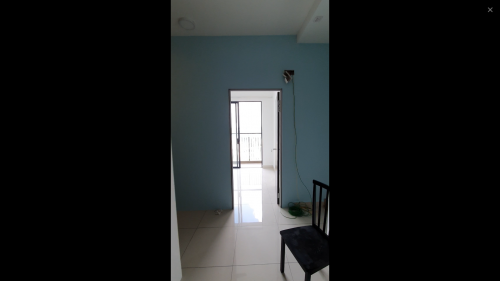
tie the fiber cable with existing copper cable that already concealed inside wall and slowly pull up.

no, the suffix can be removed but technician dun allow to do so. it's okay, later when the technician left i renamed the SSID to preferred one by own tongue.gif

user posted imageuser posted image
*
Haha....

Thanks for the information.
Have a nice day bro...

biggrin.gif biggrin.gif biggrin.gif biggrin.gif
FusionXY
post May 26 2020, 09:26 PM

LAZZIE ON VACATION
*******
Senior Member
3,834 posts

Joined: Aug 2016

QUOTE(ryws @ May 26 2020, 08:26 PM)
Does the Tp Link EC230 router have better coverage than the Archer C1200?

I am using C1200. One of my rooms has a usable WIFI but with low signal (2 bar). I am thinking if changing to EC230 can help,  at least improve the signal to 2.5 bar?
*
TP-Link EC230 coverage is more or less same with the C1200.

May I know which plan that you're using?
Do you have budget?

Thanks.
FusionXY
post May 26 2020, 11:47 PM

LAZZIE ON VACATION
*******
Senior Member
3,834 posts

Joined: Aug 2016

QUOTE(ryws @ May 26 2020, 11:25 PM)
Don't mind basic, just need abit more coverage will do.

Any router to recommend to up a level? (focus on coverage)

Thanks~
*
I may suggest you to get TP-Link Archer AX10.

Thanks.
FusionXY
post May 28 2020, 09:29 PM

LAZZIE ON VACATION
*******
Senior Member
3,834 posts

Joined: Aug 2016

QUOTE(Stochastic @ May 28 2020, 09:25 PM)
My 5g is slower than 2.4g, I tested at front of the router, any sifu know the reason? Need to change router?

A bit frustrated...thanks
*
May I know which router that you're currently using?

Thanks.

FusionXY
post May 29 2020, 12:53 AM

LAZZIE ON VACATION
*******
Senior Member
3,834 posts

Joined: Aug 2016

QUOTE(Stochastic @ May 29 2020, 12:49 AM)
TP-Link archer C1200, the router given by TIME
*
Hello, I have heard many complaints regarding this router.

I would like to suggest you to get a new router.
May I know what is your plan speed and budget?

Thanks.

This post has been edited by FusionXY: May 29 2020, 12:54 AM
FusionXY
post May 29 2020, 12:42 PM

LAZZIE ON VACATION
*******
Senior Member
3,834 posts

Joined: Aug 2016

QUOTE(Stochastic @ May 29 2020, 12:35 PM)
100Mbps and max RM200 budget for router, Huawei one okay?
*
Which router do you refer?

Or you can top up to get TP-Link Archer C80.
TP-Link Archer C80

Thanks.
FusionXY
post May 29 2020, 12:43 PM

LAZZIE ON VACATION
*******
Senior Member
3,834 posts

Joined: Aug 2016

QUOTE(spacerx @ May 29 2020, 12:39 PM)
Ayaaakkkk. Internet down. I just got time fibre yesterday and today it failed.

[attachmentid=10503052]
*
Hi, is the LOS light blinking on your router.

Or Red Internet Light?

Thanks.
FusionXY
post May 29 2020, 01:24 PM

LAZZIE ON VACATION
*******
Senior Member
3,834 posts

Joined: Aug 2016

QUOTE(spacerx @ May 29 2020, 01:15 PM)
I got red internet light. Through livechat i got this. Second day of using time fibre and i got this issue.
Hi we regret to inform you that we’re currently experiencing an interruption in our network & our engineers are on-site to fully restore services as soon as possible. We’re sorry for the inconvenience and thank
*
LOS no blinking?

You got it from SMS?

Thanks.

45 Pages « < 19 20 21 22 23 > » Top
 

Change to:
| Lo-Fi Version
0.0292sec    0.68    7 queries    GZIP Disabled
Time is now: 2nd December 2025 - 11:25 PM