Welcome Guest ( Log In | Register )

Outline · [ Standard ] · Linear+

TIME [OFFICIAL] TIME Fibre Broadband™ v4, Experience the ONE TRUE 2Gbps

views
     
jjj2
post Oct 2 2025, 03:44 PM

Look at all my stars!!
*******
Senior Member
3,604 posts

Joined: Feb 2006
QUOTE(Skylinestar @ Oct 2 2025, 02:44 PM)
can the stock time router Huawei HG8145V5 be configured as wireless range extender? want to connect to main/host router wirelessly.
*
You can configure as wireless AP/Repeater mode.
But seriously not advisable to use this crap.... use other model which is far more better.

This post has been edited by jjj2: Oct 2 2025, 03:45 PM
jjj2
post Oct 4 2025, 03:43 PM

Look at all my stars!!
*******
Senior Member
3,604 posts

Joined: Feb 2006
QUOTE(Skylinestar @ Oct 3 2025, 07:04 PM)
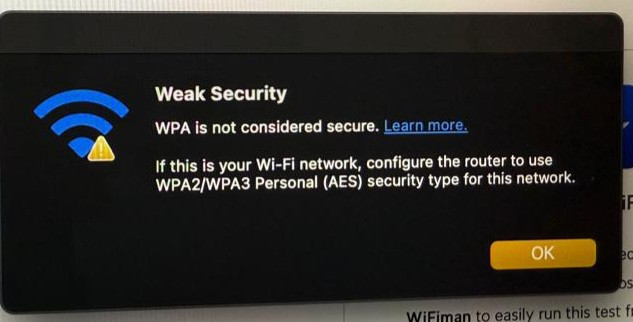
my sibling's house just got TIME internet installed. he complains that his Apple device reports the wifi is not safe. he shows me this:

user posted image

it's 2025 and installer chose WPA and not WPA2? why? can we change this?
router model is HG8145X6-10.
*
Starting from iOS14 or OSX15.1 & above, this message will be shown if your wifi security is set to WPA / WPA2 (TKIP).
You need to change it to WPA2 (AES) or WPA3.
jjj2
post Oct 4 2025, 03:50 PM

Look at all my stars!!
*******
Senior Member
3,604 posts

Joined: Feb 2006
QUOTE(Leroi2x @ Oct 4 2025, 11:14 AM)
Hi all,
I recently moved into my new house in Sri Rampai and decided to try TIME Fiber, which has a better reputation compared to Unifi. The internet speed meets my 600 Mbps package.
However, I'm experiencing intermittent packet loss when playing Dota 2. Today, a technician from TIME came by and said everything seems fine on their end. He suggested replacing the stock Huawei WiFi 7 router because, according to him, it is unstable. He recommended upgrading to the WiFi 6 X6-10 model instead.
Has anyone had experience with this? Any suggestions would be greatly appreciated.
*
I think the technician meant is downgrade instead. If you really want to upgrade, advisable to get yourself some other better range like TP-Link Deco, Asus Zen Wifi & others. Do note that changing mesh system does not gurantee the packet routing to your game server.
Unlike Metro-e / ID, for normal fiber broadband users, if you have bad International routing, there isn't much you can do, except changing ISP, rather than going through the tiring complain process.
jjj2
post Oct 4 2025, 04:03 PM

Look at all my stars!!
*******
Senior Member
3,604 posts

Joined: Feb 2006
QUOTE(AjkR06 @ Oct 3 2025, 12:05 PM)
Time fibre finally enters my taman.

Just a taman in the B40 area and not even in main city actually. Quite shocked when I saw that!

They planted a concrete pole just beside the TM pole at the back of my house around end of august.

Now they're in the midst of lying the cable as well as labelling the concrete pole.

But it seems that the fibre cable that they're using are so thin, around the thickness of CAT6 cable when compared with Unifi one, which is thick.

The FTB also smaller than Unifi and only got around 1-3 FTB for the whole jalan, compared with Unifi which got around 5-6 FTB.

But well, I still can't subscribe to Time even when their infra is ready at my area. Just renewed my contract with Unifi last June.. 1Gbps for RM159 and still in the 'honeymoon' period (free bills for 6 months)  rolleyes.gif
*
It depends on the no of ports the FTB being used. Some ISP doesn't prepare sufficient ports for the entire Taman.
There are few types of cables being deployed, the one you see which looks slightly thinner than Cat6, round & black, is the Huawei FastConnect single core fiber.
This fiber is kinda fragile & softer compared to other conventional outdoor fiber used.
jjj2
post Oct 10 2025, 10:04 PM

Look at all my stars!!
*******
Senior Member
3,604 posts

Joined: Feb 2006
QUOTE(Somtam77 @ Oct 7 2025, 09:33 AM)
Hi sifus, I want to ask — is it easy to change to a new ASUS or TP-Link router?
YEs pretty easy.
My current router is HG8145V5 (600Mbps). I don’t really have much knowledge about router setup, but based on what I’ve read, the steps are:

1. Get the new router
2. Call TIME CS and switch to Bridge Mode
3. Connect the new router’s WAN port to LAN1 of HG8145V5
4. Log in to the new router and enter PPPoE username & password

Am I correct??
YES you are correct.

Besides, does any Sifu know what Router fit my neeed? Budget are RM600-800, Apartment, 1400+ft, WiFi 7 if can
I assume your current ONT (HG8145V5) is located at living room which is somehow center of the unit, for single router, you may opt for TP-Link BE400 or BE550 or Ruijie/Reyee RG-EW7200BE PRO.
If you wish to go for Mesh System, within this budget, you can go for TP-Link Deco BE25 (2 Nodes).


600mbps plan, 2desktop PC, 1 TV, 30++ Devices including Smart Electronic and Laptop.
*
jjj2
post Oct 15 2025, 04:50 PM

Look at all my stars!!
*******
Senior Member
3,604 posts

Joined: Feb 2006
QUOTE(calvin @ Oct 13 2025, 10:53 AM)
would downgrading invoke a new subscription contract ?
*
If you have fulfilled the minimum contract you previously signed, and you downgrade without claiming free devices or promo, then it will not invoke a new contract.

jjj2
post Oct 15 2025, 09:23 PM

Look at all my stars!!
*******
Senior Member
3,604 posts

Joined: Feb 2006
QUOTE(blacktubi @ Oct 15 2025, 06:19 PM)
Did TIME started using XGPON for 1Gbps customer or still only for 2Gbps customer only?

Let say GPON port is full at my condo, will they use XGPON if I am just a 1Gbps user
Sometimes XGPON splitter will be used.

Will I get the XGPON modem hmm.gif
1Gbps plan only getting Huawei HG8245X6-8N-30 with 4xGE Ports.
Huawei HN8145X6B7N also currently being used with 1x2.5G + 3xGE ports, after WiFi7 being rolled out.

Whereas 2Gbps which is on XGPON using Huawei HN8245X6s-8N-30 with 1x2.5G + 3xGE ports.


*
This post has been edited by jjj2: Oct 15 2025, 10:31 PM
jjj2
post Oct 25 2025, 06:47 PM

Look at all my stars!!
*******
Senior Member
3,604 posts

Joined: Feb 2006
QUOTE(AjkR06 @ Oct 24 2025, 02:16 PM)
It seems that Time only use a thin fibre cable to, looks like they deploy a cat6 cable at the pole. Really thin when compared with TM. Two lorong at my taman, they laying the cable at the front drain instead of concrete pole.

[attachmentid=11520835][attachmentid=11520836]
*
This is the Huawei Fast Connect cable where it contains single core to connect from subbox to your house, kinda fragile & prone to damage very easily.
jjj2
post Oct 26 2025, 03:59 PM

Look at all my stars!!
*******
Senior Member
3,604 posts

Joined: Feb 2006
QUOTE(AjkR06 @ Oct 26 2025, 10:48 AM)
Ya, personally I think that the cable that they use looked so fragile. BTW, this is not connection from subbox or FTB? to home, it's from the their manhole at the front of lorong to the pole...  sweat.gif
It is from the subbox which usually they installed on the drain/pit wall or at the pole, if you see they pull from the pole then the subbox is located at the pole...
This cable has no protection against damage. Whereas, TM using the conventional outdoor drop cable (doesn't matter whether it contains steal wire messenger), the standard method of installation is they will put microduct as a further layer of protection, this is far better than the bare cable used by Time in this case.

I'm still thinking whether I will migrate from Unifi or Time.
Because as I read throughout this thread, it seems that Time wasn't that really good actually compared to Unifi.  rolleyes.gif
*
jjj2
post Oct 26 2025, 04:04 PM

Look at all my stars!!
*******
Senior Member
3,604 posts

Joined: Feb 2006
QUOTE(Harfan @ Oct 25 2025, 11:37 PM)
Hello all sifus,

I'm a newbie in terms of technical networking stuff but I've been a TIME user since 2019 with the Basic Plan 2Mbps.

There are some areas in my apartment where the connection is quite bad and from what I gathered, this is due to the old Router (Tp-Link AC1200) that I've been using. It is an old router that I first got when subscribing TIME.

I'm thinking of buying a new router myself as I don't want to renew my contract with time. I've been reading and ChatGPT-ing around and seems like Tp-Link Ax1500 is good enough upgrade for my case.

My question is, do i just simply plug and play the new router (with some settings ofc) and it's good to go? Or do I need to call for Time technician to configure the router?

Thank you!
*
Feel free to share a picture of the current equipment that you are using.
If you are given a ONU, then basically you just need to get your PPPOE credentials from the selfcare portal (selfcare.time.com.my) and configure your router. Plug in your router WAN (Internet) port to the LAN1 port of the ONU, and you are ready to go.

Thanks.
jjj2
post Oct 26 2025, 08:35 PM

Look at all my stars!!
*******
Senior Member
3,604 posts

Joined: Feb 2006
QUOTE(AjkR06 @ Oct 26 2025, 05:09 PM)
It seems that you're knowledgeable about Time infra,
Do you know why they suddenly expanding their service even in rural and small town like my house ya?
Because before this, they only willing to give their service to major town and state capital.
Maybe they suddenly got the MCMC assistance by 'USP funds thingy' to expand the fibre service to rural areas like TM?
Or part of their CSR?  sweat.gif
My area only got the Unifi infra at the end of 2020!
*
I do not speak on behalf of them but based on our experiences these years, previously they were focusing on MDU projects such as condo, apt, flats, office buildings etc.
And after several years where they have gained good reputation & revenue (you can check out their Yearly Report), expansion of FTTX particularly FTTH has contributed vast revenue for them. Actually it is not recent years they venture into SDU projects like terrace houses & shop lots, before that they unofficially try out some projects and we did assist them in designing & deploying the infra. Apart from the direction to continue expanding, plus the demand request from consumers & gov also play a role in pushing them to officially role out to SDU projects.
Sometimes some areas conicidentally have their infra nearby and the cost to RFS that area is justifiable, then those areas will be RFS-ed 'easier'.
Another factor the same infra can be leased to mobile Telcos, which is highly profitable.
Thanks.

This post has been edited by jjj2: Oct 31 2025, 10:34 PM
jjj2
post Oct 27 2025, 02:06 PM

Look at all my stars!!
*******
Senior Member
3,604 posts

Joined: Feb 2006
QUOTE(slackinux @ Oct 27 2025, 09:55 AM)
Can I request for termination from the TIME web portal?
*
You can login to selfcare portal, manage plan, and see if the Termination button is there, if No, then you need to call CS.
jjj2
post Nov 10 2025, 02:07 PM

Look at all my stars!!
*******
Senior Member
3,604 posts

Joined: Feb 2006
QUOTE(LuckyLim @ Nov 9 2025, 01:22 AM)
Hmm what if they give me  1 unit of ONT (combo of ONU & Router).

But I alr have a ZTE ONT (outside cable to this router).
Can I still use the  1 unit of ONT (combo of ONU & Router) and connect to the ZTE ONT?

Wan from ZTE ONT to Lan 1 ,  1 unit of ONT (combo of ONU & Router) ??
*
If you are subscribing to TIME BB (FTTx), the ONU/ONT given will be Huawei ones, where the fiber will be directly connected to this ONU/ONT.
I'm not sure what do you mean by outside cable to this router...
Anyway you can configure your ZTE ONT to AP mode and connect to anyone of the port of the Huawei ONT (in the case if you are given a combo, ONT) from Time.
jjj2
post Nov 11 2025, 11:56 AM

Look at all my stars!!
*******
Senior Member
3,604 posts

Joined: Feb 2006
QUOTE(a-ei-a @ Nov 11 2025, 12:36 AM)
Looking for AX23, hope it's easy to setup
https://www.tp-link.com/my/home-networking/...er/archer-ax23/
*
Yes, very easy.
jjj2
post Nov 11 2025, 11:57 AM

Look at all my stars!!
*******
Senior Member
3,604 posts

Joined: Feb 2006
QUOTE(laochuan597 @ Nov 11 2025, 10:46 AM)
Have scheduled for FTTR installation,

current combination offered is parent node huawei V163 and child node K153. CS told me existing ont+router unit will not be compatible with FTTR device and these devices cannot be set as bridgemode. I checked that FTTR device all is wifi 6. Anyone has idea about the performance and wall penetration? I have no much choice either as my home do not pull extra LAN cable during renovation and wifi 7 mesh also hardly settle connection issue of second floor.

Also what is the reliability and durability of these fttr device
*
Hi, you may check back previous posts on this FTTR.
jjj2
post Nov 11 2025, 04:01 PM

Look at all my stars!!
*******
Senior Member
3,604 posts

Joined: Feb 2006
QUOTE(laochuan597 @ Nov 11 2025, 03:33 PM)
Do you provide the solution of own FTTR? if yes maybe can pm me the quotation. I worry if I subcribe time fttr, I hardly switch to other ISP after contract end. mean must be using time device/protocol after end of contract
*
Hi..we do...but not recommended as once you converted to FTTR, you will be 'stuck' with limited devices that can be used for this type of deployment.
Basically it works the same across multiple ISP that supports FTTR, the fiber medium can be reused, Eg. one day you migrate to CelcomDigi or others ISP that supports FTTR, but not normal devices (Routers/AP) that commonly available in the market.


jjj2
post Nov 12 2025, 05:23 PM

Look at all my stars!!
*******
Senior Member
3,604 posts

Joined: Feb 2006
QUOTE(laochuan597 @ Nov 11 2025, 05:05 PM)
I read your comment about avoiding fttr and use lan cable but I have not choice left, impossible to hack wall to hide the conduit for lan cable now. other than time, which isp provide device for fttr also?
*
Others are CelcomDigi & Unifi.
jjj2
post Nov 12 2025, 05:25 PM

Look at all my stars!!
*******
Senior Member
3,604 posts

Joined: Feb 2006
QUOTE(a-ei-a @ Nov 12 2025, 09:47 AM)
Can this be done on my own or I need Time CS to do the changes on the existing Time Huawei modem router?
*
Once you have requested the CS to change your ONT to bridge mode, then you can configure your own router with the given PPPOE credentials.
Plug in the WAN port of your router to the LAN1 of your ONT.
jjj2
post Nov 12 2025, 05:32 PM

Look at all my stars!!
*******
Senior Member
3,604 posts

Joined: Feb 2006
QUOTE(tcwan @ Nov 12 2025, 10:25 AM)
It's been a while I looked into the whole FTTR solution and it's pros and cons.
(I didn't see the point for my place since I've already laid out CAT-5e during renovation previously).

Anyway, for anyone wanting a more technical explanation, I went down the rabbit hole trying to understand the FTTR stack and why someone will be stuck with this solution once you commit to it.

Basically the issue comes down to the use of the single flexible fiber for connecting the main unit to the end points. The single fiber requires the use of bi-directional optical signalling over the one fiber.

Currently the most common network equipment that operate with multiple optical signals (wavelengths) over the same fiber is GPON technology, so the FTTR equipment basically extending GPON to the room.

There are bi-directional (dual-wavelength) SFPs available for Ethernet switches/routers, but I don't believe that they will work over the fibers used in FTTR.

There is also an alternate Polymer Optical Fiber (POF) technology but that uses a different type of fiber than what is used for FTTR AFAIK and is not (yet) bidirectional. In addition, I have not even heard anyone talk about POF for home networking around here.
*
One more concern is the fragility as it was made to look 'nice & invisible'.
Again, the infra laid can be reused with some customisation.

jjj2
post Nov 12 2025, 09:41 PM

Look at all my stars!!
*******
Senior Member
3,604 posts

Joined: Feb 2006
QUOTE(a-ei-a @ Nov 12 2025, 07:54 PM)
Thanks jjj2 for the advise
*
You are most welcome, a-ei-a smile.gif

100 Pages « < 97 98 99 100 >Top
 

Change to:
| Lo-Fi Version
0.0308sec    0.29    7 queries    GZIP Disabled
Time is now: 3rd December 2025 - 02:04 AM