Welcome Guest ( Log In | Register )

45 Pages « < 8 9 10 11 12 > » Bottom

Outline · [ Standard ] · Linear+

TIME [OFFICIAL] TIME Fibre Broadband™ v4, Experience the ONE TRUE 2Gbps

views
     
FusionXY
post Dec 4 2018, 04:43 PM

LAZZIE ON VACATION
*******
Senior Member
3,834 posts

Joined: Aug 2016

QUOTE(bighead.23 @ Dec 4 2018, 04:37 PM)
Im using TIME 500mbps, on 5ghz wifi connection to my phone with the stock router (TP-LINK Archer 1200) I only can get around 230mbps. If i upgrade my router to TP-LINK Archer C9, will it increase the wifi speed on 5ghz ?
*
What's the max link speed on your phone?

Archer C9 can achieve 500Mbps on 5GHz Laptops via AC1900 Adapter.
Cannot guarantee on 5GHz Phones.
FusionXY
post Dec 4 2018, 05:19 PM

LAZZIE ON VACATION
*******
Senior Member
3,834 posts

Joined: Aug 2016

QUOTE(bighead.23 @ Dec 4 2018, 05:13 PM)
Link Speed 866Mbps, Im using Zenfone 5z
*
Oh OK. Should be fine if near the router.

I don't have 5GHz phone to test but I'm using Archer C9.
Another member here using AC1900 router and adapter able to achieve full speed near the router.

Thanks
FusionXY
post Dec 4 2018, 07:29 PM

LAZZIE ON VACATION
*******
Senior Member
3,834 posts

Joined: Aug 2016

QUOTE(blacktubi @ Dec 4 2018, 07:22 PM)
1Gbps WiFi speedtest on the Asus RT-AX88U.


Yup, it is totally possible to reach 1Gbps over WiFi (930Mbps after Ethernet overhead). But, this is not a practical example. The distance between router and receiver need to be super close to achieve this.

I expect WiFi 6 (Wireless AX) to enable true 1Gbps WiFi in the future. Right now we can only experiment AX routers with AC WiFi adapter and it is already showing improvements.
*
Wow! First person to test Wireless AX Router?
How much you bought this router?

Thanks.


FusionXY
post Dec 4 2018, 08:50 PM

LAZZIE ON VACATION
*******
Senior Member
3,834 posts

Joined: Aug 2016

QUOTE(Kayne @ Dec 4 2018, 08:32 PM)
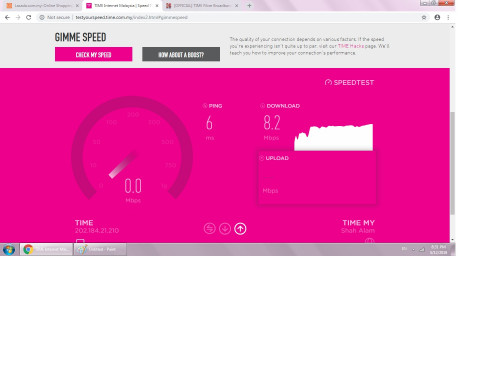
My Time Speed is soooo bad even though I am on 500 mbps.

Any sifu want to help me in troubleshoot? can it be router fault?

Im staying in cyberjaya

user posted image
*
Under 2.4Ghz or 5GHz?

Try LAN Cable connection.
Thanks.
FusionXY
post Dec 5 2018, 11:53 PM

LAZZIE ON VACATION
*******
Senior Member
3,834 posts

Joined: Aug 2016

QUOTE(zsnipes @ Dec 5 2018, 11:29 PM)
Currently I am using Asus RT-N14U Wireless Router with my old Unifi internet.

The Asus RT-N14U Wireless Router Data Rate is this, 802.11n : up to 300 Mbps

I plan to switch to TIME 100Mbps.

Can do with full speed, right?
*
Over 2.4GHz able to achieve 100Mbps near the router if not congested.
Do you have 5GHz receiving devices?
I'm able to get speed 110Mbps over 2.4GHz Wi-Fi near to the router.

Thanks.
FusionXY
post Dec 6 2018, 12:36 AM

LAZZIE ON VACATION
*******
Senior Member
3,834 posts

Joined: Aug 2016

QUOTE(zsnipes @ Dec 6 2018, 12:06 AM)
Hi, almost forgot all my devices need consider...

My Wireless Devices is this:-

ROUTER = Asus RT-N14U = 802.11n : up to 300 Mbps (2.4 GHz)

iPhone 7 Plus = 802.11ac Wi‑Fi with MIMO

Xiaomi Mi 5s = Wi-Fi 802.11 a/b/g/n/ac, dual-band

2 x PC using TP-Link TL-WN951N PCI Card = 11n: Up to 300Mbps(dynamic) & 11g: Up to 54Mbps(dynamic)
My apartment size around 1,000 sq.ft., consider the Router to PC is from one corner to another corner (Living to Bedroom)

I don't use Wired, just 4 person using internet, only me downloading Torrent.

So, can I enjoy the TIME 100Mbps package at max. speed?

Which devices need to change at least?

Thank you.
*
You need to change your router.
State your budget so that I can recommend you.
Your phone is sufficient to get 100Mbps.

100Mbps is sufficient if you have Wireless AC devices.
Change the PCI if cannot achieve full speed with new router.

Thanks.


FusionXY
post Dec 6 2018, 02:15 AM

LAZZIE ON VACATION
*******
Senior Member
3,834 posts

Joined: Aug 2016

QUOTE(zsnipes @ Dec 6 2018, 01:54 AM)
Hope can recommend me a Router, with these requirements:-
- Budget around RM500
- Can support at least 100Mbps Internet (Time Fibre)
- Stable (reliable) & Coverage is more important than Speed
- Wireless Range able cover whole Apartment Unit
- Like to stream movie from Overseas.
- No need transfer Files wirelessly between PC
- Do not need Gigabit Port
- No need QoS
- Can share with friend if they have older phone in wireless G.

Pls advise. Thanks.
*
Hi. Oops.
I misread it. Heard that you're going to subscribe TIME?
TIME do have their stock router.
You may try their stock router then only buy a new one
TIME will be giving free TP-Link C1200 router which are able to achieve 100Mbps on Wi-Fi.

You may refer to your PM for more details.

Thanks.

This post has been edited by FusionXY: Dec 6 2018, 03:00 AM
FusionXY
post Dec 6 2018, 12:26 PM

LAZZIE ON VACATION
*******
Senior Member
3,834 posts

Joined: Aug 2016

QUOTE(Kayne @ Dec 6 2018, 12:24 PM)
That kind of speed I am getting is using LAN CABLE
*
Which plan that you're using?

Thanks.
FusionXY
post Dec 6 2018, 05:22 PM

LAZZIE ON VACATION
*******
Senior Member
3,834 posts

Joined: Aug 2016

QUOTE(isma45 @ Dec 6 2018, 04:40 PM)
hi, anybody using Tenda AC6 on 500mbps?
My router unable to reach speed more that 100mbps. Can i know is it the router issue or not?

Now using free TP Link AC1200 router by Time, but coverage very small, compared to my old Tenda AC6...
*
Tenda AC6 doesn't have Gigabit Port.
The LAN/WAN Port limit up to 100Mbps only.
I suggest you to get another router if the stock router didn't serve you well.

Thanks.
FusionXY
post Dec 7 2018, 09:40 AM

LAZZIE ON VACATION
*******
Senior Member
3,834 posts

Joined: Aug 2016

QUOTE(bighead.23 @ Dec 7 2018, 04:25 AM)
Thanks. It's hard to choose between Tenda AC18 or TP Link Archer C9. Don't know which 1 perform better in overall (wide coverage, stable connection and faster speed). Anyone here tested these 2, mind to share how's the performance and max speed on both ?
*
Hi. You can get the TP-Link Archer C9.
Got 3 years warranty.
Thanks

QUOTE(isma45 @ Dec 7 2018, 09:01 AM)
aahhh.... no wonder it stuck on 100mbps only...
thanks bro
*
You're welcome bro.
FusionXY
post Dec 7 2018, 10:48 PM

LAZZIE ON VACATION
*******
Senior Member
3,834 posts

Joined: Aug 2016

QUOTE(nixuotan @ Dec 7 2018, 10:16 PM)
So I'm looking to maybe move. One thing I am looking at is Time available places. What if the building has business broadband coverage? Will I be able to get my home fiber in such a place?
*
Hi, if the building is under business. You cannot have home package. Must subscribe the business broadband.

Thanks.
FusionXY
post Dec 10 2018, 01:26 PM

LAZZIE ON VACATION
*******
Senior Member
3,834 posts

Joined: Aug 2016

QUOTE(culain99 @ Dec 10 2018, 09:39 AM)
on archer c1200, 1gig time package, connecting via wireless from few feet away....I get these speedtest results on windows 10, 5Ghz connection
intel ac 3165 (433mbps internal adaptor) - 260~310 mbps
realtek 8812 (1200mbps usb3 adaptor) - 240~260 mbps

whats the max speed anyone got on wireless ?, any setting to change for improving
btw whats time archer c1200, login/pass ?
*
Max speed on this router C1200 is up to 300Mbps depending on your receiving devices.

The login details as below.
ID: admin
PW: TIMEXXXX ( XXXX is the last 4 digit MAC Address ).

In real life this C1200 can get up to 800Mbps.
Do read out the pinned topic to check what speed you can get. Impossible to get full speed on Wi-Fi.

Thanks.
FusionXY
post Dec 11 2018, 10:19 AM

LAZZIE ON VACATION
*******
Senior Member
3,834 posts

Joined: Aug 2016

QUOTE(eien no kataomoi @ Dec 11 2018, 02:10 AM)
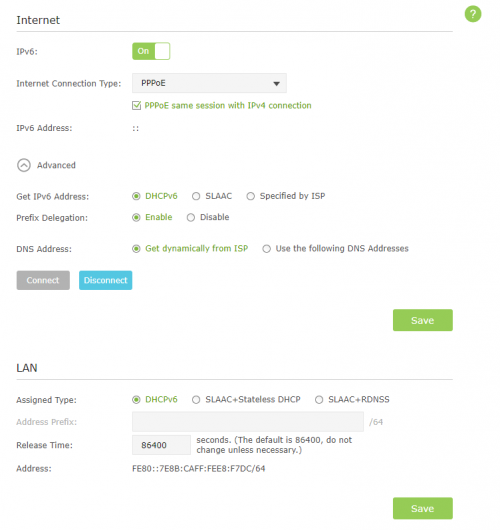
Hi, how to enable ipv6?

user posted image

user posted image
*
Hi. Try LAN DHCPv6 first then save and restart.

Thanks.
QUOTE(7ienlee @ Dec 11 2018, 09:59 AM)
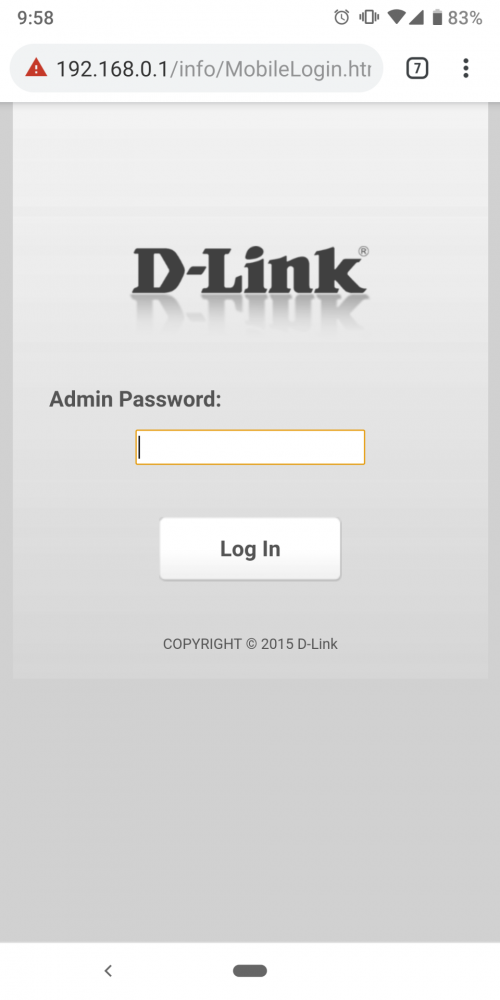
Anyone know what is the latest password for DIR850L after firmware update? I can't login after they remote update my firmware

user posted image
*
You're using TIME stock router?
What was your previous password?

Thanks.
FusionXY
post Dec 11 2018, 12:23 PM

LAZZIE ON VACATION
*******
Senior Member
3,834 posts

Joined: Aug 2016

QUOTE(eien no kataomoi @ Dec 11 2018, 11:42 AM)
Still not working.
user posted image
*
Try out the 3rd option and see.
Try switch on and off the Prefix Delegation.
Make sure to click save before restarting.

If still can't, need to guide over PM.

Mine having the same UI but mine works well.

Thanks.
FusionXY
post Dec 11 2018, 01:40 PM

LAZZIE ON VACATION
*******
Senior Member
3,834 posts

Joined: Aug 2016

QUOTE(Kayne @ Dec 11 2018, 01:08 PM)
Fusion bro , mine is the 500 Mbps package. Now waiting for time technician to come and inspect
*
Hi. Do let me know the outcome ya.

Over LAN didn't get full speed?

Thanks.
FusionXY
post Dec 11 2018, 03:33 PM

LAZZIE ON VACATION
*******
Senior Member
3,834 posts

Joined: Aug 2016

QUOTE(Lord_Ashe @ Dec 11 2018, 02:11 PM)
Last night a disruption occurred in Damansara Perdana (again) caused by construction work (again). Thankfully by midnight it was rectified. Now just waiting for my Deco unit to arrive...
*
Which Deco did you order?

Do test out for me ya.
Before and After ya.

One of the member here didn't give updates.
Hope you can test and stare it here.

Wanna how the speed look like from main deco and the secondary deco.

Thanks.

FusionXY
post Dec 11 2018, 03:58 PM

LAZZIE ON VACATION
*******
Senior Member
3,834 posts

Joined: Aug 2016

QUOTE(Lord_Ashe @ Dec 11 2018, 03:51 PM)
Noted boss, ordered M9+. Will compare like this (my plan la):
Before:
Near main router
In master bedroom - furthest, nearer to my wifi extender

After
Near Main unit
In Master bedroom - (furthest, nearer to secondary deco)

Thanks to Mr @Yeapch who helped with this
*
Thanks bro.

You bought the 2 or 3 pack type?

Appreciate your plan bro.
Can't wait for the results and the improvements.

Thanks.
FusionXY
post Dec 11 2018, 04:11 PM

LAZZIE ON VACATION
*******
Senior Member
3,834 posts

Joined: Aug 2016

QUOTE(Lord_Ashe @ Dec 11 2018, 04:10 PM)
The 2 pack. My apartment isn't that big but congestion is a challenge (too many competing networks).
Will report back ASAP
*
OK. Looking forward to hear from you soon.

Thanks.
FusionXY
post Dec 11 2018, 04:15 PM

LAZZIE ON VACATION
*******
Senior Member
3,834 posts

Joined: Aug 2016

QUOTE(jjj2 @ Dec 11 2018, 04:13 PM)
Deco M9 Plus is back in stock.
*
Need to wait for bro Lord_Ashe to report back the results.

Wanna know got any improvements than one router.

Thanks.

FusionXY
post Dec 11 2018, 05:58 PM

LAZZIE ON VACATION
*******
Senior Member
3,834 posts

Joined: Aug 2016

QUOTE(kmrdeva @ Dec 11 2018, 05:17 PM)
Not sure if you meant me but I have yet to pickup my Deco M9 Plus (2 pack) from yeapch. Stock just arrived, I was informed.

Gonna test how the 2 node mesh works vs my single AP (Asus AC68U) now.

WAN - 500mbps Time Fibre with UBNT Edgerouter X
Home - 12xx sf condo unit

Current setup - single dual band AP (AC1900) in the living room
Future setup - 2 node tri band mesh (AC2200), living room and study room.
*
Yes, I mean you. Been waiting for so long. I almost feel that you have forgotten.
Just arrived today only?
Do test it out ya.


QUOTE(7ienlee @ Dec 11 2018, 05:27 PM)
Yup stock router by TIME. The cylinder black router.
I didn't set any password before.
*
Try the password as bro jjj2 told.
Or try TIMEXXXX ( XXXX is the last 4 digit of MAC Address ).
Or try admin.

Thanks

45 Pages « < 8 9 10 11 12 > » Top
 

Change to:
| Lo-Fi Version
0.0289sec    0.49    7 queries    GZIP Disabled
Time is now: 3rd December 2025 - 02:15 AM