Welcome Guest ( Log In | Register )

666 Pages « < 564 565 566 567 568 > » Bottom

Outline · [ Standard ] · Linear+

TIME [OFFICIAL] TIME Fibre Broadband™ v4, Experience the ONE TRUE 2Gbps

views
     
blacktubi
post Apr 11 2024, 10:48 PM

-
Group Icon
Elite
8,409 posts

Joined: Jul 2008

QUOTE(@secret@ @ Apr 11 2024, 10:46 PM)
Thanks! I would assume even the aged & TP Link Router would have sufficient coverage and do the job for now?
*
High rise is always tricky to predict due to the walls

However, I will estimate that the router cant reliably penetrate more than 2 walls.
@secret@
post Apr 11 2024, 11:21 PM

Casual
***
Junior Member
343 posts

Joined: Jun 2008
QUOTE(blacktubi @ Apr 11 2024, 10:48 PM)
High rise is always tricky to predict due to the walls

However, I will estimate that the router cant reliably penetrate more than 2 walls.
*
Got it. Thank you blacktubi you have been helpful.

Many many years back it was you addressing my questions also. Shifu already
westlife
post Apr 12 2024, 09:38 PM

10k Club
********
All Stars
14,258 posts

Joined: Jan 2011
user posted image

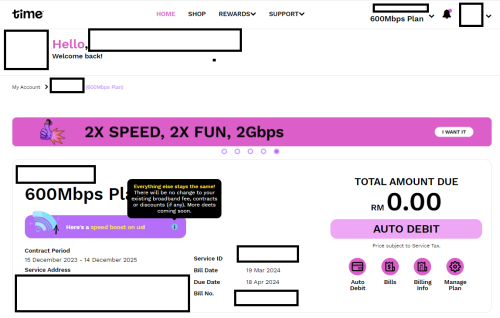
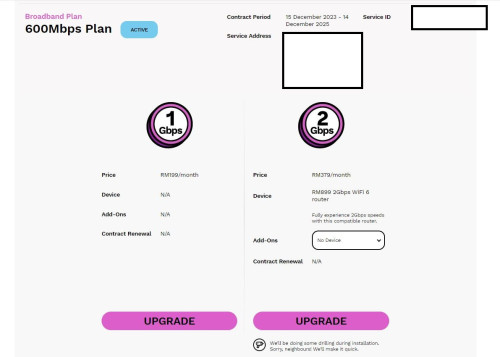
seems like even my address is also eligible for 2Gbps now...
user posted image

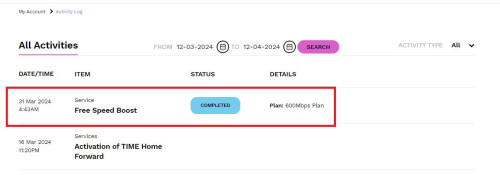
indeed got free speed boost woh.... shocking.gif
user posted image

This post has been edited by westlife: Apr 12 2024, 09:51 PM
westlife
post Apr 12 2024, 10:53 PM

10k Club
********
All Stars
14,258 posts

Joined: Jan 2011
QUOTE(@secret@ @ Apr 11 2024, 08:27 PM)
I'm shifting to a new place (900 sqft). No contract and relocation fee can be waived.

Currently on speed boost @200mbps, using Time provided TP Link AC1350 duel band router dated back 2020.

Thought of signing up the new 100 mbps - 24 months package and get Huawei WiFi 6 router. It seems the coverage is very bad.

Should I just relocate with old router and stay no contract?
*
dun waste ur time and tie to new contract by getting the shitty free wifi 6 routers from time...

just buy any cheap tp-link mesh also can beat it...
darren_yuri
post Apr 13 2024, 10:04 AM

Casual
***
Junior Member
394 posts

Joined: Aug 2010
From: 御堂筋

Would you suggest to upgrade my router from the Huawei OptiXstar HG8145X6 to TP-Link Archer AX53 V2 (the price isn't bad in eCommerce platforms)? Is it compatible with the existing Huawei WA8021V5 mesh?

Can I also get rid of the Huawei Echolife router too? Thanks.
jjj2
post Apr 13 2024, 10:24 AM

Look at all my stars!!
*******
Senior Member
3,606 posts

Joined: Feb 2006
QUOTE(darren_yuri @ Apr 13 2024, 10:04 AM)
Would you suggest to upgrade my router from the Huawei OptiXstar HG8145X6 to TP-Link Archer AX53 V2 (the price isn't bad in eCommerce platforms)? Is it compatible with the existing Huawei WA8021V5 mesh?
Not compatible in terms of meshing, in fact you can ditch off the rubbish WA8021V5.
Can I also get rid of the Huawei Echolife router too? Thanks.
If you are referring to the ONT unit that comes with fiber plugging in to it, you cant totally ditch off this, but what you can is turn it to bridge mode so that your self bought mesh system can take over.
*
darren_yuri
post Apr 13 2024, 10:33 AM

Casual
***
Junior Member
394 posts

Joined: Aug 2010
From: 御堂筋

QUOTE(jjj2 @ Apr 13 2024, 10:24 AM)
Not compatible in terms of meshing, in fact you can ditch off the rubbish WA8021V5.

If you are referring to the ONT unit that comes with fiber plugging in to it, you cant totally ditch off this, but what you can is turn it to bridge mode so that your self bought mesh system can take over.
*
1. Sad.... although I found the current WA8021V5 kinda okay covering the coverage of the master bedroom of my 950sqft unit, from the router located in the living room. Hopefully, the TP-Link Archer AX53 can achieve that room (previously the HG8145X6 signal was unable to reach the master bedroom) so Time gave me a few units of WA8021V5.

2. Alright so the ONT cannot be removed, but I can replace that OptiXstar with TP-Link Archer AX53 right?
westlife
post Apr 13 2024, 12:41 PM

10k Club
********
All Stars
14,258 posts

Joined: Jan 2011
QUOTE(darren_yuri @ Apr 13 2024, 10:33 AM)
1. Sad.... although I found the current WA8021V5 kinda okay covering the coverage of the master bedroom of my 950sqft unit, from the router located in the living room. Hopefully, the TP-Link Archer AX53 can achieve that room (previously the HG8145X6 signal was unable to reach the master bedroom) so Time gave me a few units of WA8021V5.

2. Alright so the ONT cannot be removed, but I can replace that OptiXstar with TP-Link Archer AX53 right?
*
if it is ok for current coverage, why change... if it is not broken, why break it?

tongue.gif
westlife
post Apr 13 2024, 12:45 PM

10k Club
********
All Stars
14,258 posts

Joined: Jan 2011
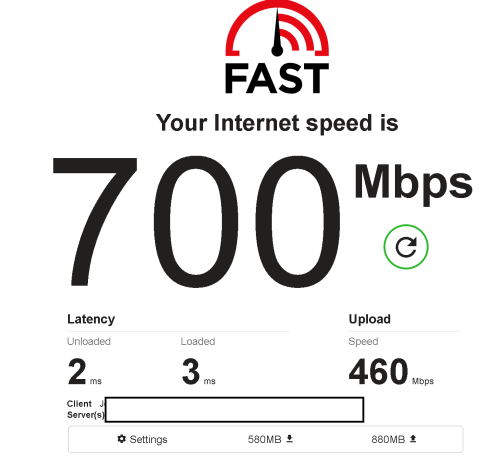
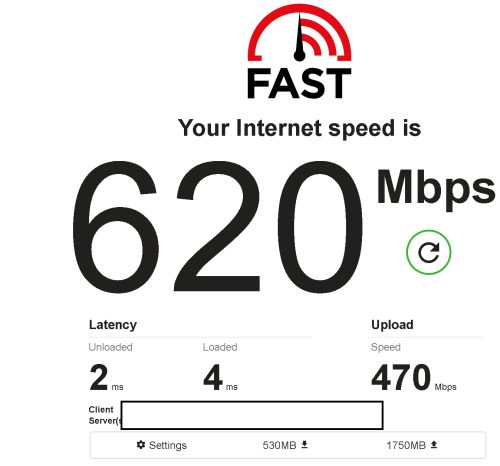
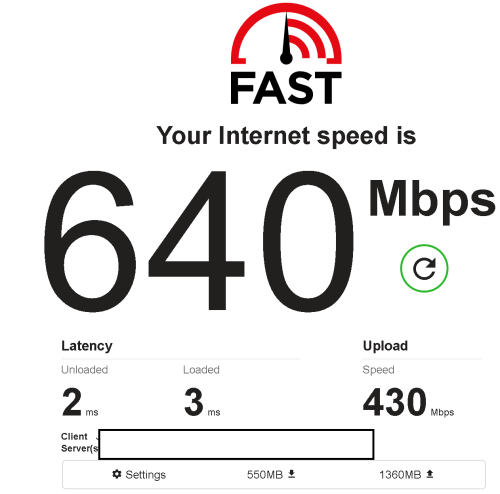
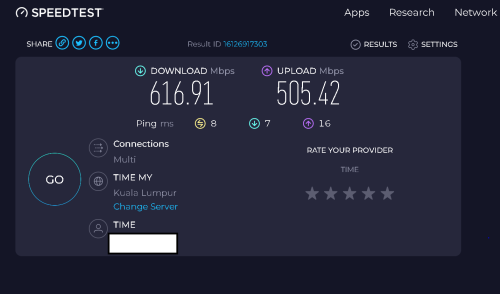
tested using ethernet direct connection via wired to the main mesh router...

user posted image
user posted image
user posted image
user posted image
user posted image
darren_yuri
post Apr 13 2024, 01:03 PM

Casual
***
Junior Member
394 posts

Joined: Aug 2010
From: 御堂筋

QUOTE(westlife @ Apr 13 2024, 12:41 PM)
if it is ok for current coverage, why change... if it is not broken, why break it?

tongue.gif
*
Speed very very slowww
I wanted to upgrade the router very long edi.
I paid so much yet only get slow speed.
I know using wired much faster but I got multiple devices
westlife
post Apr 13 2024, 01:15 PM

10k Club
********
All Stars
14,258 posts

Joined: Jan 2011
QUOTE(darren_yuri @ Apr 13 2024, 01:03 PM)
Speed very very slowww
I wanted to upgrade the router very long edi.
I paid so much yet only get slow speed.
I know using wired much faster but I got multiple devices
*
i think ur coverage ok is becos it is covered by 2.4Ghz that's why speed is slow or the coverage is actually not ok also...

just buy any other third party brand mesh system... u can get better speed...
tp-link is cheap and speed is good..
other more pricey one like linksys also not bad...

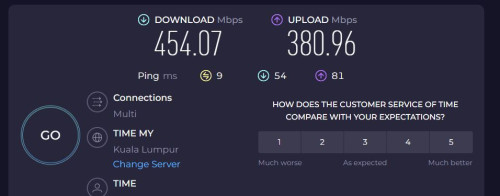
my study room and other area can get around this speed which is not too bad... latency is ok also..
if this is not my rented place, i may opt for FTTR instead which the speed is more guaranteed.

user posted image
FoxSeaTiger
post Apr 13 2024, 07:47 PM

Regular
******
Senior Member
1,180 posts

Joined: Jun 2006


Hi I try using remote play on my ps5 but got this code error 8801330d.

I have no issue using remote play with the same network. But failed when using mobile data.

Anyone got this problem ans how to fix it?

This post has been edited by FoxSeaTiger: Apr 13 2024, 07:47 PM
jjj2
post Apr 13 2024, 11:17 PM

Look at all my stars!!
*******
Senior Member
3,606 posts

Joined: Feb 2006
QUOTE(darren_yuri @ Apr 13 2024, 10:33 AM)
1. Sad.... although I found the current WA8021V5 kinda okay covering the coverage of the master bedroom of my 950sqft unit, from the router located in the living room. Hopefully, the TP-Link Archer AX53 can achieve that room (previously the HG8145X6 signal was unable to reach the master bedroom) so Time gave me a few units of WA8021V5.

2. Alright so the ONT cannot be removed, but I can replace that OptiXstar with TP-Link Archer AX53 right?
Yes the OptiXstar HG8145X6 can be replaced.
So generally this would be good, ONU --> TP-Link AX53 --> Another TP-Link Router that supports EasyMesh.

*
derthvadar
post Apr 13 2024, 11:33 PM

(ง •̀_•́)ง
******
Senior Member
1,792 posts

Joined: Feb 2016
From: Bikini Bottom
I'm planning to terminate my fibre account for a cheaper bundle of CelcomDigi 5G Home with postpaid plan.

No more contract.
I don't see the option for termination.

icon_question.gif
westlife
post Apr 14 2024, 11:57 AM

10k Club
********
All Stars
14,258 posts

Joined: Jan 2011
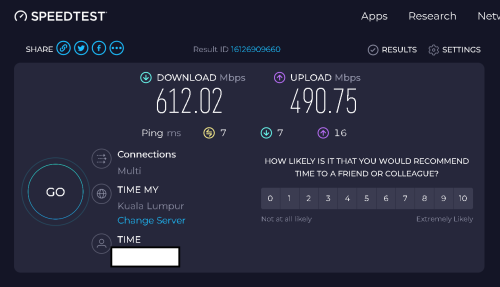
Seems like the free speed boost only boosts download speed and not upload speed?
PRSXFENG
post Apr 14 2024, 12:17 PM

Look at all my stars!!
*******
Senior Member
2,608 posts

Joined: Nov 2020


QUOTE(westlife @ Apr 14 2024, 11:57 AM)
Seems like the free speed boost only boosts download speed and not upload speed?
*
probably their max upload is 500mbps plans since even 2gbps plan gets 500mbps upload

for me I went from 100/100 to 200/200
ahpaul82
post Apr 14 2024, 03:14 PM

.:保罗:.
*******
Senior Member
3,795 posts

Joined: Jan 2003
From: .: Old Klang Road :.


QUOTE(blacktubi @ Apr 8 2024, 10:58 AM)
Basically anything that's AX3000 and above will be better than that provided modem router.

I will get something that's AX4200 and above for a more significant upgrade.

Yup, it's an all-in-one product. If you want to use your own router, you need to contact TIME and request their customer service to switch it to bridge mode (they can do it remotely) then you can proceed with the usual PPPOE config as usual.

PPPOE details available on self care portal.
*
do share your thoughts after change to new WiFi router ya
I also planning to replace the stock TIME WiFi Modem Router...

rkwan67
post Apr 14 2024, 04:22 PM

Look at all my stars!!
*******
Senior Member
2,455 posts

Joined: Feb 2005
From: --Hidden--


Hi, anyone without time contract already, willing to take over my contract? Until Feb 2025, will pay for transfer fee and some cash.
It is 500mbps line @ rm139.
jjj2
post Apr 14 2024, 07:13 PM

Look at all my stars!!
*******
Senior Member
3,606 posts

Joined: Feb 2006
QUOTE(derthvadar @ Apr 13 2024, 11:33 PM)
I'm planning to terminate my fibre account for a cheaper bundle of CelcomDigi 5G Home with postpaid plan.

No more contract.
I don't see the option for termination.

icon_question.gif
*
You need to contact the CS for that.
derthvadar
post Apr 14 2024, 11:36 PM

(ง •̀_•́)ง
******
Senior Member
1,792 posts

Joined: Feb 2016
From: Bikini Bottom
QUOTE(jjj2 @ Apr 14 2024, 07:13 PM)
You need to contact the CS for that.
*
Noted, I'll check with them on the termination.
Thanks!

This post has been edited by derthvadar: Apr 14 2024, 11:37 PM

666 Pages « < 564 565 566 567 568 > » Top
 

Change to:
| Lo-Fi Version
0.0219sec    0.45    6 queries    GZIP Disabled
Time is now: 7th December 2025 - 03:18 PM