Outline ·
[ Standard ] ·
Linear+
TIME [OFFICIAL] TIME Fibre Broadband™ v4, Experience the ONE TRUE 2Gbps
|
ckokwei
|
 Apr 8 2024, 01:13 PM Apr 8 2024, 01:13 PM
|
Getting Started


|
QUOTE(blacktubi @ Apr 8 2024, 10:58 AM) Basically anything that's AX3000 and above will be better than that provided modem router. I will get something that's AX4200 and above for a more significant upgrade. Yup, it's an all-in-one product. If you want to use your own router, you need to contact TIME and request their customer service to switch it to bridge mode (they can do it remotely) then you can proceed with the usual PPPOE config as usual. PPPOE details available on self care portal. Is it possible to use AX3000 provided by unifi for time ? |
|
|
|
|
|
blacktubi
|
Apr 8 2024, 01:34 PM
|
-

|
QUOTE(ckokwei @ Apr 8 2024, 01:13 PM) Is it possible to use AX3000 provided by unifi for time ? The Unifi free router is worst than the free TIME router. |
|
|
|
|
|
GBP56
|
Apr 8 2024, 05:49 PM
|
Getting Started
|
QUOTE(blacktubi @ Apr 8 2024, 10:58 AM) Basically anything that's AX3000 and above will be better than that provided modem router. I will get something that's AX4200 and above for a more significant upgrade. Yup, it's an all-in-one product. If you want to use your own router, you need to contact TIME and request their customer service to switch it to bridge mode (they can do it remotely) then you can proceed with the usual PPPOE config as usual. PPPOE details available on self care portal. What about the FTTR main router, can it also be set to bridge mode? |
|
|
|
|
|
blacktubi
|
Apr 8 2024, 06:11 PM
|
-
|
QUOTE(GBP56 @ Apr 8 2024, 05:49 PM) What about the FTTR main router, can it also be set to bridge mode? If you use FTTR, you can't use your own router. FTTR only works with the provided main router. |
|
|
|
|
|
jjj2
|
Apr 8 2024, 06:24 PM
|
|
|
QUOTE(GBP56 @ Apr 8 2024, 05:49 PM) What about the FTTR main router, can it also be set to bridge mode? No point set it as bridge mode as so will defeat the entire reason to go for FTTR. |
|
|
|
|
|
shitmyx
|
Apr 8 2024, 07:08 PM
|
Getting Started
|
QUOTE(derthvadar @ Apr 8 2024, 12:44 PM) Received email from Time on the free boost? Just restart the modem? No email received Yes just restart modem & router |
|
|
|
|
|
danielkai
|
Apr 8 2024, 08:03 PM
|
New Member
|
QUOTE(JimmyX @ Apr 5 2024, 10:07 AM) After you downgrade, you terus get the 200mbps speed boost? Or still 100mbps? as likely most of 100mbps users now awaiting the speed boost After downgraded, direct assign to 200mbps package. I think all 100mbps accounts will be upgraded to 200mbps progressively. If you downgrade to 200mbps package within promo period with condition, your contract has ended, no contract extension is applied. But in the portal, you can opt for 24 months contract for free wifi6 router with 200mbps package. This post has been edited by danielkai: Apr 8 2024, 08:08 PM |
|
|
|
|
|
Seng89
|
Apr 8 2024, 09:40 PM
|
|
|
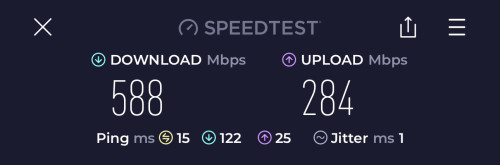
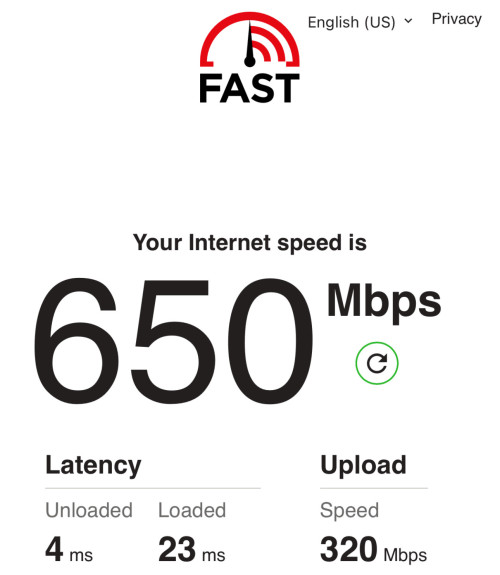
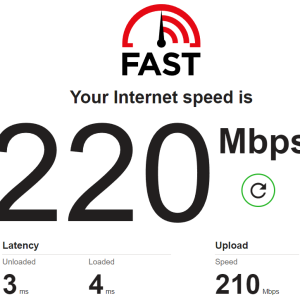
Finally got mine today 😉 Attached thumbnail(s)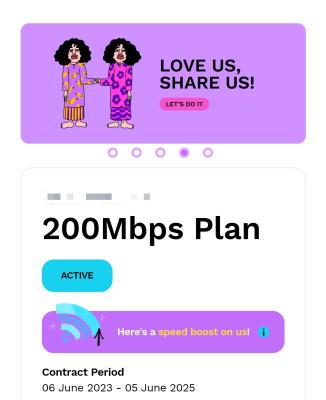
|
|
|
|
|
|
westlife
|
Apr 8 2024, 10:52 PM
|
|
|
|
|
|
|
|
|
rip_code
|
Apr 9 2024, 02:03 AM
|
|
|
no contract, still at 100
|
|
|
|
|
|
ckokwei
|
Apr 9 2024, 04:08 PM
|
Getting Started
|
QUOTE(blacktubi @ Apr 8 2024, 01:34 PM) The Unifi free router is worst than the free TIME router. This https://www.carousell.com.my/p/tm-unifi-d-l...-5g-1089441964/ is worst than time want ? |
|
|
|
|
|
derthvadar
|
Apr 9 2024, 04:28 PM
|
|
|
Just got the speed boost to 200Mbps at 4:00PM today. Noticed the modem suddenly restart itself. Selfcare still showing 100Mbps plan. 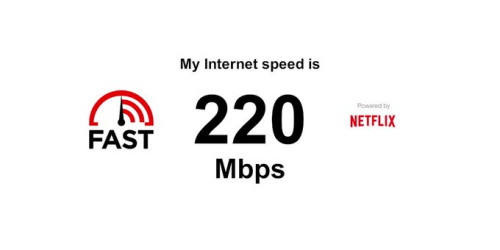  |
|
|
|
|
|
PRSXFENG
|
Apr 9 2024, 05:32 PM
|
|
|
QUOTE(ckokwei @ Apr 9 2024, 04:08 PM) yes, because that is an old WIFI 5 router the time one is at least wifi 6 |
|
|
|
|
|
rip_code
|
Apr 11 2024, 01:54 AM
|
|
|
Got mine too. Weird that app says 100 but web selfcare is 200.
|
|
|
|
|
|
studentsurvey
|
Apr 11 2024, 03:10 AM
|
Getting Started
|
Hi All,
Random question, is Time internet still the better internet compared to Unifi and also the Umobile fibre (in case anyone has tried it).
My friend installed time fibre with the Wifi 6 setup and did not use the modems & Router.
I am planning to subscribe the same package and get the same Wifi 6, does it make sense for me to take his hardware and make it into a repeater for the whole house?
|
|
|
|
|
|
jjj2
|
Apr 11 2024, 11:05 AM
|
|
|
QUOTE(studentsurvey @ Apr 11 2024, 03:10 AM) Hi All, Random question, is Time internet still the better internet compared to Unifi and also the Umobile fibre (in case anyone has tried it). My friend installed time fibre with the Wifi 6 setup and did not use the modems & Router. Your friend did a brilliant thing.I am planning to subscribe the same package and get the same Wifi 6, does it make sense for me to take his hardware and make it into a repeater for the whole house? |
|
|
|
|
|
@secret@
|
Apr 11 2024, 08:27 PM
|
|
|
I'm shifting to a new place (900 sqft). No contract and relocation fee can be waived.
Currently on speed boost @200mbps, using Time provided TP Link AC1350 duel band router dated back 2020.
Thought of signing up the new 100 mbps - 24 months package and get Huawei WiFi 6 router. It seems the coverage is very bad.
Should I just relocate with old router and stay no contract?
This post has been edited by @secret@: Apr 11 2024, 08:29 PM
|
|
|
|
|
|
blacktubi
|
Apr 11 2024, 10:33 PM
|
-
|
QUOTE(@secret@ @ Apr 11 2024, 08:27 PM) I'm shifting to a new place (900 sqft). No contract and relocation fee can be waived. Currently on speed boost @200mbps, using Time provided TP Link AC1350 duel band router dated back 2020. Thought of signing up the new 100 mbps - 24 months package and get Huawei WiFi 6 router. It seems the coverage is very bad. Should I just relocate with old router and stay no contract? If you are renting, no contract is the best choice for peace of mind. Just buy your own router or you can go for a used Deco M9 Plus, it's more than enough for 200Mbps and they are super cheap these days. |
|
|
|
|
|
@secret@
|
Apr 11 2024, 10:46 PM
|
|
|
QUOTE(blacktubi @ Apr 11 2024, 10:33 PM) If you are renting, no contract is the best choice for peace of mind. Just buy your own router or you can go for a used Deco M9 Plus, it's more than enough for 200Mbps and they are super cheap these days. Thanks! I would assume even the aged & TP Link Router would have sufficient coverage and do the job for now? |
|
|
|
|



 Quote
Quote







 0.0218sec
 0.31
0.31
 6 queries
 GZIP Disabled