

QUOTE(muhammadnajmi96 @ Oct 26 2018, 11:47 PM)
Found this in fb group, didn't know the existent of this plan before 🤔

Any idea how much is the plan? RM 329-30 (discount) +30 (Aneka)? 
Unifi Official TM UniFi High Speed Broadband Thread V35, READ 1ST PAGE FOR TURBO SPEED INFO!
|
|
 Oct 26 2018, 11:52 PM Oct 26 2018, 11:52 PM
|
 
Staff
72,797 posts Joined: Sep 2005 From: KUL  
|
QUOTE(muhammadnajmi96 @ Oct 26 2018, 11:47 PM) Found this in fb group, didn't know the existent of this plan before 🤔 Any idea how much is the plan? RM 329-30 (discount) +30 (Aneka)? |
|
|
|
|
|
Oct 26 2018, 11:57 PM
|
 
Junior Member
233 posts Joined: Jan 2013 From: Sepang 
|
QUOTE(fruitie @ Oct 26 2018, 11:52 PM) Any idea how much is the plan? RM 329-30 (discount) +30 (Aneka)? He said that he apply for rm129 100mbps plan. But what make i wonder is the 800mbps ones 😂 |
|
|
Oct 26 2018, 11:59 PM
|
|
Staff
72,797 posts Joined: Sep 2005 From: KUL
|
QUOTE(muhammadnajmi96 @ Oct 26 2018, 11:57 PM) He said that he apply for rm129 100mbps plan. But what make i wonder is the 800mbps ones 😂 Converted from old plan to RM 129 for 100 or newly applied plan? |
|
|
Oct 27 2018, 12:12 AM
|

Senior Member
2,664 posts Joined: Jan 2005 From: Puchong
|
QUOTE(vez @ Oct 26 2018, 10:55 PM) i am using RT-AC68U, latest firmware Just sharing my experience. Have you also disabled apps analysis, QoS, AiProtection?when i NAT Acceleration CTF (Cut Through Forwarding) is enabled i can get max speed 500Mbps for my UniFi 500Mbps package when i disabled it, i only can get 300Mbps the problem is when i enabled, after few days, my speed test might drop and drop until 20-30Mbps... if disabled, i can consistently getting 300Mbps forever when running speed test (somehow unable to achieve 500Mbps) any sifues here can helps? if i leave it disabled, my speed test only close to 300Mbps unable to reach 500Mbps if i leave if enabled, day by day the router speed seems dropping and have to restart I could hit 800+Mbps initially after applying NAT acceleration but then it will slow down to 260-300Mbps tops. Then, I have to turn off and on NAT Acceleration again to hit 800Mbps but it will again drop down to 260Mbps. Finally, one time when it drops to 260Mbps, I just re-applied NAT Acceleration again (without turning off and on). The setting finally stuck. I have been getting 800Mbps ever since (even after rebooting). |
|
|
Oct 27 2018, 12:18 AM
|
|
Junior Member
233 posts Joined: Jan 2013 From: Sepang
|
QUOTE(fruitie @ Oct 26 2018, 11:59 PM) Converted from old plan to RM 129 for 100 or newly applied plan? If i not mistaken newly applied plan |
|
|
Oct 27 2018, 12:19 AM
|

Junior Member
210 posts Joined: Jan 2011
|
Found out that unifi and streamyx page was undergo maintenance, would it be new plan launching soon?
  Attached thumbnail(s) 
|
|
|
|
|
|
Oct 27 2018, 12:22 AM
|
|
Staff
72,797 posts Joined: Sep 2005 From: KUL
|
QUOTE(muhammadnajmi96 @ Oct 27 2018, 12:18 AM) If i not mistaken newly applied plan Wah, if it's RM 129 then it's a steal. However, let's wait till the first statement is out first.  |
|
|
Oct 27 2018, 12:26 AM
|
|
Senior Member
4,622 posts Joined: Mar 2007
|
QUOTE(PoorMan @ Oct 27 2018, 12:12 AM) Just sharing my experience. Have you also disabled apps analysis, QoS, AiProtection? which Asus router you using? I could hit 800+Mbps initially after applying NAT acceleration but then it will slow down to 260-300Mbps tops. Then, I have to turn off and on NAT Acceleration again to hit 800Mbps but it will again drop down to 260Mbps. Finally, one time when it drops to 260Mbps, I just re-applied NAT Acceleration again (without turning off and on). The setting finally stuck. I have been getting 800Mbps ever since (even after rebooting). i checked all QoS, AiProtection, apps anlysis all off because i didnt use all the while also, i google search, notice a lot comment from this NAT acceleration, i have no choice to getting 500Mbps have to leave it on... perhaps it is Asus router older model issue? is geeting newer model can resolve this? i actually notice this problem when getting 100Mbps last year enabled NAT acceleration, after some time my 100Mbps drop til 20Mbps... need reboot router after disabled, i can forever hitting 100Mbps from speed test This post has been edited by vez: Oct 27 2018, 12:28 AM |
|
|
Oct 27 2018, 12:27 AM
|

Senior Member
1,125 posts Joined: Sep 2014 From: Cheras
|
QUOTE(ken120 @ Oct 27 2018, 12:19 AM) Found out that unifi and streamyx page was undergo maintenance, would it be new plan launching soon? nothing if you notice, their page goes on maintenance quite frequently and mostly at midnight too but yea nothing new. |
|
|
Oct 27 2018, 12:30 AM
|
|
Junior Member
210 posts Joined: Jan 2011
|
QUOTE(Ben Ling @ Oct 27 2018, 12:27 AM) nothing really? if you notice, their page goes on maintenance quite frequently and mostly at midnight too but yea nothing new. did keep checking on their plan page during midnight time but never seem on maintenance too in past 2 weeks time |
|
|
Oct 27 2018, 12:52 AM
|
|
Senior Member
1,125 posts Joined: Sep 2014 From: Cheras
|
QUOTE(ken120 @ Oct 27 2018, 12:30 AM) really? yea, before I get my turbo I always check my portal page and mostly at midnight their page is on maintenance... did keep checking on their plan page during midnight time but never seem on maintenance too in past 2 weeks time |
|
|
Oct 27 2018, 01:21 AM
Show posts by this member only | IPv6 | Post
#7812
|
 
Elite
8,402 posts Joined: Jul 2008 
|
QUOTE(kentangz @ Oct 26 2018, 07:05 PM) Thought I should chime in here based on my experience. I bought the RT-AC86U from Gearbest.com, the Chinese version one. At least for this model, you can change the router region inside the ASUS GUI. The last time I check, it has 5 different regions you can change to: US, Europe, Australia, China and Singapore. Not sure if there are more regions to choose in the current firmware update plus I'm not home to check right now. Anyway, I've tried all those regions and there are some difference in the number of channel selection available between the regions, and it will also depend on the wifi client you use (the origin of the wifi device you use). If I’m not mistaken, the latest firmware locked the region as users are abusing this for better signal and get the brand sued by regulators. Do share with us your findings.On the other hand, I've owned the RT-AC88U model as well bought from US and the wifi channel selection is strictly for US region only (locked for region changed due to FCC rules). My ROG RAPTURE do not have region selection available. QUOTE(kentangz @ Oct 26 2018, 08:09 PM) You can use this link to check difference in number of wifi channels in major countries including SG: https://en.wikipedia.org/wiki/List_of_WLAN_channels The Wikipedia page is not updated.For Malaysia, perhaps can check on SKMM webpage but I believe it is similar to Singapore. Number of channels used in each country where the router is sold is standard across the router brand regardless of the price. Similarly, the wifi device/client bought in that particular country (bought in official market, not the grey import) will only detect the wifi channels intended for that country only. I did read somewhere there was some exception to this rule but couldn't really remember. You are right for the supported channels. If the router happen to run on a channel that’s not supported by your clients, you won’t even see it. But that’s a super rare case. |
|
|
Oct 27 2018, 01:22 AM
|

Senior Member
2,093 posts Joined: Apr 2005
|
QUOTE(Ben Ling @ Oct 27 2018, 12:52 AM) yea, before I get my turbo I always check my portal page and mostly at midnight their page is on maintenance... They always do this, nothing new. |
|
|
|
|
|
Oct 27 2018, 01:25 AM
|
|
Senior Member
550 posts Joined: Apr 2011
|
QUOTE(fleur_cherie @ Oct 26 2018, 10:52 PM) Done, but my utorrent become slower, or didnt connect to peers at all. After enabling, then only connected 🤔 Have you tested with other clients? IINM, utorrent isn't that recommended nowdays. Try Deluge or Qbittorrent. |
|
|
Oct 27 2018, 01:41 AM
Show posts by this member only | IPv6 | Post
#7815
|

Junior Member
422 posts Joined: Feb 2006
|
I have something to share. I still have about 10 months on my Unifi RM179 package contract but I want to save money by switching to the RM79 package.
I went to TM Point, waited for 2 hours before I was served. I was given 2 options: 1. Pay a RM200 penalty to downgrade without signing a fresh contract. 2. Sign a fresh two-year contract to have the penalty waived. I chose to pay the penalty, since I will still save money. When the frontline staff came back after obtaining the go ahead from her manager, she told me that they are waiving the penalty and I don't have to commit to a new contract. Wow. |
|
|
Oct 27 2018, 01:46 AM
|

Senior Member
2,551 posts Joined: Jan 2003 From: Cheras / Ampang
|
Sorry guys, just wondering how to check the wifi radio of our devices (smartphones, tablets, laptops), whether is 1x1, 2x2, 3x3, 4x4?
What is the correct term to use for the 2x2 , 3x3 thing? |
|
|
Oct 27 2018, 01:50 AM
|

Senior Member
959 posts Joined: Jan 2016
|
QUOTE(blacktubi @ Oct 26 2018, 10:37 AM) Locked in hardware level due to China local laws. Every country have slightly different WiFi law. That's why all routers sold in Malaysia got MCMC sticker. Asus ac86u china unit also have MCMC sticker.If I remember correctly, China maximum transmit power is lower as well.  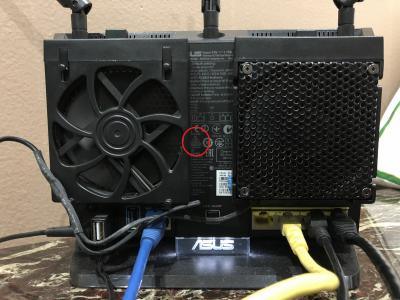

|
|
|
Oct 27 2018, 02:11 AM
Show posts by this member only | IPv6 | Post
#7818
|

Junior Member
272 posts Joined: Jan 2010
|
QUOTE(joehann @ Oct 26 2018, 09:01 PM) Last time I'm on 50mbps with RM179/month. then go to tm to upgrade to 100mbps speed with RM129/month since the turbo upgrade are damn slow and already successful half and hour after that. 1 day after that, tm suddenly gave me the 500mbps turbo plan but remain the old payment of RM179/month. It seems they screwed things up.I already called and live chat them to confirm that the contract period will not be renew and also they will not revert it back to 100mbps plan and maintain the 500mbps speed. Demn it, Already upgrade the router and all. what a wonderful thing TM have done here. |
|
|
Oct 27 2018, 02:17 AM
|
|
Elite
8,402 posts Joined: Jul 2008
|
QUOTE(cskean @ Oct 27 2018, 01:46 AM) Sorry guys, just wondering how to check the wifi radio of our devices (smartphones, tablets, laptops), whether is 1x1, 2x2, 3x3, 4x4? Known as transmit chain or how many streams. Google it, not mentioned on specs sheet. What is the correct term to use for the 2x2 , 3x3 thing? Most new smartphones and laptops are 2x2. Higher end laptops got 3x3. LA Mate 20 comes with 4x4. First in the industry. QUOTE(Ebony & Ivory @ Oct 27 2018, 01:50 AM) Asus ac86u china unit also have MCMC sticker. They are doing all in one sticker now. But nonetheless, the hardware region is set to China.
|
|
|
Oct 27 2018, 04:09 AM
|
|
Senior Member
2,664 posts Joined: Jan 2005 From: Puchong
|
QUOTE(vez @ Oct 27 2018, 12:26 AM) which Asus router you using? I am using Asus RT-AC68U hardware ver A2 if not mistaken. Firmware is latest from Asus Support 3.0.0.4.384_32799. i checked all QoS, AiProtection, apps anlysis all off because i didnt use all the while also, i google search, notice a lot comment from this NAT acceleration, i have no choice to getting 500Mbps have to leave it on... perhaps it is Asus router older model issue? is geeting newer model can resolve this? i actually notice this problem when getting 100Mbps last year enabled NAT acceleration, after some time my 100Mbps drop til 20Mbps... need reboot router after disabled, i can forever hitting 100Mbps from speed test Have you tried using another laptop/PC to check speed? |
|
Topic ClosedOptions
|
| Change to: |  0.0200sec 0.0200sec
 0.24 0.24
 6 queries 6 queries
 GZIP Disabled GZIP Disabled
Time is now: 3rd December 2025 - 02:02 AM |
 Quote
Quote