

QUOTE(lzchyi @ Sep 21 2018, 05:43 PM)
Hi, yours is running copper wire or fibre cable?

i'm pretty sure that SUBB copper won't be getting Turbo upgrades..Unifi Official TM UniFi High Speed Broadband Thread V35, READ 1ST PAGE FOR TURBO SPEED INFO!
|
|
 Sep 21 2018, 05:48 PM Sep 21 2018, 05:48 PM
|
 
Senior Member
1,304 posts Joined: Mar 2010  
|
QUOTE(lzchyi @ Sep 21 2018, 05:43 PM) Hi, yours is running copper wire or fibre cable? i'm pretty sure that SUBB copper won't be getting Turbo upgrades.. |
|
|
|
|
|
Sep 21 2018, 05:49 PM
|
|
Senior Member
1,304 posts Joined: Mar 2010
|
QUOTE(kuntakinte @ Sep 21 2018, 05:47 PM) What's the best practice with regards to running one or both bandwidths on the router? if you have only 5GHz devices, then it's just logical to disable the 2.4GHz one..All my devices could connect to 5ghz and reception is great to usable throughout the house? Do you still switch on 2.4ghz or prefer to reduce the router load by just running 5ghz I'm only switching on 5ghz at the moment until a guest comes over and complain that he/she can't connect to your wifi due to no 2.4GHz band..  |
|
|
Sep 21 2018, 05:50 PM
Show posts by this member only | IPv6 | Post
#1163
|

Junior Member
37 posts Joined: Oct 2006
|
to all boss,
if i currently using the unifi 10mbps package, and upgrade the RM129 100mbps package the telephone number must change new? the Tv box cannot use watch tv? kindly advise |
|
|
Sep 21 2018, 05:55 PM
|

Junior Member
472 posts Joined: Jun 2015
|
QUOTE(SilentVampire @ Sep 21 2018, 05:28 PM) Refer to 1st page, 1st post, green text, for list of compatible routers. Refer to 1st post, 1st page, green text, for troubleshooting help and links. modem unsupported those speed  |
|
|
Sep 21 2018, 05:56 PM
|

All Stars
18,503 posts Joined: Oct 2007 From: P.Jaya
|
QUOTE(figure8 @ Sep 21 2018, 05:34 PM) bro. i ordered c3150 from lazada, unfortunately, the router are on hold due to defected units. do you know other alternative to this model which as good as c3150?. Hmmm....same for me,but on Shopee....what is your seller?Interesting......  QUOTE(figure8 @ Sep 21 2018, 05:41 PM) they said 20 units in hand need a revision. so they resent back to supplier. It's seller MonoDigital...? how about 5400?.  Interesting seller still keep Shopee page open with 2 item left......  https://shopee.com.my/product/5954247/1352494808/ They send to me about my C3150 unit: This post has been edited by stasio: Sep 21 2018, 06:11 PM Attached image(s)  |
|
|
Sep 21 2018, 06:02 PM
|

Junior Member
141 posts Joined: Mar 2005 From: Kay El...Segambut
|
QUOTE(x3BabyLemon @ Sep 21 2018, 10:51 AM) dont knw kepong can or not...i'm paying 221 every month walao.. QUOTE(gahkin @ Sep 21 2018, 11:13 AM) So do i , i pay mine on rm229 (rye2017-100m unifi pro). I start lost my patience already. Already got turbo'ed here..Taman Pusat Kepong...Just now received sms and email though i've been turbo'ed on 16/9This post has been edited by serve: Sep 21 2018, 06:04 PM |
|
|
|
|
|
Sep 21 2018, 06:20 PM
|

Senior Member
2,093 posts Joined: Apr 2005
|
QUOTE(serve @ Sep 21 2018, 06:02 PM) Already got turbo'ed here..Taman Pusat Kepong...Just now received sms and email though i've been turbo'ed on 16/9 Mana Ada system one the way the turbo upgrade is being done. I'm still waiting here in Kepong Baru. My 50 Mbps package price is negligible with the new 100 Mbps plan +Ultimate TV pack. So even if I go threaten to to change to 100 Mbps they will just relax only. So forced to wait. |
|
|
Sep 21 2018, 06:25 PM
Show posts by this member only | IPv6 | Post
#1168
|

Junior Member
228 posts Joined: Apr 2007
|
Need some advice whether to terminate and re-apply this new RM129 (100mbps) or wait for the Turbo Upgrade (500mbps)
I am currently paying RM159 for 50 Mbps (contract is over). I have been using the antique equipment since 8 years ago. For Turbo Upgrade, they will not replace the equipment, but there will be no renewal of contract. For termination and re-application, they will of course give you a new set of equipment but with 24 months contract I guess. How about downgrade? Will they give new equipment? |
|
|
Sep 21 2018, 06:31 PM
|
|
Senior Member
2,093 posts Joined: Apr 2005
|
QUOTE(joejee @ Sep 21 2018, 06:25 PM) Need some advice whether to terminate and re-apply this new RM129 (100mbps) or wait for the Turbo Upgrade (500mbps) Almost the same boat as you. If you don't think you'll need the speed or don't want to invest in gear to maximise your user experience just upgrade to the 100 Mbps plan. I am currently paying RM159 for 50 Mbps (contract is over). I have been using the antique equipment since 8 years ago. For Turbo Upgrade, they will not replace the equipment, but there will be no renewal of contract. For termination and re-application, they will of course give you a new set of equipment but with 24 months contract I guess. How about downgrade? Will they give new equipment? If your current setup is sufficient, they may not even change your setup or suggest you buy new equipment i.e. buy the router from them ( according to the Twitter CS). Though I doubt your setup BTU and router are gigabit Ethernet capable so they may have to replace your BTU and router anyway which should be at no cost to you. This post has been edited by dickybird: Sep 21 2018, 06:34 PM |
|
|
Sep 21 2018, 06:33 PM
|

Senior Member
5,714 posts Joined: Mar 2007 
|
QUOTE(dickybird @ Sep 21 2018, 06:31 PM) Almost the same boat as you. If you don't think you'll need the speed or don't want to invest in gear to maximise your user experience just upgrade to the 100 Mbps plan. It is better to buy it yourself than buying from them.If your current setup is sufficient, they may not even change your setup or suggest you buy new equipment i.e. buy the router from them ( according to the Twitter CS). |
|
|
Sep 21 2018, 06:35 PM
|
|
Senior Member
2,093 posts Joined: Apr 2005
|
QUOTE(SilentVampire @ Sep 21 2018, 06:33 PM) It is better to buy it yourself than buying from them. For sure it is better to buy your own router.I mean for him to understand that the BTU is TM's responsibility whatever the case. |
|
|
Sep 21 2018, 06:35 PM
Show posts by this member only | IPv6 | Post
#1172
|

Junior Member
34 posts Joined: Jul 2017
|
Just change my RM139 30Mbps to RM129 100Mbps this morning, only took less than an hour to complete the upgrade, very fast & efficient mannn
 Speed tested by wifi using laptop + tplink AC1300 MIMO wifi adapter + second floor, hg8240h + dir-850l at first floor 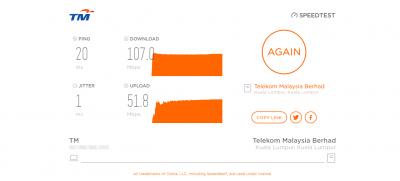
No need to return the STB and still able to watch the hypp tv (although i never use it)  |
|
|
Sep 21 2018, 06:47 PM
Show posts by this member only | IPv6 | Post
#1173
|

Senior Member
1,125 posts Joined: Sep 2014 From: Cheras
|
actually I wanna ask that...
Will TM offer speed upgrade for maybe add RM10/20 for the 100Mbps RM129 plan in the future ? Right now those 30Mbps Advance users are paying RM139 monthly, and will get 300Mbps turbo. What I mean is, RM129 for 100Mbps while RM139 for 300Mbps, definitely the 139 is much more worth it. |
|
|
|
|
|
Sep 21 2018, 06:50 PM
|

Junior Member
656 posts Joined: Jan 2003
|
QUOTE(CocaCola2020 @ Sep 21 2018, 06:35 PM) Just change my RM139 30Mbps to RM129 100Mbps this morning, only took less than an hour to complete the upgrade, very fast & efficient mannn Impressive. I think I want to "upgrade" too. Which TM branch did you visit? Speed tested by wifi using laptop + tplink AC1300 MIMO wifi adapter + second floor, hg8240h + dir-850l at first floor
No need to return the STB and still able to watch the hypp tv (although i never use it) |
|
|
Sep 21 2018, 06:55 PM
|

Senior Member
3,952 posts Joined: Apr 2005 From: Sector 1921B, Delta Quadrant
|
QUOTE(joejee @ Sep 21 2018, 06:25 PM) Need some advice whether to terminate and re-apply this new RM129 (100mbps) or wait for the Turbo Upgrade (500mbps) Went from 30mbps rm159 to 100mbps rm129. Just go TMpoint to apply, renew contract to 2 years, make appointment for technician to upgrade router. That’s if compare 100mbps rm129 to your upcoming 500mbps at rm159, I’d wait... unless 500mbps for you is an overkill.I am currently paying RM159 for 50 Mbps (contract is over). I have been using the antique equipment since 8 years ago. For Turbo Upgrade, they will not replace the equipment, but there will be no renewal of contract. For termination and re-application, they will of course give you a new set of equipment but with 24 months contract I guess. How about downgrade? Will they give new equipment? This post has been edited by Eithanius: Sep 21 2018, 06:57 PM |
|
|
Sep 21 2018, 06:56 PM
Show posts by this member only | IPv6 | Post
#1176
|

All Stars
10,859 posts Joined: Jan 2003 From: Sarawak
|
juust received email say got turbo and sms as well. but after turn off modem and on back after few mins, my line seems slower now only got 30mbps.. used to get 50mbps.. where is the 500mbps. i using ac68u
|
|
|
Sep 21 2018, 06:57 PM
Show posts by this member only | IPv6 | Post
#1177
|
|
Junior Member
34 posts Joined: Jul 2017
|
QUOTE(tohca @ Sep 21 2018, 06:50 PM) Impressive. I think I want to "upgrade" too. Which TM branch did you visit? TM Batu Lintang Kuching  |
|
|
Sep 21 2018, 06:59 PM
|

Senior Member
3,681 posts Joined: Nov 2005 From: -
|
QUOTE(citizen32 @ Sep 21 2018, 05:50 PM) to all boss, Existing phone number can keep.if i currently using the unifi 10mbps package, and upgrade the RM129 100mbps package the telephone number must change new? the Tv box cannot use watch tv? kindly advise either you go to TM Point or find a unifi reseller to help you. |
|
|
Sep 21 2018, 06:59 PM
Show posts by this member only | IPv6 | Post
#1179
|

All Stars
11,456 posts Joined: Oct 2007 From: KL
|
QUOTE(dickybird @ Sep 21 2018, 03:48 PM) Nobody remembers their pppoe password, the Twitter will give it to you after they do verification My PPPoE password very easy to remember: DRoWsSApYmTOnThis post has been edited by soonwai: Sep 21 2018, 06:59 PM |
|
|
Sep 21 2018, 07:02 PM
Show posts by this member only | IPv6 | Post
#1180
|

Junior Member
131 posts Joined: Nov 2011
|
QUOTE(CocaCola2020 @ Sep 21 2018, 06:35 PM) Just change my RM139 30Mbps to RM129 100Mbps this morning, only took less than an hour to complete the upgrade, very fast & efficient mannn so your house is Fiber connect? Speed tested by wifi using laptop + tplink AC1300 MIMO wifi adapter + second floor, hg8240h + dir-850l at first floor
No need to return the STB and still able to watch the hypp tv (although i never use it) |
|
Topic ClosedOptions
|
| Change to: |  0.0350sec 0.0350sec
 0.98 0.98
 6 queries 6 queries
 GZIP Disabled GZIP Disabled
Time is now: 2nd December 2025 - 10:27 PM |
 Quote
Quote