Welcome Guest ( Log In | Register )

Outline · [ Standard ] · Linear+

Home Networking WiFi Router Discussion Thread, Updated for 2023

views
     
ben3003
post Jun 18 2023, 10:41 AM

10k Club
********
All Stars
10,859 posts

Joined: Jan 2003
From: Sarawak


any router that can have better latency over wifi? currently archer ax20 or ax30 forget edi.

planning to try remote play over wifi and 5g, but xbox only wireless AC. Wired not an option, because too much hassle pulling cable to my room, the router is at ground floor.. if my home still alot AC devices, will tri-band a better choice? im looking at ASUS RT-AX86S currently, seems like is best buy. my room directly on top of the router currently, but then seems like latency for xbox still cant get within 50ms connect to server. maybe is external limitation instead of internal wifi.

This post has been edited by ben3003: Jun 18 2023, 11:00 AM
ben3003
post Jun 21 2023, 10:40 PM

10k Club
********
All Stars
10,859 posts

Joined: Jan 2003
From: Sarawak


QUOTE(blacktubi @ Jun 21 2023, 09:58 PM)
For your budget, I think the newer Deco X80 from TP-Link is a better choice.

The twin pack model is sufficient. Contrary to popular believes, more mesh points aren't always better in mesh Wi-Fi as they causes interference and backhaul issues.

If two units can provide sufficient coverage, always go for 2 units.
I will suggest getting 2 units of ASUS routers.

Configure the first unit as the router and the second unit as the AiMesh node in your room. Then, connect your XBOX via LAN cable to the second unit.

This will get rid of bufferbloat or congestion issues that lead to ping spikes and lower your latency as well.
That's a really huge property

I will suggest the Deco X50-4G and pair it with 2-3 units of Deco X20 to have full Wi-Fi coverage at your property.

Since it's a mesh Wi-Fi, you enjoy all the benefits of seamless roaming one just one Wi-Fi name throughout the entire property.

If you prefer something budget friendly, get the TP-Link MR500 4G modem router.

Doubt you needed the Mikrotik since you have pretty decent 4G signal. I will recommend that if you stayed at somewhere really remote or you have an unlimited budget.  tongue.gif
*
Ah i can be really expensive lol. What router would u recommend to do so?
ben3003
post Jun 22 2023, 04:59 AM

10k Club
********
All Stars
10,859 posts

Joined: Jan 2003
From: Sarawak


QUOTE(blacktubi @ Jun 21 2023, 11:08 PM)
If budget is not really a concern, I will like to use at least 2 units of RT-AX86S or above.

Just remember it will not be any faster than using a direct Ethernet LAN cable.
*
I think i only can afford 1k+- lol. If thats the case, it might be cheaper to get someone to properly route lan cable to my room, probably cost less than 2 router lol.

This post has been edited by ben3003: Jun 22 2023, 05:00 AM
ben3003
post Aug 30 2023, 07:20 PM

10k Club
********
All Stars
10,859 posts

Joined: Jan 2003
From: Sarawak


QUOTE(eclectice @ Aug 30 2023, 06:21 PM)
user posted image
*
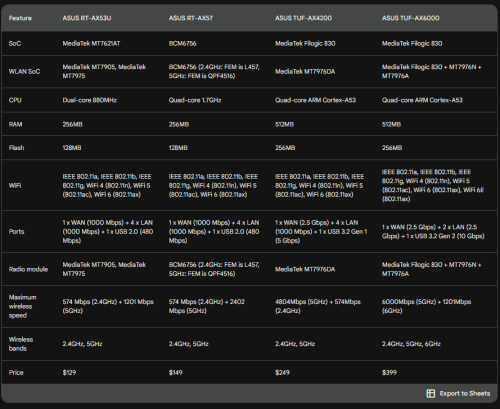
blacktubi review of tuf ax4200 seems promising. Bought 1 to replace my ax30 lol. Hopefully can reduce wifi latency.
ben3003
post Oct 10 2023, 05:09 AM

10k Club
********
All Stars
10,859 posts

Joined: Jan 2003
From: Sarawak


QUOTE(Khan92 @ Oct 10 2023, 12:46 AM)
Giving with current 500 mbps and my Ax3000 being crap, I need a decent router that can transmit 500 mbps on mesh as well..

I'm down between Ax53 and Ax55. Since Ax73 cannot mesh with the same unit

In term of mesh compatibility which one was better?
*
Ax4200 tuf.

Btw, wanna ask as im current on ax4200, what is the cheapest way other than pulling ethernet cable to make my wifi5 device connected to wifi6? I changed my router from ax20 go ax4200, but the ax20 cannot be used as a wireless bridge.. dang..

Im planning to connect my xbox via lan to a wifi6 device, then the device can connect to my ax4200 via wifi6.. cos wifi5 latency really not good

This post has been edited by ben3003: Oct 10 2023, 06:29 AM
ben3003
post Oct 16 2023, 10:49 AM

10k Club
********
All Stars
10,859 posts

Joined: Jan 2003
From: Sarawak


Hi i just got ax4200, anyone know what setting normally need to set for the router?
ben3003
post Oct 17 2023, 09:53 AM

10k Club
********
All Stars
10,859 posts

Joined: Jan 2003
From: Sarawak


1 thing i found out, if my xbox series x connect to my TUF ax4200 and downloading games the speed i see around 150-200mbps, and my tv streaming netflix youtube quality will drop and sometimes will buffering, both is WiFi 5 and 5GHz, should i set QoS prioritize media streaming? or is it my setting got problem?

This post has been edited by ben3003: Oct 17 2023, 09:53 AM
ben3003
post Oct 18 2023, 05:37 PM

10k Club
********
All Stars
10,859 posts

Joined: Jan 2003
From: Sarawak


Anyone know how does my 160mhz compatible device has connected to that bandwidth?

I see for my desktop, i use the wifi analyzer app, it show 20mhz.. but my killer 1650x card is 160mhz capable.

This post has been edited by ben3003: Oct 18 2023, 05:38 PM
ben3003
post Oct 18 2023, 05:43 PM

10k Club
********
All Stars
10,859 posts

Joined: Jan 2003
From: Sarawak


QUOTE(sHawTY @ Oct 18 2023, 05:42 PM)
Your router also needs to support 160MHz in order for your WiFi card to utilize it
Not all router supports 160MHz bandwidth
*
My router tuf ax4200 support, also already enabled. Not sure is driver prob or not. Any way to confirm? Cos dunno the wifi analyzer app ok or not. No other device to test lol
ben3003
post Jan 26 2024, 12:20 PM

10k Club
********
All Stars
10,859 posts

Joined: Jan 2003
From: Sarawak


QUOTE(TongCN @ Jan 26 2024, 11:51 AM)
My mind just pop out this issue after making purchase of TP-Link Deco XE75 yesterday (haven't received)

So what i learnt is that 6Ghz can be wireless backhaul and SSID at the same time but the 6Ghz will be like a separated SSID toward 2.4/5Ghz.

Question: Meaning to say that if my Wi-Fi 6E devices connecting to 6Ghz SSID will not be able to see devices connected to Wi-Fi 2.4/5Ghz ?
Example if i want to chromecast (google) or screen mirror (ios) from my Wi-Fi 6E devices to TV (connected with non-Wi-Fi 6E). It will not see each other cause differ SSID
*
No issue, as long as the gateway is the same. 2.4ghz device also can see 5ghz device, and is separate ssid.
ben3003
post Jan 27 2024, 07:56 PM

10k Club
********
All Stars
10,859 posts

Joined: Jan 2003
From: Sarawak


QUOTE(blacktubi @ Jan 27 2024, 01:01 PM)
iOS will prompt a warning if 6Ghz is different name with 2.4/5Ghz as well

Best practice nowadays is to use same name
*
Same name as in like ssid is identical? Or like abc_5G and abc_6G can also? Cos mine is abc_2.4G and abc_5G default by router
ben3003
post Jan 28 2024, 05:04 AM

10k Club
********
All Stars
10,859 posts

Joined: Jan 2003
From: Sarawak


QUOTE(blacktubi @ Jan 27 2024, 09:30 PM)
SSID should be identical these days
*
mean both same or enable the smart connect at router? Problem is i don wan my 5ghz device connecting to 2.4g.
ben3003
post Jan 29 2024, 12:52 PM

10k Club
********
All Stars
10,859 posts

Joined: Jan 2003
From: Sarawak


QUOTE(TongCN @ Jan 29 2024, 08:35 AM)
I dun have Iphone 15 pro series (only series with Wi-Fi 6E) with me though.

I do have few Wi-Fi 6E devices at home so i can just rename the 6Ghz as same SSID with 2.4Ghz/5Ghz so the client will auto switch it self ?
Mesh router normally combine into one SSID (2.4Ghz and 5Ghz) so the client can auto switch whenever it's strong signal exclude Wi-Fi 6E default with "_6ghz" index behind
if rename to all same meaning sort of "combine" and client will auto detect and connect.
Create a guest network with only 2.4Ghz tongue.gif
But now router has those "IoT network" separate out SSID
*
Ohh, i prefer to control which connect 2.4g which connect 5g lol. Asus do have smart connect with band steering bla bla. Asus don have IoT thingy i think lol. My uncle sharing my wifi also they connect 2.4g, ancient phone so yeah, better just separate lol
ben3003
post Jan 29 2024, 07:12 PM

10k Club
********
All Stars
10,859 posts

Joined: Jan 2003
From: Sarawak


QUOTE(TongCN @ Jan 29 2024, 01:36 PM)
I prefer the router and client auto switch themselves XD

Further range auto switch to 2.4Ghz and vice versa

While most of my IoT using guest network with 2.4Ghz for stable link

Wait XE75 come and see how adjust later  tongue.gif

Only issue is my x20 is v1 which does not support IoT network (only v3 and v4) which is a bummer for early adopter  doh.gif
*
diff ppl diff preference lol. because if it based on SNR, it will always connect for 2.4g but actually 5g is still within good range. not 2k sqft house, so self control better, same like drive manual car biggrin.gif
ben3003
post Mar 13 2025, 07:30 AM

10k Club
********
All Stars
10,859 posts

Joined: Jan 2003
From: Sarawak


QUOTE(tropik @ Mar 12 2025, 06:51 PM)
Sifus,

I'm using Asus TUF AX4200 as the main router, located at ground floor.

Also having a Huawei EchoLife WA8021V5 set as AP, wired to the Asus, located at the back of upper floor.

Both set with the same SSID.

My issue is, my S23U phone can switch to the Huawei and connectivity works fine.

But when I go downstairs, it switches back to Asus but without internet.

What is the problem here?
Do I need to change the SSID for the AP?
*
diff router better don use same ssid.

3 Pages < 1 2 3Top
 

Change to:
| Lo-Fi Version
0.0398sec    0.31    7 queries    GZIP Disabled
Time is now: 3rd December 2025 - 03:36 AM