QUOTE(x3Kai @ Jun 18 2024, 04:46 PM)
Hey guys,
Here is my current set up:
TIME Fibre 500 Mbps (now on free upgrade to 600 Mbps)
2x Huawei HG8145X6
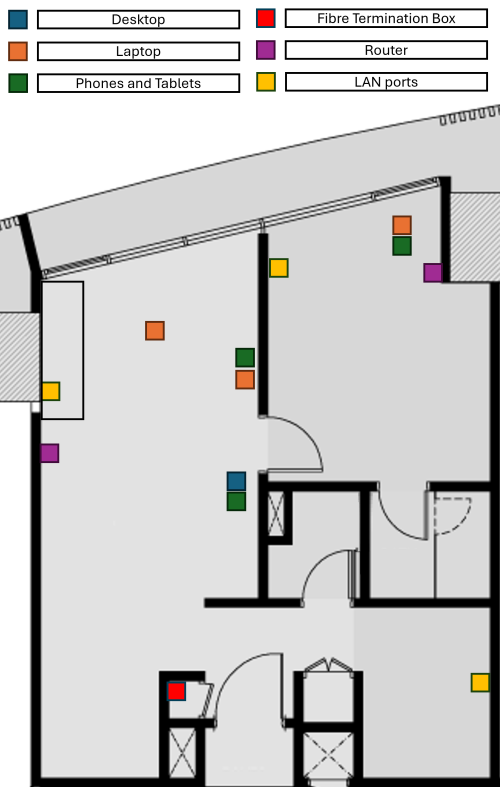
1 located in the electrical box / storage room where fibre comes in. (fully concrete structure, it's so bad that my room right down the hallway couldn't even get more than 2/5 bars on my phone, assuming it's the 5ghz band because the current setup didn't split the SSIDs)
1 located in my living room, behind my big ass printer connected to the other unit via cable, should be CAT5.
The condo is bout 800 sq. ft. and I sit in the living area most of the time anyways.
6 months back when the installer came, he was able to get 500Mbps in both 5g and LAN in the speed test and reported back as such. Today, even after the 600 Mbps upgrade, I'm only getting bout 100 Mbps on my living room computer.
The Wi-Fi setup for the computer is also a little junky. I went from a USB Wi-Fi card (dead now) to now, using an old phone (can receive 5ghz connection) to USB tether my connection (temporary solution). I'm getting AX210 Wi-Fi card + PCIE adapter from China to replace this junky set up but was wondering if I should also upgrade the router set up.
This is because other devices were also never able to get 600 Mbps speed. At peak, I will have like 3 computers, 6 phones, 2 android TV box and 2 tablets connecting to my poor router.
From what I read, unlike Unifi that uses VLAN tagging, TIME only relies on PPPoE so I guess most of the China routers should be compatible? Plus most likely, I'll be using it as a router only, instead of modem + router since my Fibre termination box is stuck at the electrical box / storage room. Sure, I'll miss out on 6ghz but is it really that big of a deal?
Any recommendations?
You can try to extend the fibre cable to somewhere which has less electrical interference, but I don't really think is electrical box but more likely the spot of the storage room is, where there are many walls and a door that makes your wifi signal keep bouncing here and there, and by the time it reaches your living room, the speed is heavily affected.
But best way is to get the fibre extended up to living room, wiring it or how to conceal is up to your imagination and planning as we do not know how your house is like, or get a specialist who can do it, but doesn't comes cheap to pull a simple fibre or LAN.
But most importantly, you need to test your speed by plugging a LAN cable directly to the main router and test whether can you hit 500mbps or not, once you rule out is not the router issues, then it could be either your
1) device Wifi gen is WiFi4 or 5. devices too old to support your router speeds, bottle necking.
2) settings on the router not optimized for your house network
3) wrong timing day of speed test server (this affects too during high peak usage test)
4) placement of your router.
Also will not recommend China based router even if its cheaper unless you are 100% sure and done your research that the particular model can flash it to a english version or international firmware, but most likely cannot. So better stick with the general worldwide ones that is being sold locally here in shops as that would means it supports our local ISP settings.
Would recommend you to ASUS, tp link or if you don't mind, D-Link which is the cheapest among them but unreliable firmware stability.
This post has been edited by Omochao: Jun 19 2024, 08:48 AM 

 Feb 8 2024, 04:11 PM


 Quote
Quote


 0.0239sec
 0.20
0.20
 7 queries
 GZIP Disabled