Welcome Guest ( Log In | Register )

301 Pages « < 13 14 15 16 17 > » Bottom

Outline · [ Standard ] · Linear+

Home Networking WiFi Router Discussion Thread, Updated for 2023

views
     
leezhijiang
post Oct 16 2018, 09:19 AM

Getting Started
**
Junior Member
272 posts

Joined: Jan 2010


QUOTE(infrasonic @ Oct 16 2018, 09:01 AM)
Is your D26G near to the PC? What's the difference if say instead I were to use my laptop's own wifi receiver to connect to the router downstairs? 5GHz is available on my laptop
*
Yes, just beside. The speed will decrease when you connect your router down stairs directly. In my opinion and my experience, router is more powerful
K4iz3n
post Oct 17 2018, 11:09 AM

Getting Started
**
Junior Member
212 posts

Joined: May 2010
On the first page, it states that Asus RT-AC68U can reach max wifi of 500Mbps? I thought it is rather higher for wifi?
TSblacktubi
post Oct 17 2018, 11:10 AM

-
Group Icon
Elite
8,401 posts

Joined: Jul 2008

QUOTE(K4iz3n @ Oct 17 2018, 11:09 AM)
On the first page, it states that Asus RT-AC68U can reach max wifi of 500Mbps? I thought it is rather higher for wifi?
*
Realistically it can only reach that speed on most situation.
K4iz3n
post Oct 17 2018, 11:16 AM

Getting Started
**
Junior Member
212 posts

Joined: May 2010
QUOTE(blacktubi @ Oct 17 2018, 11:10 AM)
Realistically it can only reach that speed on most situation.
*
Understood, this is for wifi only correct. Over LAN it should be able 1Gbps speed yeah?
TSblacktubi
post Oct 17 2018, 11:28 AM

-
Group Icon
Elite
8,401 posts

Joined: Jul 2008

QUOTE(K4iz3n @ Oct 17 2018, 11:16 AM)
Understood, this is for wifi only correct. Over LAN it should be able 1Gbps speed yeah?
*
Yup.
leezhijiang
post Oct 18 2018, 05:29 PM

Getting Started
**
Junior Member
272 posts

Joined: Jan 2010


This is how I setup for my house la.


Everything bought from Taobao.

AC88U : RM 542 AC2600 rating Main Router place beside BTU
D26G: Mercury Router RM 180 AC2600 rating Set as WDS placed in Living Room
AC68U: RM 470 AC1900 rating : Media Bridge / AI Mesh mode in my room


I have tried the setup above, able to achieve 300 Mbps ++

Hi just to update you guys, the setup above is so OP. I still able to stream Youtube video at HD, downlaod files on my mobile via wiFi blazing fast. Did speed test and they are above 100 Mbps

This post has been edited by leezhijiang: Oct 18 2018, 05:33 PM
tomastan4134
post Oct 19 2018, 12:18 PM

Enthusiast
*****
Senior Member
830 posts

Joined: Mar 2014
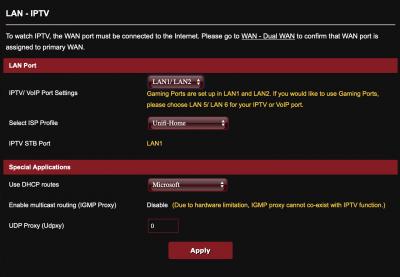
anyone know the asus rt-ac88u can support unifi's playtv/hypptv? how to configure in router setting?

is there a specific lan port for unifi IPTV? coz there got 8 lan ports.

normal asus router will specify lan 4 - unifi IPTV.

please help?

This post has been edited by tomastan4134: Oct 19 2018, 12:20 PM
TSblacktubi
post Oct 19 2018, 12:20 PM

-
Group Icon
Elite
8,401 posts

Joined: Jul 2008

QUOTE(tomastan4134 @ Oct 19 2018, 12:18 PM)
anyone know the asus rt-ac88u can support unifi's playtv/hypptv?  how to configure in router setting?
*
Shameless plug of my own setup guide for Asus routers.

https://www.blacktubi.com/unifi/setup-asus-router-for-unifi/
tomastan4134
post Oct 19 2018, 12:24 PM

Enthusiast
*****
Senior Member
830 posts

Joined: Mar 2014
QUOTE(blacktubi @ Oct 19 2018, 12:20 PM)
Shameless plug of my own setup guide for Asus routers.

https://www.blacktubi.com/unifi/setup-asus-router-for-unifi/
*
noticed 87U is 4 lan port.

is there a specific lan port for unifi IPTV? coz there got 8 lan ports.

normal asus router will specify lan 4 - unifi IPTV.

please help?
Zot
post Oct 19 2018, 12:37 PM

Look at all my stars!!
*******
Senior Member
7,936 posts

Joined: Mar 2014
QUOTE(tomastan4134 @ Oct 19 2018, 12:24 PM)
noticed 87U is 4 lan port.

is there a specific lan port for unifi IPTV?  coz  there got 8 lan ports. 

normal asus router  will specify lan 4 - unifi IPTV.

please help?
*
I think even for this still Port4
TSblacktubi
post Oct 19 2018, 12:43 PM

-
Group Icon
Elite
8,401 posts

Joined: Jul 2008

QUOTE(tomastan4134 @ Oct 19 2018, 12:24 PM)
noticed 87U is 4 lan port.

is there a specific lan port for unifi IPTV?  coz  there got 8 lan ports. 

normal asus router  will specify lan 4 - unifi IPTV.

please help?
*
Refer to the settings page. It will actually tell you.


Attached thumbnail(s)
Attached Image
tomastan4134
post Oct 19 2018, 12:59 PM

Enthusiast
*****
Senior Member
830 posts

Joined: Mar 2014
QUOTE(blacktubi @ Oct 19 2018, 12:43 PM)
Refer to the settings page. It will actually tell you.
*
okie.. thanks.

i am planning to get the ac88u.

just want to confirm everything is compatible first only buy.
Remnant_T
post Oct 19 2018, 08:15 PM

New Member
*
Junior Member
24 posts

Joined: Nov 2014


Hi guys, I need some help over here, its regarding my new router TL-WR840N

I bought this router to replace the current lousy Unifi router ( TRG-212M)

However, my new TP-LINK router is unable to get the internet connection UP.
Status tab shows the IP gateway all 0.0.0.0. [B]

I have confirm the my Unifi ID and PW is correct, end up I can only disable the wifi of Unifi router, and use this TP-link router as WIFI access point.

But...now the wifi connection keeps on disconnecting every few minutes, which drives me crazy. I have tried to tweak the WIFI channel but it doesnt help..

Anyone can enlighten me on this issue ?

Thanks in advance icon_question.gif


SilentVampire
post Oct 20 2018, 12:11 AM

Networking Enthusiast
*******
Senior Member
5,714 posts

Joined: Mar 2007


QUOTE(Remnant_T @ Oct 19 2018, 08:15 PM)
Hi guys, I need some help over here, its regarding my new router TL-WR840N

I bought this router to replace the current lousy Unifi router ( TRG-212M)

However, my new TP-LINK router is unable to get the internet connection UP.
Status tab shows the IP gateway all 0.0.0.0. [B]

I have confirm the my Unifi ID and PW is correct, end up I can only disable the wifi of Unifi router, and use this TP-link router as WIFI access point.

But...now the wifi connection keeps on disconnecting every few minutes, which drives me crazy. I have tried to tweak the WIFI channel but it doesnt help..

Anyone can enlighten me on this issue ?

Thanks in advance  icon_question.gif
*
See my reply to you on other thread. VLAN settings and because of 2.4GHz interference, as your router does not support 5GHz AC. Why did you get that router anyway? It is not much better than the TRG-212M, and it has very basic hardware.

Remnant_T
post Oct 20 2018, 06:54 AM

New Member
*
Junior Member
24 posts

Joined: Nov 2014


QUOTE(SilentVampire @ Oct 20 2018, 12:11 AM)
See my reply to you on other thread. VLAN settings and because of 2.4GHz interference, as your router does not support 5GHz AC. Why did you get that router anyway? It is not much better than the TRG-212M, and it has very basic hardware.
*
Hi, thanks for your reply.

I bought this basic router due to :

1) The Unifi package speed of my unit is just 5mbps ( I am just a tenant, Unifi registered under the owner name and he dont care about the upgrade). Therefore I feel like buying a high end router is just a waste.

2) All of the devices I use only support to N, no AC feature

3) Poorfag trying to save cost as I just need a router which do the basic surfing hmm.gif


By the way, the interface of this router page doesnt have Unifi Mode (like the green firmware), I can only pick the mode in either wireless router/ access point / range extender.


SilentVampire
post Oct 20 2018, 08:27 AM

Networking Enthusiast
*******
Senior Member
5,714 posts

Joined: Mar 2007


QUOTE(Remnant_T @ Oct 20 2018, 06:54 AM)
Hi, thanks for your reply.

I bought this basic router due to :

1) The Unifi package speed of my unit is just 5mbps ( I am just a tenant, Unifi registered under the owner name and he dont care about the upgrade). Therefore I feel like buying a high end router is just a waste.

2) All of the devices I use only support to N, no AC feature

3) Poorfag trying to save cost as I just need a router which do the basic surfing hmm.gif
By the way, the interface of this router page doesnt have Unifi Mode (like the green firmware), I can only pick the mode in either wireless router/ access point / range extender.
*
Fair enough. The owner is an idiot then. I have a feeling that he is paying more for less lol. Anyway, fair enough. That router is sufficient for your needs,

Bro, every router from TP-Link has the Unifi mode. You are looking for it at the wrong place. Go to your router, look for ‘Network, then ‘IPTV’, then select mode ‘Malaysia-Unifi’. You will be be able to use it as a router then. Remember to set Operation Mode to Wireless Router to use it as a main router. By the way, what version are you using? Look at the box and see the version. Get the latest firmware here: https://www.tp-link.com/my/download/TL-WR840N.html

If you do update the firmware, you have to reconfigure it again, so have your PPPoE username and password ready, and remember to set ‘Malaysia-Unifi’ mode again.

hdd-corrupted
post Oct 20 2018, 09:23 AM

Getting Started
**
Junior Member
279 posts

Joined: Aug 2009
From: KL


anybody have experience with prolink prc8301? compare to dlink dir850l?
Remnant_T
post Oct 20 2018, 10:24 AM

New Member
*
Junior Member
24 posts

Joined: Nov 2014


QUOTE(SilentVampire @ Oct 20 2018, 08:27 AM)
Fair enough. The owner is an idiot then. I have a feeling that he is paying more for less lol. Anyway, fair enough. That router is sufficient for your needs,

Bro, every router from TP-Link has the Unifi mode. You are looking for it at the wrong place. Go to your router, look for ‘Network, then ‘IPTV’, then select mode ‘Malaysia-Unifi’. You will be be able to use it as a router then. Remember to set Operation Mode to Wireless Router to use it as a main router. By the way, what version are you using? Look at the box and see the version. Get the latest firmware here: https://www.tp-link.com/my/download/TL-WR840N.html

If you do update the firmware, you have to reconfigure it again, so have your PPPoE username and password ready, and remember to set ‘Malaysia-Unifi’ mode again.
*
You are da savior bro ! Finally i can use it as an independent wireless router and ditch the old Unifi unit rclxms.gif

Regarding the firmware, mine is V6 Build 171220, and the latest firmware available at TP-Link web is Build 180614

However, the note says its For TL-WR840N EU V6.0. (Mine is EU V6.1 )

Shall i upgrade the firmware in this case ?


Thanks again
SilentVampire
post Oct 20 2018, 10:42 AM

Networking Enthusiast
*******
Senior Member
5,714 posts

Joined: Mar 2007


QUOTE(Remnant_T @ Oct 20 2018, 10:24 AM)
You are da savior bro ! Finally i can use it as an independent wireless router and ditch the old Unifi unit  rclxms.gif

Regarding the firmware, mine is V6 Build 171220, and the latest firmware available at TP-Link web is Build 180614

However, the note says its For TL-WR840N EU V6.0. (Mine is EU V6.1 )

Shall i upgrade the firmware in this case ?
Thanks again
*
No worries. Happy to help. It is similar actually, but if it is working well, and the new firmware doesn’t seem to have new features, then just ignore it for now.
ckh83
post Oct 22 2018, 06:09 PM

Getting Started
**
Junior Member
176 posts

Joined: Jan 2003
Notice 1st page showing TPlink Archer C9 support 500mbps for wifi speed.
Is it can support up to 1gb internet speed using LAN because i read smallnetbuilder review WAN to LAN is 7xx mb?

This post has been edited by ckh83: Oct 22 2018, 07:00 PM

301 Pages « < 13 14 15 16 17 > » Top
 

Change to:
| Lo-Fi Version
0.0174sec    0.63    6 queries    GZIP Disabled
Time is now: 2nd December 2025 - 01:24 PM