

so when i topup and proceed to pay, i got this msg
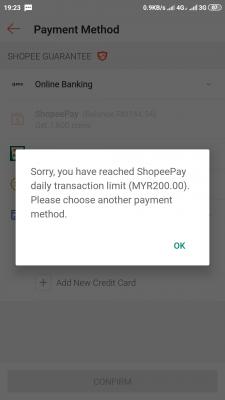
of course, then i went to have a little chat with CS and found out i cant proceed as i was on Android 6.

just want to verify if this is indeed BNM requirement.
SHOPEE DEALS,CODE AND DISCUSSION Version 2.0!, Anything about shopee can be shared here
|
|
 Jan 15 2020, 08:38 PM Jan 15 2020, 08:38 PM
Return to original view | IPv6 | Post
#1
|
 
Junior Member
129 posts Joined: Mar 2009 
|
so, yeah ! usually i use CC more than Shopee Pay. with the coupon offered, they encourage you to use Shopee Pay.
so when i topup and proceed to pay, i got this msg
of course, then i went to have a little chat with CS and found out i cant proceed as i was on Android 6.
just want to verify if this is indeed BNM requirement. |
|
|
|
|
|
May 16 2020, 06:52 AM
Return to original view | Post
#2
|
|
Junior Member
129 posts Joined: Mar 2009
|
quick question, everytime when i go to my shopping cart, it automatically select the first few items i do not want to purchase.
i have the deselect those items i do not want to purchase, manually. anyone experience this? feedback appreciated. |
|
|
May 16 2020, 09:04 AM
Return to original view | Post
#3
|
|
Junior Member
129 posts Joined: Mar 2009
|
QUOTE(vernon91 @ May 16 2020, 08:25 AM) yup seems like started very recently, annoying as hell the_office_thankyou.gif  thank you. just wanted to verify, not just me getting annoyed. already send an email to shopee and lets wait for reply. appreciate the feedback. |
|
|
May 16 2020, 12:01 PM
Return to original view | Post
#4
|
|
Junior Member
129 posts Joined: Mar 2009
|
QUOTE(sonotme @ May 16 2020, 09:54 AM) There is a deselect button on the bottom right for me.. using android btw.. well, if u mean the "Select All" button on the bottom 'LEFT', mine is grayed out.i tried a few times using this method. 1. go to cart 2. once the page is loading, quickly untick Select All (the select all is ticked on default) 3. pray it will let u untick, otherwise repeat process. helluva annoying.  This post has been edited by boygenetic: May 16 2020, 12:01 PM |
|
|
May 16 2020, 01:52 PM
Return to original view | Post
#5
|
|
Junior Member
129 posts Joined: Mar 2009
|
QUOTE(alexwsk @ May 16 2020, 01:22 PM) mobile version has the "All" check box at the bottom left which you can untick to unselect everything in cart as well i tried clearing cache and that does not work. mine always work without fail, I wonder why so many grey out among users here perhaps shopee knew you guys are rich, so can checkout everything in cart  im suspecting my Android version is too old for the apps. im running on Android 6. |
|
|
May 16 2020, 02:48 PM
Return to original view | Post
#6
|
|
Junior Member
129 posts Joined: Mar 2009
|
QUOTE(!@#$%^ @ May 16 2020, 01:57 PM) probably, unsupported old operating system is vulnerable to hacks etc glad i dont have to meet you in person because i cant pronounce your nick. "hey, exclamation-alias-hashtag-dollarsign-percent-???" OR how ure doing, hold shift + 1 2 3 4 5 6 !!!!  QUOTE(Max @ May 16 2020, 02:00 PM) I think that selected all item grey out started recently.. alrighty then, thank you for verifying. B4 this its working fine, can just untick select all.. I think not android version related, mine latest android also have this problem and yes, it was working fine before but having this issue when i was checking out yesterday. hence, just wanted to find out if its not just me.  |
|
|
|
|
|
May 16 2020, 05:50 PM
Return to original view | Post
#7
|
|
Junior Member
129 posts Joined: Mar 2009
|
QUOTE(richyiu @ May 16 2020, 05:24 PM) my handphone android 5, can click to unselect all then i really dont understand.  thank you for the feedback.  |
|
|
May 17 2020, 09:27 PM
Return to original view | Post
#8
|
|
Junior Member
129 posts Joined: Mar 2009
|
QUOTE(Terence573 @ May 17 2020, 09:01 PM) have also sent email to shopee as well, cool annoying as hell. i have yet to receive any reply from them. |
|
|
May 20 2020, 08:10 PM
Return to original view | Post
#9
|
|
Junior Member
129 posts Joined: Mar 2009
|
QUOTE(Terence573 @ May 19 2020, 09:49 PM) 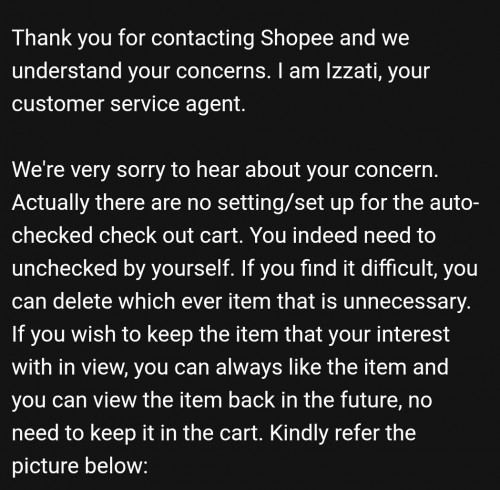 This is the email reply from shopee regarding the cart auto select all thing. The odd thing is it never happen before maybe months ago,why now? The apps developer was lazy with this i guess? If it is not broken don't fix it. heres the reply i received: QUOTE(help@support.shopee.com.my) Thank you for contacting Shopee Malaysia! I am xxxx and I will be assisting your inquiry. It comes to our understanding that you are facing with a technical problem at this moment and I do understand on your frustration. Rest assured and allow me to assist you. With regards to your query, we would like to seek for your cooperation to do a trouble shooting as per listed below as this matter could be due to bug issue. For any technical issue while browsing Shopee website via web browser, kindly refer below steps one by one. 1. Clear web browser cache and cookies 2. Try to use different web browsers (e.g. Chrome, Firefox, Opera, Safari etc.) 3. Use private / incognito mode 4. Ensure that you are using a stable internet connection, such as wifi 5. If you are using Macbook, please use other computer/laptop For any technical issue while browsing Shopee platform via Shopee app, please try the following methods individually: 1. Clear cache and cookies in your phone. 2. Clear your Shopping Cart or minimize the number of items to as little as possible as this can also cause issues. 3. Exit the app and clear from the recent apps and try again. 4. Uninstall and re-install the app if the above methods did not work. Once you have done the troubleshooting, please try again after 5-6 hours. If the issue is still occur, please provide us the screenshot of error message for further checking. We seek for your kind time in confirming should the information provided resolves your inquiry. You may reply to this email should you require further assistance we will be more than happy to assist you. We apologize for any inconveniences caused and your co-operation in this matter is highly appreciated. how exactly do you clear cookies' apps? |
| Change to: |  0.0424sec 0.0424sec
 0.70 0.70
 7 queries 7 queries
 GZIP Disabled GZIP Disabled
Time is now: 4th December 2025 - 09:23 PM |
 Quote
Quote