QUOTE(fixgd @ Jun 3 2021, 07:33 PM)
1.yup as i said in my in previous reply, the reverting issue occured 2 weeks back.
2.for today, i performed the removal of said profile as per post #4850, but the i could not even get the volte to be activated.
3.since i removed the original default profile, now im on india vodafone 100% (i even verified this by running pdc again after my phone reboot), and the active profile is india vodafone lte.
4.even on india vodafone lte, somehow the my phone volte is still not activated (when i make phone call, 4g drop to 3G/H+)
5. i repeated steps 3 and 4 on telefonica UK too, but the result is still the same (volte not activated at all)
*i've verified with Digi CS that my volte is confirm activated too (on telco side)
I post the instructions tat i google, thanks to them, hope it can enlighten u.
**Make sure VoLTE service has been activated on Carrier side**
1. Enable VoLTE and VoWiFi options
Option 1:
i. Open Dialer
ii. Type USSD code *#*#4636#*#*
iii. Select phone information
iv. Activate VoLTE Provisioned, Wifi Calling Provisioned
Option 2:
i. Open Dialer
ii. Type USSD code *#800#
iii. Select Oneplus Logkit
iv. Select Function Switch
v. Activate VoLTE switch, VoWifi switch
2. Reboot the device and turn on VoLTE and VoWiFi in the settings
(“Settings” –– “WiFi and Internet” –– “SIM and network” –– “SIM 1” –– “VoLTE” & Wi-Fi Calling”)
3. Install Qualcomm QPST Diag port x64 / QPST 2.7.474 software on your computer.
4. Connect phone to the computer via “USB cable”.
5. Type USSD code *#801#.
6. Turn on there "Full-port switch".
7. Start the program “PDC” from the QPST software package and select your smartphone from the list of connected devices.
8. Right-click on the “Oversea-Commercial_DS” and deactivate “Sub0” and “Sub1”.
9. Next, select a “Profile” that will be good for your country and Carrier. Right-click on it and select "SetSelectedConfig" for both "Sub0" and "Sub1".
If you could not find your country or operator, then try to use “India_Volte_Vodafone” or “Telefonica_UK_Commercial” as these are most common modes.
10. Click on the selected profile line and then click on the “Activate” button located at the bottom of the program window.
11. Now go back to the phone MENU (Step 6). Turn off "Full-port switch" and reboot your smartphone. The VoLTE or VoWiFi logo should be displayed in the status bar.
12. If u have an issue with VoLTE (may go back to default setting after reboot), then repeat and do next after Step 8: Click on “Oversea-Commercial_DS” again and then click on the “Remove” button located at the bottom of the program window.


 May 30 2021, 10:25 AM


 Quote
Quote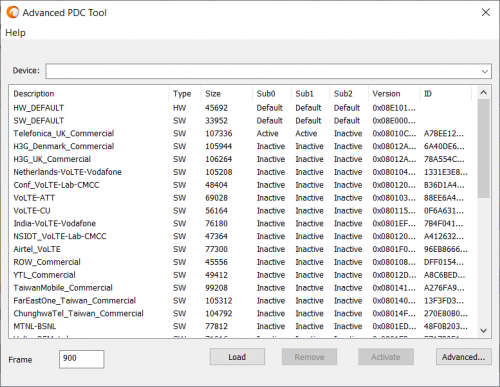



 0.0969sec
 0.68
0.68
 7 queries
 GZIP Disabled