Outline ·
[ Standard ] ·
Linear+
[OFFICIAL]Counter Strike Online, Never Fall Back !
|
TSCSOnline
|
 Sep 6 2018, 01:27 PM, updated 7y ago Sep 6 2018, 01:27 PM, updated 7y ago
|
New Member


|
QUOTE Welcome to Counter Strike Online Singapore & Malaysia Thread  Title : Counter Strike Online | Genre : MMOFPS | Published : PT.Megaxus Infotech Title : Counter Strike Online | Genre : MMOFPS | Published : PT.Megaxus Infotech
Counter-Strike Online comes with much better, more exciting and certainly more fun than ever before. Counter-Strike Online comes with MMO features as well as new elements, new features, new characters and new modes of course. Everything is packaged Online (requires internet connection) so that all people in Indonesia can enjoy and play it together. Counter-Strike Online also presents an easy-to-use interface and can be quickly understood by all players.
According to the standard Counter-Strike Online provisions, the user can choose between Counter-Terrorist or Terrorist team. They can help each other fellow team members to achieve the goal of victory.
Counter-Strike Online provides many additions than before. Counter-Strike Online presents the latest features while still having a fast tempo and tactical game and also adrenaline rush.
Counter-Strike Online is certainly ready to provide an amazing experience in playing FPS game for the players.OFFICIAL WEBSITE System Spec Instalation 1. Run the Counter-Strike Online installation file (can be downloaded from http://www.csonline.co.id or from Counter-Strike Online DVD).
2. Select the directory / folder installation of Counter-Strike Online. Make sure that there is at least 1 GB of HDD space left. Select "Browse" to change
the directory / installation folder of Counter-Strike Online.
3. Press "Install" to continue the installation of Counter-Strike Online.
4. After the installation process is complete, you can play Counter-Strike Online immediately. Icon Counter-Strike Online will be available on the Desktop
or in the Start Menu - Programs - Megaxus - Counter-Strike Online.Interface » Click to show Spoiler - click again to hide... « Player Info In the upper left corner of the lobby room, there is a player info that shows various information about you such as nickname, ranking, level, rank and also the bar of exp needed to move to the next level. InformationShows all your character information: 1. Nickname: your character name. 2. Codename: nickname or nickname for you. 3. Level: your current level and rank. 4. Experience: the amount of Exp that has been collected. 5. Location: the location where you play. (will appear after filling in "Register Area") 6. Clan: clan name 7. Win Rate: number of battles, victories, defeats and also ratings. 8. K / D: number of kills, death and rating. 9. Points: the number of points you have collected. InfoBanListShows the player nickname that you have entered in the ban list. Here you can also make arrangements for all player lists that have been banned such as: 1. Check the first option so that all players in your tire list cannot enter the room that was created by you. (only works if you are the room maker) 2. Check the second option so you can't see the chat or receive whisper from the player in your ban list » Click to show Spoiler - click again to hide... « Player List
In the lower left corner of the lobby room, you can see the player list. From here you can see the players who are active on the channel, list all your friends, list all clan members, send whispers to other players and also add other players as your friends.You can see all the players in the channel. Right-click on one of the players to perform various interactions such as:
1. Show info: view player information.
2. Send note: send message.
3. Add friend: add friends.
4. Whisper: send a "chat" prompt.
5. Clan invitation: send an invitation to join Clan. (can only be done if you are the Clan Chair).
6. Clan: clan name
7. Report: report the player on charges
8. Add Ban List: add the player to the InfoBanList.
9. whisper is used to send messages.
10. add friend is used to add friends.
Friend list
You can see all the players who have registered as your friends. Right-click on one of your friends to do the following interactions:
1. Delete friend: delete player from friend list. /Li>
2. Show info: view your friend's information and data.
3. Co-op function is used to direct you directly to your friend's place and connect automatically.
4. Send note is used to send messagest.
Clan members
You can see the clan members who are online. The Co-op and Send notes functions can also be used here.» Click to show Spoiler - click again to hide... « Chatting
In the lobby room, you can chat with all the players on the channel. Chat is done in chat boxes.
Chat boxes are places where you can chat with other players in the lobby room.
There are various types of chat that can be seen in the chat column. You can set and choose the type of chat you want.
1. All: see all types of chat.
2. Channel: chat in the channel where you are.
3. Clan: chat with all your clan members.
4. System: announcements or chat that come from the game system.» Click to show Spoiler - click again to hide... « Room Menu To access the room more easily, then in the lobby room there is a room menu so players can choose the game room you want or even sort the room based on the game mode you like.
Filter Change
Change filters are used for players to filter the rooms displayed in the lobby room.
You can set the filter based on various options such as: mode, map, ping, level and etc.
Create Game
Use this button to create a new room. All settings for the game can be done after accessing Create Game. These settings include: room title, room password, limit level, time limit, mode, map and others
Join Game
Select the room you want and then click on the Join Game button to enter the game room.
Custom Start
Custom Start is used if you want to start or enter a game room that matches your requirements.
Quick Start
Quick Start is used if you want to enter a room with certain modes.
You just select a mode and then click on the quick start button. You will automatically be taken to a random room using your preferred mode.» Click to show Spoiler - click again to hide... « Main Menu This section will discuss the main menu at the top of the lobby room. From there, you can access all the features of Counter-Strike Online. Each menu that is available will give you access to every feature that is needed, a variety of useful information, access to purchase items or weapons and the incomparable experience of playing Counter-Strike Online.
Register Area
This menu is used so you can register your location. The area and location that you have entered can be seen in player information.
This way you can get to know other players or even your rival clans.
Channel
This menu is used to return to the room server if you want to move to a different server.
Notice
Access this menu if you want to see various news, the latest events from Counter-Strike Online.
Each notification is also equipped with an explanation of the event so you can more easily understand it.
Inbox
This menu is used to view your message box. There are all the messages that you have received or sent. Of course from the Inbox, you can send messages, reply to messages and delete messages.
Shop
This is the most important menu access for all. Shop offers a variety of equipment, weaponry and even the characters you need to play in Counter-Strike Online.
Barrack
Enter Barracks and prepare yourself with all the appropriate equipment and weapons.
From here you can see all the items you have. Not only that, you can also set suitable equipment sets to make it easier for you while in the game.
Clan
Enter the Clan menu and find the most complete information from your clan or even other famous clans.
Various information can be seen starting from the clan name, clan level, number of clan members, clan records, clan ranks and many more.
From here you can also form new clans, combine 2 clans (clan mergers) and do clan battles with other clans.
Ranking
Want to know about your ranking? or maybe the development of other players? If so, the ranking of all ratings and info can be seen. The ranking itself is divided into various types such as: ranking for players, clans, areas, certain modes and many more.
Options
Here you can change or manage various options so you can play more fun. These settings include: spray images, crosshair shapes, keyboard settings, mouse sensitivity, audio, video and voices.
Retire
Access to this menu if you want to exit the game. |
|
|
|
|
|
TSCSOnline
|
Sep 6 2018, 02:17 PM
|
New Member
|
Update June 19th, 2019 Salute Soldier,
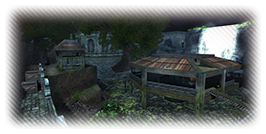
On June 19th, 2019, the Counter-Strike Online presented New Map (Falls), New Zombie (Yaksha), and Weapon Parts Update. New Map Falls Falls the newest map in CSO. This maps background is an old temple near a waterfall. Size: Large.New Zombie Yakhsa [/b] Yakhsa is a strong revenant Zombie, but strong body needs a lot of stuff . It can absord attacks and throw fireballs when counter attacking. [/b] Weapon Parts Update Knife Reach Parts that can be equipped on a melee weapon to enhance its performance
-Increase basic attack range of melee weapon in zombie mode by 4/6/8/10/12/14
-Increase basic attack range of melee weapon in zombie scenario mode by 4/6/8/10/12/14
*Weapons on which parts can be equipped have a Part Emblem in front of the weapon's name. [/b]
Airbag Parts that can be equipped on a weapon to enhance its performance
-Reduce damage and recoil of zombie bomb with 20%/30%/40%/50%/60%70% chance in zombie modes
-Reduce damage and recoil of zombie bomb with 20%/30%/40%/50%/60%70% chance in zombie scenario mode.
*Weapons on which parts can be equipped have a Part Emblem in front of the weapon's name [/b] Event #1: Weekend Ultimated Hot Time Bonus EXP + POINT 300% (If playing in Warnetku 900%) by playing on Saturday and Sunday from 11.00 - 16.00 WIB during the event period, this bonus runs in all modes and maps.
Event Period : January 30th - February 13th, 2019 before maintenance.Event #2:Daily Report It's Daily Report, let's login on Every Monday - Friday to get a FREE Brand Top 30 Decoder! You will get 1 Brand Top 30 Decoders every 30 Minutes (Max 3 Brand Top 30 Decoder everyday) on 12.00 - 15.00 WIB & 18.00 - 21.00 WIB.
Event Period :Every Monday - Friday at 12.00 - 15.00 WIB & 18.00 - 21.00 WIB.Event #3:New Battlefield Supply Login Come login to CSO to get 50 Mileage Points every Monday - Friday and 1 Brand Top 30 Decoder every Saturday - Sunday. Achieve accumulated attendance at Battlefield Supply to get the following rewards:
Total Days Reward
5 Days Dual Sword Phantom Slayer (20 Days)
7 Days Dual Beretta Gunslinger (15 Days)
10 Days 2x Magnum Launcher Piece
15 Days CSOGS Reward Box
Event Period : December 3rd, 2018 - January 2nd, 2019 before maintenance.Event #4:Build Scaner License Test Play CSO Studio mode (Creation mode) for 30 minutes for 5 days to get the Build Scanner License. Build Scanner License is needed to be able to use the Build Scanner in Studio Mode.
Periode Event : Februari 7th, 2018 ~[B]
Event #5:Build Minigun License Test
Play CSO Studio mode (Play Mode) for 30 minutes for 5 days to get the Build Minigun License. Build MinigunLicense is needed to be able to use Build Minigun in Studio Mode.
Periode Event : Februari 7th, 2018 ~.
Event #6:Season Worker
Play CSO in any mode for 30 minutes to get 3 Season Badges (4 Season Badges if playing in Warnetku).
Condition :
Max you can get up to 12 Season Badges (16 Season Badges if playing in Warnetku) daily.
Event Period : January 30th, 2019 ~
Event #7:Daily Weapon
Login and choose one of 1 day duration weapon below as reward :
- Barret M95 White Tiger
- M3 Black Dragon
- Wind Rider
- Dual Sword Hellfire
- Red Dragon Cannon +6
- Python Desperado +6
- Magnum Launcher
- Trinity Grenade
- AUG Guardian
- M249 Phoenix
Note:
Rewards can be obtained daily.
Event Period : June 19th - July 3rd, 2019
Event #8:Supply Weapon
Play CSO for 30 minute in any mode every day, You will get a reward below depending on the number of days you have passed
Cummulative Days Reward
1 Day Bunker Buster LTD / Claymore Mine MDS / Storm Giant Warhammer (choose one)
3 Days Stun Rifle / Bouncer (choose one)
5 Days Starchaser SR / Starchaser AR (choose one)
7 Days AK-47 Paladin +6 / M4A1 Dark Knight +6 (choose one)
10 Days Python Desperado + 2 Gunboost Part Grade 4 + 2 Power-Up Part Grade 4
Note:
Required 8 people or more in the room
Reward can only be obtained once.
Event Periode : June 19th - July 3rd, 2019
» Click to show Spoiler - click again to hide... « Joint Dismantle Event
Event Periode : June 5th - June 19th, 2019. at 19.00 WIB - 22:00 WIB
The Joint Dismantle Event is an event where you can dismantle / decompose weapons and have the opportunity to get a lot of mileage. 10 Soldiers who have registered will compete to get the Bonus Mileage that has been collected from the weapon that will be destroyed.
Condition:
1. The event takes place every day at 19.00 WIB - 22:00 WIB.
2. It takes 10 players to start the game.
3. Can only use permanent weapons that are not used or have the same 2 weapons.
4. Registration / reservation cannot be canceled.
5. Weapons that have been registered cannot be returned.
6. Minimum mileage of weapons to be registered is 2000 Mileage.
7. Can register up to 20 weapons.
How to play:
1. The game will start when 10 players have registered.
2. Players can add weapons after a reservation or when the game has started.
3. The possibility of winning is determined by the Mileage contribution and weapon grade registered.
4. Game information will be updated in real time during the game.
5. The game will continue even if the player is not logged in.
6. When the game ends, the winner will be chosen randomly by the system.
7. Winners will get the main prize 'Bonus Mileage' collected in the game.
8. All participants will get 500 Mileage for each weapon registered.
9. 'Bonus Mileage' is determined from the total weapons registered in the game.
Weapon update : Dual Sword Hellfire, Gungnir, Windrider, Transgear Series, Hunter Killer X-7, Thunder Ghost Walker.
Never Fall Back
Team Counter-Strike Online Indonesia
Never Fall Back
Team Counter Strike Online [/B]
This post has been edited by CSOnline: Jun 19 2019, 03:19 PM
|
|
|
|
|



 Quote
Quote


 0.0155sec
 0.64
0.64
 6 queries
 GZIP Disabled