

default given is user, user
but can't do anything..what is admin access on this router?
Edit : SOLVED. SEE POST #35 credit to ash55
This post has been edited by pikacu: Aug 30 2018, 03:11 PM
[SOLVED] maxis fibre : how to access router cfg?
[SOLVED] maxis fibre : how to access router cfg?
|
|
 Aug 30 2018, 10:49 AM, updated 6y ago Aug 30 2018, 10:49 AM, updated 6y ago
Show posts by this member only | Post
#1
|
 
Senior Member
7,740 posts Joined: Jun 2006 From: Some Yih  
|
default given is user, user but can't do anything..what is admin access on this router? Edit : SOLVED. SEE POST #35 credit to ash55 This post has been edited by pikacu: Aug 30 2018, 03:11 PM fireballs and [="@k£LwIN@"=] liked this post
|
|
|
|
|
|
Aug 30 2018, 10:53 AM
Show posts by this member only | Post
#2
|

Newbie
16 posts Joined: Dec 2017 
|
192.168.1.1 on browser
|
|
|
Aug 30 2018, 10:54 AM
Show posts by this member only | IPv6 | Post
#3
|

Senior Member
4,884 posts Joined: Jan 2003 From: Petaling Jaya 
|
What router?
Last time it was Thompson router, not sure what they use now. |
|
|
Aug 30 2018, 10:54 AM
Show posts by this member only | IPv6 | Post
#4
|
|
Senior Member
4,884 posts Joined: Jan 2003 From: Petaling Jaya
|
Damnit sialkom
This post has been edited by Rusty Nail: Aug 30 2018, 10:55 AM |
|
|
Aug 30 2018, 11:14 AM
Show posts by this member only | Post
#5
|
|
Senior Member
7,740 posts Joined: Jun 2006 From: Some Yih
|
QUOTE(Rusty Nail @ Aug 30 2018, 10:54 AM) What router? tplink archer C5vLast time it was Thompson router, not sure what they use now.  |
|
|
Aug 30 2018, 11:16 AM
Show posts by this member only | IPv6 | Post
#6
|

Senior Member
1,659 posts Joined: Nov 2010 From: the tip of borneo
|
Changing router?
|
|
|
|
|
|
Aug 30 2018, 11:20 AM
Show posts by this member only | Post
#7
|

Senior Member
758 posts Joined: Aug 2008
|
wat u want to do actually
have u tried admin:admin This post has been edited by mousqy: Aug 30 2018, 11:21 AM |
|
|
Aug 30 2018, 11:29 AM
Show posts by this member only | Post
#8
|
|
Senior Member
7,740 posts Joined: Jun 2006 From: Some Yih
|
QUOTE(mousqy @ Aug 30 2018, 11:20 AM) wat u want to do actually tried, no avail.have u tried admin:admin want to reconfigure it to be serving WiFi only |
|
|
Aug 30 2018, 11:33 AM
Show posts by this member only | Post
#9
|
|
Senior Member
758 posts Joined: Aug 2008
|
reset it
.jpg) then use admin:admin |
|
|
Aug 30 2018, 11:33 AM
|
|
Senior Member
4,884 posts Joined: Jan 2003 From: Petaling Jaya
|
QUOTE(pikacu @ Aug 30 2018, 11:14 AM) tplink archer C5v sorry, but i don't have experience with that one.if you have your log in credentials (pikacu@maxisfiber), you can try to hard reset and see if you can use the default admin login (admin,admin) |
|
|
Aug 30 2018, 11:37 AM
|

Junior Member
200 posts Joined: Jan 2005 From: kch
|
for my router, password is the router's serial number
dunno urs is the same or not |
|
|
Aug 30 2018, 11:40 AM
|
|
Senior Member
7,740 posts Joined: Jun 2006 From: Some Yih
|
QUOTE(mousqy @ Aug 30 2018, 11:33 AM) reset it did it, no availthen use admin:admin QUOTE(Rusty Nail @ Aug 30 2018, 11:33 AM) sorry, but i don't have experience with that one. username@maxisfiber? or maxis uid/pw?if you have your log in credentials (pikacu@maxisfiber), you can try to hard reset and see if you can use the default admin login (admin,admin) QUOTE(asphiroth @ Aug 30 2018, 11:37 AM) for my router, password is the router's serial number tplink archer c5v1?dunno urs is the same or not maxis ? |
|
|
Aug 30 2018, 11:42 AM
|
|
Senior Member
4,884 posts Joined: Jan 2003 From: Petaling Jaya
|
QUOTE(pikacu @ Aug 30 2018, 11:40 AM) did it, no avail your maxis uid/pwusername@maxisfiber? or maxis uid/pw? tplink archer c5v1? maxis ? |
|
|
|
|
|
Aug 30 2018, 11:45 AM
|
|
Senior Member
7,740 posts Joined: Jun 2006 From: Some Yih
|
QUOTE(Rusty Nail @ Aug 30 2018, 11:42 AM) your maxis uid/pw not working.. |
|
|
Aug 30 2018, 11:54 AM
|

Senior Member
6,562 posts Joined: Jan 2003 From: Kuala Lumpur 
|
i have great experience with TPlink routers, have like 3 of them so far... teamviewer me and i check for you?
|
|
|
Aug 30 2018, 12:12 PM
|
|
Junior Member
200 posts Joined: Jan 2005 From: kch
|
QUOTE(pikacu @ Aug 30 2018, 11:40 AM) tplink archer c5v1? i'm using thismaxis ?  forgot what model |
|
|
Aug 30 2018, 12:25 PM
|
|
Senior Member
7,740 posts Joined: Jun 2006 From: Some Yih
|
QUOTE(wild_card_my @ Aug 30 2018, 11:54 AM) i have great experience with TPlink routers, have like 3 of them so far... teamviewer me and i check for you? just need admin accees to maxis router |
|
|
Aug 30 2018, 12:26 PM
|
|
Senior Member
6,562 posts Joined: Jan 2003 From: Kuala Lumpur
|
QUOTE(pikacu @ Aug 30 2018, 12:25 PM) just need admin accees to maxis router its just a TP link router. I never fail to enter admin page... |
|
|
Aug 30 2018, 12:35 PM
|
|
Senior Member
7,740 posts Joined: Jun 2006 From: Some Yih
|
QUOTE(wild_card_my @ Aug 30 2018, 12:26 PM) its just a TP link router. I never fail to enter admin page... i would like to give TV access to you, but now i cant because cant configure tplink archer c7v1 to be at my current lan subnet |
|
|
Aug 30 2018, 12:37 PM
Show posts by this member only | IPv6 | Post
#20
|

Senior Member
4,403 posts Joined: Jan 2007 From: Johor Bahru
|
Just like me, Unifi password for modem dunno, call here and there..
In the end when I check the modem, got sticker on it with all the passwords. Bodoh me. |
|
|
Aug 30 2018, 12:41 PM
Show posts by this member only | IPv6 | Post
#21
|
|
Newbie
14 posts Joined: Aug 2010
|
Some archer default password is the MAC address
|
|
|
Aug 30 2018, 12:45 PM
|
|
Senior Member
7,740 posts Joined: Jun 2006 From: Some Yih
|
QUOTE(GPKGB @ Aug 30 2018, 12:41 PM) Some archer default password is the MAC address how about user id? |
|
|
Aug 30 2018, 12:52 PM
|
|
Junior Member
573 posts Joined: Mar 2012
|
QUOTE(pikacu @ Aug 30 2018, 12:45 PM) how about user id? default is admin, adminif cant, see the bck, try the SN & mac. izzit the original tp link firmware or loaded with maxis own modified firmware? |
|
|
Aug 30 2018, 12:56 PM
|

Junior Member
288 posts Joined: Nov 2013 From: Autonomous State of Sarawak
|
tplinkwifi.net
ID and PW both admin? |
|
|
Aug 30 2018, 01:34 PM
|
|
Newbie
14 posts Joined: Aug 2010
|
QUOTE(pikacu @ Aug 30 2018, 12:45 PM) how about user id? that have to check router, mine is tmadmin for default user |
|
|
Aug 30 2018, 01:52 PM
|
|
Senior Member
7,740 posts Joined: Jun 2006 From: Some Yih
|
QUOTE(unknown_2 @ Aug 30 2018, 12:52 PM) default is admin, admin got maxis logo inside. must be loaded with maxis fwif cant, see the bck, try the SN & mac. izzit the original tp link firmware or loaded with maxis own modified firmware? QUOTE(GPKGB @ Aug 30 2018, 01:34 PM) that have to check router, mine is tmadmin for default user u use unifi or maxis? |
|
|
Aug 30 2018, 01:55 PM
|
|
Newbie
14 posts Joined: Aug 2010
|
QUOTE(pikacu @ Aug 30 2018, 01:52 PM) got maxis logo inside. must be loaded with maxis fw i used both before...and neither use admin/admin as default on their archer modem, have to look around sticker for the user and password. if really cannot find then hard reset, just remember your maxis account and password.u use unifi or maxis? |
|
|
Aug 30 2018, 01:57 PM
|
|
Senior Member
7,740 posts Joined: Jun 2006 From: Some Yih
|
QUOTE(GPKGB @ Aug 30 2018, 01:55 PM) i used both before...and neither use admin/admin as default on their archer modem, have to look around sticker for the user and password. if really cannot find then hard reset, just remember your maxis account and password. hard reset done, sticker only gave user/user |
|
|
Aug 30 2018, 02:03 PM
|
|
Junior Member
573 posts Joined: Mar 2012
|
QUOTE(pikacu @ Aug 30 2018, 01:52 PM) got maxis logo inside. must be loaded with maxis fw try Administrator, access keyu use unifi or maxis? |
|
|
Aug 30 2018, 02:08 PM
|
|
Newbie
14 posts Joined: Aug 2010
|
QUOTE(pikacu @ Aug 30 2018, 01:57 PM) hard reset done, sticker only gave user/user does user/user have any caps? |
|
|
Aug 30 2018, 02:10 PM
|
|
Senior Member
7,740 posts Joined: Jun 2006 From: Some Yih
|
QUOTE(unknown_2 @ Aug 30 2018, 02:03 PM) try Administrator, access key wut access key? howe to find it at tplink c5v?QUOTE(GPKGB @ Aug 30 2018, 02:08 PM) does user/user have any caps? nope |
|
|
Aug 30 2018, 02:14 PM
|
|
Junior Member
573 posts Joined: Mar 2012
|
QUOTE(pikacu @ Aug 30 2018, 02:10 PM) wut access key? howe to find it at tplink c5v? sticker on or under the router.nope try access, key, mac, sn, whatever u find. btw, MaxisBB + no password can enter o not? |
|
|
Aug 30 2018, 02:15 PM
|
|
Newbie
14 posts Joined: Aug 2010
|
maybe take a picture of the stickers, that would be way easier for us
|
|
|
Aug 30 2018, 02:22 PM
|

Junior Member
976 posts Joined: Nov 2014 From: Sandakan, Sabah
|
I know the problem. Some TM modem also got it. Its like 1 admin user (can see can configure )and 1 normal user(can see cannot configure). Probably your given is normal user, try admin password.
|
|
|
Aug 30 2018, 02:27 PM
|

Junior Member
104 posts Joined: Dec 2014 From: Axis Federation
|
administrator pass: SN on behind router give a try davidletterboyz, ashburn98, and 4 others liked this post
|
|
|
Aug 30 2018, 03:09 PM
|
|
Senior Member
7,740 posts Joined: Jun 2006 From: Some Yih
|
QUOTE(Ash55 @ Aug 30 2018, 02:27 PM) administrator hole crap this works. thanks!!pass: SN on behind router give a try |
|
|
Sep 15 2018, 02:30 PM
Show posts by this member only | IPv6 | Post
#37
|

Junior Member
24 posts Joined: May 2009
|
Thanks a lot guys.. manage to setup my dynamic dns
|
|
|
Sep 21 2018, 02:14 PM
|

Junior Member
317 posts Joined: Jan 2003
|
done. IP is 192.268.1.245 with above user name and password
This post has been edited by g_kw2: Sep 21 2018, 02:45 PM |
|
|
Oct 20 2018, 08:56 PM
Show posts by this member only | IPv6 | Post
#39
|
|
Newbie
2 posts Joined: Feb 2013
|
Post #35 really helps a lot. Have been struggling on how to do the port forwarding with user as the user name and password, until I see this post. Why the hell they don't provide the admin username and password at first place
|
|
|
Oct 20 2018, 09:34 PM
|
|
Senior Member
7,740 posts Joined: Jun 2006 From: Some Yih
|
QUOTE(dari lokap srpm @ Oct 20 2018, 08:59 PM) question: does the new maxis fibre router still blocks access to illegal sites? or still need to adjust ipv6? lolwut. just change dns. you went into lokap without knowing this? |
|
|
Oct 20 2018, 10:18 PM
|
|
Senior Member
7,740 posts Joined: Jun 2006 From: Some Yih
|
QUOTE(dari lokap srpm @ Oct 20 2018, 10:07 PM) google ipv4 dns does not work for my maxis fibre. need to change the ipv6 one everytime. gimme the site and ill testim.using opendna btw |
|
|
Oct 20 2018, 10:30 PM
|

Senior Member
2,491 posts Joined: Dec 2004 From: initrd
|
QUOTE(dari lokap srpm @ Oct 20 2018, 10:07 PM) google ipv4 dns does not work for my maxis fibre. need to change the ipv6 one everytime. GG PDRM knows u are watching pr0nhub liao |
|
|
Oct 27 2018, 04:20 PM
|

Junior Member
34 posts Joined: Oct 2010
|
Any idea how to remove user user account?
|
|
|
Nov 2 2018, 02:52 PM
|

Junior Member
454 posts Joined: Jan 2006 From: kuala lumpur
|
Thank you, conclusion is maxis a5v firmware locked with connection type at pppoe.
This post has been edited by ati radeon: Nov 2 2018, 06:37 PM |
|
|
Nov 24 2018, 03:27 PM
|

Senior Member
546 posts Joined: Nov 2004
|
QUOTE(ati radeon @ Nov 2 2018, 02:52 PM) Thank you, conclusion is maxis a5v firmware locked with connection type at pppoe. hi, what do you mean locked with connection type at pppoe? |
|
|
Nov 24 2018, 03:30 PM
|

All Stars
13,494 posts Joined: Jan 2012
|
QUOTE(gsl25 @ Oct 20 2018, 08:56 PM) Post #35 really helps a lot. Have been struggling on how to do the port forwarding with user as the user name and password, until I see this post. Why the hell they don't provide the admin username and password at first place If you need port forwarding then you need to request public ip from maxis first. By default, all maxis fibre came with private ip. |
|
|
Nov 24 2018, 03:50 PM
|

Junior Member
112 posts Joined: Apr 2014
|
how to chg the dns to google dns 8888 8844
fail to change it  This post has been edited by pattleongkam: Nov 24 2018, 03:50 PM |
|
|
Dec 7 2018, 10:06 PM
Show posts by this member only | IPv6 | Post
#48
|

Junior Member
158 posts Joined: Jan 2008
|
QUOTE(pattleongkam @ Nov 24 2018, 03:50 PM) how to chg the dns to google dns 8888 8844 when login as admin, go to DHCP Server > Lan Settingsfail to change it QUOTE(Xiao`Imba @ Oct 27 2018, 04:20 PM) Any idea how to remove user user account? i need to know this too..anyone?it's model Archer C5v This post has been edited by amandamai: Dec 7 2018, 10:13 PM |
|
|
Dec 8 2018, 12:06 AM
Show posts by this member only | IPv6 | Post
#49
|

Junior Member
9 posts Joined: May 2007
|
QUOTE(amandamai @ Dec 7 2018, 10:06 PM) when login as admin, go to DHCP Server > Lan Settings i think factory setting default got 2 access, administrator and user, those guys who know Linux maybe can help you on this.i need to know this too..anyone? it's model Archer C5v |
|
|
Apr 29 2019, 09:48 PM
|

Senior Member
4,341 posts Joined: Jan 2003 From: Bora-bora u jelly? Special: Age of multi-monitor 
|
tqqqqqqqqqqqqqqqqqqqqqqqqqqqqqqqqqqqqqqqqqqq
|
|
|
May 17 2019, 10:24 PM
Show posts by this member only | IPv6 | Post
#51
|

Junior Member
611 posts Joined: Jun 2008
|
Just change to maxis wifi
can i know what is the different between these 2 networks? wireless 2.4Ghz and wireless 5Ghz thanks |
|
|
May 18 2019, 01:52 AM
|
|
Senior Member
1,021 posts Joined: Aug 2006 From: Penang Island, Alor Star
|
QUOTE(daimon @ May 17 2019, 10:24 PM) Just change to maxis wifi With current fiber in Malaysia ranging from 30Mbps to 1Gbps, any Internet provider gives wireless router with 2.4GHz and 5GHz (Dual Band).can i know what is the different between these 2 networks? wireless 2.4Ghz and wireless 5Ghz thanks Quick explanation : 2.4GHz = older gen, longer range but slower speed. Most devices smartphone, tablet, laptop, wifi USB dongle, camera, cctv support this. Widely in use. 5GHz = newer gen, faster speed but shorter range. Not all device support this. Need to check the spec on the device. Best to use 5GHz if you need the speed or want to take full potential of the 100Mbps - 1Gbps broadband. In general, 2.4Ghz is also called 801.11n / Wireless N / Wifi 4. This 2.4GHz is considered standard for all wireless devices. Theoretical speed is 300Mbps - 450Mbps. But in real life is only about 30-60Mbps.  5GHz is newer wireless standard. Other names for it is 802.11ac / Wireless AC / Wifi 5 Roughly  Wi-Fi 1: 802.11b 2.4GHz (1999) Wi-Fi 2: 802.11a 2.4GHz (1999) Wi-Fi 3: 802.11g 2.4GHz (2003) Wi-Fi 4: 802.11n 2.4GHz (2009) Wi-Fi 5: 802.11ac 5GHz (2014) Wi-Fi 6: 802.11ax 1GHz upto 7GHz (2019) This post has been edited by mmohdnor: May 18 2019, 12:26 PM |
|
|
May 18 2019, 12:31 PM
Show posts by this member only | IPv6 | Post
#53
|
|
Junior Member
611 posts Joined: Jun 2008
|
QUOTE(mmohdnor @ May 18 2019, 01:52 AM) With current fiber in Malaysia ranging from 30Mbps to 1Gbps, any Internet provider gives wireless router with 2.4GHz and 5GHz (Dual Band). Thanks for the detailed explanation! Quick explanation : 2.4GHz = older gen, longer range but slower speed. Most devices smartphone, tablet, laptop, wifi USB dongle, camera, cctv support this. Widely in use. 5GHz = newer gen, faster speed but shorter range. Not all device support this. Need to check the spec on the device. Best to use 5GHz if you need the speed or want to take full potential of the 100Mbps - 1Gbps broadband. In general, 2.4Ghz is also called 801.11n / Wireless N / Wifi 4. This 2.4GHz is considered standard for all wireless devices. Theoretical speed is 300Mbps - 450Mbps. But in real life is only about 30-60Mbps. 5GHz is newer wireless standard. Other names for it is 802.11ac / Wireless AC / Wifi 5 Roughly Wi-Fi 1: 802.11b 2.4GHz (1999) Wi-Fi 2: 802.11a 2.4GHz (1999) Wi-Fi 3: 802.11g 2.4GHz (2003) Wi-Fi 4: 802.11n 2.4GHz (2009) Wi-Fi 5: 802.11ac 5GHz (2014) Wi-Fi 6: 802.11ax 1GHz upto 7GHz (2019) no wonder sometimes when i choose 2.4Ghz, the line abit slow compare to 5Ghz lol, though i know 2.4 is memang slower one, but didnt know longer range |
|
|
Jul 5 2019, 08:09 PM
|

Junior Member
45 posts Joined: Aug 2011
|
guys,how to bandwidth control on Archer c5v router?
im using masix fibre.. |
|
|
Jul 17 2019, 02:10 PM
Show posts by this member only | IPv6 | Post
#55
|
|
Newbie
0 posts Joined: Jan 2009
|
Why i can't use 192.168.1.254 to login to my router anymore
Kindly help This post has been edited by Blabla83: Jul 17 2019, 02:21 PM |
|
|
Aug 26 2019, 02:39 PM
|

Junior Member
17 posts Joined: Jan 2010
|
QUOTE(hazelmint88 @ Jul 5 2019, 08:09 PM) guys,how to bandwidth control on Archer c5v router? i wanna know the same too ... some muka mintak penumbok steals my bandwidth with games up to Gbps .. DAYUMim using masix fibre.. |
|
|
Oct 23 2019, 06:52 PM
|

Junior Member
25 posts Joined: Nov 2009 From: Augsburg, Germany
|
Bumping the thread. Need to know if we can lock the 4g band on archer c5v router..tq
|
|
|
Feb 5 2020, 06:38 PM
Show posts by this member only | IPv6 | Post
#58
|

Senior Member
1,680 posts Joined: Jan 2003 From: Cyberjaya
|
method above no longer works with latest installation...wonder anyone knows?
|
|
|
Feb 5 2020, 06:42 PM
Show posts by this member only | IPv6 | Post
#59
|

Junior Member
268 posts Joined: Apr 2014 From: dont harash me
|
Any1 chance of mentioning how to setup 3rd party router using maxis fibre?
|
|
|
Feb 5 2020, 07:17 PM
|

Senior Member
1,902 posts Joined: Sep 2012
|
QUOTE(kennykong85 @ Feb 5 2020, 06:42 PM) Any1 chance of mentioning how to setup 3rd party router using maxis fibre? |
|
|
Feb 5 2020, 07:21 PM
|
|
Senior Member
1,902 posts Joined: Sep 2012
|
QUOTE(gsl25 @ Oct 20 2018, 08:56 PM) Post #35 really helps a lot. Have been struggling on how to do the port forwarding with user as the user name and password, until I see this post. Why the hell they don't provide the admin username and password at first place because some ppl love to meddling with the config that they have no idea what to do - then bila changed something then kenot connect at all call meksis123 lolpress reset also need to config back |
|
|
Feb 5 2020, 10:42 PM
Show posts by this member only | IPv6 | Post
#62
|
|
Junior Member
268 posts Joined: Apr 2014 From: dont harash me
|
QUOTE(JimbeamofNRT @ Feb 5 2020, 07:17 PM) |
|
|
May 3 2020, 10:11 PM
Show posts by this member only | IPv6 | Post
#63
|
|
Probation
0 posts Joined: May 2020
|
Why dont I see a button called port forwarding? Does Archer C5v even has the option to port forward?
Attached thumbnail(s) 


|
|
|
May 3 2020, 10:12 PM
Show posts by this member only | IPv6 | Post
#64
|
|
Probation
0 posts Joined: May 2020
|
QUOTE(Steeb @ May 3 2020, 10:11 PM) Why dont I see a button called port forwarding? Does Archer C5v even has the option to port forward? Oops didnt know that I sent the picture multiple times. Sorry. |
|
|
May 3 2020, 10:13 PM
|
|
Junior Member
303 posts Joined: Nov 2013
|
QUOTE(Steeb @ May 3 2020, 10:11 PM) Why dont I see a button called port forwarding? Does Archer C5v even has the option to port forward? this maxis firmware all cannot pakai one...change dns also kenot |
|
|
Jun 7 2020, 01:31 AM
|

Probation
0 posts Joined: Jun 2020
|
QUOTE(dinozilla @ Feb 5 2020, 06:38 PM) method above no longer works with latest installation...wonder anyone knows? Maxis changed the admin login details already. Before, this admin login details work: id: administrator password: serial number Now they changed it. Anyone know the new one? |
|
|
Jun 7 2020, 01:42 AM
|

Senior Member
2,058 posts Joined: Mar 2011 From: Today: 9:03 AM
|
I'm not sure about the new tp-link router if you can still telnet it.
|
|
|
Jun 12 2020, 11:59 AM
|
|
Junior Member
397 posts Joined: May 2010
|
QUOTE(Steeb @ May 3 2020, 10:11 PM) Why dont I see a button called port forwarding? Does Archer C5v even has the option to port forward? Port Forward? Can u explain to me what beneficial can we get from this option?Thanks |
|
|
Jun 14 2020, 03:11 PM
Show posts by this member only | IPv6 | Post
#69
|
|
Probation
0 posts Joined: Jun 2020
|
QUOTE(enaleni @ Jun 12 2020, 11:59 AM) Port Forward? Can u explain to me what beneficial can we get from this option? Where is the WPS pinThanks |
|
|
Aug 26 2020, 11:26 AM
Show posts by this member only | IPv6 | Post
#70
|

Senior Member
4,202 posts Joined: Jan 2003 From: THE ONE AND ONLY CHOO CHOO TRAIN KINGDOM
|
QUOTE(Ash55 @ Aug 30 2018, 02:27 PM) administrator i tried it and it works! pass: SN on behind router give a try thanks! googling for ac1200 wireless dual band gigabit voip router admin login maxis brought me here NoKusshon liked this post
|
|
|
Aug 26 2020, 11:47 AM
Show posts by this member only | IPv6 | Post
#71
|
|
Junior Member
573 posts Joined: Mar 2012
|
QUOTE(Deimos Tel`Arin @ Aug 26 2020, 11:26 AM) i tried it and it works! that is normal admin only.thanks! googling for ac1200 wireless dual band gigabit voip router admin login maxis brought me here there's another super admin above that. but unfortunately, this password is set by technician using their SOP at the time of installation. this SOP password changes from period to period, depending on what is the provided password by maxis at the the time of installation. so the only way to get the super admin password is to make good wit your maxis installer & ask the installer when he install. if your purpose is to unblock sites by changing dns, i can tell u now it doesn't work. i still not sure how maxis block it, but this is what happens after i change dns. > nslookup a blocked site, redirect to mcmc > tracert redirect to mcmc > change dns > nslookup reaches blocked site public ip > tracert successful reach blocked site destination > open on browser, keeps loading until time out > change dns in computer also same > use vpn, everything works so yeah, i dunno how maxis block it. |
|
|
Aug 26 2020, 12:38 PM
|
|
Senior Member
7,740 posts Joined: Jun 2006 From: Some Yih
|
QUOTE(unknown_2 @ Aug 26 2020, 11:47 AM) that is normal admin only. nslookup and GET request can be tempered differently, and youre fixing only nslookup by changing dns. not sure the correct term, but this is like honeypot/web proxy gateway approach...in short internet spoofing by ISP. It can be deployed in transparent mode (not visible via tracert).there's another super admin above that. but unfortunately, this password is set by technician using their SOP at the time of installation. this SOP password changes from period to period, depending on what is the provided password by maxis at the the time of installation. so the only way to get the super admin password is to make good wit your maxis installer & ask the installer when he install. if your purpose is to unblock sites by changing dns, i can tell u now it doesn't work. i still not sure how maxis block it, but this is what happens after i change dns. > nslookup a blocked site, redirect to mcmc > tracert redirect to mcmc > change dns > nslookup reaches blocked site public ip > tracert successful reach blocked site destination > open on browser, keeps loading until time out > change dns in computer also same > use vpn, everything works so yeah, i dunno how maxis block it. im curious how fvcking big the appliance is, to handle nationwide internet traffic. by using VPN, your destination is only (visible as) the vpn IP destination. This post has been edited by pikacu: Aug 26 2020, 12:41 PM |
|
|
Aug 26 2020, 04:05 PM
Show posts by this member only | IPv6 | Post
#73
|
|
Junior Member
573 posts Joined: Mar 2012
|
QUOTE(pikacu @ Aug 26 2020, 12:38 PM) nslookup and GET request can be tempered differently, and youre fixing only nslookup by changing dns. not sure the correct term, but this is like honeypot/web proxy gateway approach...in short internet spoofing by ISP. It can be deployed in transparent mode (not visible via tracert). so vpn is the only way now.im curious how fvcking big the appliance is, to handle nationwide internet traffic. by using VPN, your destination is only (visible as) the vpn IP destination. |
|
|
Oct 14 2020, 06:54 PM
Show posts by this member only | IPv6 | Post
#74
|
|
Junior Member
830 posts Joined: Mar 2010
|
QUOTE(unknown_2 @ Aug 26 2020, 11:47 AM) that is normal admin only. yup, just installed maxis, saw the technician typingthere's another super admin above that. but unfortunately, this password is set by technician using their SOP at the time of installation. this SOP password changes from period to period, depending on what is the provided password by maxis at the the time of installation. so the only way to get the super admin password is to make good wit your maxis installer & ask the installer when he install. if your purpose is to unblock sites by changing dns, i can tell u now it doesn't work. i still not sure how maxis block it, but this is what happens after i change dns. > nslookup a blocked site, redirect to mcmc > tracert redirect to mcmc > change dns > nslookup reaches blocked site public ip > tracert successful reach blocked site destination > open on browser, keeps loading until time out > change dns in computer also same > use vpn, everything works so yeah, i dunno how maxis block it. username: maxisadmin password: ***maxis***@2019, cant see what is the *** part This post has been edited by jmas: Oct 14 2020, 06:54 PM |
|
|
Nov 12 2020, 08:51 AM
|
|
Senior Member
2,616 posts Joined: Nov 2020
|
QUOTE(unknown_2 @ Aug 26 2020, 11:47 AM) that is normal admin only. Looked into the config file of the routerthere's another super admin above that. but unfortunately, this password is set by technician using their SOP at the time of installation. this SOP password changes from period to period, depending on what is the provided password by maxis at the the time of installation. so the only way to get the super admin password is to make good wit your maxis installer & ask the installer when he install. if your purpose is to unblock sites by changing dns, i can tell u now it doesn't work. i still not sure how maxis block it, but this is what happens after i change dns. > nslookup a blocked site, redirect to mcmc > tracert redirect to mcmc > change dns > nslookup reaches blocked site public ip > tracert successful reach blocked site destination > open on browser, keeps loading until time out > change dns in computer also same > use vpn, everything works so yeah, i dunno how maxis block it. See if this works for you Username: MaxSysAdm Password: Ng88Mxs@2019! |
|
|
Nov 12 2020, 10:02 AM
|
|
Junior Member
573 posts Joined: Mar 2012
|
QUOTE(PRSXFENG @ Nov 12 2020, 08:51 AM) Looked into the config file of the router tried already.See if this works for you Username: MaxSysAdm Password: Ng88Mxs@2019! seems that maxis block on their end. so no way around for end user, other than VPN. |
|
|
Nov 12 2020, 10:58 AM
Show posts by this member only | IPv6 | Post
#77
|
|
Senior Member
2,616 posts Joined: Nov 2020
|
QUOTE(unknown_2 @ Nov 12 2020, 10:02 AM) tried already. Ah I think I've heard somewhere they block those sites on the IP level, so you have to use VPNseems that maxis block on their end. so no way around for end user, other than VPN. |
|
|
Jan 13 2021, 07:41 AM
|

Senior Member
731 posts Joined: Nov 2006 From: Shah Alam
|
I kindly of lock myself out from the Adminstrator login by changing the password. Now I cannot login back to Administrator even if I key in the new password. If I factory reset the modem, would the default setting works with Maxis fibre?
|
|
|
Jan 13 2021, 09:12 AM
|

Junior Member
382 posts Joined: Sep 2006
|
QUOTE(clieman @ Jan 13 2021, 08:41 AM) I kindly of lock myself out from the Adminstrator login by changing the password. Now I cannot login back to Administrator even if I key in the new password. If I factory reset the modem, would the default setting works with Maxis fibre? I think i tried this the last time and it works. But you will have to re-key your PPPoE username and password. |
|
|
Jan 13 2021, 09:15 AM
|

Moderator
6,181 posts Joined: Oct 2004
|
QUOTE(HuorEarfalas @ Jan 13 2021, 09:12 AM) I think i tried this the last time and it works. But you will have to re-key your PPPoE username and password. and the vlan id information. |
|
|
Jan 13 2021, 09:19 AM
|
|
Junior Member
382 posts Joined: Sep 2006
|
QUOTE(kons @ Jan 13 2021, 10:15 AM) and the vlan id information. That's not hard-coded onto the maxis router? Weird that they arent doing it for their own router |
|
|
Jan 13 2021, 09:27 AM
|
|
Moderator
6,181 posts Joined: Oct 2004
|
QUOTE(HuorEarfalas @ Jan 13 2021, 09:19 AM) That's not hard-coded onto the maxis router? Weird that they arent doing it for their own router at least for the new tplink ax10 they need to configure it.to me the ax10 is like a downgrade in terms of coverage, but upgrade in terms of wifi speed. |
|
|
Jan 13 2021, 09:35 AM
|
|
Junior Member
382 posts Joined: Sep 2006
|
QUOTE(kons @ Jan 13 2021, 10:27 AM) at least for the new tplink ax10 they need to configure it. I see. I use pfsense as my main router. The MA131 whatever shitty router they provide is used as a 4G backup in case the main one failsto me the ax10 is like a downgrade in terms of coverage, but upgrade in terms of wifi speed. Ash55 liked this post
|
|
|
Jan 18 2021, 11:06 AM
|
|
Senior Member
2,616 posts Joined: Nov 2020
|
QUOTE(clieman @ Jan 13 2021, 07:41 AM) I kindly of lock myself out from the Adminstrator login by changing the password. Now I cannot login back to Administrator even if I key in the new password. If I factory reset the modem, would the default setting works with Maxis fibre? Try to use the root user to login and change backMaxSysAdm Ng88Mxs@2019! |
|
|
Jan 18 2021, 11:06 AM
|
|
Senior Member
2,616 posts Joined: Nov 2020
|
QUOTE(kons @ Jan 13 2021, 09:27 AM) at least for the new tplink ax10 they need to configure it. Eh they're giving wifi 6 router?to me the ax10 is like a downgrade in terms of coverage, but upgrade in terms of wifi speed. |
|
|
Jan 18 2021, 11:09 AM
|

Junior Member
549 posts Joined: Mar 2007
|
QUOTE(PRSXFENG @ Nov 12 2020, 08:51 AM) Looked into the config file of the router This password works for me. I'm able to get root access to the router.See if this works for you Username: MaxSysAdm Password: Ng88Mxs@2019! 
|
|
|
Jan 19 2021, 09:06 AM
|
|
Moderator
6,181 posts Joined: Oct 2004
|
QUOTE(PRSXFENG @ Jan 18 2021, 11:06 AM) Eh they're giving wifi 6 router? starting this year i guess.but coverage worse than old netgear even on 2.4ghz |
|
|
Jan 19 2021, 01:44 PM
|
|
Senior Member
2,616 posts Joined: Nov 2020
|
QUOTE(kons @ Jan 19 2021, 09:06 AM) starting this year i guess. huh their site still shows the old Archer c5vbut coverage worse than old netgear even on 2.4ghz would be nice to have a wifi 6 router |
|
|
Jan 21 2021, 10:00 AM
|
|
Senior Member
731 posts Joined: Nov 2006 From: Shah Alam
|
QUOTE(PRSXFENG @ Jan 18 2021, 11:06 AM) Try to use the root user to login and change back Thanks. Will check if this special admin works.MaxSysAdm Ng88Mxs@2019! Alternatively I have confirmed with Maxis support on Twitter that I can simply hard reset the modem and it will go back to default, including my pppoe username and password. Just need to change back the wifi SSID, DNS etc... |
|
|
Feb 2 2021, 08:05 PM
Show posts by this member only | IPv6 | Post
#90
|
|
Senior Member
731 posts Joined: Nov 2006 From: Shah Alam
|
Is it possible to change the password of MaxSysAdm?
|
|
|
Feb 5 2021, 04:46 PM
|
|
Senior Member
2,616 posts Joined: Nov 2020
|
QUOTE(clieman @ Feb 2 2021, 08:05 PM) Is it possible to change the password of MaxSysAdm? I’m not aware other than messing with the config fileWhich has to be decrypted, edited, then re-encrypted then reuploaded to the router The encryption key that TP-Link uses is out there somewhere on the internet This MaxSysAdm account is sorta a security risk but i guess it’s for the techs to help reset administrator passwords lol and also some settings that are hidden/uneditable from the administrator user, such as CWMP |
|
|
Apr 15 2021, 07:52 AM
Show posts by this member only | IPv6 | Post
#92
|

Senior Member
1,391 posts Joined: May 2011 From: Muar, Johor
|
QUOTE(Ash55 @ Aug 30 2018, 02:27 PM) administrator It's an old post, but it's help me setting port forwarding. Thank you so much Sir !pass: SN on behind router give a try |
|
|
Sep 6 2021, 10:52 PM
|

Junior Member
127 posts Joined: Aug 2008
|
Is there a simple way to get the ppoe - PPP password ? or need to call Maxis ? thks. |
|
|
Sep 26 2021, 09:25 AM
Show posts by this member only | IPv6 | Post
#94
|
|
Senior Member
2,616 posts Joined: Nov 2020
|
QUOTE(RJdio @ Sep 6 2021, 10:52 PM) Is there a simple way to get the ppoe - PPP password ? or need to call Maxis ? Yes there are guides out there on this forum, usually involves the dev console to unhide itthks. |
|
|
Sep 26 2021, 09:25 AM
Show posts by this member only | IPv6 | Post
#95
|
|
Senior Member
2,616 posts Joined: Nov 2020
|
PSA, do not update to the 2021 firmware, the MaxSysAdm account has been changed
|
|
|
Sep 26 2021, 09:36 AM
|
|
Senior Member
2,058 posts Joined: Mar 2011 From: Today: 9:03 AM
|
QUOTE(RJdio @ Sep 6 2021, 10:52 PM) Is there a simple way to get the ppoe - PPP password ? or need to call Maxis ? Your maxis pppoe user ID +1thks. If your ID is 123456 then add 1 behind. 1234561 |
|
|
Sep 26 2021, 09:45 AM
Show posts by this member only | IPv6 | Post
#97
|
|
Senior Member
2,616 posts Joined: Nov 2020
|
QUOTE(patienceGNR @ Sep 26 2021, 09:36 AM) Your maxis pppoe user ID +1 For me mine surprisingly didn't have the 1 behind and confused me for a while so check both without a 1 and with a 1If your ID is 123456 then add 1 behind. 1234561 |
|
|
Sep 26 2021, 09:49 AM
|
|
Senior Member
2,058 posts Joined: Mar 2011 From: Today: 9:03 AM
|
QUOTE(PRSXFENG @ Sep 26 2021, 09:45 AM) For me mine surprisingly didn't have the 1 behind and confused me for a while so check both without a 1 and with a 1 Woah. Maxis says as per SOP their password is maxis ID +1 behind. But well I guess sometimes it could fakap once or twice. Human error. So long it works ok la.. PRSXFENG liked this post
|
|
|
Sep 26 2021, 09:50 AM
Show posts by this member only | IPv6 | Post
#99
|
|
Senior Member
2,616 posts Joined: Nov 2020
|
QUOTE(PRSXFENG @ Sep 26 2021, 09:25 AM) PSA, do not update to the 2021 firmware, the MaxSysAdm account has been changed Oh a quick decryption later got it, it's !!bestHOME!!0084Interesting password, Maxis. |
|
|
Sep 26 2021, 10:04 PM
|
|
Senior Member
2,616 posts Joined: Nov 2020
|
QUOTE(patienceGNR @ Sep 26 2021, 09:49 AM) Woah. Maxis says as per SOP their password is maxis ID +1 behind. But well I guess sometimes it could fakap once or twice. Human error. So long it works ok la.. Yeah it's actually a problem since their servers are remotely pushing the wrong password and I loose internet connection (after moving from private to public IP), so i had to disable the remote TR-069/CWMP stuff |
|
|
Nov 12 2021, 01:41 AM
Show posts by this member only | IPv6 | Post
#101
|

Junior Member
677 posts Joined: Apr 2008
|
QUOTE(PRSXFENG @ Sep 26 2021, 09:50 AM) Oh a quick decryption later got it, it's !!bestHOME!!0084 Hw bout fw version 2.0.22_20200709? Still same pwd?Interesting password, Maxis. |
|
|
Apr 20 2022, 12:14 PM
Show posts by this member only | IPv6 | Post
#102
|

Junior Member
31 posts Joined: Jan 2022 From: Selangor/KL
|
QUOTE(PRSXFENG @ Jan 18 2021, 11:06 AM) Try to use the root user to login and change back This password is not working on the new wifi6 router. Can anyone share the new admin password ?MaxSysAdm Ng88Mxs@2019! |
|
|
Apr 20 2022, 06:11 PM
Show posts by this member only | IPv6 | Post
#103
|
|
Senior Member
2,616 posts Joined: Nov 2020
|
QUOTE(algorhythm @ Apr 20 2022, 12:14 PM) This password is not working on the new wifi6 router. Can anyone share the new admin password ? Assuming the Kaon branded oneUsername: MaxARSysOpr Password: !!bestHOME!!XXXX replace XXXX with last 4 digits of serial number |
|
|
Jun 1 2022, 10:35 PM
Show posts by this member only | IPv6 | Post
#104
|
|
Probation
0 posts Joined: Jun 2022
|
QUOTE(PRSXFENG @ Apr 20 2022, 06:11 PM) Assuming the Kaon branded one This password not working on Wifi 6 router - HUAWEI LG8245X6-10Username: MaxARSysOpr Password: !!bestHOME!!XXXX replace XXXX with last 4 digits of serial number Anyone have working super admin access? |
|
|
Jun 3 2022, 12:09 PM
|
|
Probation
2 posts Joined: Sep 2020
|
QUOTE(coopert @ Jun 1 2022, 10:35 PM) This password not working on Wifi 6 router - HUAWEI LG8245X6-10 Try:Anyone have working super admin access? User name : administrator Password : router S/N I managed to get into this page...seems to be the admin page. I wish to change to google DNS but the options are still greyed out under DCHP. Anyone can advise? 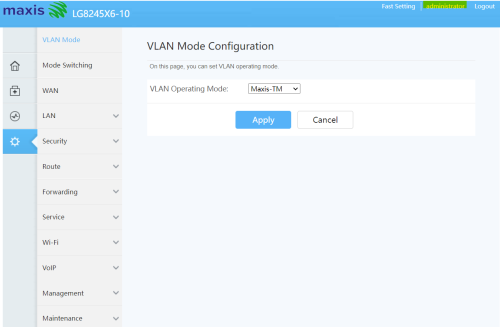 |
|
|
Jun 3 2022, 12:13 PM
Show posts by this member only | IPv6 | Post
#106
|
|
Senior Member
1,902 posts Joined: Sep 2012
|
QUOTE(jhjhho @ Jun 3 2022, 12:09 PM) Try: you just cant.User name : administrator Password : router S/N I managed to get into this page...seems to be the admin page. I wish to change to google DNS but the options are still greyed out under DCHP. Anyone can advise? TBH just sell the lousy router in carousell and get yourself a better one like Asus https://shopee.com.my/ASUS-Router-RT-AX55-R...9596.6669685297 This post has been edited by JimbeamofNRT: Jun 3 2022, 12:13 PM |
|
|
Aug 13 2022, 03:10 PM
|
|
Junior Member
63 posts Joined: Nov 2008
|
User this credential instead MaxDNSprUsr !!bestHOME!!XXXX XXXX is the last 4 digit of the router SN QUOTE(JimbeamofNRT @ Jun 3 2022, 12:13 PM) you just cant. TBH just sell the lousy router in carousell and get yourself a better one like Asus https://shopee.com.my/ASUS-Router-RT-AX55-R...9596.6669685297 JimbeamofNRT liked this post
|
|
|
Aug 13 2022, 05:43 PM
Show posts by this member only | IPv6 | Post
#108
|
|
Senior Member
1,902 posts Joined: Sep 2012
|
QUOTE(darthobiguan @ Aug 13 2022, 03:10 PM) User this credential instead +1MaxDNSprUsr !!bestHOME!!XXXX XXXX is the last 4 digit of the router SN bump |
|
|
Nov 15 2022, 12:37 AM
|

Junior Member
612 posts Joined: Mar 2008
|
Is this thread still v alid? I tried all the credentials provided but still unsuccessful to login as root/admin
|
| Change to: |  0.0577sec 0.0577sec
 1.77 1.77
 6 queries 6 queries
 GZIP Disabled GZIP Disabled
Time is now: 24th December 2025 - 06:09 PM |
 Quote
Quote