Welcome Guest ( Log In | Register )

Bump Topic Topic Closed RSS Feed

Outline · [ Standard ] · Linear+

Unifi Official TM UniFi High Speed Broadband Thread V34, READ 1ST PAGE FOR TURBO SPEED INFO!

views
     
zubir2k
post Sep 4 2018, 01:49 PM

Getting Started
**
Junior Member
70 posts

Joined: Feb 2007
From: Kajang, Selangor


Bros,

Saw in the first post.. C1200 can get average ~ 300mbps onli.
Wondering if..

1. anyone with C1200 manage to achieve 800mbps?
2. is it really necessary to use cat6 from modem -> router?

Thanks
zubir2k
post Sep 4 2018, 02:06 PM

Getting Started
**
Junior Member
70 posts

Joined: Feb 2007
From: Kajang, Selangor


Previously my cat5e caput alreadi.. so manage to get 100mbps max.. when changing to cat6 then only manage to get max around 300+mbps..

Still missing 500mbps.. my pc is on wired.
Thats why i tot could it be the cable between router n modem?
zubir2k
post Sep 4 2018, 08:53 PM

Getting Started
**
Junior Member
70 posts

Joined: Feb 2007
From: Kajang, Selangor


QUOTE(insane.gamer @ Sep 4 2018, 08:49 PM)
[attachmentid=10008681]
Your wan is 100mbps only thats why

This post has been edited by zubir2k: Sep 4 2018, 08:55 PM
zubir2k
post Sep 6 2018, 06:21 PM

Getting Started
**
Junior Member
70 posts

Joined: Feb 2007
From: Kajang, Selangor


QUOTE(mat_7824 @ Sep 5 2018, 04:39 PM)
Saujana Impian, Kajang.
Thanks.  nod.gif
*
Hi there neighbor! Same here.
Did u managed to get full speed?
zubir2k
post Sep 11 2018, 06:56 PM

Getting Started
**
Junior Member
70 posts

Joined: Feb 2007
From: Kajang, Selangor


QUOTE(SilentVampire @ Aug 15 2018, 03:15 PM)
To enjoy the full turbo speed on WIRED connection, you NEED to be connected to the gigabit router directly via Cat 5e or Cat 6 RJ45 Ethernet cable. Recommended brands that are reliable and 100% confirmed to fit the Cat ratings accurately are Dintek, Prolink, AMP Netconnect, and Ugreen. If your device can support gigabit speed, and you are not getting the upgraded turbo speed, there are a few reasons why this happens, see below:

1) Due to current pilot phase, TM has not upgraded you to turbo speed yet.
2) Your cable might faulty or not up to standard, test with another CAT5e or CAT6 cable, see above for reliable brands.
3) Your BTU does not support gigabit speed, or wrongly configured. You have to contact TM.
4) Your router was not configured correctly, which limits your connection speed to 100Mbps, instead of 1000Mbps.
Sorry bro SilentVampire, based on your above 1st post, need to further understand point 3 and 4.

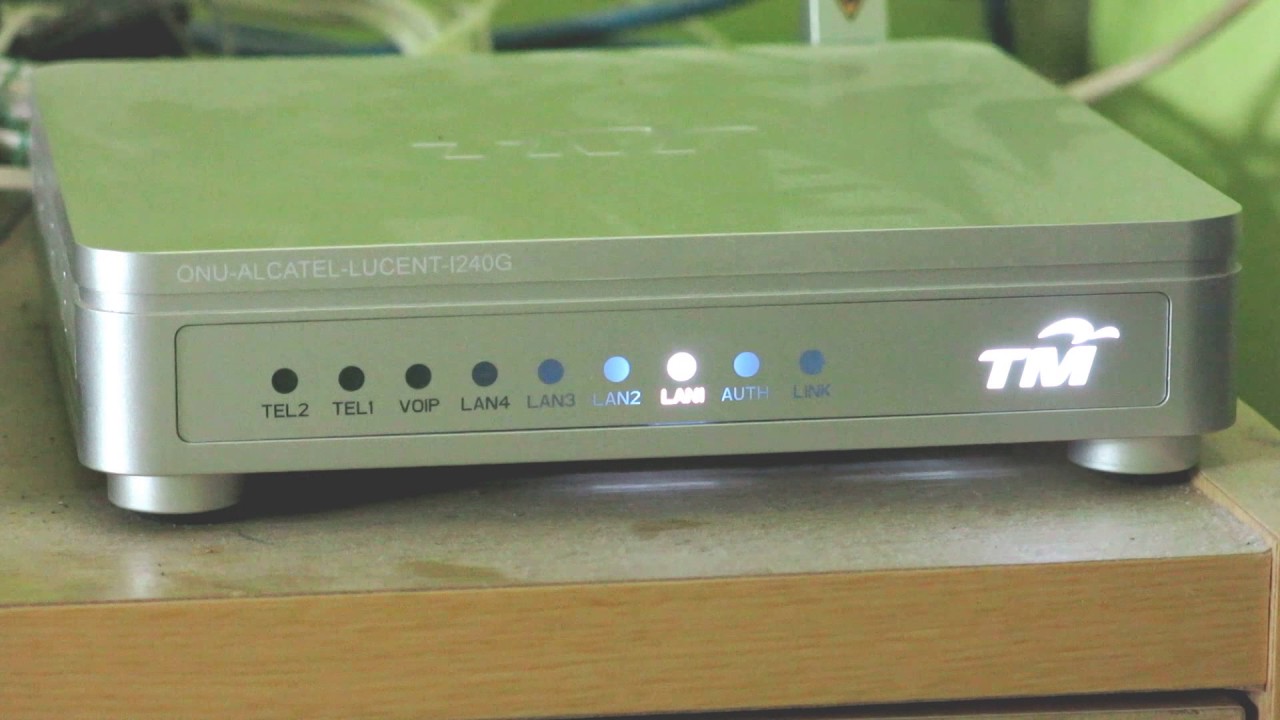
3) my BTU is alcatel lucent I-240G-P .. suppose it does support 1Gbps?
4) on TM C1200 (flashed EU firmware), any specific config that need to look into?

Still figuring this out as im still getting max of 360mbps using cat6 from PC > router > BTU

Thanks

zubir2k
post Sep 11 2018, 08:29 PM

Getting Started
**
Junior Member
70 posts

Joined: Feb 2007
From: Kajang, Selangor


SilentVampire QOS is disabled. IPV6 also disabled.

zubir2k
post Sep 11 2018, 09:46 PM

Getting Started
**
Junior Member
70 posts

Joined: Feb 2007
From: Kajang, Selangor


QUOTE(RokXIII @ Sep 11 2018, 08:56 PM)
seems there is a bit confusion here:

at Post # 1, the Alcatel Lucent I240G should referring to this:
» Click to show Spoiler - click again to hide... «

and this model supporting gigabits speed.

whereby, some of us have the much older model of Alcatel Lucent I-240G-P, which is this:
» Click to show Spoiler - click again to hide... «

this model probably not supporting gigabits speed.
i tried to connect this BTU to my PC, the speed shows only 100Mbps, instead of 1Gbps.

hopefully someone could clarify and confirm.
*
Anyone here with Alcatel Lucent I-240G-P able to get 800mbps?
If its being capped.. then i guess need to get TM to reconfigure it?
zubir2k
post Sep 12 2018, 11:08 PM

Getting Started
**
Junior Member
70 posts

Joined: Feb 2007
From: Kajang, Selangor


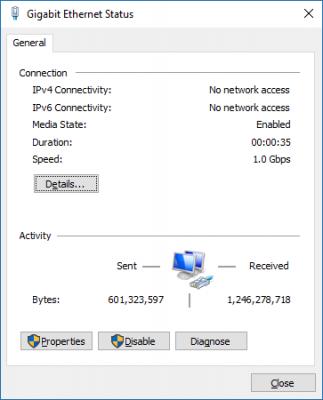
Ok, I received a call from TM technician. He confirms that most likely the BTU I-240G-P is what causing the speed is being capped probably something to do with the config.

To confirm this I plug in my PC directly to the BTU port and the connection was indeed 1Gbps
» Click to show Spoiler - click again to hide... «


I'll see if changing or re-configuring the BTU by the technician resolve this issue later.
Will keep you guys posted.


zubir2k
post Sep 15 2018, 02:10 PM

Getting Started
**
Junior Member
70 posts

Joined: Feb 2007
From: Kajang, Selangor


QUOTE(zubir2k @ Sep 12 2018, 11:08 PM)
Ok, I received a call from TM technician. He confirms that most likely the BTU I-240G-P is what causing the speed is being capped probably something to do with the config.

To confirm this I plug in my PC directly to the BTU port and the connection was indeed 1Gbps
» Click to show Spoiler - click again to hide... «


I'll see if changing or re-configuring the BTU by the technician resolve this issue later.
Will keep you guys posted.
*
The technician came just now and replaced all my equipment
BTU : Nokia G-240G-E
Router : Dlink DIR-842

Speedtest still couldn't achieve 800mbps. However, it did slightly improved to 400mbps *sigh*
They say will report back and going to test few more at their lab.

Guess I have to wait.. yawn.gif
zubir2k
post Sep 16 2018, 09:53 AM

Getting Started
**
Junior Member
70 posts

Joined: Feb 2007
From: Kajang, Selangor


QUOTE(Ebony & Ivory @ Sep 16 2018, 06:35 AM)
how u change the dns? via router or network adapter?

try this

open cmd, type

CODE
ipconfig /flushdns


and clear the cache and cookie in web browser.
*
Saw this post and i realized bout the browser cache.
Perform speedtest again in incognito mode and able to get 750-ish mbps

Thank you!!

Topic ClosedOptions
 

Change to:
| Lo-Fi Version
0.8501sec    0.38    7 queries    GZIP Disabled
Time is now: 1st December 2025 - 10:30 PM