

deleted
This post has been edited by zher4883: Aug 28 2018, 11:06 AM
Unifi Official TM UniFi High Speed Broadband Thread V34, READ 1ST PAGE FOR TURBO SPEED INFO!
Unifi Official TM UniFi High Speed Broadband Thread V34, READ 1ST PAGE FOR TURBO SPEED INFO!
|
|
 Aug 28 2018, 11:05 AM Aug 28 2018, 11:05 AM
Return to original view | IPv6 | Post
#1
|
 
Senior Member
4,490 posts Joined: Oct 2014  
|
deleted
This post has been edited by zher4883: Aug 28 2018, 11:06 AM |
|
|
|
|
|
Sep 4 2018, 01:31 PM
Return to original view | IPv6 | Post
#2
|
|
Senior Member
4,490 posts Joined: Oct 2014
|
Just bought a DWA-182 and tried it out and for those for are interested in the performance, here it is
http://www.speedtest.net/result/7606296466.png http://www.speedtest.net/result/7606294325.png http://www.speedtest.net/result/7606292068.png Line of sight <3m away from router Asus RT-AC66U Unifi 500Mbps For 300Mbps connection, I would recommend this adapter but for 500Mbps not really. SilentVampire In case you would like to amend the thread to reflect real world experience. |
|
|
Sep 4 2018, 01:39 PM
Return to original view | IPv6 | Post
#3
|
|
Senior Member
4,490 posts Joined: Oct 2014
|
QUOTE(SilentVampire @ Sep 4 2018, 01:34 PM) Cheers bro. Have you tried 5GHz, AC, and bandwidth set to 80MHz? If you did, will change the value there. Yes it is 80MHz all the time. But for the price of RM80, I got not complaint regarding this adapter. |
|
|
Sep 4 2018, 09:11 PM
Return to original view | IPv6 | Post
#4
|
|
Senior Member
4,490 posts Joined: Oct 2014
|
QUOTE(soonwai @ Sep 4 2018, 07:05 PM) Sg Long here. No turbo yet.   Attached thumbnail(s) 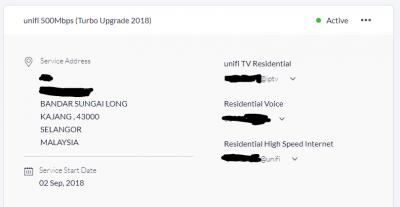
|
|
|
Sep 5 2018, 07:45 PM
Return to original view | IPv6 | Post
#5
|
|
Senior Member
4,490 posts Joined: Oct 2014
|
QUOTE(latios507 @ Sep 5 2018, 07:42 PM) Thanks but pardon me, could you elaborate a bit more on the limited bandwidth? Don't even think about achieving 500Mbps over powerline. So far the fastest powerline only barely achieve more than 300Mbps and the cost of a pair is enough to get top tier Asus wifi adapter.I'm also thinking on going with the Powerline Adapter route + Wired Cable but dunno if it's a good idea if I can get consistent 800Mpbs from a wireless adapter hmm. |
|
|
Sep 8 2018, 02:15 PM
Return to original view | IPv6 | Post
#6
|
|
Senior Member
4,490 posts Joined: Oct 2014
|
QUOTE(may_day @ Sep 8 2018, 02:04 PM) Got it today?! That is mean Turbo Team still working during public holiday? The upgrade isn't initiated manually. It's done automatically in the system. |
|
|
|
|
|
Sep 11 2018, 08:21 AM
Return to original view | IPv6 | Post
#7
|
|
Senior Member
4,490 posts Joined: Oct 2014
|
QUOTE(soonwai @ Sep 11 2018, 12:14 AM) Next door to you, still waiting. So far I know only one in Sg Long that has got it. zherxxx forgot this username. Anyone else in Sg Long or BMC? That's meOrder modified on 2 September 2018  Attached thumbnail(s) 
|
|
|
Sep 11 2018, 04:16 PM
Return to original view | IPv6 | Post
#8
|
|
Senior Member
4,490 posts Joined: Oct 2014
|
QUOTE(soonwai @ Sep 11 2018, 04:11 PM) Lucky fella you. Know anyone else in this area, already got Turbo? Those I knew are staying in condominium so no Turbo upgrade due to infrastructure limitation  |
|
|
Sep 11 2018, 08:01 PM
Return to original view | IPv6 | Post
#9
|
|
Senior Member
4,490 posts Joined: Oct 2014
|
QUOTE(frozenstarxd93 @ Sep 11 2018, 07:54 PM) Any news about unifi turbo speed upgrade from Seri Kembangan to Tun Hussein Onn or Balakong area? Attached thumbnail(s) 
|
|
|
Sep 13 2018, 12:50 PM
Return to original view | IPv6 | Post
#10
|
|
Senior Member
4,490 posts Joined: Oct 2014
|
QUOTE(Hou_JaI @ Sep 13 2018, 12:49 PM) need some help here, i am using tplink AC5, which from their website, this router can actually goes up to 800++ Mbps at 5GHz. You need a triple chain Wifi router and adapter. i am also using tplink T4U AC1300 high gain, but at speed test, i am only getting like 300 Mbps ... what am i not doing here ... Hint: triple chain adapter could be quite expensive |
|
|
Sep 13 2018, 02:27 PM
Return to original view | Post
#11
|
|
Senior Member
4,490 posts Joined: Oct 2014
|
QUOTE(cpmlml @ Sep 13 2018, 01:48 PM) Internal news:-they are blocking torrent as the back bone unable to suport massive turbo upgrade. In fact they are about to faill the pilot test as unable to cope with the bandwidth demand. When there's a will, there's a way. They could only make it harder for heavy downloaders using torrent but they can't stop them  |
|
|
Sep 13 2018, 03:20 PM
Return to original view | IPv6 | Post
#12
|
|
Senior Member
4,490 posts Joined: Oct 2014
|
QUOTE(StuartLee2015 @ Sep 13 2018, 03:03 PM) How long are they going to block us from torrent? I don't know I was just replying someone with the insider info claiming that torrents will be blocked. |
|
|
Sep 13 2018, 09:20 PM
Return to original view | IPv6 | Post
#13
|
|
Senior Member
4,490 posts Joined: Oct 2014
|
QUOTE(JohnLai @ Sep 13 2018, 09:15 PM) Your RGX4400 might be faulty too........? I bought a D1 version of DWA-182 and it comes with USB3.0.Buy new router please....... EDIT: And beware of cheap DWA182. Only revision C1 model have USB 3.0 interface. |
|
|
|
|
|
Sep 13 2018, 09:24 PM
Return to original view | IPv6 | Post
#14
|
|
Senior Member
4,490 posts Joined: Oct 2014
|
QUOTE(StuartLee2015 @ Sep 13 2018, 09:18 PM) Let's say after i bought the DIR878 and DWA182 , and if still the same, can't even hit 300 to 400+ over wifi..., what's next? You will never hit more than 320Mbps with DWA-182. I just bought one and tested it outIf say congested, i think it's not likely, cause before i can get constant 40 to 50 Mbps with the same channels, and settings... |
|
|
Sep 13 2018, 09:24 PM
Return to original view | IPv6 | Post
#15
|
|
Senior Member
4,490 posts Joined: Oct 2014
|
QUOTE(JohnLai @ Sep 13 2018, 09:23 PM) Oh? Good thing we have you here. Around 290-320 MbpsWhat is the max possible real world speed you got from it? |
|
|
Sep 13 2018, 09:34 PM
Return to original view | Post
#16
|
|
Senior Member
4,490 posts Joined: Oct 2014
|
QUOTE(JohnLai @ Sep 13 2018, 09:26 PM) Direct line of sight? Is there any obstacles? Distance? Direct line of sight approximately 3-4 meters away. |
|
|
Sep 13 2018, 10:03 PM
Return to original view | IPv6 | Post
#17
|
|
Senior Member
4,490 posts Joined: Oct 2014
|
QUOTE(StuartLee2015 @ Sep 13 2018, 09:51 PM) Oh.... no... if i recall, it's AC type adapter right? and thing like USB3.0 is better for the speed? Yes it is a AC adapter and the USB 3.0/2.0 doesn't matter as it can't even get close to 480Mbps. |
|
|
Sep 15 2018, 10:04 AM
Return to original view | IPv6 | Post
#18
|
|
Senior Member
4,490 posts Joined: Oct 2014
|
QUOTE(gahkin @ Sep 15 2018, 09:54 AM) Pls share with us how to get the upgrade ? I still been paid rm229 monthy for the 100m plan. It's done automatically. Just wait for it |
|
|
Sep 15 2018, 10:30 AM
Return to original view | IPv6 | Post
#19
|
|
Senior Member
4,490 posts Joined: Oct 2014
|
QUOTE(AndrewGKX @ Sep 15 2018, 10:28 AM) get upgrade but router cant support should i call tm come change it got any charges ? Read first page first post green text to see if you met the technical requirement |
|
|
Sep 15 2018, 04:54 PM
Return to original view | IPv6 | Post
#20
|
|
Senior Member
4,490 posts Joined: Oct 2014
|
QUOTE(briangan @ Sep 15 2018, 03:16 PM) hi, wanna ask a few questions: 1. I have two account for my Unifi subscription and both located at different corner of the Klang Valley. One of it got upgraded earlier this month and the other will be next year. Nobody knows how they prioritize the upgrades.1. I got 2 accounts tagged to same IC number but different locations. I receive SMS from TM that account have been upgraded (I have only 1 account number but 2 Unifi ID, 2 phone number), so went into Unifi care and check, 1 account turbo upgraded to 500Mbps. So izzit its not done together for both accounts? Anyone have similar experiences? I assume then its location based upgrades and not account based. 2. The Unifi ID upgraded to 500Mbps can download at 500Mbps and upload sometimes 100Mbps and sometimes 200Mbps. Which is the upload given? 3. the Unifi ID upgraded to 500Mbps cannot torrent at 500Mbps, max achievable at 100Mbps. Izzit limited? Anyone experience the same? Download other things can do 500Mbps, eg Microsoft Windows Server ISO 6GB. All above was tested using cable. My Wifi can only get 50Mbps/50Mbps which I think its my router. 2. 100Mbps 3. To torrent at 500Mbps you need a router with good CPU as it requires significant amount of routing performance to do so. Remember torrents packets are much smaller than packets received/transmit for the speedtest and typical http download. |
|
Topic ClosedOptions
|
| Change to: |  0.0340sec 0.0340sec
 0.37 0.37
 7 queries 7 queries
 GZIP Disabled GZIP Disabled
Time is now: 5th December 2025 - 11:44 PM |
 Quote
Quote