


Unifi Official TM UniFi High Speed Broadband Thread V34, READ 1ST PAGE FOR TURBO SPEED INFO!
|
|
 Aug 21 2018, 09:04 AM Aug 21 2018, 09:04 AM
Return to original view | Post
#1
|
 
Junior Member
241 posts Joined: Feb 2012 From: Melaka   
|
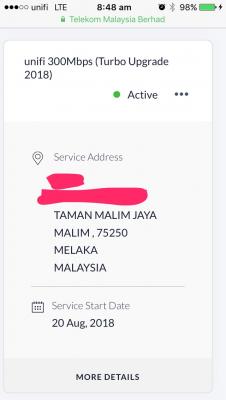
Only realize that I was upgraded to unifi turbo 300Mbps yesterday when I check unifi portal just now. Nowhere near home now so I can't be physically present to restart BTU and check upgraded speed. Surprised me as I didn't receive any Turbo-ed email or SMS at all. Melaka area, Taman Malim Jaya to be exact. Using Huawei HG8240W. Note that there's a completed order created on the same day evening.
|
|
|
|
|
|
Aug 21 2018, 09:19 AM
Return to original view | Post
#2
|
|
Junior Member
241 posts Joined: Feb 2012 From: Melaka
|
QUOTE(Ebony & Ivory @ Aug 21 2018, 09:10 AM) good Jump from strimix to RM129 Unifi Lite 10Mbps May/June last year, then add RM10 upgrade to Unifi Advance 30Mbps (RYE) early this year.when u subscribed to unifi last time? check the cable jacket, it got printed some label like "CAT5E"  |
|
|
Aug 21 2018, 09:24 AM
Return to original view | Post
#3
|
|
Junior Member
241 posts Joined: Feb 2012 From: Melaka
|
QUOTE(may_day @ Aug 21 2018, 09:20 AM) Totally agree with what you said 😃 Not sure whether my actual speed upgraded or not. Will get someone to check for me and update. Has your dashboard updated with Turbo Upgrade 2018?I have an order, similar with you, also marked complete, but haven't upgrade the speed yet... Something wrong? |
|
|
Aug 22 2018, 09:29 PM
Return to original view | Post
#4
|
|
Junior Member
241 posts Joined: Feb 2012 From: Melaka
|
For me:
Report created on 20 Aug 7:21pm, PPPoE connection reconnected on 20 Aug 8:08pm, a mere 47 minutes for speed upgrade to arrive, and ive gotten no SMS/email till now 22 Aug. So I guess you are minutes away from getting the speed upgrade once you have a report created, and theres no need to restart BTU/router as my last restart was months ago. |
|
|
Aug 23 2018, 11:47 PM
Return to original view | Post
#5
|
|
Junior Member
241 posts Joined: Feb 2012 From: Melaka
|
QUOTE(coolguy_0925 @ Aug 23 2018, 09:53 PM) Not a single 30M > 300M was seen thus far I am. Upgraded on 20 Aug. |
|
|
Aug 25 2018, 09:00 AM
Return to original view | Post
#6
|
|
Junior Member
241 posts Joined: Feb 2012 From: Melaka
|
QUOTE(shahie @ Aug 25 2018, 08:20 AM) if so many complaints from those has been upgraded recently, high possibility TM will temporarily stop/differ the turbo upgrade plan to the rest of us. lol Not yet turbo-ed user unhappyTurbo-ed user unhappy too  |
|
|
|
|
|
Aug 28 2018, 11:17 PM
Return to original view | Post
#7
|
|
Junior Member
241 posts Joined: Feb 2012 From: Melaka
|
QUOTE(boxsystem @ Aug 28 2018, 10:25 PM) I thought the triple play services comes from the Govt themselves? Not sure whether it is really gov that pushed bladi IPTV to us the users, but gov today =! gov when triple play was introduced. 😏 |
|
|
Sep 10 2018, 12:53 PM
Return to original view | Post
#8
|
|
Junior Member
241 posts Joined: Feb 2012 From: Melaka
|
30Mbps RM139 TURBO-ed to 300Mbps down & 50Mbps up on 20 Aug. Can personally confirm that upload speed for 300Mbps package is currently capped at 50Mbps.
Wired speed test @ 1Gbps link: 320Mbps down, 55Mbps up. Wireless speed test @ 300Mbps TX rate (VHT40, 11ac): 240 down, 55 up. Equipment used: HG8240W, TL-WR1043ND (wifi disabled), UAP-AC-LR.  
|
|
|
Sep 10 2018, 01:42 PM
Return to original view | Post
#9
|
|
Junior Member
241 posts Joined: Feb 2012 From: Melaka
|
QUOTE(2pig @ Sep 10 2018, 01:09 PM) after changing the cable to cat7 also same...only 100mb... Don't think you need cat7 for for now. An up-to-spec cat5e or cat6 will suffice even for the highest turbo speed. Most probably your WAN speed is the culprit.btw, my btu is ONU-ALCATEL-LUCWNT-I-240G-T. |
|
|
Sep 10 2018, 03:52 PM
Return to original view | Post
#10
|
|
Junior Member
241 posts Joined: Feb 2012 From: Melaka
|
QUOTE(JimbeamofNRT @ Sep 10 2018, 03:12 PM) try borrow your friend's device which support 1gbps or change cable see how lah QUOTE(2pig @ Sep 10 2018, 03:48 PM) already change cable, but still same... Dont think changing device will help so long as gigabit link is established. |
|
|
Sep 12 2018, 10:13 PM
Return to original view | Post
#11
|
|
Junior Member
241 posts Joined: Feb 2012 From: Melaka
|
QUOTE(lwk523 @ Sep 12 2018, 09:58 PM) Hi, Yes, typical setup. Can I make it work on unifi fibre with the setup above ? Thank you |
|
|
Sep 12 2018, 10:37 PM
Return to original view | Post
#12
|
|
Junior Member
241 posts Joined: Feb 2012 From: Melaka
|
Is this how TM's system work?
1. Let say if I'm on 30Mbps currently (RM139, under contract, with STB) and HAVEN'T turbo to 300Mbps, if I'm changing to the new RM129 100Mbps plan without STB, this will be counted as an 'UPGRADE' and there will be no penalty whatsoever. 2. Similar case as number 1, but speed has been turbo-ed to 300Mbps. So switching to 100Mbps will instead be counted as a 'DOWNGRADE' and under contract penalty will be imposed. AFAIK, TM count any plan change as an 'UPGRADE' so long as the speed is increased and vice versa. And how about the STB, need to return or not after plan change since the new plan doesn't have playTV? Edit: Is the new plan still for new subscriber only? How about out of contract cust? This post has been edited by y561994: Sep 12 2018, 10:39 PM |
|
|
Sep 15 2018, 08:56 PM
Return to original view | Post
#13
|
|
Junior Member
241 posts Joined: Feb 2012 From: Melaka
|
QUOTE(OKLY @ Sep 15 2018, 08:06 PM) Looks like they now have an email/SMS to notify customer once account is Turbo-Ed. I believe they have it since the start of turbo exercise. But their sms is quite delayed tho. Received mine 4 days after successful turbo telling to restart btu and router LOL.  |
|
|
|
|
|
Sep 16 2018, 08:39 PM
Return to original view | Post
#14
|
|
Junior Member
241 posts Joined: Feb 2012 From: Melaka
|
QUOTE(lightbringer @ Sep 16 2018, 07:40 PM) Have another question: No, you cant. Hv to set up pppoe dialing on laptop and theres vlan 500 tagging somemore for internet access unlike streamyx.Never tried this setup before. If I connect my laptop directly to the BTU, I can immediately surf the net? Any setup required? (eg. need to enter username and password manually like in the router page) |
|
|
Sep 16 2018, 09:10 PM
Return to original view | Post
#15
|
|
Junior Member
241 posts Joined: Feb 2012 From: Melaka
|
QUOTE(V3nz @ Sep 16 2018, 08:50 PM) Hi guys, just a question here, as now holidays and tm not working lol Not sure about price reduction, but there will be no extra charges/ contract extension for turbo upgrade. Just slow slow wait for the upgrade if u are eligible.I'm currently using UniFi Advance Plus 50Mbps for rm199 per month is it possible for me to change the plan to turbo plan without any charges? or if there will be any price reduced anytime soon? Thank you very much if you have the answers |
|
|
Sep 16 2018, 09:25 PM
Return to original view | Post
#16
|
|
Junior Member
241 posts Joined: Feb 2012 From: Melaka
|
Currently on 300Mbps RM139 TURBO-ed plan. Compared to the new 100Mbps RM129 plan, I actually need the STD20 way more than the +200Mbps increase in speed. Can't downgrade since still under contract.
|
|
|
Sep 16 2018, 09:45 PM
Return to original view | Post
#17
|
|
Junior Member
241 posts Joined: Feb 2012 From: Melaka
|
QUOTE(aneip @ Sep 15 2018, 11:40 AM) TM equipment just use few minutes.. Currently using mikrotik + ubnt AP.. Got limit at mikrotik when 1st turboed. After enable fastrack can hit full 300.. UAP-AC-LR also able to deliver full 300 if the same room and connected at 866Mbps (ipad).. My phone 433Mbps can only reach 150-200.. How do u get ur ipad to connect to UAP-AC-LR at 866Mbps (866Mbps link speed as shown in Unifi controller?)? Same equipment as yours (ipad, UAP-AC-LR), mine will not connect beyond 300Mbps TX rate and download speed test yields ~240Mbps. What is your 5Ghz ac band bandwidth and any other setting done in Unifi controller to get 866Mbps link (bandsteering etc)? |
|
|
Sep 16 2018, 09:47 PM
Return to original view | Post
#18
|
|
Junior Member
241 posts Joined: Feb 2012 From: Melaka
|
QUOTE(wilson1stop @ Sep 16 2018, 09:30 PM) can, but no need as re-contract will apply. Really? But since mine is already turbo-ed to 300Mbps, wouldn't this be counted as an "downgrade" and hence downgrading penalty/fee will apply?Just enjoy ur 300Mbps at RM10 extra. |
|
Topic ClosedOptions
|
| Change to: |  0.2191sec 0.2191sec
 0.33 0.33
 7 queries 7 queries
 GZIP Disabled GZIP Disabled
Time is now: 5th December 2025 - 10:37 PM |
 Quote
Quote