Welcome Guest ( Log In | Register )

Bump Topic Topic Closed RSS Feed

Outline · [ Standard ] · Linear+

Unifi Official TM UniFi High Speed Broadband Thread V34, READ 1ST PAGE FOR TURBO SPEED INFO!

views
     
boxsystem
post Aug 22 2018, 10:25 AM

Legend
******
Senior Member
1,573 posts

Joined: Jan 2003
From: Nilai, Negeri Sembilan
They say Rome wasn't built in a day .. so patience is key.

To be honest, when TM start to introduce fiber connection to the country, I read up a bit on the technology and what is it capable of. The only downside/worries that I had during that time was the bandwidth capabilities of the backbone. Can it be catered?

Also, I am glad for this fiber connection has been enrolled in most parts of the country now if not all, because it opens up to a lot of local content opportunities. Hope it will grow more and better.
boxsystem
post Aug 24 2018, 07:01 PM

Legend
******
Senior Member
1,573 posts

Joined: Jan 2003
From: Nilai, Negeri Sembilan
QUOTE(specky94 @ Aug 24 2018, 06:40 PM)
Ye tak ye ah. Haha. Nevermind la I buy already, when i got time i buy new one. Need to pasang 2 ssid inside house. One for living room, and another one for my bilik.
*
Why the need of 2 ssid after all most routers these days can clone settings already?

Also, unless u are using ASUS, this is somewhat seamless already, change place same ssid. Hassle free. Just a suggestion though.
boxsystem
post Aug 25 2018, 06:41 PM

Legend
******
Senior Member
1,573 posts

Joined: Jan 2003
From: Nilai, Negeri Sembilan
That ping though..
boxsystem
post Aug 25 2018, 10:10 PM

Legend
******
Senior Member
1,573 posts

Joined: Jan 2003
From: Nilai, Negeri Sembilan
QUOTE(phhweittt @ Aug 25 2018, 09:04 PM)
We want cheaper & reasonable rate yet TM focus on unnecessary overkill internet speed yawn.gif
*
Everything also complaint lol. Go change maxis la.. Cheaper with lower bandwidth offered. Abes cerita
boxsystem
post Aug 26 2018, 09:25 AM

Legend
******
Senior Member
1,573 posts

Joined: Jan 2003
From: Nilai, Negeri Sembilan
QUOTE(voncrane @ Aug 26 2018, 09:05 AM)
Nah fam, you shouldn't be cuz you are being overcharged. There are people who for months have been paying either 169/179/189 for the exact same 100Mbps. Some with Hypptv Ultimate pack and free voice calls thrown in. If I were you, I'd flip table till I got the lowest price possible now. Then you'll be turbo-ed to 800Mbps and STILL be paying lower price.. Do it! smile.gif

Edit: I did for mine couple months back.. Was paying RM179 for 30Mbps.. Then TM introduced RM139 for the same 30Mbps for new subs.. Went, politely flipped table couple times and voila.. Managed to get my bill reduced to RM139 too and best of all, no contract refresh. Some others did the same back then.
*
Crap, i am paying rm259/mo for 100Mbps + Utilmate pack. I should give them a call? No contract for me as well..
boxsystem
post Aug 26 2018, 03:29 PM

Legend
******
Senior Member
1,573 posts

Joined: Jan 2003
From: Nilai, Negeri Sembilan
Seems like Maxis is pushing TM to the edge. I wonder what's happening with TIME. All in all, it's all good for us, consumers.

This is like Umobile pushing the big players all over again. Nice.
boxsystem
post Aug 26 2018, 10:21 PM

Legend
******
Senior Member
1,573 posts

Joined: Jan 2003
From: Nilai, Negeri Sembilan
800Mbps download and only 100Mbps upload?
boxsystem
post Aug 26 2018, 10:45 PM

Legend
******
Senior Member
1,573 posts

Joined: Jan 2003
From: Nilai, Negeri Sembilan
Chillax la guys.. I am a user since 1515 days lagi. Be patience a bit. Not yet upgraded lagi but got the email in June.

U all so wanna fastpoke, later got 800Mbps pon underwhelmed plak.

This post has been edited by boxsystem: Aug 26 2018, 10:46 PM
boxsystem
post Aug 28 2018, 09:02 AM

Legend
******
Senior Member
1,573 posts

Joined: Jan 2003
From: Nilai, Negeri Sembilan
Guys, just a recommendation..

Get a gigabit LAN router, wifi can stay around 200Mbps. Should be more than enough. Wait till AX routers come out then spend your money there.
boxsystem
post Aug 28 2018, 12:56 PM

Legend
******
Senior Member
1,573 posts

Joined: Jan 2003
From: Nilai, Negeri Sembilan
QUOTE(jAkUn @ Aug 28 2018, 12:54 PM)
Guys. I have tplink AC1200 provided by the TM, and Huawei BTU that can support gigabit connection.

My question is, how do we enable the 802.11ac wifi 5ghz on this router? Current speed test on wifi 5ghz now is 300 Mbps max. My package is 800.

Many thanks!
*
This is already on AC connection and that is the max already.

This device wont support faster connection on wifi but on LAN will be on gigabit connection provided you are using equipment and cable that supports it.
boxsystem
post Aug 28 2018, 03:21 PM

Legend
******
Senior Member
1,573 posts

Joined: Jan 2003
From: Nilai, Negeri Sembilan
QUOTE(pcboss00 @ Aug 28 2018, 03:14 PM)
i'm supposed to get 500Mbps. after do a speed test, only manage to get between 80 to 90 Mbps.
*
Call TM, make complaint.

Tweet Gobind Singh.

Go to social media and make a fuss.
boxsystem
post Aug 28 2018, 10:25 PM

Legend
******
Senior Member
1,573 posts

Joined: Jan 2003
From: Nilai, Negeri Sembilan
I thought the triple play services comes from the Govt themselves?
boxsystem
post Aug 29 2018, 12:41 PM

Legend
******
Senior Member
1,573 posts

Joined: Jan 2003
From: Nilai, Negeri Sembilan
QUOTE(Ronald K. @ Aug 29 2018, 12:36 PM)
Hey guys,

I just got the turbo upgrade to 300mbps but I’m only getting max 200mbps wireless on 5ghz archer c5 router on both my phone and laptop. Router should be able to support 300mbps if I’m not mistaken? Do correct me if I’m wrong.

Thanks! smile.gif
*
Hi Sir, kindly search for appropriate answer.

Here comes an another one, no wonder TS is pissed off. Even I am starting to...

GUYS, DO SOME RESEARCH FIRST.
boxsystem
post Aug 29 2018, 06:06 PM

Legend
******
Senior Member
1,573 posts

Joined: Jan 2003
From: Nilai, Negeri Sembilan
QUOTE(Mazda9 @ Aug 29 2018, 05:50 PM)
Mention not sharing is caring.
*
Thanks, currently asking them now.
boxsystem
post Aug 29 2018, 06:56 PM

Legend
******
Senior Member
1,573 posts

Joined: Jan 2003
From: Nilai, Negeri Sembilan
Meh, I am getting the usual script reply from @helpmeunifi.
boxsystem
post Sep 3 2018, 01:10 AM

Legend
******
Senior Member
1,573 posts

Joined: Jan 2003
From: Nilai, Negeri Sembilan
Spoke to Cust Service earlier today, i am feeling underwhelmed. Might have to jump to Maxis.
boxsystem
post Sep 4 2018, 04:08 PM

Legend
******
Senior Member
1,573 posts

Joined: Jan 2003
From: Nilai, Negeri Sembilan
Logging onto my Unifi Care.

Seeing there was an order placed. Not sure whether this might be the one though? Few days earlier, logged a call asking for my contract because I am considering to switch operators.Attached Image
boxsystem
post Sep 5 2018, 07:07 AM

Legend
******
Senior Member
1,573 posts

Joined: Jan 2003
From: Nilai, Negeri Sembilan
Got upgrade to 800Mbps. Am using RT-AC68u currently. not going to 800Mbps and maxed around 500Mbps only. Must be something wrong somewhere. Will do some testing later on.
boxsystem
post Sep 5 2018, 11:02 AM

Legend
******
Senior Member
1,573 posts

Joined: Jan 2003
From: Nilai, Negeri Sembilan
QUOTE(SilentVampire @ Sep 5 2018, 08:13 AM)
Nothing wrong, the RT-AC68U maxed around 500Mbps on wireless. Read 1st page, 1st post, green text, for more info.
*
On WIFI yes, no issue. I am getting around 500Mbps on LAN. Going to buy a new CAT5E or CAT6 cable later on and test again.

Also, I can understand it is currently on pilot phase.
boxsystem
post Sep 6 2018, 12:36 AM

Legend
******
Senior Member
1,573 posts

Joined: Jan 2003
From: Nilai, Negeri Sembilan
QUOTE(alfredkch @ Sep 5 2018, 10:57 PM)
yea. i'm 250 for 100mbps. I saw some are getting 136?
*
Yeah, same here. I am paying RM259 monthly for 100Mbps + Ultimate Pack.

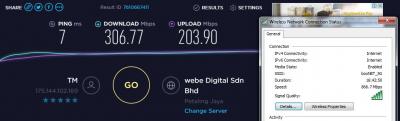
Anyway, I am turbo-ed already. Did some tests and trying to achieve the 800Mbps but all tests return negative. I am posting this here to educate some of the users on how to properly check.

Using CAT5E Cable (Black Colored)
Attached Image

Using CAT5E Cable (White Colored)
Attached Image

Using CAT5E Cable (Red Colored)
Attached Image

Using WIFI 2.4 GHz
Attached Image

Using WIFI 5 GHz
Attached Image

Please bear in mind, current router that I am using is ASUS RT-AC68U which has the capabilities of supporting 800Mbps on LAN. Wifi should be maxed out at 500Mbps realistically and 1300Mbps theoretically. I am sitting 1 meter away from the router and of course there are obstructions like my TV and so on. Hence, the degraded WIFI signal. What fascinates me is the LAN speed. I can deduce that all cables that I have might not be good enough or it was done/crimped poorly. And I can also deduce that my laptop WIFI adapter can only support 2x2 MIMO.

Going to conduct some further tests once I get my CAT6 cable.

Thanks for reading, hope this enlightens some if not all of the readers.

2 Pages  1 2 >Top
Topic ClosedOptions
 

Change to:
| Lo-Fi Version
0.2289sec    0.27    7 queries    GZIP Disabled
Time is now: 5th December 2025 - 02:49 AM